

Vendor lock-in is one of the less-discussed operational risks in private blog network management, yet it can quietly limit your ability to move, scale, or restructure a network when circumstances change. If your PBN hosting setup ties your domains, content, databases, or DNS configurations to a single provider in ways that are difficult or costly to reverse, you lose the flexibility that makes a well-managed network durable. Understanding data portability and how hosting choices affect it is a practical step toward building a PBN infrastructure that remains under your control over the long term.
Key Takeaways
- Vendor lock-in in PBN hosting occurs when your domains, content, databases, or configurations become difficult to migrate away from a single provider, reducing your operational flexibility.
- Data portability — the ability to export and transfer your site content, databases, and DNS settings — is a concrete measure of how locked in your network actually is before a problem arises.
- Hosting provider selection, CMS choice, DNS management, and domain registrar decisions each contribute independently to how portable your PBN infrastructure is.
- Distributing your network across multiple independent hosting accounts and registrars reduces single-point dependency without necessarily increasing footprint risk when done thoughtfully.
- Reviewing export options, contract terms, and data ownership policies before committing to a PBN hosting provider is more effective than attempting a forced migration later.
What Vendor Lock-In Means for a PBN
Vendor lock-in describes a situation where switching away from a service provider becomes technically difficult, financially costly, or operationally disruptive enough that you effectively stay with that provider even when better options exist. In general web hosting, this is a familiar problem. In PBN hosting, the consequences are more specific: if a hosting provider shuts down, changes its terms, raises prices significantly, or becomes unreliable, a locked-in network operator may face losing access to site content, databases, and configurations simultaneously across multiple properties.
For a private blog network, the stakes of a forced or rushed migration are higher than for a single website. A PBN typically involves multiple domains, each with its own WordPress installation, content, internal linking structure, and outbound link configuration. Migrating one site under pressure is manageable. Migrating twenty or fifty sites simultaneously because a provider has failed or terminated accounts is a different operational challenge entirely. Vendor lock-in amplifies that pressure by making each individual migration harder than it needs to be.
Lock-in in PBN hosting can take several forms. It may be technical, where proprietary control panels, non-standard database formats, or bundled DNS services make export and transfer cumbersome. It may be contractual, where long-term prepaid hosting agreements or domain registration terms restrict transfers for defined periods. It may also be practical, where a provider offers PBN-specific features — such as IP diversity management, footprint-reduction tools, or automated CMS deployment — that are not easily replicated elsewhere, creating a dependency that is difficult to unwind even when the contract allows it.
Data Portability: The Practical Measure of Flexibility
Data portability refers to your ability to export, transfer, and re-deploy your site content, databases, and configurations without losing material information or requiring significant reconstruction. For a WordPress-based PBN site, the core portable assets are the MySQL database containing posts, pages, settings, and user data; the wp-content directory containing themes, plugins, uploads, and media; and the domain’s DNS records. If you can export all three cleanly and import them to a new host without data loss, that site is portable.
The practical test of data portability is straightforward: can you take a full site backup from your current host, upload it to a different host, point the domain’s DNS to the new server, and have the site function correctly within a reasonable time frame? If the answer is yes without significant manual reconstruction, your hosting setup is reasonably portable. If the answer involves proprietary migration tools, provider-specific support tickets, or partial data exports that omit media files or plugin configurations, your portability is limited.
WordPress itself is inherently portable as a CMS. Standard WordPress installations use MySQL databases and a file structure that can be moved between compatible hosting environments using tools such as phpMyAdmin exports, cPanel backup utilities, or plugins like Duplicator and All-in-One WP Migration. The portability constraint usually comes not from WordPress itself but from the hosting environment around it — specifically, whether the host uses standard cPanel or Plesk interfaces, whether it provides direct database access, and whether it allows full file-system downloads via FTP or SFTP.
Proprietary hosting control panels that do not expose direct database access or that bundle site management into a closed interface reduce portability even when the underlying CMS is standard. Before committing to a PBN hosting provider, confirming that you have direct FTP or SFTP access, phpMyAdmin or equivalent database access, and the ability to download a complete site backup independently — without relying on the provider’s support team — is a meaningful portability check.
Hosting Architecture Choices That Reduce Lock-In
The most effective way to avoid vendor lock-in in PBN hosting is to make architectural decisions at the outset that preserve your ability to move individual sites or the entire network without catastrophic disruption. Several specific choices contribute to this.
Distribute Across Multiple Independent Providers
Concentrating all PBN sites on a single hosting account or provider creates a single point of dependency. If that provider experiences downtime, terminates your account, or changes its pricing structure, the entire network is affected simultaneously. Distributing sites across multiple independent hosting providers — ideally with different ownership, different data centers, and different control panel environments — means that a problem with one provider affects only a portion of the network. This distribution also has relevance to footprint management, since sites sharing the same hosting account, IP block, or nameserver cluster may be more easily associated with each other by crawlers analyzing server-level patterns.
The practical approach is to treat each hosting provider relationship as a separate operational unit. Keep records of login credentials, nameserver configurations, and backup schedules for each provider independently. Do not rely on a single dashboard or aggregated management tool that itself becomes a dependency if the tool provider changes its terms or ceases operation.
Use Standard CMS Installations on Standard Hosting Environments
Standard WordPress installations on cPanel or Plesk hosting environments are the most portable combination available for PBN sites. Both control panel environments provide direct database access, full file-system access via FTP or SFTP, and standardized backup utilities. Sites built on these environments can be migrated to any compatible host using standard tools without requiring provider-specific assistance.
Avoid hosting environments that require proprietary deployment scripts, that store site data in non-standard formats, or that bundle the CMS installation with the hosting account in ways that prevent independent export. Some managed WordPress hosting platforms offer convenience features but restrict direct database access or limit backup portability to their own restore systems. For PBN sites where operational independence matters, standard unmanaged or semi-managed hosting with full access credentials is generally preferable to convenience-focused managed platforms that reduce direct control.
Separate Domain Registration from Hosting
Registering PBN domains with the same provider that hosts the sites creates a compounded dependency. If the provider experiences problems, both the domain and the hosting may be affected simultaneously, and transferring the domain away may be subject to the same account restrictions that affect the hosting. Keeping domain registration and hosting with separate providers means that a hosting failure does not automatically prevent you from pointing the domain to a new host quickly.
Domain transfer lock periods — typically 60 days after registration or a previous transfer — are a standard registrar policy that applies regardless of provider. Planning domain registrations and transfers with these windows in mind reduces the risk of being unable to move a domain when you need to. Using a registrar that provides straightforward transfer authorization codes, clear WHOIS management, and reliable DNS editing tools gives you direct control over the domain layer independently of the hosting layer.
Manage DNS Independently
DNS management is a frequently overlooked portability factor. If your PBN domains use the nameservers provided by your hosting company, changing hosts requires updating nameservers at the registrar level, which introduces propagation delays of up to 48 hours and depends on registrar access being available. Using an independent DNS provider — such as Cloudflare’s free DNS service or another third-party DNS manager — means that changing the hosting server requires only updating the A record in your DNS provider’s dashboard, which typically propagates faster and does not depend on the hosting provider’s systems being accessible.
Independent DNS management also allows you to maintain consistent DNS configurations across a network of sites without being tied to the nameserver infrastructure of any single hosting provider. If you move a site from one host to another, the DNS layer remains stable and under your control throughout the migration.
Contract Terms and Data Ownership Policies
Technical portability is only part of the picture. Contractual terms can create lock-in even when the technical migration is straightforward. Before committing to a PBN hosting provider, reviewing the terms of service for data ownership, account termination procedures, backup retention policies, and transfer restrictions is a practical due-diligence step.
Key questions to assess in a provider’s terms include: who owns the data stored on the hosting account; what happens to site data if the account is terminated for any reason; how long the provider retains backups after account closure; whether there are transfer fees or restrictions on moving domains registered through the provider; and whether prepaid hosting periods are refundable if you need to migrate before the term ends. Providers that clearly state that you own your data, that provide a defined window to retrieve data after account closure, and that do not impose transfer fees on domain registrations are meaningfully less restrictive than those whose terms are ambiguous on these points.
Long-term prepaid hosting agreements — sometimes offered at a discount for annual or multi-year commitments — can create financial lock-in even when the technical migration is possible. If you prepay for two years of hosting across a large number of sites and then need to migrate, the sunk cost of the prepaid period may discourage the move even when a better provider is available. Balancing the cost savings of longer commitments against the flexibility of shorter billing cycles is a practical consideration for PBN operators managing networks of meaningful size.
Backup Strategy as a Portability Foundation
A reliable, independently stored backup strategy is the most direct operational safeguard against vendor lock-in consequences. If you maintain current, complete backups of every PBN site stored outside the hosting provider’s infrastructure — on your own storage, a cloud storage service, or a separate backup provider — then a hosting provider failure, account termination, or forced migration becomes a restoration exercise rather than a data-loss event.
For WordPress-based PBN sites, a complete backup includes the full database export and the complete wp-content directory. Backing up only the database without the media files and plugin configurations, or only the files without the database, produces an incomplete backup that requires reconstruction work during a migration. Automated backup plugins that schedule regular exports and push them to external storage — such as Amazon S3, Google Cloud Storage, or a remote FTP location — provide a practical solution that does not depend on the hosting provider’s own backup systems.
Testing backups periodically by performing a restoration to a staging environment confirms that the backup is complete and that the restoration process works as expected. A backup that has never been tested is an assumption rather than a verified safeguard. For a network of sites, rotating test restorations across a sample of properties on a regular schedule is a proportionate approach to backup verification without requiring a full network restoration exercise each time.
PBN-Specific Hosting Features and Their Portability Implications
Some hosting providers market services specifically designed for PBN operators, offering features such as IP diversity across multiple class C subnets, automated WordPress installation across multiple accounts, footprint-reduction configurations, or bundled domain acquisition services. These features can be genuinely useful for network management, but they also carry portability implications that are worth evaluating before committing to a provider.
Automated deployment tools that install and configure WordPress sites across a provider’s infrastructure may store configuration data, license keys, or site relationships in the provider’s own systems rather than in the individual site installations. If those systems are not exportable, migrating away from the provider may require rebuilding configurations manually rather than simply moving files and databases. Before using a PBN-specific hosting platform’s automation features, confirming that the resulting site installations are standard WordPress instances with full direct access — and that no essential configuration data exists only within the provider’s proprietary systems — is a meaningful portability check.
IP diversity services that assign sites to different IP addresses or hosting accounts within a single provider’s infrastructure may appear to distribute the network but still create a single-provider dependency at the account or billing level. True distribution for both portability and footprint purposes involves separate provider relationships, not just separate IP assignments within one provider’s network.
Evaluating a PBN Hosting Provider Before Committing
Assessing a hosting provider’s portability characteristics before signing up is more efficient than discovering limitations during a forced migration. A practical evaluation covers several specific areas.
- Direct access credentials: Does the provider give you FTP or SFTP access, direct phpMyAdmin or database access, and the ability to download complete site backups without contacting support?
- Control panel type: Is the hosting environment based on cPanel, Plesk, or another standard panel, or does it use a proprietary interface that limits direct file and database access?
- Backup ownership: Are backups stored in your accessible account, or only in the provider’s internal systems? Can you download a complete backup independently?
- Domain transfer policy: If domains are registered through the provider, what is the transfer process, and are there fees or waiting periods beyond the standard 60-day lock?
- DNS management: Does the provider allow you to use external nameservers, or does it require its own nameservers for hosting to function?
- Account termination terms: How long does the provider retain your data after account closure, and what is the process for retrieving it?
- Contract flexibility: Are monthly billing options available, or are long-term prepaid commitments required to access the service?
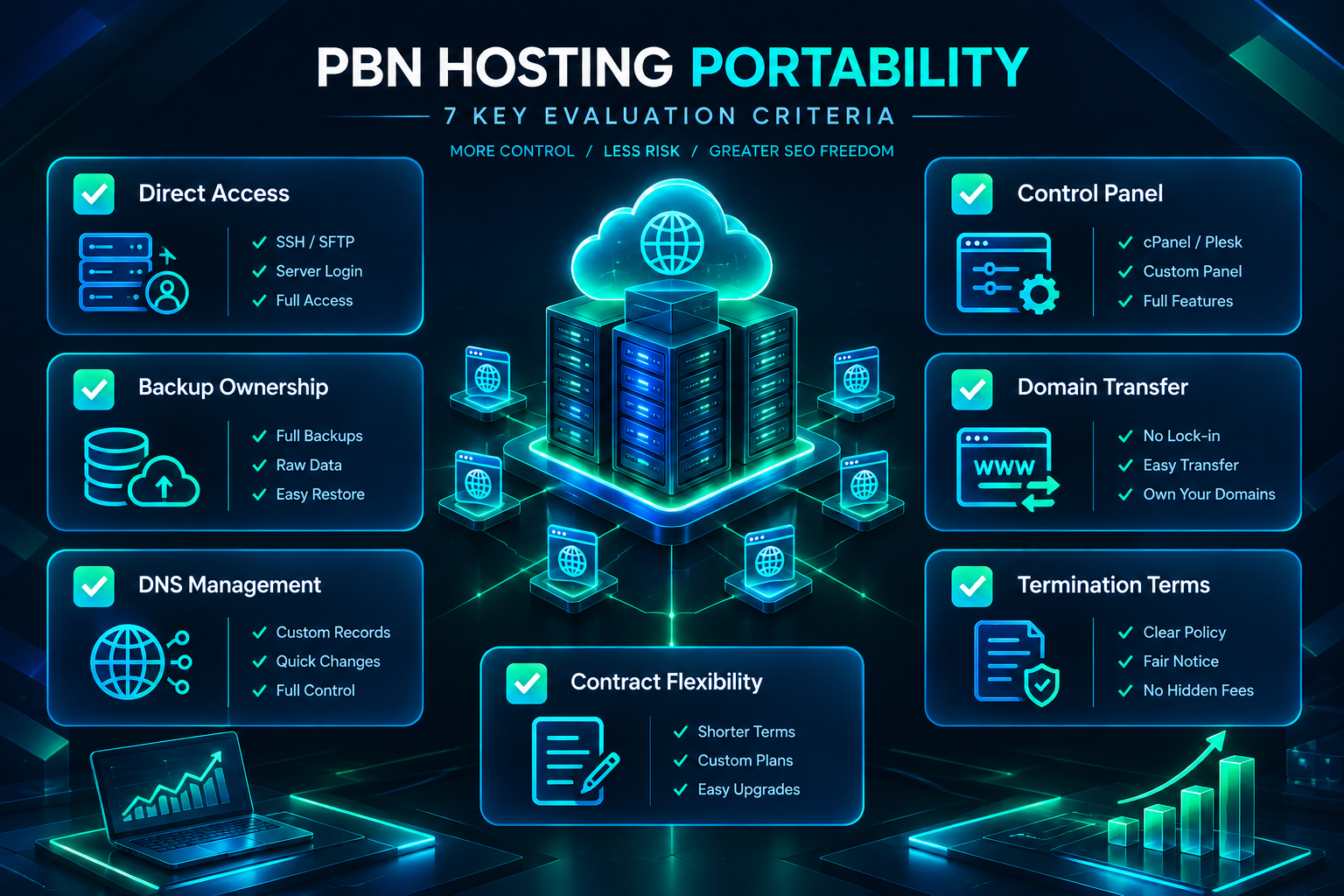
Providers that answer these questions clearly and favorably in their documentation or support responses are demonstrating a level of operational transparency that reduces the practical risk of lock-in. Providers that are vague about data access, backup ownership, or termination procedures warrant additional scrutiny before a significant network is built on their infrastructure.
Frequently Asked Questions
What is the most common form of vendor lock-in in PBN hosting?
The most common form is a combination of proprietary control panels that limit direct database and file access, and domain registration bundled with hosting in ways that complicate independent transfers. Together, these make migrating sites away from a provider more technically demanding than it needs to be, particularly when the migration is urgent.
Does using multiple hosting providers increase a PBN’s footprint risk?
Using multiple independent providers is generally considered a footprint-reduction practice rather than a risk factor, because it reduces the number of sites sharing the same IP ranges, nameservers, or hosting account identifiers. The footprint concern is more typically associated with concentrating many sites on a single provider’s infrastructure, not with distributing them across separate providers.
Can I use Cloudflare DNS across all my PBN sites without creating a footprint?
Using a single DNS provider across all PBN sites is a factor that some SEO practitioners consider when assessing network footprints, since nameserver patterns can be observed by crawlers. Whether this constitutes a meaningful footprint concern depends on the scale of the network and other co-occurring signals. Some operators use different DNS providers across subsets of their network to reduce this pattern; others use Cloudflare across all sites without observing issues. There is no publicly documented threshold from search engines on this specific factor.
How often should I test my PBN site backups?
Testing a restoration from backup on a sample of sites every one to three months is a reasonable practice for a network of moderate size. The goal is to confirm that the backup is complete — including both the database and the wp-content directory — and that the restoration process produces a functioning site. Automated backup systems should be checked periodically to confirm that scheduled exports are completing successfully and that the stored files are accessible.
Is it worth paying more for monthly hosting billing to preserve flexibility?
For a new or evolving PBN where provider selection may change as the network grows, monthly billing preserves the ability to migrate without a significant sunk cost. For a stable, established network on a provider that has proven reliable and portable, annual billing may offer cost savings without meaningful additional lock-in risk. The decision depends on how confident you are in the provider and how likely the network’s hosting requirements are to change in the near term.
What should I do if a PBN hosting provider terminates my account unexpectedly?
If you maintain current external backups and have domain registration with a separate registrar, an unexpected account termination is a migration exercise rather than a data-loss event. The immediate steps are to confirm that your domain DNS can be updated independently, restore site files and databases to a new host from your external backups, and update DNS records to point to the new server. Having a tested restoration process and a shortlist of alternative hosting providers prepared in advance significantly reduces the disruption of an unexpected termination.
Building a PBN Hosting Setup That Stays Under Your Control
Vendor lock-in in PBN hosting is a practical operational risk rather than an abstract concern. The consequences — forced migrations under pressure, data loss during provider failures, inability to restructure a network when circumstances change — are concrete and avoidable with deliberate infrastructure decisions made before they become necessary. The core principle is straightforward: keep the layers of your network infrastructure — domains, DNS, hosting, and content — as independently manageable as possible, so that a problem with any one layer does not cascade into a network-wide disruption.
Standard WordPress installations on cPanel or Plesk hosting with direct database and file access, domains registered separately from hosting, independent DNS management, and externally stored backups tested on a regular schedule give you the operational foundation to migrate, restructure, or scale a PBN without being constrained by a single provider’s systems or terms. Distributing sites across multiple independent hosting providers adds a further layer of resilience that serves both portability and network management goals.
If you are evaluating hosting options for a new PBN or reviewing the infrastructure of an existing network, assessing data portability and provider dependency as part of that review is a practical step that pays dividends when circumstances require a change. PBN Backlinks Service works with operators at different stages of network development and can help you assess domain quality, placement strategy, and network structure as part of a broader link-building approach suited to your specific goals.