

A private blog network represents a meaningful investment in domains, content, hosting infrastructure, and link-building strategy. Losing any part of that infrastructure to a server failure, accidental deletion, hosting account suspension, or CMS corruption can disrupt active link placements and require costly rebuilding. Backing up a PBN systematically is one of the most practical maintenance tasks a network operator can perform, and it is far less complicated than most people assume once a clear process is in place.
Key Takeaways
- A complete PBN backup covers database files, theme and plugin files, uploaded media, and domain configuration records — not just the WordPress installation folder.
- Automated scheduled backups reduce the risk of losing recent content and link placements; manual-only approaches are unreliable at scale.
- Off-site storage, separate from the hosting account, is essential because a hosting-level failure or suspension can make on-server backups inaccessible.
- Backup frequency should reflect how often the site changes; a PBN site updated weekly needs more frequent backups than a static site that rarely changes.
- Testing restoration from a backup is as important as creating the backup itself — an untested backup is an assumption, not a guarantee.
Why Backing Up a PBN Requires a Specific Approach
Most general WordPress backup advice is written for a single website with one hosting account and one administrator. A private blog network introduces additional complexity: multiple domains, potentially multiple hosting providers, varying CMS versions, and the need to keep link placements live and indexed. If one site in a network goes down and stays down for an extended period, the backlinks it hosts may lose crawl frequency, and the pages linking to your target site may temporarily or permanently disappear from search engine indexes. Restoring quickly from a clean backup is the most direct way to limit that disruption.
PBN operators also face a hosting-specific risk that single-site owners rarely encounter. Because network operators often distribute sites across multiple hosting accounts to reduce footprint, a billing lapse, a terms-of-service issue, or a provider outage on one account can take down several sites simultaneously. Without off-site backups stored independently of each hosting account, recovery becomes a rebuild rather than a restore.
What a Complete PBN Site Backup Should Include
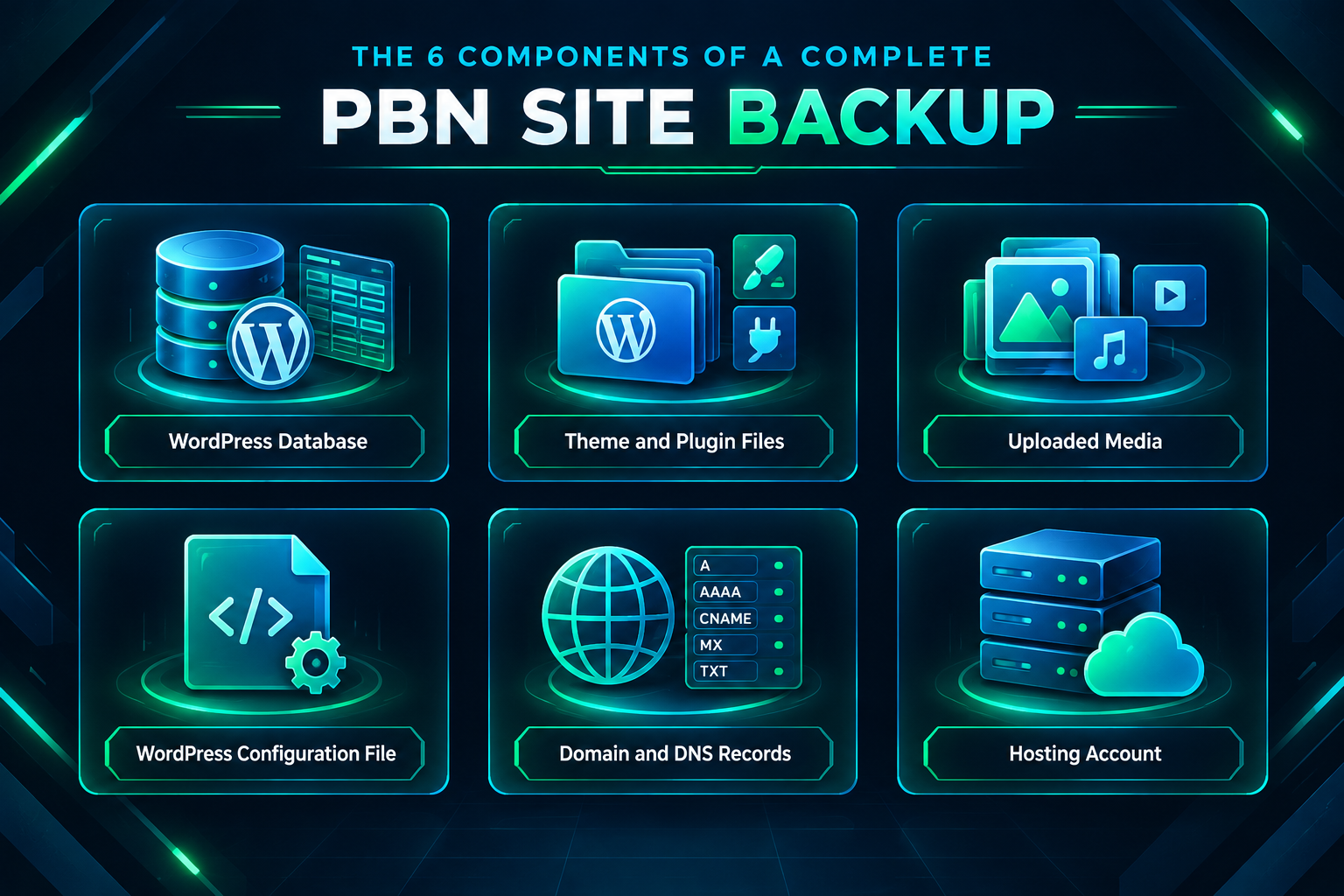
A backup that only copies the WordPress core files is not a complete backup. A full site backup for a PBN property should include all of the following components.
WordPress Database
The database contains everything that makes a WordPress site unique: posts, pages, comments, user accounts, plugin settings, widget configurations, and options. Without a current database backup, restoring the file system alone produces a broken or empty site. The database is typically a MySQL or MariaDB file exported in SQL format. Most backup tools handle this automatically, but it is worth confirming that the database export is included and not just the file directory.
Theme and Plugin Files
Custom themes, child themes, and any plugins with modified configuration files should be included in the backup. While many plugins can be reinstalled from the WordPress repository, custom or premium plugins with license keys, modified templates, or site-specific settings may not restore correctly from a fresh install. Backing up the wp-content/themes and wp-content/plugins directories ensures these are preserved exactly as configured.
Uploaded Media
The wp-content/uploads directory contains images, documents, and other media files. These are not stored in the database and must be backed up separately as part of the file system. For PBN sites with substantial image libraries, this directory can be large, so some operators back it up less frequently than the database if the media rarely changes.
WordPress Configuration File
The wp-config.php file contains database credentials, security keys, and site-specific constants. It should be included in every backup. If a site needs to be restored to a different server or hosting account, the configuration file will need to be updated with new database credentials, but having the original as a reference saves time during recovery.
Domain and DNS Records
Domain configuration is not part of the WordPress installation, but it is part of the site’s operational infrastructure. Keeping a documented record of nameserver settings, DNS records (A records, MX records, CNAME entries), and registrar account details for each domain in the network means that if a domain needs to be pointed to a new host, the process is straightforward rather than a guessing exercise. This is especially relevant for PBN operators who manage domains across multiple registrars.
Hosting Account Details
For each site in the network, maintain a record of the hosting provider, account login, server location, PHP version, and any server-level configurations such as custom .htaccess rules or caching settings. This information is not part of a WordPress backup but is essential for rapid recovery when a site needs to be moved or rebuilt on a new server.
Backup Methods for PBN Sites
There are several practical approaches to creating backups, and most experienced PBN operators use a combination of more than one method.
WordPress Backup Plugins
Plugins such as UpdraftPlus, BackWPup, and Duplicator are widely used for WordPress site backups. They can be configured to back up both the database and the file system on a schedule, and most support direct export to remote storage destinations including Google Drive, Amazon S3, Dropbox, and FTP servers. For a PBN with many sites, the free tiers of these plugins may be sufficient for basic scheduled backups, while premium versions offer additional automation and remote destination options.
The main limitation of plugin-based backups at scale is management overhead. Configuring and monitoring a backup plugin on each individual site in a large network is time-consuming. Some operators use a WordPress management platform such as MainWP or ManageWP to centralize backup scheduling and monitoring across multiple sites from a single dashboard, which significantly reduces the per-site administration burden.
Hosting-Level Backups
Many shared hosting providers and managed WordPress hosts offer automatic daily or weekly backups at the server level. These are convenient and require no plugin installation, but they come with an important limitation: if the hosting account itself is suspended, inaccessible, or deleted, the backups stored on that same server may be unavailable. Hosting-level backups are a useful secondary layer, not a primary backup strategy for a PBN where account continuity cannot always be guaranteed.
Some hosting providers offer backup snapshots that can be downloaded directly to a local machine or exported to external storage. If this option is available, it is worth enabling and testing, as it provides a clean server-state snapshot that can be faster to restore than a plugin-generated backup.
Manual Backups via cPanel or FTP
For operators who prefer direct control, a manual backup involves logging into cPanel and using the built-in backup wizard to download a full account backup, or connecting via FTP to download the file system and exporting the database via phpMyAdmin. Manual backups are reliable when performed correctly, but they depend entirely on the operator remembering to do them and following through consistently. For a network of more than a handful of sites, manual-only backups are difficult to maintain reliably.
Staging and Clone-Based Backups
Some PBN operators maintain a staging copy of each site, either on a local development environment or on a low-cost secondary hosting account. A staging copy serves as both a working backup and a testing environment for plugin updates or content changes before they are applied to the live site. Tools such as Duplicator or Local by Flywheel can create a portable package of a WordPress site that can be imported to a new environment quickly. This approach requires more storage and setup time but provides a ready-to-deploy copy of each site.
Off-Site Storage: Why It Matters for PBN Backups
Storing backups only on the same server as the live site creates a single point of failure. If the server fails, is compromised, or the hosting account is terminated, both the live site and its backup may be lost simultaneously. Off-site storage means keeping backup copies in a location that is independent of the hosting account.
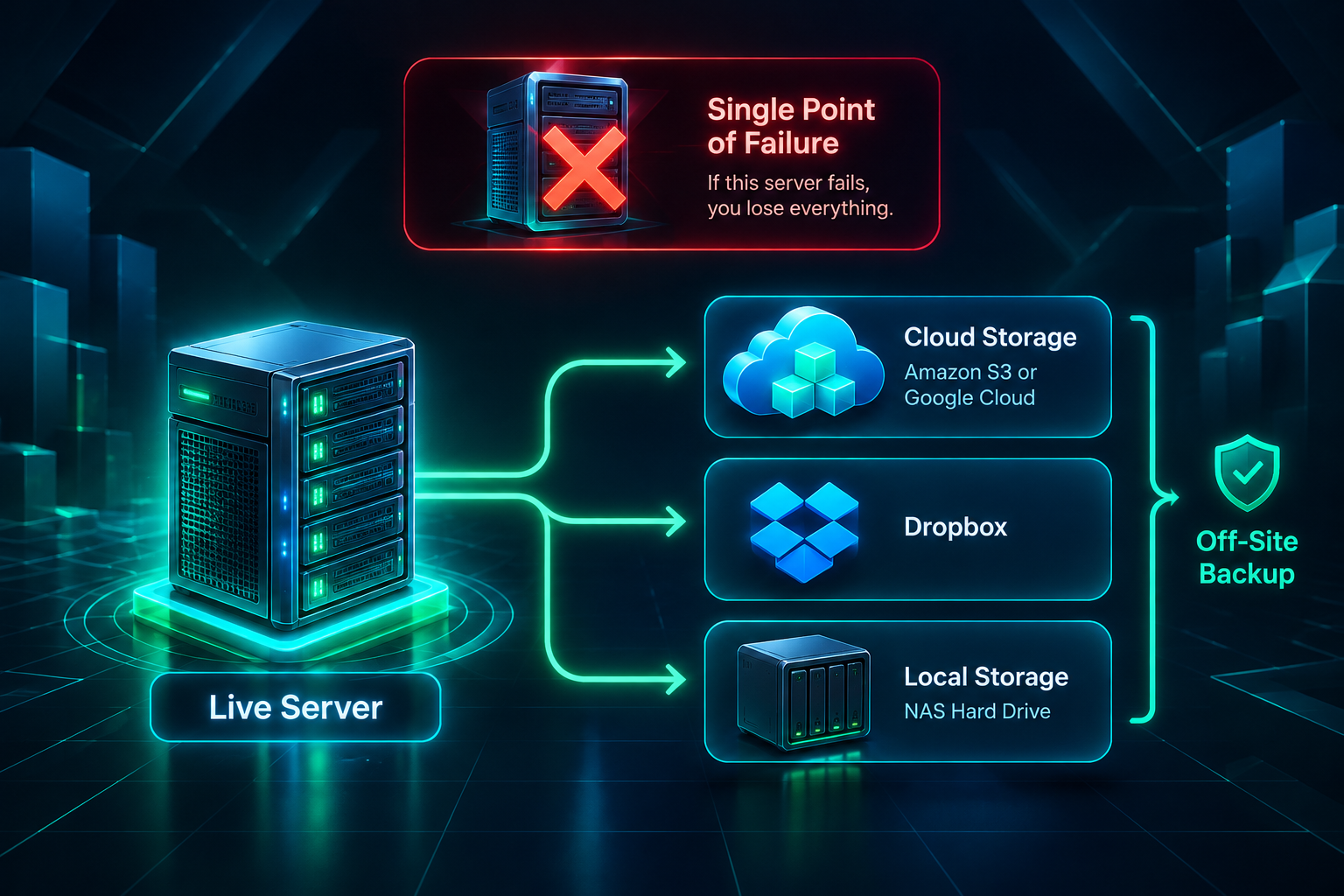
Practical off-site storage options for PBN backups include cloud storage services such as Amazon S3, Google Cloud Storage, Backblaze B2, and Dropbox. Most WordPress backup plugins support direct upload to these destinations. A cost-effective approach for a large network is to use a cloud storage tier with low per-gigabyte costs and configure backup plugins to upload compressed archives automatically after each scheduled backup run.
Local storage — meaning a hard drive or NAS device at the operator’s location — is another off-site option relative to the hosting server. Local storage provides fast access for restoration but is vulnerable to physical damage, theft, or local hardware failure. A combination of cloud storage and periodic local copies provides reasonable redundancy without excessive cost.
Backup Frequency: How Often Should PBN Sites Be Backed Up?
Backup frequency should be proportional to how often the site changes and how much data loss would be acceptable in a worst-case scenario. For a PBN site that receives new content weekly and has active link placements, a weekly full backup with daily database backups is a reasonable baseline. For a site that is essentially static after initial setup, a weekly or even bi-weekly full backup may be sufficient.
The practical consideration for PBN operators is that more frequent backups consume more storage and, if using cloud storage, may incur higher costs. Compressing backup archives and retaining only a rolling window of recent backups — for example, the last four weekly backups and the last seven daily database backups — keeps storage costs manageable while maintaining meaningful recovery options.
After any significant change to a site — a theme update, a plugin upgrade, a batch of new content, or a structural change to the site — a manual backup before and after the change is a sensible precaution. Plugin and theme updates are a common cause of site breakage, and having a pre-update backup means recovery takes minutes rather than hours.
Organizing Backups Across a Multi-Site PBN
Managing backups for a network of ten, twenty, or more sites requires a systematic organizational approach. Without clear naming conventions and a centralized record, it becomes difficult to identify which backup belongs to which site, whether a backup is current, and where the most recent copy is stored.
A practical organizational system for PBN backups includes a consistent file naming convention that incorporates the domain name, backup date, and backup type. For example, a database backup for a site called example-domain.com taken on a specific date might be named example-domain-com_db_2024-06-15.sql.gz. Storing backups in a folder structure organized by domain name within the cloud storage account makes retrieval straightforward.
A simple backup log — a spreadsheet or document listing each site, its backup schedule, the date of the last successful backup, and the storage location — provides a quick reference for confirming that all sites in the network are being backed up as intended. This log is particularly useful when managing a network across multiple hosting accounts and registrars, where it is easy to overlook a site that has fallen off the backup schedule.
Testing Backup Restoration
Creating backups without testing whether they can be successfully restored is a common and costly oversight. A backup file that is corrupted, incomplete, or incompatible with the current server environment may fail at the moment it is most needed. Testing restoration periodically — ideally on a staging environment or a temporary hosting account — confirms that the backup process is working correctly and that the operator is familiar with the restoration steps before an emergency arises.
A restoration test for a WordPress PBN site typically involves creating a temporary subdomain or staging environment, importing the backup database, uploading the file system backup, updating the wp-config.php file with the staging database credentials, and confirming that the site loads correctly with all content and settings intact. Running through this process once for each site type in the network — rather than every individual site — is usually sufficient to validate the backup approach.
Protecting Domain Assets Alongside Site Backups
The domains in a private blog network are often the most valuable assets, particularly aged or expired domains acquired for their historical backlink profiles and topical relevance. A site backup does not protect the domain itself. Domain protection requires separate attention.
Enabling domain auto-renewal for every domain in the network prevents accidental expiry, which would make the domain available for registration by others and could disrupt all link placements hosted on that site. Setting renewal reminders well in advance of the expiry date provides a secondary safeguard. For domains with significant link equity, some operators enable domain locking at the registrar level to prevent unauthorized transfers.
Keeping a record of each domain’s registration details, expiry date, registrar, and associated hosting account in a centralized document means that if access to a registrar account is lost, the information needed to recover or transfer the domain is available. This record should be stored securely and separately from the hosting accounts themselves.
Recovery Planning: What Happens When a PBN Site Goes Down
Having backups in place is only part of a recovery plan. Knowing the steps to take when a site goes down reduces downtime and limits the impact on active link placements. A basic recovery plan for a PBN site should address the following questions: Where is the most recent backup stored? What hosting environment will the site be restored to? How long will DNS propagation take if the site is being moved to a new host? Who has access to the registrar account if the domain needs to be pointed to a new server?
For operators managing a large network, documenting a step-by-step recovery procedure for a typical site restoration — even a simple one-page checklist — means that recovery can be delegated or executed under pressure without missing critical steps. The goal is to restore the site to a functional state with all content and link placements intact as quickly as possible, minimizing the period during which the linking pages are unavailable to search engine crawlers.
Frequently Asked Questions
Do I need to back up every site in my PBN separately?
Yes. Each site in a private blog network is a separate WordPress installation with its own database, files, and configuration. Backups must be created and stored individually for each site. A centralized management tool such as MainWP can automate this process across multiple sites from a single interface, reducing the manual effort involved.
How much storage do PBN backups typically require?
Storage requirements vary depending on the size of each site’s media library and database. A typical PBN site with moderate content and images may produce a compressed backup of between 50 MB and 500 MB. For a network of twenty sites, total backup storage across a rolling four-week window might range from a few gigabytes to tens of gigabytes. Cloud storage services with low per-gigabyte pricing make this manageable at reasonable cost.
What is the fastest way to restore a PBN site after a hosting failure?
The fastest restoration path is to have a recent full backup stored off-site, a pre-selected alternative hosting account ready to receive the site, and a documented restoration checklist. Using a plugin like Duplicator or UpdraftPlus with a one-click restore function on a compatible host can bring a site back online within an hour in straightforward cases. DNS propagation to a new host may add several hours to the total recovery time.
Should I back up PBN sites differently from a regular website?
The core backup components are the same as for any WordPress site: database, files, and configuration. The differences for a PBN are primarily organizational — managing backups across multiple sites and hosting accounts, maintaining domain records separately, and ensuring that off-site storage is genuinely independent of each hosting account. The multi-site nature of a PBN makes automation and centralized management more important than for a single website.
Can I use the same backup plugin across all sites in my network?
Yes, and using a consistent plugin across the network simplifies training, troubleshooting, and restoration procedures. UpdraftPlus, BackWPup, and Duplicator are all capable of handling scheduled backups with remote storage destinations. If you use a WordPress management platform to administer multiple sites, check whether it includes integrated backup functionality before installing a separate plugin on each site.
What should I do if a hosting provider suspends my account and I cannot access my backups?
This is precisely the scenario that off-site backups are designed to address. If backups are stored in a cloud storage account or on a local drive that is independent of the suspended hosting account, restoration to a new host can proceed without needing access to the original server. If backups were stored only on the suspended server, recovery options are limited to negotiating access with the provider or rebuilding the site from scratch. This outcome underscores why off-site storage is a non-negotiable element of a PBN backup strategy.
Building a Reliable Backup Routine for Your Private Blog Network
A private blog network is a long-term infrastructure investment, and protecting that infrastructure through consistent backups is straightforward once the right tools and processes are in place. The essential elements are a complete backup scope covering database, files, and configuration; automated scheduling so backups happen without depending on manual action; off-site storage independent of each hosting account; organized naming and logging so backups are easy to locate and verify; and periodic restoration testing so the process works when it is actually needed.
Domain asset protection — auto-renewal, registrar locking, and centralized domain records — sits alongside site backups as a separate but equally important layer of network maintenance. Together, these practices reduce the operational risk of losing link placements due to infrastructure failures that are entirely within the operator’s control to prevent.
If you are building or expanding a private blog network and want to discuss domain selection, placement quality, or network infrastructure with an experienced team, PBN Backlinks Service is available to help you assess your requirements and identify the right approach for your campaign goals.