

Configuring a firewall for PBN websites is a practical infrastructure task that protects your hosting environment, limits unauthorized access, and helps maintain the operational stability of each site in your network. Whether you manage a handful of domains or a larger collection of PBN properties, understanding firewall basics and applying them consistently across your setup can reduce exposure to brute-force attacks, unwanted crawlers, and server-level intrusions that could disrupt your link-building operations.
Key Takeaways
- A properly configured firewall for PBN sites controls inbound and outbound traffic at the server or application level, reducing the risk of unauthorized access and service disruption.
- Firewall rules for PBN websites typically cover SSH access restrictions, HTTP/HTTPS traffic filtering, rate limiting, and blocking known malicious IP ranges.
- Application-layer firewalls such as a Web Application Firewall (WAF) add a second layer of protection against common web exploits targeting WordPress and similar CMS installations.
- Separating firewall configurations across individual PBN domains, rather than applying a single shared ruleset, supports independent site management and reduces the risk of a single misconfiguration affecting your entire network.
- Firewall setup is one component of a broader server hardening process that also includes CMS updates, strong authentication, and access logging.
Why Firewall Configuration Matters for PBN Infrastructure
PBN websites are self-managed web properties, and like any publicly accessible server, they are exposed to automated scanning, credential-stuffing attempts, and vulnerability probes. Without a firewall, a compromised PBN site can be used to distribute malware, redirect traffic, or inject content that damages both the site’s usability and its value as a link-building asset. A firewall does not guarantee immunity from every threat, but it significantly narrows the attack surface available to opportunistic bots and targeted intrusion attempts.
For operators managing multiple PBN domains, the risk compounds. A single unprotected server hosting several sites can become a single point of failure. Configuring firewalls at both the server level and the application level for each property creates layered protection that is proportionate to the operational importance of the network. The goal is not complexity for its own sake but reliable, low-maintenance protection that keeps each site functioning as intended.
Understanding the Two Main Firewall Layers for PBN Sites
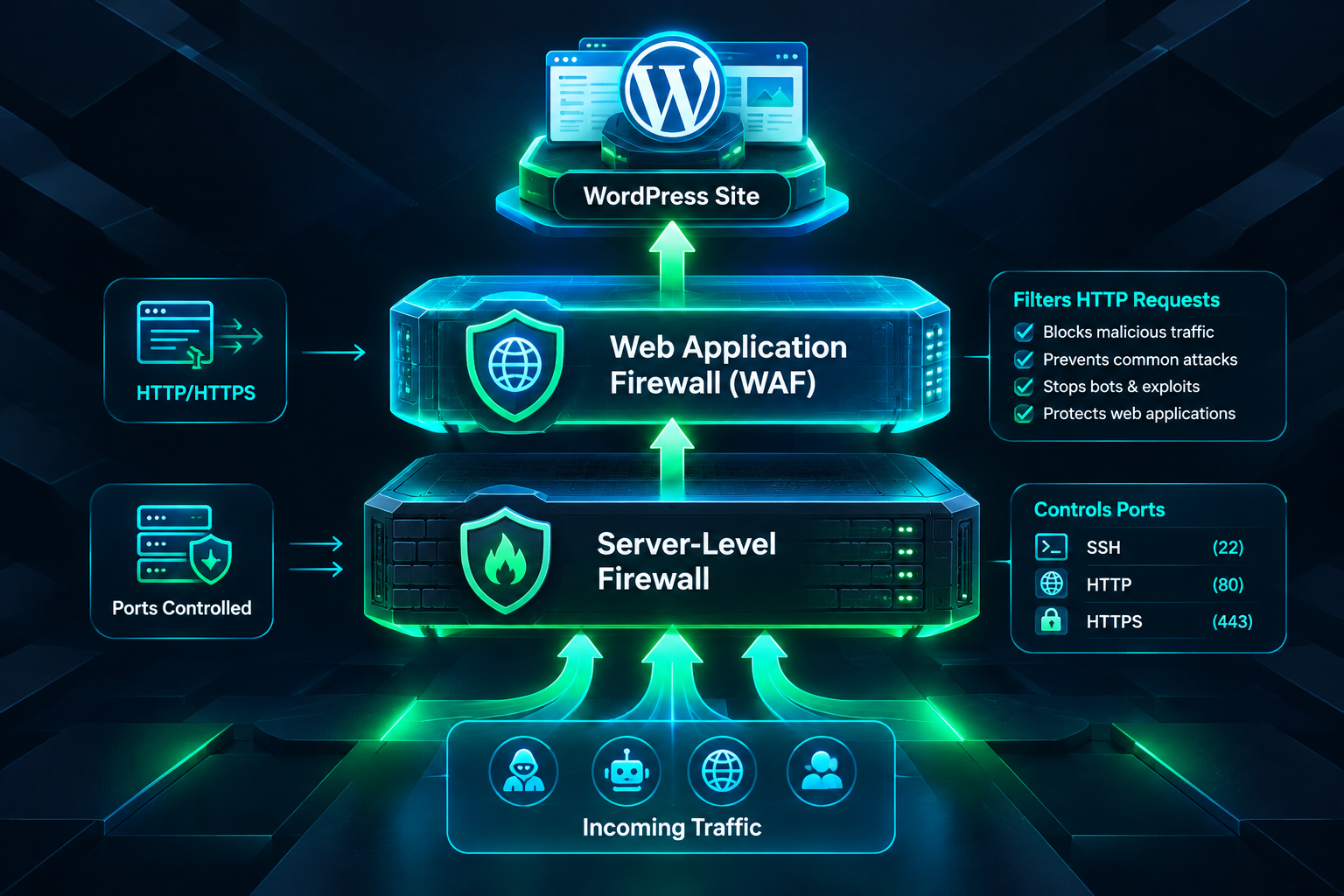
PBN site protection typically involves two distinct firewall layers: a network or server-level firewall and an application-layer firewall. Each operates differently and addresses different categories of threat.
Server-Level Firewalls
A server-level firewall, such as UFW (Uncomplicated Firewall) on Ubuntu-based systems or firewalld on CentOS and RHEL-based distributions, controls which ports and protocols are permitted to communicate with the server. For a typical PBN site running on a VPS or dedicated server, the relevant ports are port 22 (SSH), port 80 (HTTP), and port 443 (HTTPS). A minimal, secure default configuration allows inbound traffic only on these three ports and denies everything else by default.
SSH access deserves particular attention. Leaving SSH open to all IP addresses exposes the server to brute-force login attempts. A practical mitigation is to restrict SSH access to a specific IP address or a narrow IP range corresponding to your management location. If your management IP changes frequently, an alternative is to use a non-standard SSH port combined with key-based authentication and a tool such as Fail2Ban, which automatically blocks IP addresses after a configurable number of failed login attempts. Fail2Ban integrates with UFW and firewalld and is widely used in shared and VPS hosting environments.
Web Application Firewalls (WAF)
A Web Application Firewall operates at the HTTP layer and inspects incoming web requests for patterns associated with common exploits, including SQL injection, cross-site scripting (XSS), remote file inclusion, and WordPress-specific attack vectors such as xmlrpc.php abuse and wp-login.php brute-force attempts. A WAF can be deployed in several ways for PBN sites: as a server-side module such as ModSecurity with a ruleset like the OWASP Core Rule Set, as a plugin-level solution within WordPress, or as a cloud-based reverse proxy service.
Cloud-based WAF and CDN services can sit in front of your PBN domains and filter malicious traffic before it reaches your origin server. This approach also masks the origin server’s IP address, which has infrastructure management benefits. When evaluating cloud WAF options, consider whether the service’s logging and traffic routing practices align with how you manage your PBN domains, since routing all traffic through a single provider could introduce a shared infrastructure signal if applied uniformly across many sites.
Step-by-Step: Configuring UFW for a PBN Site on a Linux VPS
The following describes a general UFW configuration process for a Linux-based VPS hosting a PBN site. Exact commands and menu paths may vary depending on your Linux distribution version and hosting environment. Always verify current documentation for your specific system before applying changes.
Step 1: Set Default Policies
Begin by setting UFW’s default policies to deny all inbound connections and allow all outbound connections. This ensures that only explicitly permitted traffic can reach the server, while the server itself can initiate outbound connections for updates and API calls.
- Set the default inbound policy to deny.
- Set the default outbound policy to allow.
Step 2: Allow Essential Services
After setting defaults, explicitly allow the services your PBN site requires. For a standard web server, this means permitting inbound traffic on port 80 for HTTP and port 443 for HTTPS. If you use a control panel such as cPanel, Plesk, or CyberPanel, you will also need to allow the relevant control panel ports, though these should be restricted to your management IP rather than opened to the public internet.
Step 3: Restrict SSH Access
Rather than allowing SSH from any IP address, create a rule that permits SSH only from your specific management IP address. If you manage multiple PBN servers from the same location, this single rule can be applied consistently across all of them. After restricting SSH, enable UFW and verify that the active rules match your intended configuration before closing your current session to avoid locking yourself out.
Step 4: Enable Rate Limiting
UFW includes a built-in rate-limiting option for SSH that blocks IP addresses making more than a defined number of connection attempts within a short window. Enabling this rule adds a lightweight brute-force mitigation layer without requiring Fail2Ban, though Fail2Ban provides more granular control and can be configured to protect wp-login.php and xmlrpc.php endpoints as well.
Step 5: Block Known Malicious IP Ranges
Threat intelligence feeds and hosting provider abuse lists publish IP ranges associated with scanning bots, spam networks, and known attack infrastructure. Adding deny rules for these ranges reduces noise in your server logs and lowers the volume of malicious requests reaching your application layer. This step is optional but worthwhile for servers that show high volumes of automated traffic in their access logs.
Step 6: Enable Logging and Review Regularly
UFW supports configurable logging levels. Enabling low or medium logging captures blocked connection attempts without generating excessive log volume. Reviewing firewall logs periodically helps identify new attack patterns, unexpected traffic sources, and misconfigured rules that may be blocking legitimate traffic such as search engine crawlers or monitoring services.
WordPress-Level Firewall Configuration for PBN Sites
Server-level firewalls protect the operating system and network layer, but WordPress installations require additional protection at the application level. PBN sites built on WordPress are frequent targets for automated attacks because WordPress is widely deployed and its default configuration exposes several well-known endpoints.
Protecting wp-login.php and xmlrpc.php
The WordPress login page and the XML-RPC endpoint are the two most commonly targeted entry points. Restricting access to wp-login.php by IP address using server configuration rules or a security plugin prevents credential-stuffing bots from reaching the login form at all. Disabling or blocking xmlrpc.php entirely is appropriate for most PBN sites, since the XML-RPC interface is rarely needed for standard content management and represents a significant attack surface.
These restrictions can be implemented at the web server configuration level using Nginx location blocks or Apache .htaccess directives, or through a WordPress security plugin that provides firewall and access control features. Implementing restrictions at the web server level is generally more efficient because requests are blocked before PHP processes them, reducing server load during high-volume attack attempts.
File Permission Hardening
Correct file permissions are a complementary control that limits what an attacker can do if they gain partial access to the server. WordPress core files, the wp-config.php file, and the uploads directory each have recommended permission settings. The wp-config.php file, which contains database credentials and security keys, should be readable only by the web server process owner and not accessible via the browser. Verifying and correcting file permissions is a standard part of WordPress hardening and works alongside firewall rules rather than replacing them.
Security Plugins with WAF Functionality
Several WordPress security plugins include built-in WAF functionality that inspects requests before they reach WordPress core. These plugins can block common exploit patterns, enforce login attempt limits, and alert you to file changes that may indicate a compromise. When selecting a security plugin for PBN sites, consider whether the plugin’s external reporting or telemetry features are appropriate for your operational preferences, since some plugins send site data to external servers for threat intelligence purposes.
Managing Firewall Configurations Across Multiple PBN Domains
Operating a PBN with multiple domains introduces a management challenge: maintaining consistent firewall configurations across many servers without creating a uniform, easily identifiable infrastructure pattern. The practical approach is to use a configuration template that defines your baseline security rules and then apply it to each server individually, adjusting for the specific hosting environment, control panel, and any site-specific requirements.
Infrastructure automation tools can help apply consistent configurations across multiple servers without manual repetition. However, for smaller PBN operations, a documented manual checklist applied during server provisioning is often sufficient. The key principle is that each server should be independently configured rather than sharing a single firewall appliance or cloud security account that creates a visible connection between domains.
Monitoring and Maintenance
Firewall rules require periodic review as your PBN infrastructure evolves. Adding new domains, changing hosting providers, updating WordPress and plugins, or modifying your management IP address all create situations where existing rules may need adjustment. A simple maintenance schedule that includes reviewing active firewall rules, checking Fail2Ban ban logs, and verifying that security plugin configurations are current helps prevent configuration drift that can leave gaps in your protection over time.
Uptime monitoring for each PBN domain is also relevant here. A firewall misconfiguration that blocks legitimate HTTP traffic will cause a site to appear offline to crawlers and visitors. Monitoring tools that alert you when a site becomes unreachable allow you to identify and correct firewall-related outages quickly, before they affect crawling and indexing of the site’s content.
Cloudflare and CDN-Based Firewall Options for PBN Sites
Cloudflare and similar CDN providers offer firewall and DDoS protection features that operate at the network edge, before traffic reaches your origin server. For PBN sites, these services can provide meaningful protection against volumetric attacks and common web exploits without requiring server-level configuration expertise. Cloudflare’s free tier includes basic DDoS mitigation and a limited WAF, while paid tiers provide more granular rule customization and advanced bot management features.
When using a CDN-based firewall for PBN sites, consider the implications of routing all traffic through a single provider’s infrastructure. If many domains in a network share the same CDN account or nameserver configuration, this creates a visible infrastructure pattern that may be observable through DNS records or SSL certificate data. Using separate accounts or varying CDN providers across different PBN properties is a common approach to managing this consideration. The specific implications depend on your network’s overall footprint management strategy and are worth evaluating alongside your firewall configuration decisions.
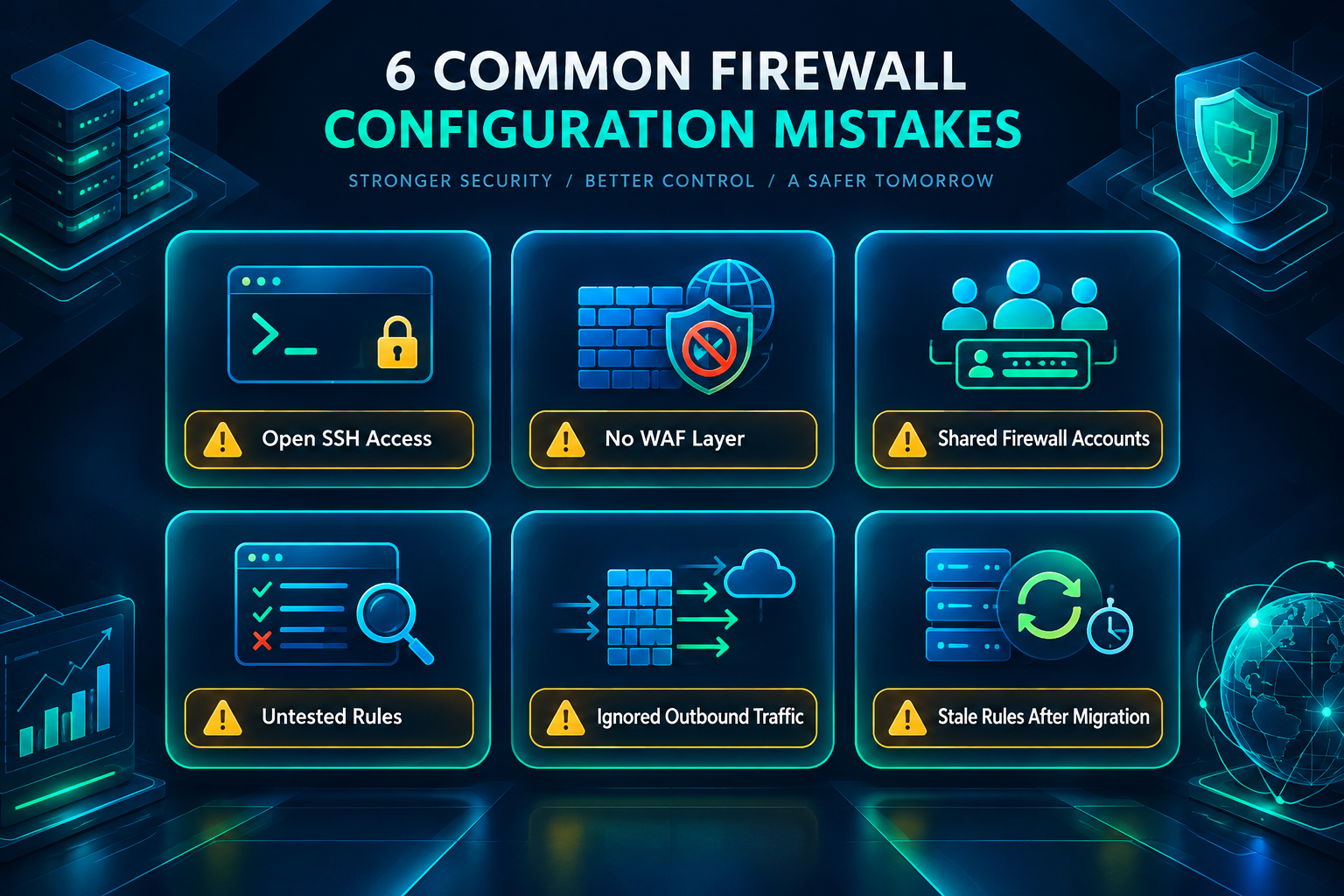
Common Firewall Configuration Mistakes to Avoid
Several configuration errors appear frequently in PBN site setups and are worth addressing explicitly.
- Leaving SSH open to all IP addresses: This is the most common and consequential oversight. Restricting SSH to known management IPs or using key-based authentication with Fail2Ban significantly reduces brute-force exposure.
- Applying firewall rules without testing them first: Enabling a restrictive firewall without verifying that your management access rules are correct can lock you out of the server. Always confirm that your SSH allow rule is active before enabling the firewall.
- Ignoring application-layer threats: A server-level firewall does not inspect HTTP request content. Without a WAF or WordPress-level protections, application-layer attacks such as SQL injection and login brute-forcing can succeed even when the server firewall is correctly configured.
- Using identical firewall configurations managed through a single shared account: Centralizing firewall management for all PBN domains through one account or control panel can create an infrastructure connection between sites. Independent configurations are preferable from an operational management perspective.
- Neglecting outbound traffic rules: Most default configurations allow all outbound traffic, which means a compromised server can freely communicate with external command-and-control infrastructure. Adding outbound rules that restrict traffic to known necessary destinations adds a useful containment layer, though this requires more careful planning to avoid blocking legitimate services.
- Failing to update firewall rules after infrastructure changes: Changing hosting providers, adding new management IPs, or migrating domains can make existing rules obsolete. A review process tied to infrastructure changes prevents stale rules from creating either security gaps or access problems.
Frequently Asked Questions
Do I need a separate firewall for each PBN site?
If each PBN site is hosted on its own VPS or dedicated server, each server requires its own firewall configuration. If multiple sites share a single server, the server-level firewall applies to all of them, but application-level protections such as WAF rules and WordPress security settings should still be configured individually for each site. Independent server-level configurations are generally preferable for PBN operations where separating infrastructure is a management priority.
Can a firewall affect how search engines crawl my PBN sites?
A misconfigured firewall can block search engine crawlers if their IP addresses fall within a denied range or if rate-limiting rules are set too aggressively. Googlebot and Bingbot use documented IP ranges that are publicly available. Verifying that your firewall rules do not block these ranges, and that rate-limiting thresholds are set to levels that accommodate normal crawl traffic, helps ensure that your PBN sites remain crawlable and indexable.
Is a WAF necessary if I already have a server-level firewall?
A server-level firewall and a WAF address different threat categories and are complementary rather than interchangeable. A server-level firewall controls port and protocol access but does not inspect the content of HTTP requests. A WAF inspects request content and can block exploit patterns that arrive on permitted ports. For WordPress-based PBN sites, both layers are worth implementing because WordPress installations are frequent targets for application-layer attacks that a server firewall alone cannot prevent.
How does Fail2Ban work with a firewall for PBN sites?
Fail2Ban monitors log files for patterns indicating repeated failed access attempts, such as multiple failed SSH logins or repeated wp-login.php failures, and automatically creates temporary firewall rules that block the offending IP address for a configurable period. It integrates with UFW and firewalld and can be configured to monitor multiple services simultaneously. For PBN sites, configuring Fail2Ban to monitor both SSH and WordPress login endpoints provides automated brute-force mitigation without manual intervention.
Should I use Cloudflare for all my PBN domains?
Cloudflare provides useful DDoS protection and WAF functionality, but routing all PBN domains through a single Cloudflare account creates a visible infrastructure connection between those domains. Whether this is a concern depends on your overall footprint management approach. Using separate accounts, varying providers, or selectively applying Cloudflare to domains where DDoS risk is a genuine concern are all reasonable approaches. Evaluate this decision in the context of your broader network management strategy rather than as a purely technical firewall question.
How often should I review my PBN site firewall configurations?
A practical review schedule includes checking active firewall rules whenever you make infrastructure changes such as adding domains, changing hosting providers, or updating your management IP. A broader periodic review every few months helps catch configuration drift, outdated IP block lists, and security plugin updates that may have changed default WAF rules. Reviewing Fail2Ban logs and server access logs at the same interval helps identify new attack patterns that may warrant additional rules.
Choosing the Right Firewall Setup for Your PBN Infrastructure
The appropriate firewall configuration for a PBN site depends on your hosting environment, the number of domains you manage, your technical comfort level, and the operational priorities of your network. A single PBN site on a managed hosting plan may be adequately protected by the host’s built-in firewall combined with a WordPress security plugin. A larger network of self-managed VPS instances benefits from a more deliberate approach that includes server-level UFW or firewalld configuration, Fail2Ban for automated brute-force mitigation, and a WAF at either the server or application layer.
The principles that apply across all configurations are consistent: restrict access to only what is necessary, protect administrative endpoints, implement automated responses to repeated attack attempts, and review configurations regularly as your infrastructure evolves. Firewall configuration is not a one-time task but an ongoing part of managing web properties that serve as link-building assets. Sites that remain secure, accessible, and properly indexed contribute reliably to your SEO campaigns, while compromised or misconfigured sites can become liabilities that require remediation effort.
If you are building or expanding a PBN and want to ensure that your domain selection, hosting setup, and link placement strategy are aligned with your SEO goals, the team at PBN Backlinks Service can help you assess your requirements and identify the right approach for your campaign.