

Configuring caching on PBN sites is a practical server and CMS task that affects page load speed, crawl efficiency, and the overall stability of each network property. A well-cached PBN site loads faster for search engine crawlers, reduces server resource consumption, and presents a more technically consistent experience — all of which matter when you want each site to function as a credible, independently maintained web property rather than a neglected placeholder.
Key Takeaways
- Caching reduces server load and improves page delivery speed on each PBN property, which can support crawlability and indexing consistency.
- WordPress-based PBN sites can use plugin-level caching such as WP Super Cache or W3 Total Cache, while server-level options like Nginx FastCGI cache or Varnish offer more control.
- CDN-layer caching through services like Cloudflare adds an additional performance tier and can mask origin server details, which some PBN operators consider a useful configuration choice.
- Cache configuration should be tested after setup to confirm that dynamic elements, login pages, and admin areas are correctly excluded from cached output.
- Caching is one component of a broader technical setup; it works alongside hosting quality, content delivery, and internal linking to determine how well each PBN property performs its intended function.
Why Caching Matters for PBN Sites
Private blog network sites are typically WordPress installations hosted on separate domains, each intended to function as an independent web property. Like any website, a PBN site that loads slowly or times out under crawler requests creates a poor technical environment. Search engine crawlers allocate a crawl budget to each domain, and a slow-loading site may result in fewer pages being crawled per session. For a PBN property where the primary goal is to have specific pages indexed and their outbound links followed, reliable crawl performance is directly relevant to whether the site fulfills its purpose.
Caching works by storing a pre-generated version of a page — either on the server, in memory, or at a CDN edge node — so that subsequent requests for that page are served from the stored copy rather than triggering a full PHP and database execution cycle. On a shared hosting environment, which many PBN operators use to manage costs across multiple domains, this reduction in processing demand can meaningfully improve response times. On a VPS or dedicated server, caching still reduces load and improves time-to-first-byte, which is the interval between a browser or crawler making a request and receiving the first byte of the response.
Beyond raw speed, a consistently available and fast-loading site is less likely to return server errors during a crawl. A 503 or 504 error during a Googlebot visit does not automatically cause a ranking problem, but repeated server errors over time can affect how frequently a site is crawled and whether its pages remain indexed. Caching reduces the likelihood of these errors by offloading the work of generating page responses.
Plugin-Level Caching for WordPress PBN Sites
Most PBN sites run on WordPress, which makes plugin-based caching the most accessible starting point. Several well-established plugins handle page caching without requiring server configuration access.
WP Super Cache
WP Super Cache generates static HTML files from WordPress pages and serves those files directly to visitors and crawlers. Once a page is cached, WordPress’s PHP engine and the database are bypassed entirely for that request. The plugin offers three delivery modes: simple mode, which uses PHP to serve cached files; expert mode, which uses Apache mod_rewrite rules to serve files even faster; and WP-Cache mode, which caches pages in PHP memory. For most shared hosting environments, simple mode is the most compatible starting point. Expert mode requires access to the site’s .htaccess file and is faster but needs careful configuration to avoid conflicts with other rewrite rules.
Within WP Super Cache settings, the cache timeout value controls how long a cached page is stored before being regenerated. A longer timeout reduces server load but means that content updates take longer to appear to crawlers. For PBN sites where content changes infrequently, a timeout of several hours or longer is generally appropriate. The plugin also allows specific pages to be excluded from caching — the WordPress login page and admin area should always be excluded to prevent authentication issues.
W3 Total Cache
W3 Total Cache provides a broader set of caching layers than WP Super Cache, including page cache, database cache, object cache, and browser cache headers. For a PBN site, the most relevant layers are page cache and browser cache. Page cache stores the full HTML output of each page, while browser cache settings instruct visiting browsers and crawlers to store static assets such as images, CSS files, and JavaScript locally for a defined period, reducing repeat request overhead.
W3 Total Cache supports multiple page cache storage methods including disk-enhanced, disk-basic, and memory-based options such as Memcached or Redis. On shared hosting, disk-enhanced is typically the most practical choice. On a VPS where Memcached or Redis is available, memory-based caching delivers faster response times. The plugin’s minification settings, which compress CSS and JavaScript files, can also contribute to faster page loads but should be tested carefully because aggressive minification occasionally breaks theme or plugin functionality.
LiteSpeed Cache
If the PBN site is hosted on a LiteSpeed web server — which some managed WordPress hosts and certain VPS configurations use — the LiteSpeed Cache plugin integrates directly with the server’s built-in caching engine. This server-native integration is generally faster than disk-based plugin caching because the cache is handled at the web server level rather than within PHP. LiteSpeed Cache also includes image optimization, lazy loading, and CDN integration options. Hosts that advertise LiteSpeed or OpenLiteSpeed support are worth considering for PBN properties where performance is a priority.
Server-Level Caching Options
For PBN operators managing sites on a VPS or dedicated server with root access, server-level caching provides more control and typically better performance than plugin-only solutions.
Nginx FastCGI Cache
Nginx is a widely used web server that supports FastCGI caching natively. When configured, Nginx stores cached responses in a defined directory on the server and serves them directly without passing requests to PHP-FPM or the WordPress application. This approach is faster than plugin-based caching because the cache is handled before WordPress loads at all. Configuring Nginx FastCGI cache requires editing the Nginx server block configuration to define a cache zone, set cache validity periods, and specify which request types should bypass the cache — typically POST requests, requests with cookies indicating a logged-in user, and WooCommerce or other dynamic pages if present.
A basic Nginx FastCGI cache configuration defines a fastcgi_cache_path directive specifying the storage location, cache size, and inactive timeout, then applies fastcgi_cache and fastcgi_cache_valid directives within the relevant server block. Cache bypass conditions use fastcgi_cache_bypass and fastcgi_no_cache variables tied to cookie presence or request method. After configuration, the Nginx service must be reloaded for changes to take effect. Testing with a tool that checks response headers — looking for an X-Cache or X-Fastcgi-Cache header showing HIT — confirms that caching is active.
Varnish Cache
Varnish is a dedicated HTTP accelerator that sits in front of the web server and handles caching at the network layer. It is highly configurable through its VCL (Varnish Configuration Language) and can cache large volumes of requests with very low latency. For PBN operators running multiple sites on a single server, Varnish can be configured to handle caching for all hosted domains simultaneously. The trade-off is configuration complexity: Varnish requires careful VCL rules to handle WordPress-specific behaviors such as cookie-based cache bypass for logged-in users and correct cache invalidation when content is updated. Varnish is generally more appropriate for operators with server administration experience or access to managed server support.
CDN-Layer Caching with Cloudflare
Cloudflare operates as a reverse proxy and content delivery network, sitting between the visitor or crawler and the origin server. When a PBN site’s DNS is pointed through Cloudflare, static assets and, depending on configuration, full HTML pages can be cached at Cloudflare’s edge nodes globally. This means that a crawler or visitor in a different geographic region receives a cached response from a nearby edge location rather than from the origin server, reducing latency and origin server load.
Cloudflare’s free tier includes basic caching for static assets and allows configuration of cache rules through its dashboard. The Cache Level setting controls how aggressively Cloudflare caches content. The Browser Cache TTL setting determines how long Cloudflare instructs browsers to cache assets locally. For full HTML page caching through Cloudflare, a Page Rule or Cache Rule can be configured to cache everything for specific URL patterns, though this requires careful exclusion of the WordPress admin path (/wp-admin/), the login page (/wp-login.php), and any dynamic or user-specific pages.
One configuration consideration relevant to PBN operators is that Cloudflare’s proxy hides the origin server’s IP address from public DNS lookups. Visitors and crawlers connecting to the domain see Cloudflare’s IP rather than the hosting server’s IP. Some PBN operators view this as a useful layer of infrastructure separation between domains, though it is worth noting that Cloudflare account-level footprints — such as multiple domains under the same account — remain a consideration in network management. Using separate Cloudflare accounts per site or per cluster of sites is a common approach among operators who prioritize footprint management.
Cache Exclusions and Dynamic Content Handling
Correct cache exclusion configuration is as important as enabling caching in the first place. Serving a cached version of a page to a logged-in WordPress user can expose admin interface elements or prevent correct session handling. The following paths and conditions should typically be excluded from page caching on any WordPress PBN site:
- The WordPress admin area:
/wp-admin/ - The login page:
/wp-login.php - Pages with active WordPress login cookies (typically
wordpress_logged_in_*cookies) - POST requests, which are used for form submissions and should always generate a fresh response
- Any page using a contact form, search results page, or other dynamically generated output
- XML sitemaps if they are generated dynamically and need to reflect recent content changes promptly
Most WordPress caching plugins handle these exclusions automatically for the admin area and login page, but it is worth verifying the exclusion list in the plugin settings after installation. For server-level caching configurations, exclusions must be defined manually in the Nginx or Varnish configuration files. After any cache configuration change, testing the site while logged in and while logged out confirms that the correct version is being served in each context.
Cache Invalidation and Content Update Workflows
Cache invalidation refers to the process of clearing or expiring cached versions of pages when the underlying content changes. On a PBN site where content is updated infrequently, this is a relatively minor operational concern, but it becomes relevant when a new post is published, an existing page is edited, or a plugin update changes the site’s output.
WP Super Cache and W3 Total Cache both include automatic cache clearing triggered by WordPress post publish and update events. This means that when a new article is published on a PBN site, the cached version of the homepage and relevant archive pages is automatically cleared and regenerated on the next request. For Nginx FastCGI cache, automatic invalidation requires either a WordPress plugin that sends cache purge signals to Nginx — such as the Nginx Helper plugin — or a manual cache clear by deleting the cache directory contents via the server command line or a hosting control panel.
Cloudflare’s cache can be purged through the Cloudflare dashboard, via its API, or automatically through plugins that integrate with Cloudflare’s cache purge API. When a PBN site’s content is updated and Cloudflare full-page caching is active, purging the relevant URLs ensures that crawlers and visitors receive the updated content rather than a stale cached version. For sites where content changes are infrequent, setting a reasonable cache TTL and allowing natural expiration is often sufficient without manual purging.
Verifying That Caching Is Working Correctly
After configuring caching on a PBN site, verification confirms that the setup is functioning as intended. The most direct method is to inspect the HTTP response headers returned by the server when a page is requested. Tools such as a browser’s developer tools network panel, the curl command-line utility, or online header-checking services can display these headers without requiring server access.
A cached response from WP Super Cache typically includes a comment in the HTML source indicating the cache generation time. W3 Total Cache adds an X-Powered-By or similar header. Nginx FastCGI cache returns an X-Fastcgi-Cache: HIT header on cached responses and MISS on the first uncached request. Cloudflare returns a CF-Cache-Status header with values such as HIT, MISS, or BYPASS. Checking these headers on a second request to the same URL — after the first request has populated the cache — confirms that caching is active and serving stored responses.
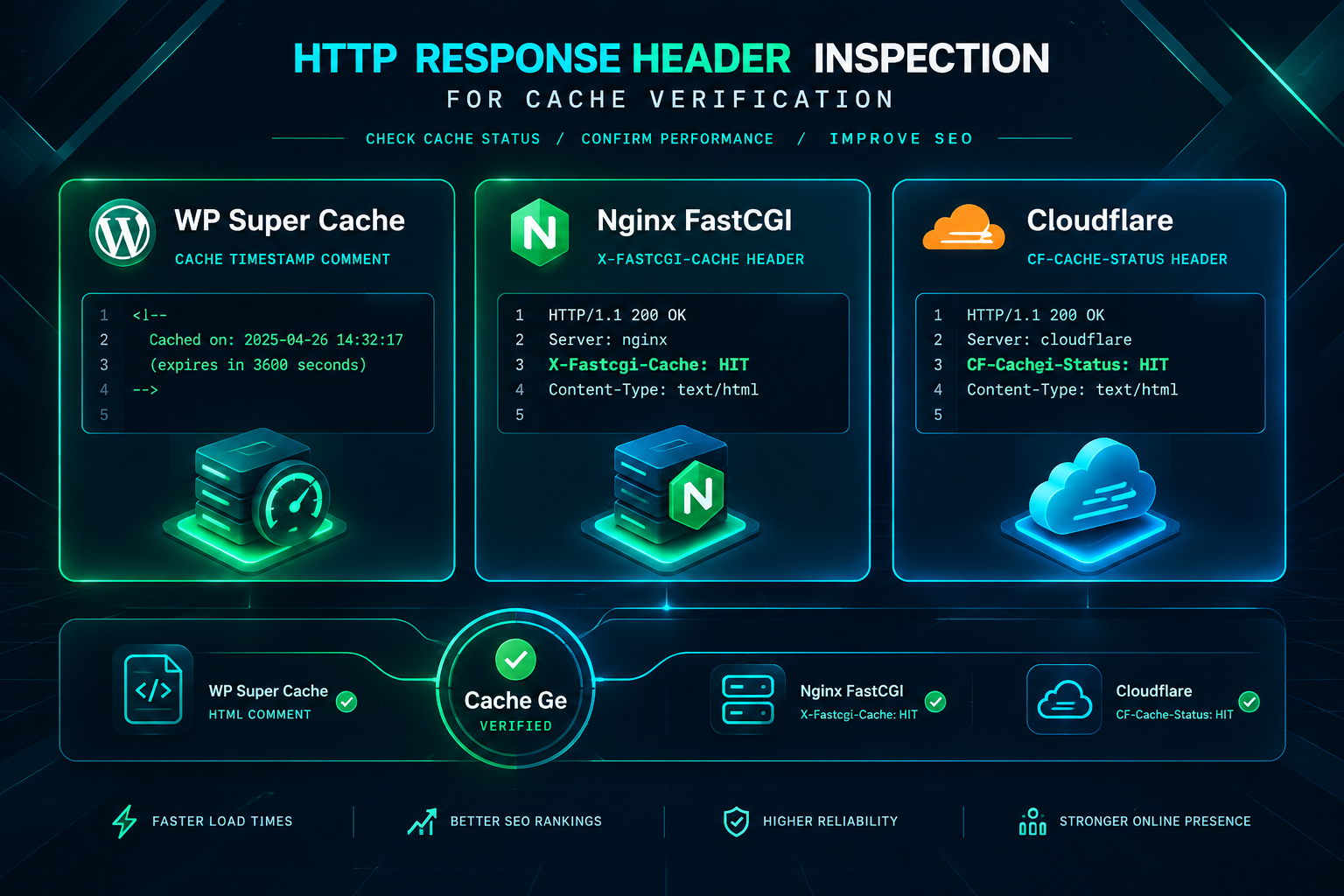
Page speed testing tools such as Google PageSpeed Insights or GTmetrix can also indicate whether caching-related improvements are reflected in load time measurements. A significant reduction in time-to-first-byte between an uncached and cached request is a practical indicator that the configuration is working. These tools also flag missing browser cache headers for static assets, which can be addressed through the caching plugin’s browser cache settings or through server-level cache-control header configuration.
Caching as Part of a Broader PBN Technical Setup
Caching configuration is one component of the technical environment that determines how well a PBN site functions as a web property. It works alongside hosting quality, server response time, SSL certificate setup, internal linking structure, and content quality to determine the overall technical profile of each domain. A site with well-configured caching but poor hosting infrastructure may still experience slow response times during traffic spikes or crawler visits. Conversely, a site on reliable hosting with no caching configured may perform adequately under light load but degrade under simultaneous crawler and visitor requests.
For PBN operators managing a larger number of domains, a consistent caching setup across the network reduces the operational overhead of troubleshooting individual site performance issues. Establishing a standard configuration template — whether a specific plugin with defined settings, a server-level Nginx configuration, or a Cloudflare setup — that is applied to each new domain as it is added to the network simplifies ongoing maintenance. Documenting the chosen configuration also makes it easier to replicate the setup when migrating sites to new hosting or rebuilding after a domain change.
The relationship between caching and crawlability is worth keeping in mind when evaluating the overall technical health of a PBN property. A site that responds quickly and consistently to crawler requests is more likely to have its pages crawled and indexed on a regular schedule. For a PBN site where the indexed pages carry the outbound links intended to pass authority to a target domain, reliable indexing of those pages is directly relevant to the network’s function. Caching contributes to this reliability by reducing the chance of server errors or slow responses during crawler visits.
Frequently Asked Questions
Does caching affect how search engines crawl a PBN site?
Caching can improve crawl efficiency by reducing server response times and lowering the likelihood of server errors during crawler visits. A faster-responding site is generally crawled more reliably, which supports consistent indexing of the pages that carry outbound links. Caching does not directly influence how a search engine evaluates the content or links on a site, but it contributes to the technical environment that affects crawl frequency and indexing stability.
Which caching plugin is best for a WordPress PBN site?
The most suitable plugin depends on the hosting environment. WP Super Cache is straightforward to configure on shared hosting and works reliably without server-level access. W3 Total Cache offers more granular control and additional caching layers, making it a reasonable choice on VPS hosting where Memcached or Redis may be available. LiteSpeed Cache is the preferred option on LiteSpeed-powered hosts because it integrates directly with the server’s caching engine. There is no single universally best option; the choice should match the hosting infrastructure and the operator’s comfort with configuration.
Should Cloudflare be used on PBN sites?
Cloudflare can be used on PBN sites and provides caching, DDoS protection, and origin IP masking as practical benefits. The main configuration consideration specific to PBN use is account-level footprint: multiple domains under a single Cloudflare account share account-level infrastructure. Operators who prioritize footprint separation between network properties sometimes use separate accounts or avoid Cloudflare’s proxy feature on some domains. The decision depends on the operator’s overall network management approach and how much weight they place on infrastructure separation.
How long should cached pages be stored before expiring?
For PBN sites where content changes infrequently, a cache TTL of several hours to 24 hours is generally practical. A longer TTL reduces server load and means that crawlers consistently receive fast cached responses. A shorter TTL is more appropriate if the site’s content is updated frequently and prompt cache refresh is important. The cache TTL can be set within the caching plugin’s settings or in the server-level cache configuration, and it can be adjusted based on observed site behavior after initial setup.
What should always be excluded from the page cache?
The WordPress admin area, the login page, pages requested with active login cookies, POST requests, and any dynamically generated pages such as search results or contact form pages should be excluded from page caching. Most WordPress caching plugins apply these exclusions automatically for the admin and login paths, but the exclusion list should be reviewed in the plugin settings after installation to confirm correct configuration.
Can caching cause problems on a PBN site?
Misconfigured caching can cause issues such as serving stale content after updates, displaying cached pages to logged-in users, or breaking dynamic functionality. These problems are generally resolved by reviewing exclusion rules, adjusting the cache TTL, or clearing the cache after content changes. Testing the site in both logged-in and logged-out states after configuration changes is the most reliable way to identify and address caching-related issues before they affect crawler behavior.
Setting Up Caching That Supports Your PBN’s Technical Goals
Configuring caching on PBN sites is a practical technical task with a direct effect on how reliably each property loads, how consistently it is crawled, and how efficiently the hosting infrastructure handles requests across multiple domains. The right configuration depends on the hosting environment: plugin-based caching suits shared hosting setups, server-level Nginx or Varnish caching is appropriate for VPS environments with root access, and Cloudflare adds a CDN layer that can benefit sites on any hosting type. Each approach has a clear setup process, and verification through response header inspection confirms that the configuration is working as intended.
For PBN operators managing a network of properties, establishing a consistent and documented caching setup reduces ongoing maintenance effort and ensures that each domain presents a technically stable environment for crawlers. Caching is not a substitute for quality hosting, well-structured content, or sound internal linking, but it is a meaningful component of the technical foundation that supports each site’s function within the network. If you are evaluating the technical setup of your PBN properties or planning a new network build, reviewing caching configuration alongside hosting selection and domain management is a practical part of the process. PBN Backlinks Service can assist with assessing placement quality and network setup as part of a broader link-building strategy review.