

Moving a private blog network domain to a new registrar, DNS provider, or hosting environment is a routine part of PBN management, but it frequently breaks DNSSEC. When DNSSEC validation fails after a migration, browsers and resolvers may refuse to load the site entirely, which means the domain stops passing link equity and loses any indexing it had. Understanding exactly what breaks, why it breaks, and how to restore a valid DNSSEC chain of trust is the fastest way to get your PBN properties back online without unnecessary downtime.
Key Takeaways
- DNSSEC breaks during PBN migrations primarily because the DS record at the parent zone is no longer synchronized with the DNSKEY records served by the new DNS provider.
- The fix almost always involves either updating the DS record at the registrar to match the new provider’s DNSKEY, or disabling DNSSEC entirely at both the registrar and DNS provider before re-enabling it cleanly.
- DNS propagation can take up to 48 hours, but DNSSEC TTL values and negative caching mean validation errors can persist longer than standard DNS changes.
- Diagnostic tools such as Verisign’s DNSSEC Debugger, DNSViz, and the
digcommand-line utility can pinpoint exactly which part of the chain of trust has broken. - PBN domains with broken DNSSEC are effectively unreachable to validating resolvers, so restoring a clean DNSSEC state is a prerequisite for the domain to function as a link asset.
What DNSSEC Does and Why It Breaks During a Migration
DNSSEC, which stands for Domain Name System Security Extensions, adds a layer of cryptographic verification to the DNS lookup process. When a resolver queries a DNSSEC-signed domain, it checks a chain of digital signatures that runs from the root DNS zone down through the top-level domain (TLD) registry to the authoritative nameservers for that specific domain. Each link in this chain depends on a matching pair of records: a DNSKEY record served by the authoritative nameserver, and a Delegation Signer (DS) record published in the parent zone by the registrar or TLD registry.
During a PBN migration, one or more of the following changes typically occur: the domain moves to a new registrar, the authoritative nameservers change to a new DNS provider, or the hosting environment changes in a way that triggers a new DNSSEC key pair. Any of these changes can break the chain of trust because the DS record stored at the registry still points to the old DNSKEY from the previous provider. The new nameservers serve a different DNSKEY, the signatures no longer match, and validating resolvers return a SERVFAIL error rather than resolving the domain. From the perspective of a PBN operator, this means the domain is effectively offline for any user or crawler using a DNSSEC-validating resolver, which includes a growing proportion of ISPs and public DNS services.
Diagnosing the DNSSEC Problem After a PBN Move
Before attempting any fix, confirm that DNSSEC is actually the cause of the resolution failure rather than a standard DNS propagation delay or a misconfigured nameserver record. The distinction matters because the remediation steps are different.
Using DNSViz to Map the Chain of Trust
DNSViz (dnsviz.net) is a free browser-based tool that visualizes the entire DNSSEC delegation chain for a domain. Enter the domain name and run an analysis. DNSViz will display each zone in the chain, the DNSKEY records, the DS records, and any validation errors with color-coded indicators. A broken chain typically appears as a red or orange node at the point where the DS record in the parent zone does not match the DNSKEY served by the current authoritative nameservers. This visual output makes it straightforward to identify whether the problem is at the registrar level, the DNS provider level, or both.
Using the dig Command to Inspect Records Directly
The dig command-line utility provides direct inspection of DNS records without caching interference. To check the DS record currently published in the parent zone, run dig DS yourdomain.com @8.8.8.8 +short. To check the DNSKEY record served by the new authoritative nameservers, run dig DNSKEY yourdomain.com @ns1.yournewprovider.com +short. If the key tag in the DS record does not correspond to any DNSKEY served by the new nameservers, the chain of trust is broken and the DS record needs to be updated or removed.
Using Verisign’s DNSSEC Debugger
Verisign provides a DNSSEC Debugger at dnssec-debugger.verisignlabs.com that performs automated validation checks and returns specific error codes. Common errors after a migration include DNSKEY missing, DS record mismatch, and signature expired. Each error code points to a specific remediation step, which makes this tool particularly useful when the DNSViz output is ambiguous.
Checking Whether DNSSEC Validation Is the Actual Cause
To confirm that DNSSEC validation is causing the SERVFAIL rather than a different DNS issue, query the domain using a non-validating resolver such as dig yourdomain.com @8.8.8.8 +cd. The +cd flag disables DNSSEC checking. If the domain resolves correctly with +cd but fails without it, DNSSEC validation is confirmed as the cause of the failure. If the domain fails even with +cd, the problem is a standard DNS misconfiguration unrelated to DNSSEC.
The Two Main Fix Paths After a PBN Migration
Once the diagnosis confirms a broken DNSSEC chain, there are two practical remediation paths. The right choice depends on whether the new DNS provider supports DNSSEC and whether you intend to keep DNSSEC active on the domain going forward.
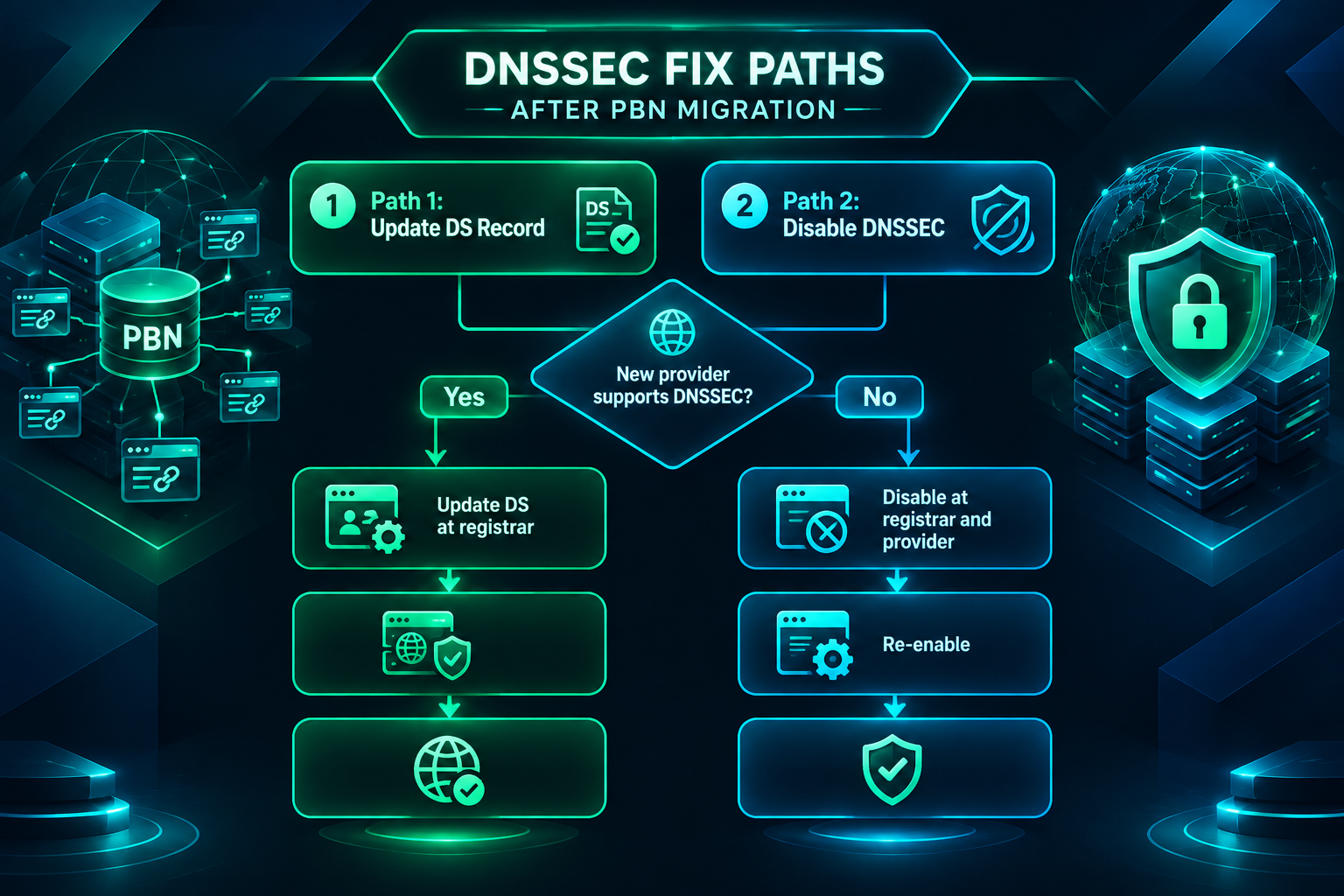
Path 1: Update the DS Record at the Registrar
If the new DNS provider supports DNSSEC and has generated a new key pair for the domain, the fix is to update the DS record at the registrar to match the new DNSKEY. The process involves the following steps.
- Log in to the new DNS provider’s control panel and locate the DNSSEC settings for the domain. The provider should display the DS record data that needs to be submitted to the registrar, including the key tag, algorithm number, digest type, and digest value.
- Log in to the registrar where the domain is currently registered. Navigate to the domain’s DNS or DNSSEC management section. Delete the existing DS record that references the old provider’s key.
- Add the new DS record using the values provided by the new DNS provider. Save the changes.
- Wait for the DS record update to propagate through the TLD registry. This typically takes between 15 minutes and several hours depending on the TLD and the registry’s update frequency, but the DS record TTL at the parent zone can extend this further.
- Re-run DNSViz or the Verisign DNSSEC Debugger to confirm the chain of trust is restored. The tool should show a clean green validation path from the root through the TLD to the domain’s authoritative nameservers.
Some registrars and DNS providers support automated DS record synchronization using the CDS and CDNSKEY record types defined in RFC 7344. If both the registrar and the DNS provider support this mechanism, the DS record update may happen automatically after the nameserver change. Check the documentation for both providers to determine whether this applies to your setup.
Path 2: Disable DNSSEC Entirely and Re-enable It Cleanly
If the new DNS provider does not support DNSSEC, or if the migration involved multiple changes that have left the DNSSEC configuration in an inconsistent state, the cleanest approach is to disable DNSSEC completely at both the registrar and the DNS provider, allow the DS record deletion to propagate, and then re-enable DNSSEC from scratch if desired.
- At the registrar, delete all existing DS records for the domain. This removes the DNSSEC delegation from the parent zone and tells resolvers that the domain is no longer DNSSEC-signed.
- At the DNS provider, disable DNSSEC signing for the domain if the provider has a separate DNSSEC toggle. This prevents the nameservers from serving DNSKEY records that resolvers might attempt to validate.
- Wait for the DS record deletion to propagate. Because DS records have their own TTL at the parent zone, resolvers may continue attempting DNSSEC validation for the duration of that TTL even after the DS record has been deleted. For most TLDs this TTL is between one and 24 hours, but it varies.
- Verify that the domain resolves cleanly without DNSSEC validation errors using
dig yourdomain.com @8.8.8.8and by checking DNSViz, which should now show the domain as unsigned rather than broken. - If you want to re-enable DNSSEC on the new provider, follow the provider’s DNSSEC setup process from the beginning, generate a new key pair, and submit the new DS record to the registrar only after the new nameservers are fully propagated and serving the correct zone data.
Common DNSSEC Migration Mistakes and How to Avoid Them
Several recurring mistakes cause DNSSEC failures during PBN domain migrations. Recognizing them in advance can prevent extended downtime.
Changing Nameservers Before Removing the DS Record
The most common mistake is updating the nameservers at the registrar to point to the new DNS provider without first removing or updating the DS record. As soon as the nameserver change propagates, resolvers begin querying the new nameservers for DNSKEY records. If the DS record in the parent zone still references the old provider’s key, validation fails immediately. The correct sequence is to either update the DS record to match the new provider’s DNSKEY before or simultaneously with the nameserver change, or to remove the DS record before changing the nameservers and re-add it after the new nameservers are fully propagated.
Assuming the New Provider Handles DNSSEC Automatically
Not all DNS providers support DNSSEC, and those that do may not enable it by default or may not automatically generate and publish DS records to the registrar. After migrating to a new provider, verify explicitly whether DNSSEC is enabled, whether the provider has generated a DNSKEY, and whether the DS record has been submitted to the registrar. Do not assume the migration tool or domain transfer process has handled this.
Ignoring TTL Values During the Transition Window
DNS TTL values determine how long resolvers cache records before re-querying. During a DNSSEC migration, the relevant TTLs include the DS record TTL at the parent zone, the DNSKEY record TTL at the authoritative nameserver, and the RRSIG (Resource Record Signature) expiry. If any of these values are long, resolvers may continue serving stale or invalid DNSSEC data for an extended period even after the correct records have been published. Lowering TTL values on the relevant records before a planned migration reduces this window, though this requires advance planning.
Transferring the Domain Without Disabling DNSSEC First
When a domain is transferred between registrars, the new registrar may not carry over the DS record from the old registrar, or it may carry it over incorrectly. If the domain was DNSSEC-signed at the old registrar and the new registrar does not support DNSSEC or does not import the DS record, the chain of trust breaks at the point of transfer. The safest approach for a domain transfer is to disable DNSSEC at the old registrar before initiating the transfer, complete the transfer, and then re-enable DNSSEC at the new registrar once the transfer is complete and the nameservers are correctly configured.
DNSSEC, PBN Indexing, and Link Equity
For PBN operators, the practical consequence of a broken DNSSEC configuration is that the affected domain becomes unreachable to any resolver that performs DNSSEC validation. This includes a significant and growing share of public DNS resolvers and ISP-level resolvers. Googlebot’s DNS resolution behavior is not publicly documented in detail, but a domain that returns SERVFAIL errors to a substantial portion of resolvers is unlikely to be crawled and indexed reliably during the period of failure. An unindexed PBN property cannot pass link signals to the target site, which means the link placement is effectively inactive until the DNSSEC issue is resolved.
Beyond indexing, a domain that intermittently fails DNS resolution may accumulate crawl errors in Google Search Console if the property is verified, and may show reduced crawl frequency as Googlebot deprioritizes domains that return repeated errors. Restoring a clean DNSSEC state promptly limits the duration of these effects. Once the chain of trust is restored and the domain resolves correctly, normal crawling and indexing behavior should resume, though the timeline for re-indexing depends on Googlebot’s crawl schedule for that domain and is not guaranteed.
Verifying the Fix and Monitoring After the Migration
After applying either fix path, systematic verification reduces the risk of residual issues going undetected.
Immediate Verification Steps
Run DNSViz again after the DS record update or deletion has had time to propagate. A clean result shows the domain as either fully validated (green chain of trust) or unsigned (no DNSSEC delegation), depending on which path was taken. Use dig yourdomain.com @1.1.1.1 and dig yourdomain.com @8.8.8.8 to test resolution against multiple public resolvers. Check the domain in a browser using a network that uses a DNSSEC-validating resolver to confirm that the site loads without a DNS error page.
Monitoring Indexing Status After the Fix
After confirming that DNS resolution is working correctly, check whether the domain’s pages are indexed by searching for site:yourdomain.com in Google. If pages that were previously indexed have dropped out, submit the domain’s sitemap through Google Search Console if the property is set up, or use the URL Inspection tool to request indexing for key pages. Re-indexing after a period of DNS failure typically takes days to weeks depending on the domain’s crawl priority and the duration of the outage.
Ongoing DNSSEC Monitoring for PBN Domains
DNSSEC signatures have expiry dates. RRSIG records are typically valid for a defined period, often between one and four weeks, and must be renewed automatically by the DNS provider’s signing infrastructure. If the DNS provider’s automatic re-signing fails for any reason, DNSSEC validation will break again even without any manual changes. For PBN operators managing multiple domains, periodic checks using DNSViz or an automated DNS monitoring service can catch signature expiry issues before they cause extended downtime. Some DNS providers offer alerts for DNSSEC signing failures; enabling these alerts where available reduces the risk of undetected outages.
Frequently Asked Questions
How long does it take for DNSSEC to work after updating the DS record?
After updating the DS record at the registrar, the change must propagate to the TLD registry and then to resolvers. This typically takes between 15 minutes and several hours for the registry update, plus the TTL of the old DS record for resolvers to stop caching the stale value. In most cases, DNSSEC validation should be restored within a few hours, but in some cases it can take up to 24 hours depending on the TLD and the TTL values involved.
Can I just disable DNSSEC permanently on my PBN domains?
Yes. DNSSEC is optional and is not required for a domain to function or to pass link signals. Many domains, including PBN properties, operate without DNSSEC. If DNSSEC is causing repeated management complexity across a large number of PBN domains, disabling it entirely at both the registrar and the DNS provider is a straightforward option. The domain will resolve normally without DNSSEC validation, and there is no SEO-specific requirement to have DNSSEC enabled.
Why does my domain resolve in some locations but not others after the migration?
This is a common symptom of a broken DNSSEC chain. Resolvers that perform DNSSEC validation will return a SERVFAIL error for a domain with a mismatched DS record, while resolvers that do not validate DNSSEC will resolve the domain normally. The result is that the domain appears to work in some locations or on some networks while failing on others. The fix is to restore a consistent DNSSEC chain of trust or to disable DNSSEC entirely so that all resolvers treat the domain as unsigned.
Does a DNSSEC failure affect the link value of a PBN placement?
A domain that cannot be resolved by a significant portion of DNS resolvers is unlikely to be crawled and indexed reliably during the failure period. Since an unindexed page cannot pass link signals, a DNSSEC failure effectively suspends the link’s contribution to the target site for the duration of the outage. Resolving the DNSSEC issue promptly restores normal crawling conditions, though re-indexing timelines vary.
What if my registrar does not support DNSSEC management?
If the registrar does not provide a DNSSEC management interface, it may not be possible to update or delete DS records directly. In this situation, the practical options are to transfer the domain to a registrar that supports DNSSEC management, or to contact the registrar’s support team and request that the DS records be removed manually. For PBN operators managing domains at scale, choosing registrars with full DNSSEC management support reduces this type of operational friction.
How do I know which algorithm my new DNS provider uses for DNSSEC?
The algorithm number is included in the DNSKEY record served by the new provider’s nameservers. You can retrieve it by running dig DNSKEY yourdomain.com @ns1.yournewprovider.com. The algorithm field in the output corresponds to the IANA-assigned algorithm number, such as 8 for RSA/SHA-256 or 13 for ECDSA Curve P-256 with SHA-256. The DS record submitted to the registrar must use the same algorithm number as the DNSKEY it references.
Getting Your PBN Domains Back Online After a DNSSEC Failure
A broken DNSSEC configuration after a PBN migration is a solvable technical problem with a clear diagnostic and remediation path. The core issue in almost every case is a mismatch between the DS record stored at the registrar or TLD registry and the DNSKEY records served by the new authoritative nameservers. Resolving this mismatch, either by updating the DS record to match the new provider’s key or by cleanly disabling DNSSEC at both layers, restores normal DNS resolution and allows the domain to be crawled and indexed again.
The most important operational lesson is sequencing: DNSSEC-related changes should be coordinated with nameserver changes rather than applied independently. Removing or updating the DS record before or simultaneously with the nameserver change prevents the validation gap that causes most post-migration DNSSEC failures. For PBN operators managing a portfolio of domains across multiple registrars and DNS providers, building a consistent pre-migration checklist that includes DNSSEC status verification, DS record management, and post-migration validation using tools like DNSViz significantly reduces the frequency and duration of these outages.
If you are managing PBN domains and want to ensure that your link assets remain technically sound and consistently indexed, reviewing your domain infrastructure and DNS configuration as part of your broader PBN strategy is a practical step. PBN Backlinks Service can help you assess placement quality, domain selection, and the technical requirements that keep a private blog network functioning effectively as a link-building asset.