

Orphan pages on PBN sites are a structural problem that quietly undermines the link equity your network is designed to pass. When a page on a private blog network has no internal links pointing to it, search engine crawlers may never discover it, and any backlink placed on that page may contribute far less ranking value than intended. Fixing orphan pages is a maintenance task that directly affects how well your PBN placements perform, and it is more straightforward than most site owners expect once you have a clear audit process in place.
Key Takeaways
- An orphan page is any page that receives no internal links from other pages on the same site, making it difficult for crawlers to discover and index it reliably.
- Orphan pages on PBN sites reduce the crawl coverage of your network and can prevent backlink placements from being indexed, limiting the link equity they pass.
- Finding orphan pages requires comparing your site’s XML sitemap against a crawl of all internally linked URLs, then identifying pages that appear in one list but not the other.
- The fix involves adding contextually relevant internal links from existing content to each orphaned page, updating navigation or category structures where appropriate, and verifying that crawlers can now reach the corrected pages.
- Regular internal link audits, ideally after each new content addition or structural change, keep orphan pages from accumulating and protect the consistency of your PBN’s link-passing capability.
What an Orphan Page Is and Why It Matters on a PBN
An orphan page is a published page that no other page on the same website links to through its internal link structure. The page may exist in the CMS, appear in an XML sitemap, and even have external backlinks pointing to it, but if no internal link path leads to it from the site’s crawlable pages, search engine bots following links from the homepage will never reach it organically. On a standard content site this is a quality and crawl-efficiency issue. On a PBN site it becomes a direct threat to the purpose of the network, because a placement page that crawlers cannot reliably reach is a placement page whose outbound link may not be crawled, indexed, or credited.
Private blog networks are built to pass link equity from PBN domains to target URLs. That process depends on a functioning crawl chain: the search engine bot enters the PBN domain, follows internal links through the site’s content, reaches the placement page, reads the outbound contextual link, and processes the signal. If the placement page is orphaned, the crawl chain breaks at the point where it matters most. The outbound link may still be indexed if the page is submitted directly through a sitemap, but a page that is only reachable via sitemap and not through internal links tends to receive less frequent recrawling and may be treated differently in terms of crawl priority than a page that is well-integrated into the site’s link graph.
Beyond indexing, orphan pages on PBN sites can also indicate a broader structural footprint concern. A network where dozens of placement pages exist in isolation, with no topical connection to the rest of the site’s content, is easier to identify as a pattern than one where each placement page is woven into a coherent internal linking structure. Fixing orphan pages therefore serves two practical goals: restoring crawl access and improving the structural coherence of the network.
How Orphan Pages Develop on PBN Sites
Orphan pages rarely appear by design. They accumulate through a series of common operational patterns that are easy to overlook when managing multiple PBN domains simultaneously.
Content published without internal links: When a new post or placement page is created and published quickly, it is common to skip the step of linking to it from existing content. The page goes live, appears in the sitemap, but has no internal link pointing to it from anywhere else on the site.
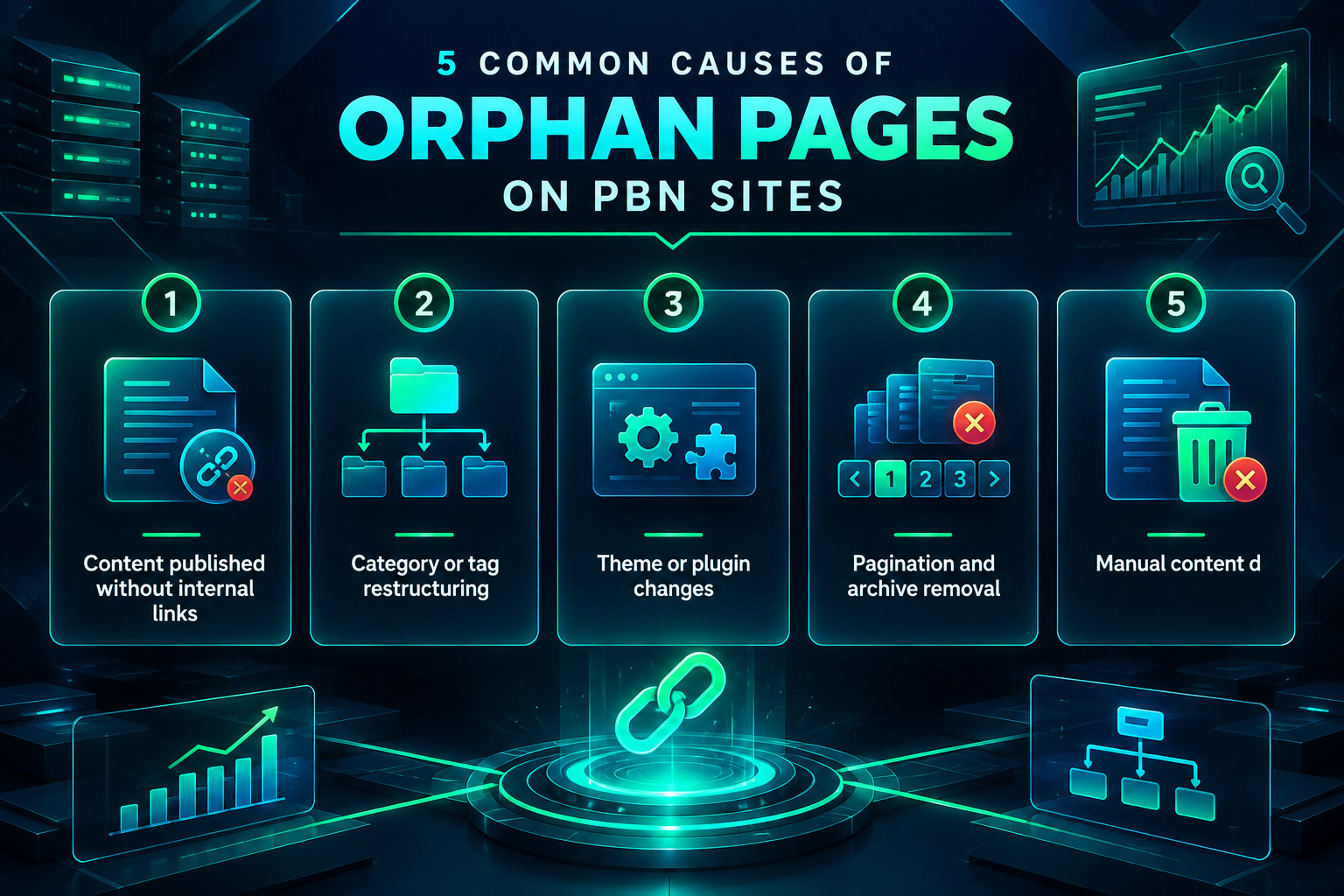
Category or tag restructuring: If a PBN site’s category structure is changed, pages that were previously reachable through a category archive may lose that path if the category is deleted or reassigned. The pages remain published but become structurally isolated.
Theme or plugin changes: Switching WordPress themes or disabling navigation plugins can remove menu items or sidebar link widgets that previously provided the only internal link path to certain pages. Pages that relied on a widget or a specific theme’s related-posts feature for their internal link suddenly become orphans.
Pagination and archive removal: Some PBN operators disable archive pages, tag pages, or paginated post lists to reduce footprint. If those archives were the only internal link source for older posts, removing them creates orphans across the older content.
Manual content deletion: Deleting a page that linked to other pages removes those internal links. If no other page linked to the same destinations, the destinations become orphaned.
Understanding how orphan pages develop helps you build a publishing workflow that prevents them from forming in the first place, which is more efficient than periodic cleanup alone.
How to Find Orphan Pages on a PBN Site
The standard method for identifying orphan pages involves comparing two data sources: the complete list of URLs the site publishes, and the complete list of URLs reachable by following internal links from the homepage. Any URL in the first list that does not appear in the second list is a candidate orphan page.
Step 1: Collect All Published URLs from the Sitemap
Start by pulling the site’s XML sitemap. For a WordPress-based PBN site, the sitemap is typically generated by a plugin such as Yoast SEO, Rank Math, or the built-in WordPress sitemap at /wp-sitemap.xml. Download or copy all URLs listed in the sitemap. This represents every page the site intends to make publicly available. If the site uses a sitemap index that references multiple child sitemaps, collect URLs from all child sitemaps covering posts, pages, and any custom post types used for placements.
Step 2: Crawl the Site’s Internal Link Structure
Use a site crawler such as Screaming Frog SEO Spider, Sitebulb, or a comparable tool to crawl the PBN domain starting from the homepage. Configure the crawler to follow internal links only and to report every URL it discovers through the crawl. This produces a list of all URLs reachable by following links from the homepage through the site’s internal link graph. Run the crawl with JavaScript rendering disabled first, since most PBN sites are standard HTML or WordPress installations where JavaScript rendering is not required for link discovery.
Step 3: Compare the Two Lists
Export both lists and compare them. URLs that appear in the sitemap but are absent from the crawl results are your orphan pages. These are pages the site declares as published but that the crawler could not reach by following internal links. A simple spreadsheet comparison using a VLOOKUP or a conditional formatting rule can identify the non-matching URLs quickly. For larger PBN sites with hundreds of posts, a dedicated SEO audit tool that automates this comparison will save time.
Step 4: Verify Each Candidate
Before treating every unmatched URL as a confirmed orphan, check whether the page is intentionally excluded from internal linking, such as a privacy policy or legal page that is linked only from the footer. Footer links are technically internal links and should be picked up by the crawler, but if a footer link was removed during a theme change, the page may appear as an orphan even though it was previously accessible. Also check whether the page is a draft, a redirect target, or a page excluded from the sitemap by mistake. Confirm that each candidate is a live, indexable page before proceeding to the fix.
How to Fix Orphan Pages on PBN Sites
Once you have a confirmed list of orphan pages, the fix involves creating internal link paths from existing, crawlable content to each orphaned page. The goal is to integrate each orphan into the site’s natural content structure so that a crawler following links from the homepage can reach it without relying solely on the sitemap.
Add Contextual Internal Links from Relevant Existing Posts
The most effective fix is to identify two or three existing posts on the PBN site that are topically related to the orphan page and add a natural in-content link from each of those posts to the orphan. The anchor text should reflect the topic of the orphan page and read naturally within the surrounding sentence. For a PBN site, this also reinforces topical coherence, which is a quality factor that affects how the site’s content is interpreted. Avoid adding links that feel forced or that require rewriting large sections of existing content; a single well-placed sentence with a contextual link is sufficient to establish the crawl path.
Update Category and Tag Assignments
If the orphan page belongs to a category or tag that is displayed in an archive page linked from the site’s navigation, assigning the orphan to the correct category will automatically add it to the archive listing, which functions as an internal link. Check that the category archive itself is crawlable and not excluded by the robots.txt file or a noindex directive. This approach works well for sites with a clear category structure and is particularly efficient when multiple orphan pages belong to the same topic cluster.
Add Links from Navigation Menus or Sidebar Widgets
For pages that are structurally important to the site, such as a cornerstone content page or a high-priority placement page, adding a link from the site’s main navigation menu or a sidebar widget provides a persistent internal link that appears on every page of the site. This is a strong crawl signal and ensures the page is discovered quickly. Use this approach selectively; adding every placement page to the main navigation would look unnatural and could create a footprint concern on a PBN site. Reserve navigation links for pages that genuinely warrant site-wide prominence.
Create or Update a Hub or Pillar Page
If the PBN site has a topic cluster structure, or if you are building one as part of a quality improvement effort, a hub page that links out to related posts and placement pages is an efficient way to resolve multiple orphan pages simultaneously. A hub page covering a broad topic can naturally link to five or ten related posts, each of which may have been orphaned. This approach also improves the topical depth of the PBN site, which can contribute to how the site’s content is evaluated.
Use a Related Posts Section
Many WordPress themes and plugins support a related posts section at the bottom of each post. If the PBN site uses a plugin that generates related posts based on categories or tags, assigning orphan pages to the correct categories will cause them to appear in related post sections across the site automatically. This is a low-effort fix that can resolve a large number of orphan pages quickly, though it depends on the plugin’s logic and the site’s category structure being well-organized.
Verifying the Fix and Monitoring for New Orphans
After adding internal links to each orphan page, re-run the site crawl to confirm that every previously orphaned URL is now reachable through the internal link graph. Compare the new crawl results against the sitemap again to verify that no pages remain isolated. If a page still does not appear in the crawl after you have added internal links, check whether the linking page itself is crawlable, whether the link uses a nofollow attribute that might affect crawler behavior, and whether the link is rendered in HTML rather than JavaScript.
Once the immediate orphan pages are resolved, submit the updated sitemap to Google Search Console and Bing Webmaster Tools to prompt recrawling of the affected pages. Search Console’s URL Inspection tool can be used to request indexing for individual pages that are high priority, such as pages containing active backlink placements. Keep in mind that recrawling and reindexing timelines vary and are not guaranteed by sitemap submission alone; the internal link fix is the structural change that matters most for long-term crawl reliability.
To prevent orphan pages from accumulating again, build a simple internal linking checklist into your PBN content publishing workflow. Each time a new post or placement page is published, identify at least two existing posts to link from, update the category assignment, and verify the page appears in the next scheduled crawl. Running a full orphan page audit once per quarter, or after any significant structural change such as a theme update or category reorganization, keeps the network’s crawl structure clean without requiring constant manual monitoring.
Orphan Pages and PBN Link Equity: What the Structural Fix Achieves
Fixing orphan pages on a PBN site does not by itself guarantee that a backlink placement will produce a ranking improvement. Link equity depends on multiple factors including the quality of the PBN domain’s backlink profile, the topical relevance of the placement page to the target URL, the anchor text used, and the overall authority signals associated with the domain. What the structural fix does achieve is removing a preventable technical barrier that was limiting the crawl and indexing of placement pages.
A placement page that is properly integrated into the PBN site’s internal link structure is more likely to be crawled regularly, more likely to be indexed, and more likely to pass the link signal it was placed to deliver. The internal link structure also distributes some of the domain’s link equity to the placement page itself, which can strengthen the page’s own authority signals before the outbound link is evaluated. This is the same principle that applies to internal linking on any content site: pages that receive internal links from other pages on the same domain tend to be treated as more important than isolated pages.
For PBN operators managing multiple domains, the cumulative effect of unresolved orphan pages across a network can be significant. If a substantial portion of placement pages across the network are orphaned, the network’s practical link-passing efficiency is lower than its domain metrics would suggest. Addressing orphan pages systematically is therefore a network maintenance task with a direct impact on the value of the placements the network delivers.
Common Mistakes When Fixing Orphan Pages on PBN Sites
Adding links from pages that are themselves not crawlable: If the page you link from is excluded by robots.txt, carries a noindex directive, or is itself an orphan, the new internal link will not establish a crawl path to the target page. Always verify that the linking page is crawlable and indexed before relying on it to resolve an orphan.
Using the same anchor text for every internal link to a placement page: Repeating identical anchor text across multiple internal links to the same page can look unnatural and may create an anchor text pattern that draws attention. Vary the anchor text across different linking pages while keeping it topically relevant.
Relying solely on sitemap submission as the fix: Submitting a sitemap tells search engines that a page exists, but it does not create an internal link path. A page that is only discoverable via sitemap and has no internal links pointing to it remains structurally isolated. The sitemap submission should accompany the internal link fix, not replace it.
Fixing orphan pages without auditing the linking pages: Adding an internal link from a page that has thin content, a manual action, or its own crawl issues may not produce the intended result. A brief quality check of the pages you plan to link from is worthwhile before making changes.
Ignoring pagination and archive crawlability: If you rely on category archives to provide internal links to posts, confirm that those archives are not blocked by robots.txt or set to noindex. A noindexed archive can still pass crawl signals in some configurations, but verifying the setup avoids ambiguity.
Frequently Asked Questions
How many internal links does an orphan page need to no longer be considered orphaned?
A single internal link from a crawlable page on the same domain is technically sufficient to remove a page’s orphan status, because it creates a discoverable path from the site’s crawl graph to the previously isolated page. In practice, two or three contextual internal links from relevant posts provide a more reliable crawl path and distribute a small amount of internal link equity to the page, which is preferable for placement pages on a PBN site.
Will fixing orphan pages cause previously unindexed placement pages to be indexed automatically?
Adding internal links increases the likelihood that a previously unindexed page will be crawled and considered for indexing, but indexing is not guaranteed and timelines vary. Submitting the updated sitemap and using the URL Inspection tool in Google Search Console to request indexing for high-priority pages can help prompt recrawling. Some pages may be indexed within days; others may take longer depending on the domain’s crawl budget and the search engine’s scheduling.
Can a page be orphaned even if it appears in the XML sitemap?
Yes. The XML sitemap tells search engines that a page exists and should be crawled, but it does not create an internal link. A page that is listed in the sitemap but has no internal links pointing to it from other pages on the site is still considered an orphan in terms of its internal link structure. Sitemap inclusion and internal link integration serve different functions and both matter for reliable crawl coverage.
Does fixing orphan pages on a PBN site affect the target site’s rankings directly?
Fixing orphan pages improves the structural conditions under which a PBN backlink operates. If a placement page was previously unindexed or infrequently crawled because it was orphaned, resolving that issue may allow the outbound link to be processed more reliably. Whether this produces a measurable ranking change for the target site depends on many additional factors including the domain’s authority signals, the placement’s topical relevance, the competitive landscape, and the target page’s overall SEO profile.
How often should I audit PBN sites for orphan pages?
A quarterly audit is a practical baseline for most PBN operators. If the site publishes new content frequently or undergoes structural changes such as theme updates, plugin changes, or category reorganization, running an audit immediately after those changes is advisable. Building a brief internal linking check into the content publishing workflow reduces the frequency of full audits needed.
Are orphan pages a footprint risk on PBN sites?
A pattern of many isolated placement pages with no internal link context could be one signal among many that a site’s content structure is not organic. Resolving orphan pages by integrating placement content into a coherent internal linking structure reduces this structural irregularity. It is one of several quality and structural factors worth maintaining on a PBN site, alongside topical relevance, content depth, and domain history.
Maintaining a Clean Internal Link Structure Across Your PBN
Orphan page repair is not a one-time task. PBN sites evolve through content additions, theme changes, plugin updates, and structural reorganizations, each of which can introduce new orphan pages. The most efficient approach is to combine a systematic fix for existing orphans with a publishing workflow that prevents new ones from forming. Each new post or placement page should be linked from at least two relevant existing pages before it is considered complete, and each structural change to the site should be followed by a targeted crawl to verify that no pages have been inadvertently isolated.
If you are managing a network of PBN domains and want to assess whether orphan pages or other structural issues are affecting the performance of your placements, PBN Backlinks Service can help you evaluate placement quality and network structure as part of a broader link-building review. A well-maintained internal link structure is one of the foundational conditions for a PBN placement to deliver the link equity it is intended to pass.