

Bandwidth limit errors on PBN hosting are a practical infrastructure problem, not a search-engine penalty. When a private blog network site hits its hosting plan’s data transfer ceiling, the server returns an error to visitors and crawlers alike, which can interrupt link delivery, delay indexing, and create unnecessary downtime across your network. Understanding why these errors occur and how to resolve them quickly is essential for anyone managing multiple PBN properties, because a site that returns errors cannot pass link equity effectively and may be dropped from a crawler’s schedule until it becomes consistently accessible again.
Key Takeaways
- Bandwidth limit errors occur when a hosting plan’s monthly data transfer allowance is exhausted, causing the server to return 509 or similar error codes to all incoming requests including search engine crawlers.
- The fastest short-term fix is upgrading the hosting plan or adding a bandwidth top-up through your current provider, while longer-term solutions involve switching to unmetered hosting or offloading static assets through a CDN.
- Crawler traffic, image-heavy pages, and unoptimized media files are common causes of unexpectedly high bandwidth consumption on PBN sites that receive little organic traffic.
- Spreading PBN sites across multiple hosting providers and plans reduces the risk of a single bandwidth event affecting a large portion of your network simultaneously.
- Monitoring bandwidth usage proactively through your hosting control panel or a lightweight uptime tool allows you to act before errors occur rather than after a site goes down.
What Bandwidth Limit Errors Mean for PBN Hosting
A bandwidth limit error, sometimes displayed as a 509 Bandwidth Limit Exceeded response or a provider-specific error page, means the hosting account has consumed all of the data transfer allocated for the current billing period. Every HTTP request to the site, including page loads, image downloads, CSS and JavaScript files, and bot crawls, counts against this allowance. Once the limit is reached, the server stops serving content until the billing period resets or the plan is upgraded.
For a standard website with moderate traffic, bandwidth limits are rarely a concern on modern hosting plans. PBN sites present a different profile: they typically receive very little human traffic, but they are crawled regularly by search engine bots, SEO tool crawlers such as Ahrefs and Semrush, and uptime monitors. If a PBN site hosts large images, uncompressed theme files, or video embeds, each crawler visit can consume more data than expected. Multiply that across dozens of bot visits per day and the cumulative transfer can exceed a low-tier shared hosting plan’s monthly allowance faster than the site’s organic traffic alone would suggest.
The practical consequence for a PBN backlink is straightforward: a site returning a 509 error cannot be crawled, so the link it contains cannot be discovered or re-evaluated by a search engine crawler during the outage. Prolonged or repeated bandwidth errors may cause a crawler to reduce the crawl frequency assigned to that domain, which delays indexing of new content and link updates. Resolving bandwidth errors promptly is therefore a basic maintenance requirement for keeping a PBN network functional.
Common Causes of High Bandwidth Consumption on PBN Sites
Identifying the source of excess bandwidth consumption is the first diagnostic step. Several factors commonly drive unexpectedly high data transfer on PBN hosting accounts.
Unoptimized Media Files
Large image files are one of the most frequent causes of excessive bandwidth use on WordPress-based PBN sites. A single uncompressed featured image can be several megabytes in size. If a crawler visits ten pages on a site and each page loads a 3 MB image, that single crawl session consumes roughly 30 MB. Across hundreds of crawl visits per month from multiple bots, unoptimized images can account for the majority of a site’s bandwidth usage even when human traffic is negligible.
Multiple Bot and Crawler Traffic
Search engine crawlers, third-party SEO tool bots, and security scanners all request pages from your PBN sites independently. Googlebot, Bingbot, and various SEO platform crawlers do not coordinate their schedules, so a single PBN domain may receive crawl requests from several different bots within the same hour. Each request downloads the full page response including all linked assets unless the site is configured to serve a lightweight response to known bots. On a shared hosting plan with a 5 GB or 10 GB monthly bandwidth cap, this cumulative bot traffic can become significant.
Hotlinking from External Sites
Hotlinking occurs when another website embeds an image or file hosted on your server directly in its own pages, causing your server to serve that file to the other site’s visitors. If a PBN site’s images are hotlinked by external pages, your hosting account bears the bandwidth cost of serving those images to an audience you did not intend to host. This is a less common cause but can produce sudden bandwidth spikes that are difficult to explain from traffic data alone.
Theme and Plugin Asset Bloat
Many WordPress themes load multiple JavaScript libraries, large CSS files, and web fonts on every page request. If a PBN site uses a theme that was not selected with performance in mind, each page load may transfer several hundred kilobytes of assets beyond the HTML content itself. Across a high crawl frequency, this asset overhead accumulates quickly.
Low Bandwidth Hosting Plans
Some budget shared hosting plans marketed to PBN operators include monthly bandwidth caps as low as 1 GB to 5 GB. These limits are often sufficient for sites with minimal traffic but can be exhausted by bot traffic alone if the site is not optimized. Choosing a hosting plan based solely on price without reviewing the bandwidth allocation is a common reason PBN operators encounter these errors.
How to Diagnose the Source of the Problem
Before applying a fix, confirm that a bandwidth limit error is actually the cause of the site’s unavailability. Log in to your hosting control panel, which is typically cPanel, Plesk, or a provider-specific dashboard, and locate the bandwidth or resource usage section. Most panels display current-period usage alongside the plan limit. If usage is at or near 100 percent of the allocated amount, a bandwidth limit error is the confirmed cause.
Once confirmed, review the access logs for the affected domain. Access logs record every request made to the server, including the requesting IP address, the requested URL, the file size transferred, and the user agent string. Sorting log entries by bytes transferred will identify which pages or files are consuming the most data. Sorting by user agent will show which crawlers are visiting most frequently. Most cPanel installations provide raw access logs under the Logs section, and these can be downloaded and analyzed with a text editor or a log analysis tool.
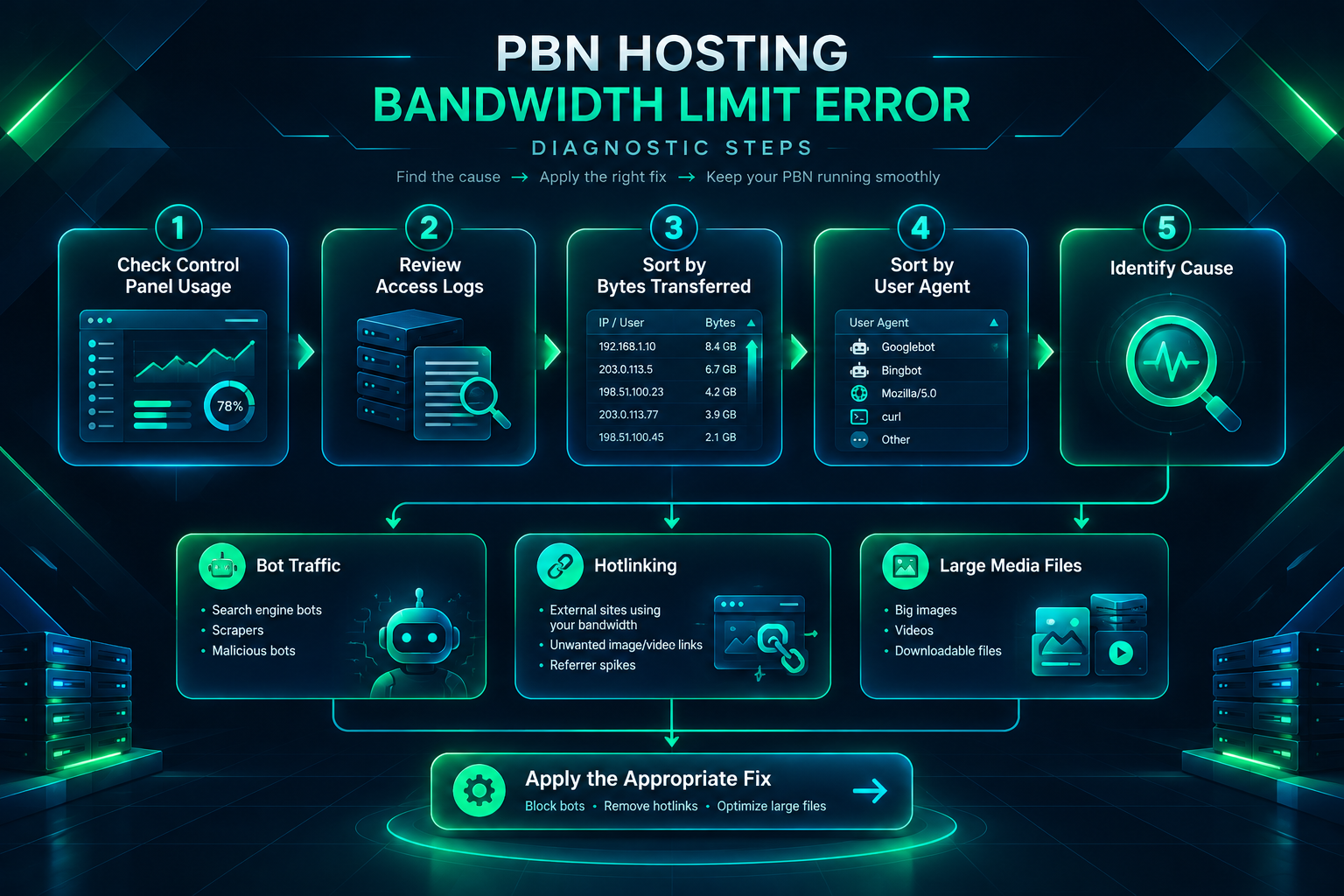
If access logs are not available through your control panel, your hosting provider’s support team can usually supply them on request. Identifying whether the bandwidth is being consumed by bot traffic, hotlinked assets, or large media files determines which fix to apply first and whether the issue is likely to recur after the billing period resets.
Immediate Fixes for Bandwidth Limit Errors
The fastest way to restore a PBN site that has hit its bandwidth limit is to upgrade the hosting plan or purchase a bandwidth add-on from your current provider. Most shared hosting providers offer one-click plan upgrades through the control panel, and the additional bandwidth is usually applied within minutes. This is the appropriate response when a site needs to be restored quickly and the underlying cause has not yet been addressed.
If your provider does not offer bandwidth add-ons and a plan upgrade is not immediately practical, contact the hosting support team directly. Some providers will temporarily lift the limit or restore access for a short period while you arrange a longer-term solution. This is not guaranteed, but it is worth requesting when a site is serving active backlinks that need to remain accessible.
As a temporary measure while the bandwidth situation is being resolved, you can configure the site to block known SEO tool crawlers through the robots.txt file or through IP-based blocking rules in the .htaccess file. This reduces ongoing bandwidth consumption from non-essential bots while Googlebot and Bingbot continue to access the site. Be cautious with this approach: blocking crawlers indiscriminately can affect indexing, so limit any blocking to clearly identified commercial SEO tool bots rather than search engine crawlers.
Long-Term Solutions for PBN Bandwidth Management
Resolving the immediate error is only the first step. Without addressing the underlying causes, the same site is likely to hit its bandwidth limit again in the following billing period. Several longer-term approaches can prevent recurrence.
Switch to Unmetered or High-Bandwidth Hosting
Unmetered hosting plans do not impose a fixed monthly data transfer cap. Instead, they typically limit the port speed or apply a fair-use policy. For PBN sites that receive primarily bot traffic, unmetered plans eliminate bandwidth limit errors as a recurring concern. Many reputable shared hosting providers offer unmetered plans at price points comparable to metered budget plans. When evaluating hosting for PBN properties, reviewing the bandwidth terms in the plan details before purchasing avoids this class of problem entirely.
Use a Content Delivery Network for Static Assets
A content delivery network, commonly referred to as a CDN, serves static files such as images, CSS, and JavaScript from its own distributed infrastructure rather than from your origin hosting server. When a CDN is configured for a PBN site, crawler and visitor requests for images and other static assets are fulfilled by the CDN’s servers, and that transfer does not count against your hosting plan’s bandwidth allowance. Cloudflare offers a free tier that can be configured for WordPress sites and provides this asset offloading benefit alongside DNS management and basic DDoS protection. Configuring Cloudflare for a PBN site involves pointing the domain’s nameservers to Cloudflare and enabling its proxy for the relevant DNS records, after which static asset requests are served from Cloudflare’s network.
Optimize Images and Media Files
Compressing images before uploading them to a PBN site significantly reduces the bandwidth consumed by each page request. Tools such as Squoosh, TinyPNG, or WordPress plugins that perform automatic image compression on upload can reduce image file sizes by 50 to 80 percent without a visible quality loss at typical screen resolutions. Replacing large PNG files with compressed JPEG or WebP formats where appropriate further reduces per-request transfer sizes. For a PBN site with ten to twenty posts, a one-time image optimization pass can meaningfully reduce monthly bandwidth consumption.
Enable Browser Caching and GZIP Compression
Browser caching instructs returning visitors and some crawlers to store copies of static files locally, reducing the number of full asset downloads per visit. GZIP compression reduces the size of HTML, CSS, and JavaScript responses before they are transmitted from the server. Both settings can be configured through the .htaccess file on Apache-based hosting or through the server configuration on Nginx-based hosting. WordPress caching plugins such as W3 Total Cache or WP Super Cache can apply these settings without requiring direct server file editing. Reducing the per-request transfer size through compression is particularly effective at lowering bandwidth consumption from frequent bot visits.
Block Hotlinking
Adding hotlink protection rules to the .htaccess file prevents external sites from embedding your PBN site’s images and consuming your bandwidth to serve them. A standard hotlink protection rule checks the HTTP referer header of each image request and denies requests that originate from domains other than your own. cPanel includes a Hotlink Protection tool in its security section that generates these rules automatically. Enabling hotlink protection is a low-effort step that eliminates one potential source of unexpected bandwidth spikes.
Distribute Sites Across Multiple Hosting Providers
Hosting all PBN properties on a single shared hosting account or with a single provider concentrates bandwidth risk. If one account hits its limit, all sites on that account are affected simultaneously. Distributing PBN sites across multiple hosting providers and account types means that a bandwidth event on one account affects only the sites hosted there, leaving the rest of the network operational. This distribution also reduces the hosting footprint of the network, which is a relevant consideration for network management more broadly.
Monitoring Bandwidth Usage Before Errors Occur
Proactive monitoring allows you to identify bandwidth consumption trends and act before a site goes offline. Most hosting control panels display current-period bandwidth usage in the account overview or resource usage section. Checking this figure weekly for each PBN hosting account gives you enough lead time to upgrade a plan or apply optimizations before the limit is reached.
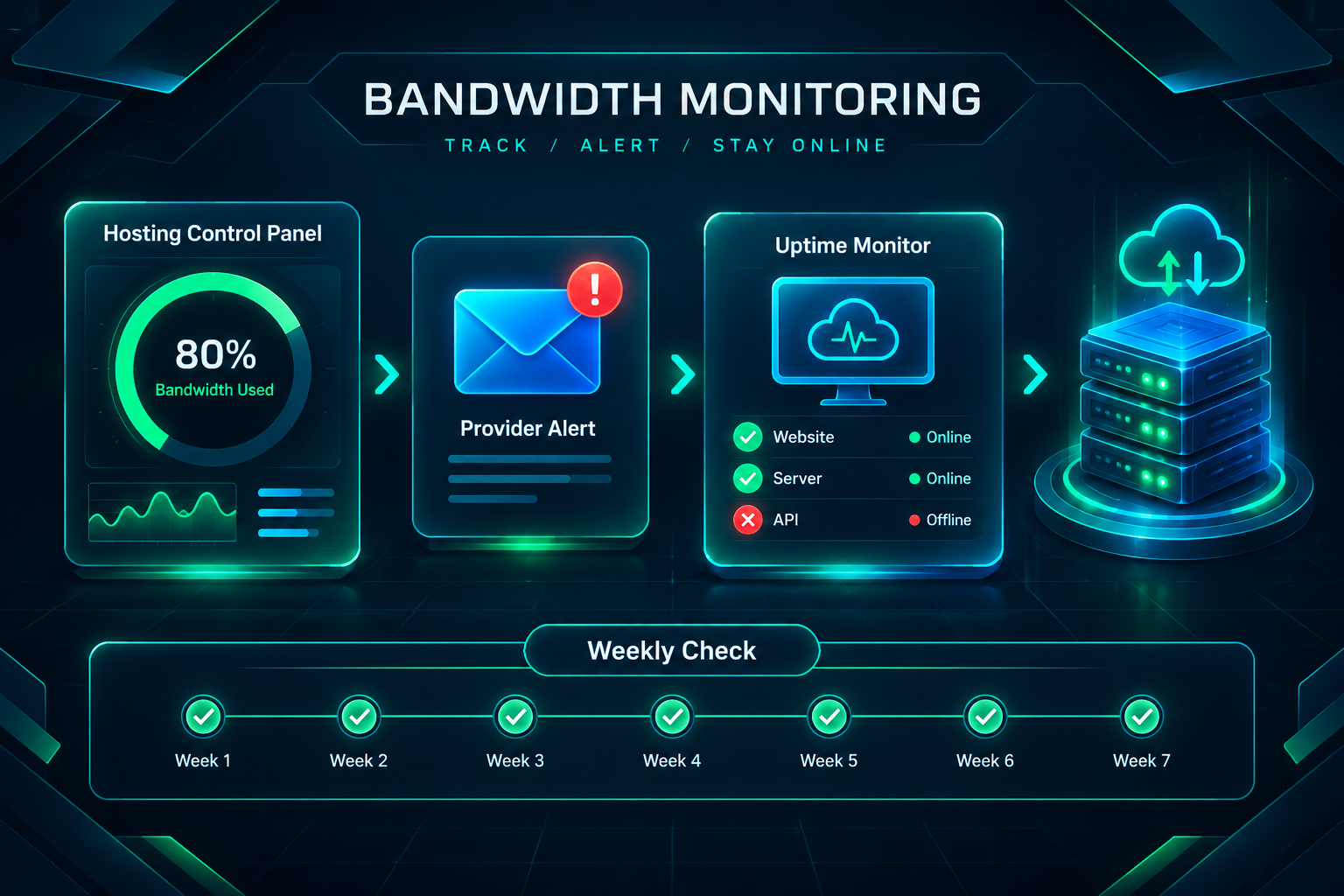
For larger networks where manual checking is impractical, lightweight uptime monitoring services can alert you when a site returns an error response. Services that check a URL at regular intervals and send an email or SMS notification when a non-200 response is detected will catch bandwidth limit errors as soon as they occur, even if you are not actively monitoring the hosting panel. This reduces the window during which a PBN site is returning errors and links are inaccessible to crawlers.
Some hosting providers also offer email alerts when bandwidth usage reaches a defined threshold, such as 80 percent of the plan limit. Enabling these alerts where available is a simple step that provides advance warning without requiring manual log-ins to the control panel. Combining provider alerts with an external uptime monitor gives you two independent signals and reduces the chance of missing a bandwidth event.
Hosting Configuration Choices That Affect Bandwidth
The type of hosting used for PBN sites has a direct bearing on how bandwidth limits are structured and how much flexibility you have when limits are approached. Shared hosting plans are the most common choice for PBN properties because of their low cost, but they vary considerably in how bandwidth is allocated and enforced. Some providers count only outbound transfer against the limit, while others count both inbound and outbound. Understanding which model your provider uses helps you interpret usage figures accurately.
Virtual private server hosting, commonly referred to as VPS hosting, typically offers higher bandwidth allocations than entry-level shared plans and gives you more control over server configuration, including the ability to implement server-level caching and compression rules directly. The trade-off is a higher monthly cost per site, which may not be justified for every PBN property. A practical approach for larger networks is to use VPS or cloud hosting for the most active PBN sites, those with the most content and the highest crawl frequency, while using optimized shared hosting for lower-activity properties.
Cloud hosting platforms that bill based on actual data transfer rather than a fixed monthly allocation can be cost-effective for PBN sites with variable traffic patterns, but they require careful monitoring to avoid unexpected charges if a site experiences a traffic spike. For most PBN operators, a combination of unmetered shared hosting and a CDN for static assets provides a practical balance between cost, simplicity, and bandwidth reliability.
Frequently Asked Questions
What HTTP error code does a bandwidth limit error typically produce?
The most common response code for a bandwidth limit error is 509 Bandwidth Limit Exceeded, though this is not a formally standardized HTTP status code and different hosting providers may implement it differently. Some providers return a 503 Service Unavailable response instead, or display a custom error page with provider-specific messaging. Checking the actual HTTP response code using a tool such as a browser developer console or an online HTTP header checker confirms whether the error is bandwidth-related or caused by a different server issue.
Will a bandwidth limit error cause a PBN site to lose its search engine rankings?
A temporary bandwidth limit error that is resolved within a short period is unlikely to cause a lasting ranking change on its own. Search engine crawlers are generally designed to retry inaccessible URLs after a delay rather than immediately removing them from the index. However, if a site returns errors consistently over an extended period, a crawler may reduce its crawl frequency for that domain, which can delay the discovery of new content and link updates. Resolving bandwidth errors promptly minimizes any disruption to crawl schedules.
Can a CDN completely eliminate bandwidth limit errors on shared hosting?
A CDN offloads the transfer of static assets such as images, CSS, and JavaScript files from your origin hosting server, which can substantially reduce the bandwidth counted against your hosting plan. However, a CDN does not eliminate all bandwidth consumption: HTML page responses are still served from the origin server and count against the hosting allowance. For most PBN sites where images and other static files represent the majority of per-request transfer, a CDN combined with image optimization can reduce hosting bandwidth consumption significantly, making limit errors much less likely on plans with reasonable allocations.
How often should I check bandwidth usage across a PBN network?
For a small network of fewer than ten sites, a weekly manual check of each hosting account’s bandwidth usage is generally sufficient. For larger networks, setting up provider-level usage alerts at 75 to 80 percent of the plan limit, combined with an external uptime monitoring service, provides continuous coverage without requiring frequent manual log-ins. The goal is to identify approaching limits with enough lead time to upgrade a plan or apply optimizations before the site goes offline.
Does switching to WordPress caching plugins reduce bandwidth consumption?
WordPress caching plugins reduce bandwidth consumption by serving pre-generated static HTML files instead of dynamically generating each page response, which reduces server processing time and can reduce the size of HTML responses. When combined with GZIP compression and browser caching headers, caching plugins can meaningfully lower the per-visit transfer size. However, the bandwidth reduction from caching is most significant for sites with human visitor traffic; for sites that receive primarily bot traffic, image optimization and CDN configuration typically have a larger impact on total monthly bandwidth usage.
Is it worth using a dedicated server for PBN hosting to avoid bandwidth issues?
Dedicated servers offer the highest bandwidth allocations and the most control over server configuration, but their cost is difficult to justify for most PBN networks where individual sites receive low traffic volumes. Unmetered shared hosting combined with a CDN and image optimization achieves bandwidth reliability at a fraction of the cost for the majority of PBN properties. Dedicated hosting may be worth considering for a small number of high-activity PBN sites that host substantial content libraries and receive frequent crawl visits, but it is not a practical solution for an entire network of typical PBN properties.
Keeping Your PBN Network Accessible and Crawlable
Bandwidth limit errors are a solvable infrastructure problem. The combination of choosing hosting plans with adequate or unmetered bandwidth allocations, offloading static assets through a CDN such as Cloudflare, optimizing images before upload, enabling server-side compression, and distributing sites across multiple providers addresses the most common causes of these errors and prevents most recurrences. None of these steps require advanced server administration skills, and most can be implemented through a standard WordPress hosting control panel or a WordPress plugin.
The underlying principle is that a PBN site needs to be consistently accessible to search engine crawlers to deliver the link value it is intended to provide. A site that intermittently returns bandwidth errors is not fulfilling that function reliably, regardless of the quality of its content or the strength of its domain history. Treating hosting configuration and bandwidth management as a routine part of PBN network maintenance, rather than an afterthought, keeps each property in a state where it can be crawled, indexed, and evaluated by search engines without interruption.
If you are building or expanding a private blog network and want to ensure that your hosting setup, domain selection, and link placements are configured to support consistent crawlability and link delivery, reviewing your infrastructure requirements with an experienced provider is a practical starting point. PBN Backlinks Service can help you assess your network’s current setup and identify the hosting and placement configuration that best supports your SEO goals.