

Documenting PBN link removal requests is a practical administrative task that becomes important whenever a link placement needs to be taken down, whether due to a site audit, a change in campaign strategy, a manual action review, or a provider arrangement that has ended. Having a clear, organized record of every removal request protects your campaign records, supports any future reconsideration request to a search engine, and gives you a reliable audit trail if questions arise later about which links were active, which were removed, and when each action was taken.
Key Takeaways
- A removal request document should capture the exact URL of the linking page, the target URL receiving the link, the anchor text used, the date the request was submitted, and the name or contact details of the person or provider responsible for the placement.
- Keeping a centralized log in a spreadsheet or project management tool makes it straightforward to track the status of each request from submission through confirmation and final verification.
- Screenshots and timestamped correspondence serve as evidence that a removal request was made, which can be relevant if you later submit a disavowal file or a reconsideration request to Google Search Console.
- Verification is a separate step from submission: confirming that a link has actually been removed requires re-crawling the linking page or checking it with a backlink tool after a reasonable interval.
- A well-maintained removal log also helps you identify patterns across a backlink profile, such as which placements are no longer live, which providers responded promptly, and which links may need to be added to a disavowal file if removal is not possible.
Why Systematic Documentation Matters for PBN Link Removal
When you request the removal of a PBN link, the action itself is straightforward: you contact the site owner or provider and ask for the link to be taken down. The documentation surrounding that action is what gives the request lasting value. Without a written record, it becomes difficult to demonstrate to a search engine, a client, or a future SEO specialist that a specific link was addressed, when the request was made, and whether the removal was confirmed. This matters most when a manual action review is underway and Google’s spam team asks for evidence of remediation efforts, but it is equally useful for routine campaign housekeeping.
Google’s documentation on manual actions and link spam notes that site owners who receive a manual action for unnatural links are expected to make a good-faith effort to remove those links before submitting a reconsideration request. While Google does not publish a precise checklist of what constitutes sufficient documentation, the general expectation is that you can demonstrate the steps you took, the links you targeted, and the outcome of each attempt. A structured removal log satisfies that expectation more reliably than a collection of scattered emails.
For agencies and SEO specialists managing multiple client campaigns, systematic documentation also prevents confusion between projects. A shared log that records which links belong to which domain, which requests are pending, and which have been confirmed as removed keeps the process auditable and reduces the risk of a removal being missed or duplicated.
What Information to Record for Each Removal Request
Each entry in your removal log should capture enough detail to reconstruct the full history of that link without relying on memory or searching through email threads. The following fields cover the information that is most consistently useful across different removal scenarios.
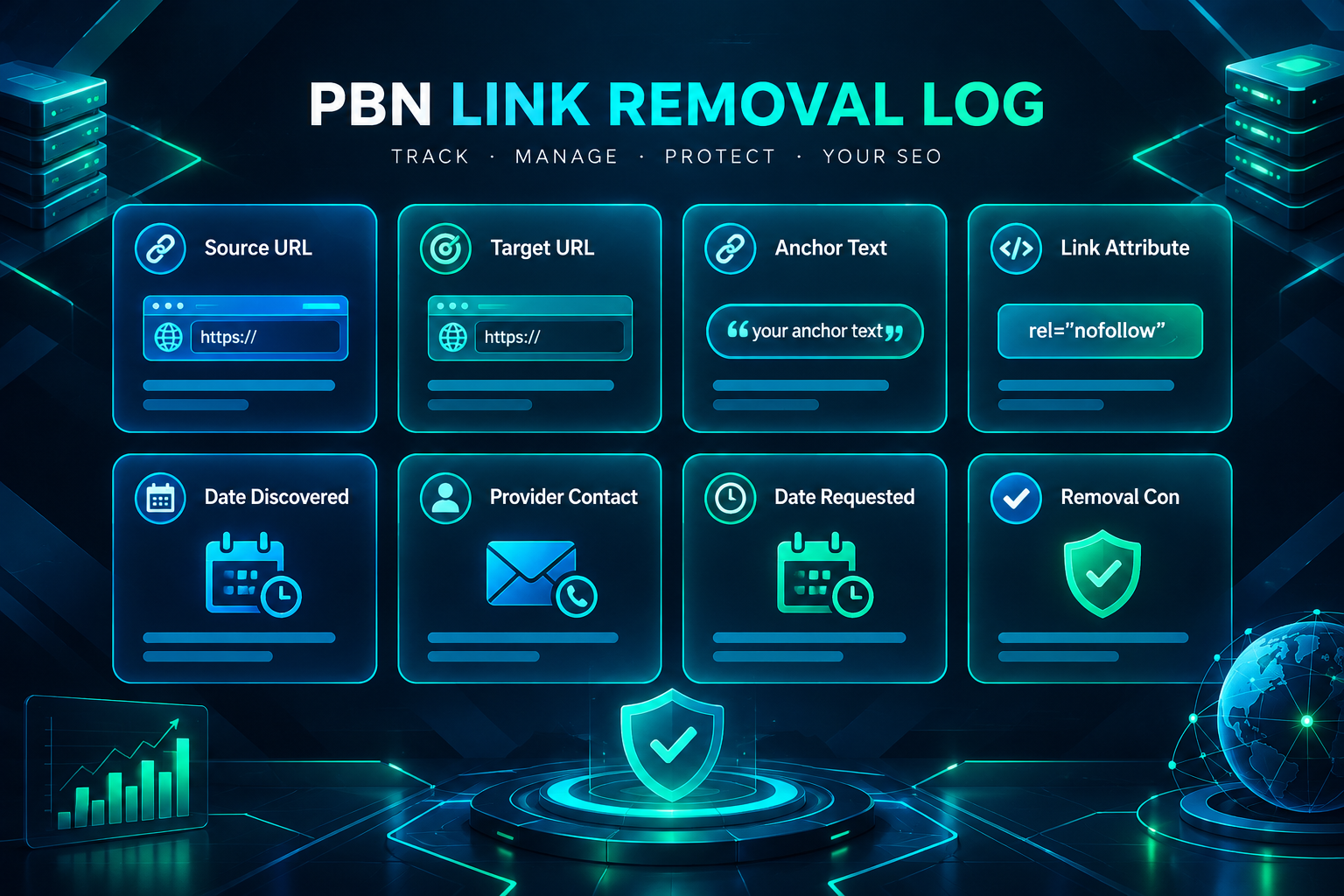
- Source URL: The full URL of the page on the PBN site where the link appears. This should be the specific page URL, not just the root domain, because a site may host multiple placements across different pages.
- Target URL: The full URL of the page on your site that the link points to. Recording this separately from the source URL makes it easier to group removals by the target page being protected or cleaned up.
- Anchor text: The exact anchor text used in the placement. This is relevant for anchor text distribution analysis and for identifying which placements were using exact-match or branded anchors.
- Link attribute: Whether the link was followed, nofollowed, or carried another attribute such as UGC or sponsored. This affects how the link is treated in a disavowal file if removal is not achieved.
- Date of discovery or audit: When the link was identified as a candidate for removal, whether through a manual audit, a backlink tool export, or a notification from a provider.
- Provider or site contact: The name, email address, or contact method for the person responsible for the placement. For PBN placements managed through a service, this may be the provider’s support channel rather than an individual site owner.
- Date request submitted: The date you sent the removal request. If you sent multiple follow-up messages, record each date separately.
- Method of contact: Email, support ticket, contact form, or another channel. Note the platform if a ticket system was used, since ticket numbers can serve as reference points.
- Response received: Whether the provider or site owner acknowledged the request, and on what date. Record the substance of the response, not just whether one arrived.
- Removal confirmed: The date on which you verified that the link was no longer present on the source page. This should be based on a direct check of the page or a crawl result, not solely on the provider’s confirmation.
- Disavowal status: Whether the domain or URL was added to a disavowal file, and on what date, if removal was not achieved within a reasonable timeframe.
- Notes: Any additional context, such as a provider dispute, a page that was taken offline entirely, or a link that reappeared after initial removal.
How to Structure Your Removal Log
A spreadsheet is the most practical format for most removal logs because it allows sorting, filtering, and status tracking without requiring specialist software. Google Sheets or Microsoft Excel both work well. Create one row per link rather than one row per domain, since a single PBN site may have placed links on multiple pages, each of which needs to be tracked independently.
Use a status column with a defined set of values such as Pending, Requested, Confirmed Removed, Unresponsive, and Disavowed. Keeping these values consistent across the log makes it easy to filter for all links that are still pending or all links that required disavowal. Avoid free-text status entries, which become difficult to filter and interpret over time.
If you are managing removals across multiple client domains, add a column for the client or project name and keep all projects in a single master workbook with separate tabs, or use a project management tool that supports task-level tracking. The goal is to avoid maintaining separate, disconnected records that cannot be cross-referenced easily.
For agencies preparing documentation to support a reconsideration request, it is worth adding a column that flags each link as either successfully removed or included in the disavowal file. Google’s reconsideration request process expects you to account for links you could not remove as well as those you did remove, so the log should reflect both outcomes clearly.
Preserving Evidence: Screenshots and Correspondence
A log entry stating that a removal request was sent on a particular date is more credible when it is supported by preserved evidence. For each removal request, save a copy of the outgoing message and any response you receive. If you used email, export the thread as a PDF or save it to a dedicated folder organized by domain or project. If you used a support ticket system, record the ticket number and save a screenshot of the ticket at the time of submission and again when it was resolved.
Take a screenshot of the linking page before submitting the removal request, capturing the link in context. This documents that the link existed at the time of the request and provides a reference point for comparison after removal is claimed. After the provider confirms removal, take a second screenshot of the same page showing that the link is no longer present. Store both screenshots alongside the log entry for that link.
Timestamped screenshots are more useful than undated ones. Most operating systems embed a creation date in saved image files, but it is also worth naming files with the date in the filename, for example 2024-11-15-source-page-before.png, to make the timeline immediately readable without opening file properties.
If a link reappears after it was confirmed as removed, the before-and-after screenshot record makes it straightforward to demonstrate that the removal was completed and then reversed, which is relevant context if you need to escalate the request or add the domain to a disavowal file.
Communicating Removal Requests to Providers
When the PBN placement was arranged through a link-building service, the removal request goes to that provider rather than to an individual site owner. A clear, professional message reduces the chance of misunderstanding and creates a written record of what was requested. Include the following in every removal request message:
- The exact source URL where the link appears.
- The exact target URL that the link points to.
- The anchor text of the link, so the provider can locate it without ambiguity if the page contains multiple links.
- A clear statement that you are requesting removal of this specific link.
- A request for written confirmation once the link has been removed.
- A reasonable response deadline, typically five to ten business days for a straightforward removal.
Avoid vague requests such as asking a provider to remove all your links without specifying which ones, particularly if the provider manages placements for multiple clients. Specificity reduces processing time and makes the provider’s confirmation more meaningful, since they can confirm removal of the exact link you identified rather than a general cleanup.
If a provider does not respond within the stated deadline, send a follow-up message and record the date. If a second follow-up also goes unanswered, document the unresponsive status in your log and proceed with adding the domain or URL to a disavowal file if the link is one you are trying to address as part of a manual action remediation. Google’s guidance on link removal acknowledges that not every removal request will receive a response, and that disavowal is the appropriate next step when removal cannot be achieved.
Verifying That a Link Has Been Removed
Provider confirmation that a link has been removed is a useful starting point, but it should not be the only verification step. Providers can make errors, and a link may be removed from one version of a page while remaining in a cached or syndicated version. Independent verification gives your documentation a stronger factual basis.
The most direct verification method is to visit the source URL and check whether the link is still present in the page’s HTML. Use your browser’s page source view or a browser extension that highlights links to confirm the link’s absence. For a large number of removals, a crawl tool such as Screaming Frog can be configured to crawl a list of source URLs and report on the links found on each page, making it practical to verify many removals in a single session.
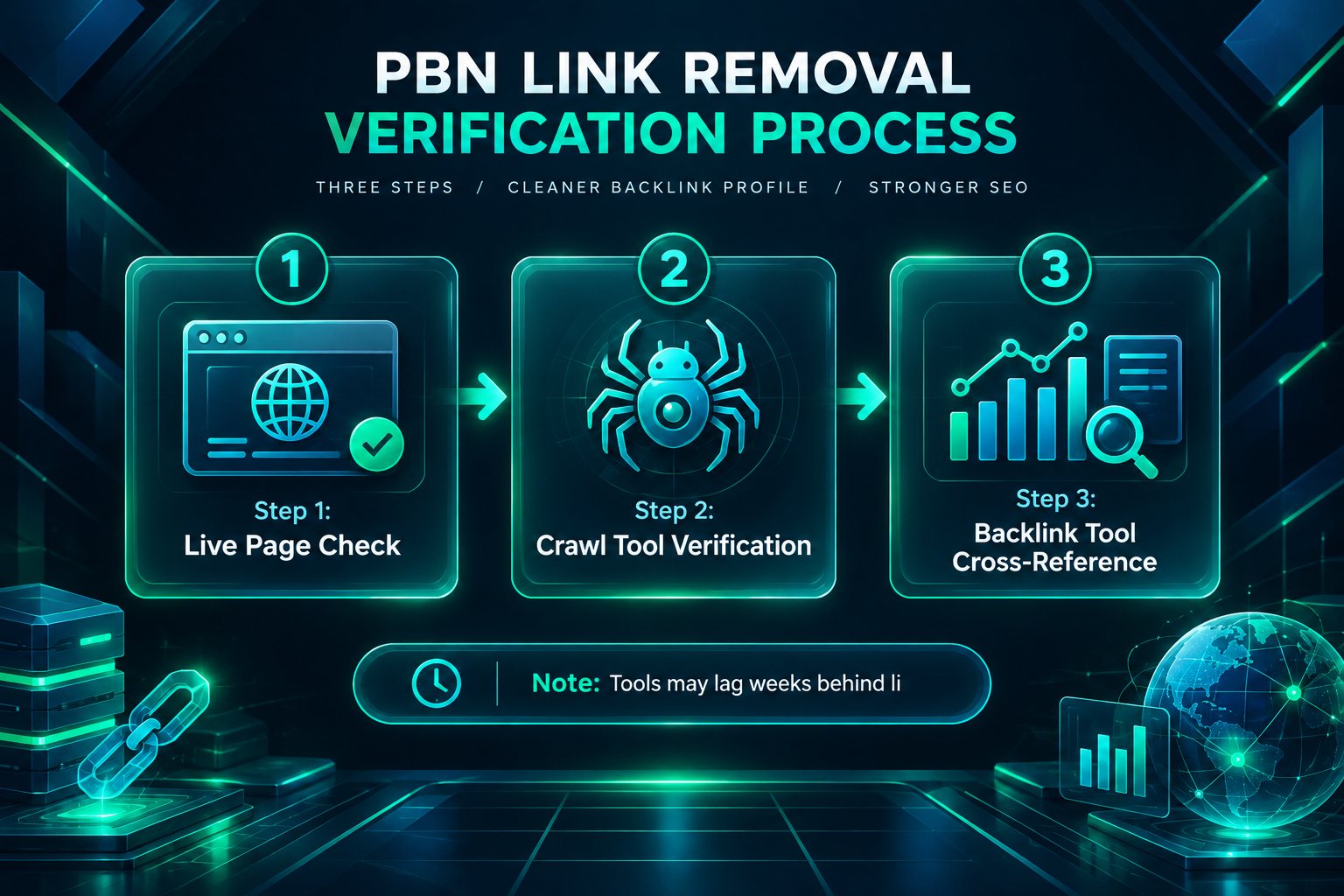
Backlink tools such as Ahrefs, Semrush, or Majestic will eventually reflect a removed link in their indexes, but their crawl frequencies vary and a link may continue to appear in their databases for weeks or months after it has been removed from the live page. Do not rely solely on a backlink tool’s index to confirm removal; use a live page check as the primary verification method and treat the tool’s data as a secondary reference that will update over time.
Record the date of your verification check in the log alongside the method used. If the link was confirmed absent on a live page check, note that. If the link still appears in a backlink tool’s index despite being removed from the live page, note that distinction so the record accurately reflects the situation rather than creating a false impression that the link is still active.
Connecting Removal Documentation to a Disavowal File
When a removal request goes unanswered or a link cannot be taken down for reasons outside your control, adding the domain or URL to a Google Search Console disavowal file is the standard next step for site owners who are addressing a manual action for unnatural links. The disavowal file itself is a plain text document listing domains or URLs you want Google to ignore when assessing your backlink profile.
Your removal log should make it straightforward to generate the disavowal file, because the log already contains the source URLs and domains for every link you attempted to remove. Filter the log for entries with a status of Unresponsive or Removal Not Confirmed, extract the relevant domains or URLs, and format them according to Google’s disavowal file specification. Keep a copy of the disavowal file alongside your removal log, and record the date it was submitted in Search Console.
If you update the disavowal file at a later date, for example to add newly identified links or to remove entries for links that were subsequently taken down, save each version of the file with a date in the filename so you have a complete version history. This is particularly useful if you submit multiple reconsideration requests over time, since you may need to demonstrate how the disavowal file evolved in response to your ongoing remediation efforts.
Maintaining the Log After Initial Removal
A removal log is not a one-time document. Links that were removed can reappear if a site is restored from a backup, if a content management system update resets page content, or if a new site owner reverses changes made by a previous owner. Periodic re-checks of previously removed links, perhaps every three to six months, help you catch reappearances before they become a problem.
Add a column to your log for the most recent re-verification date and the result of that check. If a previously removed link has reappeared, update the status and initiate a new removal request, documenting it as a follow-up to the original request rather than a new entry, so the full history of that link remains in one place.
For ongoing PBN campaigns where some placements remain active while others are being removed, the removal log can sit alongside a broader link inventory that tracks all active placements. Keeping these two records connected, for example by using a shared identifier for each placement, makes it easier to understand the current state of the full backlink profile at any point in time.
Frequently Asked Questions
Do I need to document removal requests even if I am not under a manual action?
Yes. Documenting removal requests is useful regardless of whether a manual action is in place. A clear record supports future audits, helps you track which placements are still active, and provides a reference point if a manual action is issued later. Starting documentation before a problem arises is easier than reconstructing a history after the fact.
What format should I use for the removal log?
A spreadsheet with one row per link is the most practical format for most situations. Google Sheets works well for shared access across a team. Project management tools can also be used if your workflow already relies on one, but the key requirement is that every relevant field is captured consistently for each link.
How long should I wait before adding a link to the disavowal file if a provider does not respond?
There is no fixed rule, but a common approach is to send an initial request, follow up after five to ten business days, and then proceed with disavowal if a second follow-up also goes unanswered. Google’s guidance acknowledges that unresponsive site owners are a normal part of the removal process and that disavowal is the appropriate tool when removal cannot be achieved.
Can I use a backlink tool to confirm that a link has been removed?
Backlink tools such as Ahrefs, Semrush, and Majestic are useful for identifying links and tracking changes over time, but their indexes update at varying intervals and may continue to show a removed link for weeks after it has been taken down from the live page. Use a direct page check as the primary verification method and treat tool data as a supplementary reference.
Should I keep copies of all correspondence with providers?
Yes. Saved copies of outgoing requests and provider responses, along with timestamped screenshots of the linking page before and after removal, form the evidentiary basis of your documentation. This is particularly important if you submit a reconsideration request to Google, where demonstrating a good-faith remediation effort is part of the process.
What happens if a removed link reappears later?
If a previously removed link reappears on a source page, initiate a new removal request and document it as a follow-up to the original entry in your log. If the provider does not respond or the link cannot be removed again, update the disavowal file to include the domain or URL and record the date of the update.
Building a Removal Documentation Process That Works Over Time
Effective documentation of PBN link removal requests comes down to consistency: capturing the same fields for every link, preserving evidence at each stage, verifying outcomes independently, and maintaining the log as a living record rather than a one-time exercise. The process does not require specialist software or complex workflows. A well-structured spreadsheet, a disciplined approach to saving correspondence and screenshots, and a regular re-verification schedule cover the practical requirements for most campaigns.
For site owners and SEO specialists who manage PBN placements as part of a broader link-building strategy, a removal log also serves as a useful complement to the broader backlink profile record. Knowing which placements have been removed, which are still active, and which required disavowal gives you a clearer picture of the profile’s current state and makes future audits more straightforward. If you are reviewing your backlink profile, assessing which placements to retain or remove, or planning a new PBN campaign, the team at PBN Backlinks Service can help you evaluate your options and discuss what documentation and monitoring practices make sense for your specific situation.