

A PBN backlink that search engine crawlers cannot reach delivers no ranking signal to your target page. Crawlability is the foundational requirement that determines whether a link placement on a private blog network site can be discovered, followed, and evaluated by Googlebot or other crawlers. This guide explains the technical factors that affect whether PBN links get crawled, how to identify and fix common crawl-blocking issues, and what to verify before and after a placement goes live.
Key Takeaways
- A PBN backlink must be reachable by crawlers before it can contribute any link equity to your target page — crawlability is a prerequisite, not an optional quality factor.
- The most common crawl-blocking issues on PBN sites are restrictive robots.txt rules, noindex directives, orphaned pages with no internal links, and slow or unreliable hosting.
- Verifying crawlability requires checking the robots.txt file, HTTP response codes, page indexing status, link attributes, and internal link structure of each placement page.
- Indexing and crawlability are related but distinct: a page can be crawled without being indexed, and an indexed page may not be recrawled frequently enough to pass a new link promptly.
- Ongoing monitoring of placement pages is more reliable than a one-time check, because hosting changes, CMS updates, or plugin conflicts can introduce crawl blocks after a link goes live.
Why Crawlability Matters for PBN Link Placements
Search engines discover and evaluate backlinks by crawling the pages that contain them. If Googlebot cannot reach the page hosting your PBN link, the link is effectively invisible from a ranking-signal perspective. This is true regardless of the domain’s authority metrics, its backlink profile, or the quality of the content surrounding the placement. Crawlability is the entry point for the entire link-evaluation process.
For PBN placements specifically, crawlability deserves deliberate attention because PBN sites are often built or maintained with varying levels of technical care. A domain that was correctly configured at launch may develop crawl issues over time due to plugin updates, hosting migrations, CMS changes, or accidental configuration edits. Understanding the technical mechanisms that block or allow crawlers helps you verify that each placement is working as intended and gives you a clear checklist to work through when a link appears not to be passing value.
It is also worth distinguishing crawlability from indexing. A page is crawlable if Googlebot can access and read it. A page is indexed if Google has chosen to include it in its search index. A crawlable page is not automatically indexed, and an indexed page is not automatically recrawled on a schedule that suits your campaign. Both states matter, but they require different checks and different remedies.
Common Technical Factors That Block PBN Link Crawlability
Several technical configurations can prevent crawlers from reaching a PBN placement page or from following the link it contains. Identifying which factor is responsible is the first step toward a fix.
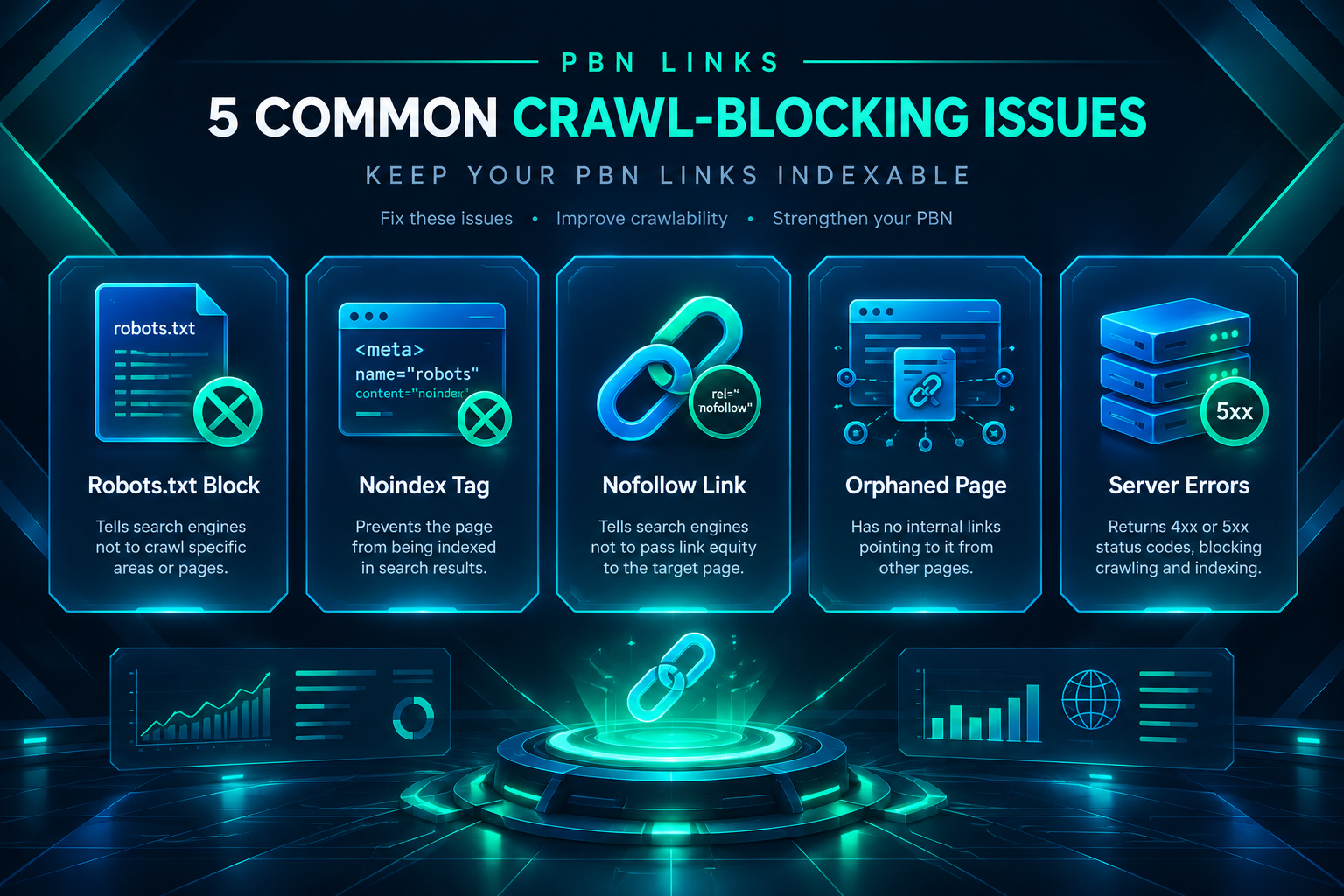
Robots.txt Disallow Rules
The robots.txt file at the root of a domain instructs crawlers which paths they are permitted to access. A misconfigured robots.txt that disallows the entire site, the directory containing the placement page, or specific URL patterns will prevent Googlebot from crawling the page at all. This is one of the most common and easily overlooked crawl-blocking issues on PBN sites, particularly those built on WordPress where a plugin or theme update can overwrite the robots.txt configuration. To check this, access the file directly at the domain root — for example, example.com/robots.txt — and confirm that no Disallow rule applies to the placement page’s URL path. A rule such as Disallow: / blocks the entire site and will prevent any link on that domain from being crawled.
Noindex Meta Tags and HTTP Headers
A noindex directive tells search engines not to include a page in their index. While a noindexed page can technically still be crawled, Google has stated that it may eventually stop crawling pages that consistently return a noindex signal, which means the link on that page may not be evaluated reliably over time. Noindex directives can appear as a meta robots tag in the HTML head section — <meta name=”robots” content=”noindex”> — or as an X-Robots-Tag HTTP response header. Both locations need to be checked. On WordPress-based PBN sites, the noindex setting is sometimes enabled site-wide through the Reading settings panel or through an SEO plugin such as Yoast or Rank Math, particularly on sites that were set to discourage search engines during initial setup and were never switched back.
Nofollow and Sponsored Link Attributes
A nofollow attribute on a link — rel=”nofollow” — instructs crawlers not to follow the link and signals that the linking page does not intend to pass ranking credit. Google treats nofollow as a hint rather than a strict directive, meaning it may still crawl the destination URL, but the link’s ability to contribute to rankings is significantly reduced or eliminated. Similarly, the rel=”sponsored” attribute is intended for paid placements and carries its own signal. Before confirming a placement, verify the link’s HTML source to confirm it uses rel=”dofollow” or carries no rel attribute at all, which is the default followed state. This check is straightforward: view the page source or use a browser extension to inspect the link element directly.
Orphaned Placement Pages
A page that has no internal links pointing to it from other pages on the same domain is called an orphaned page. Crawlers discover new pages primarily by following links from already-crawled pages. If the placement page is not linked from the site’s navigation, its homepage, a category page, or at least one other indexed page on the same domain, Googlebot may never find it through normal crawl activity. Even if the page is submitted directly to Google Search Console, the absence of internal links reduces the frequency with which it will be recrawled. Ensuring that each placement page receives at least one internal link from a crawled and indexed page on the same PBN site is a basic but important step.
HTTP Errors and Hosting Reliability
A placement page that returns a 4xx or 5xx HTTP status code cannot be crawled successfully. A 404 Not Found response means the page does not exist at that URL. A 500 Internal Server Error or 503 Service Unavailable response means the server failed to deliver the page. Googlebot records these responses and, if they persist, will reduce crawl frequency for that domain. Unreliable hosting that causes frequent downtime or slow response times can also reduce how often a PBN site is crawled, which in turn delays the discovery and evaluation of new link placements. Checking the HTTP status code of each placement page using a tool such as Screaming Frog or a simple curl request confirms whether the page is being served correctly.
JavaScript-Rendered Links
Links that are rendered through JavaScript rather than present in the static HTML of a page may not be discovered by all crawlers on the first crawl pass. Googlebot does crawl and render JavaScript, but this rendering happens in a secondary wave that can lag behind the initial HTML crawl by days or longer. For PBN placements, links should ideally be present in the static HTML source of the page rather than injected by JavaScript after page load. If a PBN site uses a page builder or theme that renders content dynamically, confirming that the link appears in the raw HTML source — not just in the rendered DOM — is an important verification step.
How to Verify That a PBN Link Is Crawlable
A systematic verification process reduces the chance that a placement goes undetected by crawlers. The following steps cover the most important checks for each placement.
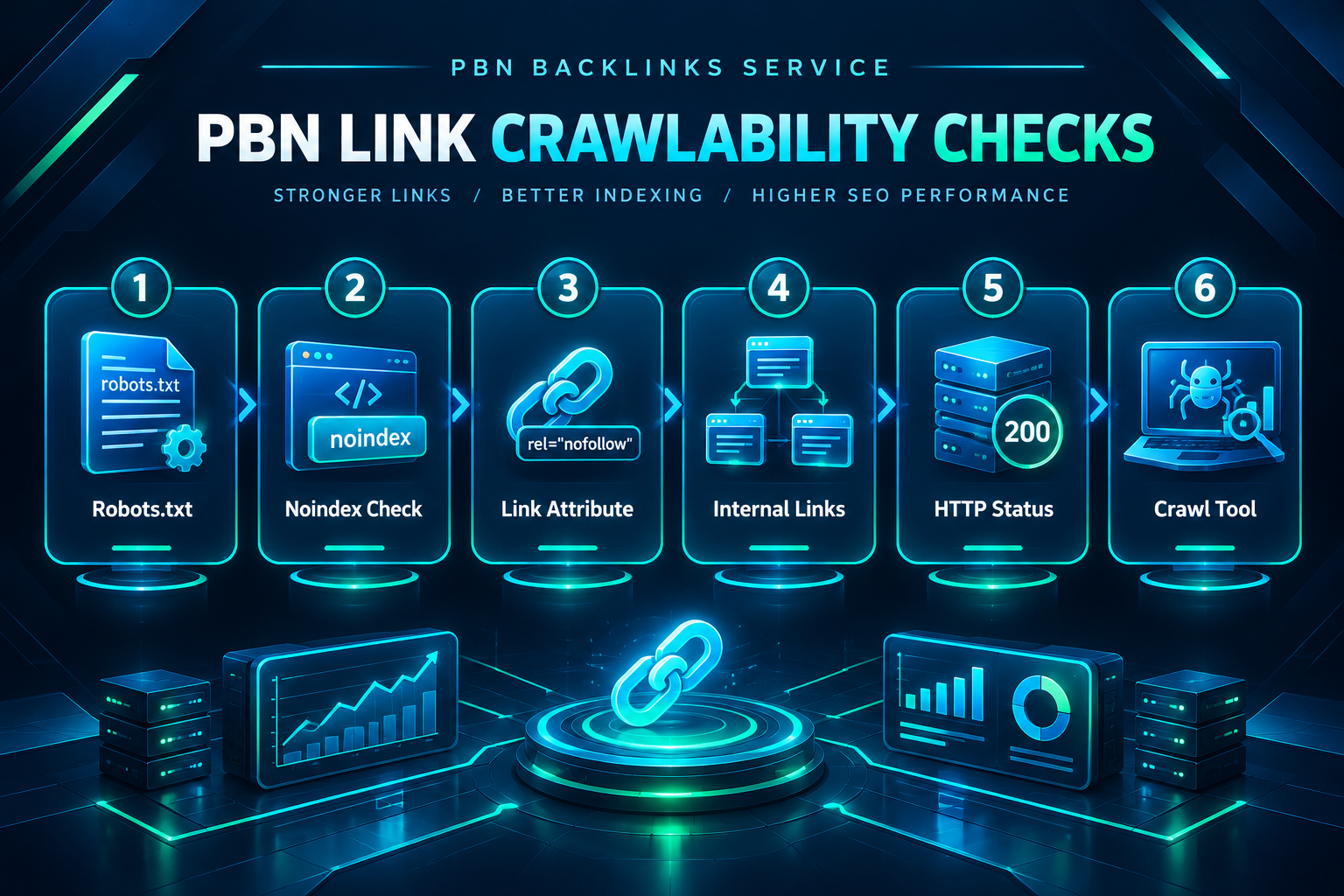
Step 1: Check the Robots.txt File
Access the robots.txt file at the root of the PBN domain and confirm that no Disallow rule applies to the placement page’s URL. Pay attention to wildcard rules that might match the page’s path. If the file disallows crawling for the relevant path or for the entire site, the placement page will not be crawled regardless of any other configuration.
Step 2: Inspect the Page for Noindex Directives
View the HTML source of the placement page and search for a meta robots tag in the head section. Also check the HTTP response headers for an X-Robots-Tag. If either contains a noindex value, the page’s long-term crawl reliability is reduced. On WordPress sites, the site-wide search engine visibility setting and any active SEO plugin settings should be reviewed to confirm that indexing is enabled for the placement page.
Step 3: Confirm the Link Attribute
Inspect the HTML of the link pointing to your target page. Confirm that the anchor element does not carry a rel=”nofollow” or rel=”sponsored” attribute. The link should either have no rel attribute or explicitly use rel=”dofollow”. Also confirm that the link uses the correct target URL and that the anchor text matches your intended anchor text strategy.
Step 4: Verify Internal Linking to the Placement Page
Confirm that the placement page is linked from at least one other crawled and indexed page on the same PBN domain. This could be the site’s homepage, a category archive, a recent posts widget, or a related posts section. The internal link does not need to be prominent, but it must be present in the HTML and must be followable — not blocked by a nofollow attribute or a JavaScript redirect.
Step 5: Check the HTTP Status Code
Confirm that the placement page returns a 200 OK HTTP status code. A redirect chain that terminates at the correct page is generally acceptable, but a chain longer than two or three hops may reduce crawl efficiency. Any 4xx or 5xx response indicates a problem that needs to be resolved before the placement can be considered live and crawlable.
Step 6: Test Crawlability with Google Search Console or a Crawl Tool
If you have access to Google Search Console for the PBN domain, the URL Inspection tool allows you to request a crawl of a specific page and see whether Googlebot can access it. For domains where Search Console access is not available, tools such as Screaming Frog can simulate a crawl and identify robots.txt blocks, noindex tags, broken links, and redirect chains. A third-party crawl test does not replicate Googlebot’s exact behavior, but it identifies the most common technical barriers reliably.
Indexing After Crawlability: What Happens Next
Once a placement page is confirmed as crawlable, the next stage is indexing. Google decides independently whether to include a crawled page in its search index based on content quality, duplication signals, and other factors. A page that is crawlable but thin, duplicated, or otherwise low-quality may be crawled without being indexed, which limits how reliably the link on that page contributes to rankings over time.
For PBN placements, the quality and uniqueness of the content on the placement page affects both indexing likelihood and the perceived value of the surrounding context. A placement page with substantive, topically relevant content is more likely to be indexed and recrawled regularly than a page with minimal or duplicated text. This is a content quality consideration that sits alongside the technical crawlability factors described above.
Submitting the placement page URL through a sitemap or directly via a Search Console fetch request can accelerate the initial crawl, but it does not guarantee indexing. Recrawl frequency after the initial index is determined by Googlebot’s assessment of how often the page changes and how valuable it is — factors that are influenced by the site’s overall crawl budget, domain authority signals, and content freshness.
Monitoring Crawlability Over Time
Crawlability is not a one-time check. Technical configurations on PBN sites can change after a placement goes live. A WordPress plugin update might alter the robots.txt file. A hosting migration might change server response codes. A CMS update might introduce a site-wide noindex setting. A domain renewal issue might cause temporary downtime that reduces crawl frequency. Any of these events can interrupt the crawlability of a placement that was correctly configured at launch.
Periodic monitoring of placement pages — checking HTTP status codes, robots.txt rules, and noindex tags at regular intervals — helps identify issues before they persist long enough to affect crawl frequency significantly. Tools such as Screaming Frog, Ahrefs, or Semrush can be used to audit a list of placement URLs on a scheduled basis. If a placement page disappears from search results or stops appearing in a backlink tool’s index, that is a signal worth investigating through a direct crawl check rather than assuming the link has been devalued.
Anchor text and link attribute changes are also worth monitoring. A CMS update or theme change on a PBN site can sometimes alter how links are rendered, converting a followed link to a nofollowed one or changing the anchor text. Confirming that the link’s HTML remains consistent with the original placement specification is part of responsible link maintenance.
Crawlability and Link Equity: Understanding the Connection
Crawlability is the mechanism through which a PBN link becomes eligible to pass link equity — sometimes called PageRank or link juice — to your target page. A link that is crawlable and followed can contribute to the target page’s authority signals in Google’s ranking systems, subject to the many other factors that determine how much weight any individual link carries. These factors include the topical relevance of the linking page, the domain’s overall authority signals, the placement context within the page, the anchor text used, and the target page’s existing backlink profile.
Crawlability alone does not determine ranking impact. A technically perfect placement on a low-authority domain with thin content and weak topical relevance will contribute less than a well-configured placement on a domain with a strong historical backlink profile and relevant content. However, without crawlability, even the strongest domain cannot pass any signal at all. Treating crawlability as a baseline requirement — rather than a differentiating quality factor — is the correct framing for campaign planning.
When evaluating PBN placements or working with a provider such as PBN Backlinks Service, asking specifically about how placement pages are configured for crawlability, how internal linking is structured across the network, and what monitoring processes are in place gives you a clearer picture of whether the technical foundation supports the link equity you are paying for.
Frequently Asked Questions
Does a PBN link need to be on an indexed page to pass value?
Indexing and crawlability are related but not identical. A page that is crawled but not indexed may still have its outbound links evaluated by Google in some circumstances, but the reliability and consistency of that signal is lower than for a fully indexed page. For PBN placements, targeting placement pages that are both crawlable and indexed provides a more dependable foundation for link equity transfer.
How long does it take for Googlebot to crawl a new PBN placement?
Crawl timing varies depending on the domain’s crawl budget, the frequency with which the site is updated, and whether the placement page is internally linked from already-crawled pages. New placements on active, well-linked PBN sites may be crawled within days. Placements on less active sites with weaker internal linking may take several weeks. Submitting the URL through Google Search Console can accelerate the initial crawl, though this requires access to the Search Console account for the PBN domain.
Can a nofollow link on a PBN site still be crawled?
Yes. Googlebot can crawl a page and follow a nofollow link to discover the destination URL, even if the nofollow attribute signals that ranking credit should not be passed. However, the link’s contribution to your target page’s rankings is significantly reduced or absent when the nofollow attribute is present. For PBN placements intended to influence rankings, confirming that the link is followed — not nofollowed — is essential.
What is the difference between a crawl block and a penalty?
A crawl block is a technical configuration that prevents Googlebot from accessing a page. It is a setup issue, not an enforcement action. A manual action or algorithmic penalty is a deliberate response by Google to a policy violation. These are distinct concepts. A PBN placement page that is blocked by robots.txt is simply not being crawled; it has not been penalized. Fixing the crawl block restores the page’s crawlability without any penalty-related implications.
Should every PBN placement page be submitted to Google Search Console?
Submitting placement pages to Search Console can accelerate initial crawling, but it requires access to the Search Console property for each PBN domain. In practice, many PBN operators rely on internal linking and sitemap submission to facilitate crawling rather than manual URL submission. The most important factor is that the placement page is reachable through normal crawl paths — via internal links from indexed pages — rather than depending solely on direct submission.
Can hosting quality affect whether a PBN link gets crawled?
Yes. Hosting reliability directly affects crawl frequency. A domain hosted on a server with frequent downtime, slow response times, or recurring 5xx errors will be crawled less often by Googlebot. If a new placement goes live during a period of hosting instability, the crawl of that page may be delayed. Stable, responsive hosting is a basic infrastructure requirement for any PBN site intended to pass link equity reliably.
Making Crawlability a Standard Part of Your PBN Link Verification Process
Crawlability is the technical prerequisite that determines whether a PBN backlink can function as intended. Without it, domain authority metrics, content quality, anchor text strategy, and placement context are all secondary — the link simply cannot be evaluated by search engine crawlers. Building a consistent verification process around the checks described in this guide — robots.txt rules, noindex directives, link attributes, internal linking, HTTP status codes, and ongoing monitoring — gives you a reliable way to confirm that each placement is technically sound before and after it goes live.
The practical implication for campaign planning is that crawlability should be treated as a non-negotiable baseline, not an advanced optimization. When assessing a PBN provider or reviewing existing placements, asking about the technical configuration of placement pages and the internal linking structure of the network is as important as asking about domain metrics or content quality. A placement that scores well on authority metrics but fails basic crawlability checks is not delivering the value it appears to offer.
If you are evaluating PBN placements or planning a link-building campaign and want to understand how crawlability is handled across a network, PBN Backlinks Service can help you assess placement quality and technical setup as part of a broader backlink strategy review.