

When you restore a private blog network site on an expired or aged domain, the URLs that existed during the domain’s active life carry much of the historical link equity you paid for. Rebuilding the site without matching those old URL structures can scatter that equity across broken paths, dilute the authority flowing to your target pages, and undermine the core reason for acquiring the domain in the first place. Preserving historical URLs during PBN restoration is a technical process that combines archive research, CMS configuration, redirect mapping, and ongoing monitoring — and getting it right from the start is considerably easier than correcting it after the site is live.
Key Takeaways
- The link equity embedded in an expired domain is tied to specific URLs, not just the root domain — restoring the wrong URL structure can break that equity chain.
- Crawling the Wayback Machine and third-party backlink tools before rebuilding gives you the URL map you need to match or redirect historical paths accurately.
- 301 redirects from old URLs to their closest restored equivalents preserve the majority of passing link signals when exact URL recreation is not practical.
- CMS permalink settings, slug configuration, and category structures must be locked in before content is published to avoid creating a second round of broken URLs.
- Ongoing monitoring with a crawl tool and backlink platform helps you catch new 404 errors and redirect chains before they erode the domain’s authority over time.
Why URL Preservation Matters for PBN Domains
An expired domain accumulates backlinks over its lifetime, and each of those backlinks points to a specific URL path — not simply the homepage. When referring domains link to a post at /category/topic-name/post-title/, that is the address the link signal is associated with. If you rebuild the PBN site and that path returns a 404 error, the linking page is effectively pointing at nothing. Search engine crawlers that follow the link encounter a dead end, and the equity that the referring domain was passing along is not transferred to your intended target.
This matters more for PBN restoration than for a standard site migration because the entire strategic value of an expired domain rests on its historical backlink profile. You are not simply moving a live site to a new server — you are reconstructing a site around a domain whose authority was built by someone else, over years, through content and links that no longer exist in their original form. Preserving or correctly redirecting those historical URLs is the mechanism by which you convert the domain’s raw backlink history into usable link equity for your network.
The degree of impact depends on how many of the domain’s inbound links point to inner pages versus the root domain. A domain where most links point to the homepage is less sensitive to URL structure errors than one where a significant share of referring domains link to specific posts or category pages. Checking this distribution in a backlink analysis tool before you begin restoration helps you prioritize which paths deserve the most careful attention.
Step One: Map the Historical URL Structure Before You Build
The first practical step in URL preservation is building a complete picture of the domain’s historical URL structure before you configure a single CMS setting or publish a single page. Two primary sources make this possible.
The Wayback Machine at web.archive.org stores crawled snapshots of many domains across multiple years. By browsing the archived versions of the domain, you can identify the URL patterns the site used — whether posts were organized under date-based paths, category slugs, flat structures, or custom taxonomies. The Wayback Machine’s sitemap archives, where available, are particularly useful because they list URLs in a structured format that you can export and work from directly. Not every domain has complete coverage, but even partial snapshots give you the structural logic of the original site.
The second source is a backlink analysis tool such as Ahrefs, Semrush, or Majestic. These platforms index referring domains and the specific URLs they link to, so you can pull a list of every linked URL path on the domain, sorted by the number of referring domains or estimated link value. This list is your priority map: the URLs with the most referring domains pointing to them are the ones where URL preservation or accurate redirects will have the greatest effect on retained link equity.
Combining both sources gives you a working URL inventory. Export the backlink data, cross-reference it with the archived URL patterns, and create a spreadsheet that records each historical URL, the number of referring domains pointing to it, and the closest content equivalent you plan to restore or redirect to. This document becomes your restoration blueprint.
Step Two: Configure Your CMS Permalink Structure First
Once you have your historical URL map, the next step is configuring your content management system to match the original permalink structure before you create any content. In WordPress, this means setting the permalink structure under Settings → Permalinks to match the pattern the original site used. Common structures include post name only (/post-title/), category and post name (/category/post-title/), or date-based paths (/year/month/post-title/).
The critical rule here is to finalize the permalink structure before publishing any pages or posts. If you publish content under one structure and then change the permalink setting later, WordPress generates new URLs for all existing content, creating a second wave of broken internal links and potentially invalidating any redirects you have already set up. Locking in the correct structure at the outset eliminates this risk entirely.
Category slugs and tag slugs also contribute to URL paths in many configurations. If the original site used specific category names that formed part of the URL — for example, /reviews/product-name/ — you need to create those categories with exactly matching slugs before assigning posts to them. WordPress allows you to set a custom slug for each category independently of its display name, so you can match the original path even if you use a slightly different label in the navigation.
For non-WordPress CMS platforms, the same principle applies: identify the URL generation logic of the platform, configure it to match the historical pattern, and test a sample URL before bulk-publishing content. Some platforms use database-driven URL generation that requires configuration at the server or application level rather than through an admin panel.
Step Three: Restore Content at Matching URLs Where Practical
Where the historical URL inventory shows high-value paths — those with multiple referring domains — the most direct approach is to restore content at the exact original URL. This means creating a page or post with a slug that precisely matches the historical path, so that any crawler following an inbound link arrives at a live page rather than a redirect or an error.
The restored content does not need to be identical to the original. The goal is to place relevant, substantive content at the correct address so that the URL resolves correctly and the page provides a reasonable destination for both crawlers and any human visitors who follow the link. Thin or placeholder content at a restored URL is less useful than a properly written page, both for the quality of the PBN site and for the credibility of the link placement it supports.
For URLs where exact restoration is not practical — because the original content topic is too narrow, the page type no longer fits the site’s structure, or the archived content is unavailable — a well-configured 301 redirect to the closest thematically relevant live page is the standard alternative. A 301 redirect signals to search engine crawlers that the resource has permanently moved, and the majority of the link signal associated with the original URL is passed to the redirect destination. The redirect destination should be a real, indexed page on the restored domain rather than an external URL or the homepage by default.
Step Four: Implement and Verify 301 Redirects for Unrestored URLs
For every historical URL in your priority list that you are not restoring with matching content, a 301 redirect needs to be in place before the site goes live. In WordPress, redirect management is typically handled through a plugin such as Redirection or through server-level rules in the .htaccess file. Server-level redirects are generally faster and do not depend on WordPress loading correctly, which makes them preferable for high-volume redirect sets.
When writing redirect rules, map each old URL to its most topically relevant destination on the restored site. Sending all unrestored URLs to the homepage is a common shortcut, but it creates what are sometimes called soft 404s — pages that return a 200 status code but provide no relevant content for the original URL’s topic. Search engine crawlers can identify these patterns, and the link equity passed through a homepage redirect from an unrelated topic is likely to be less useful than a redirect to a relevant category or post.
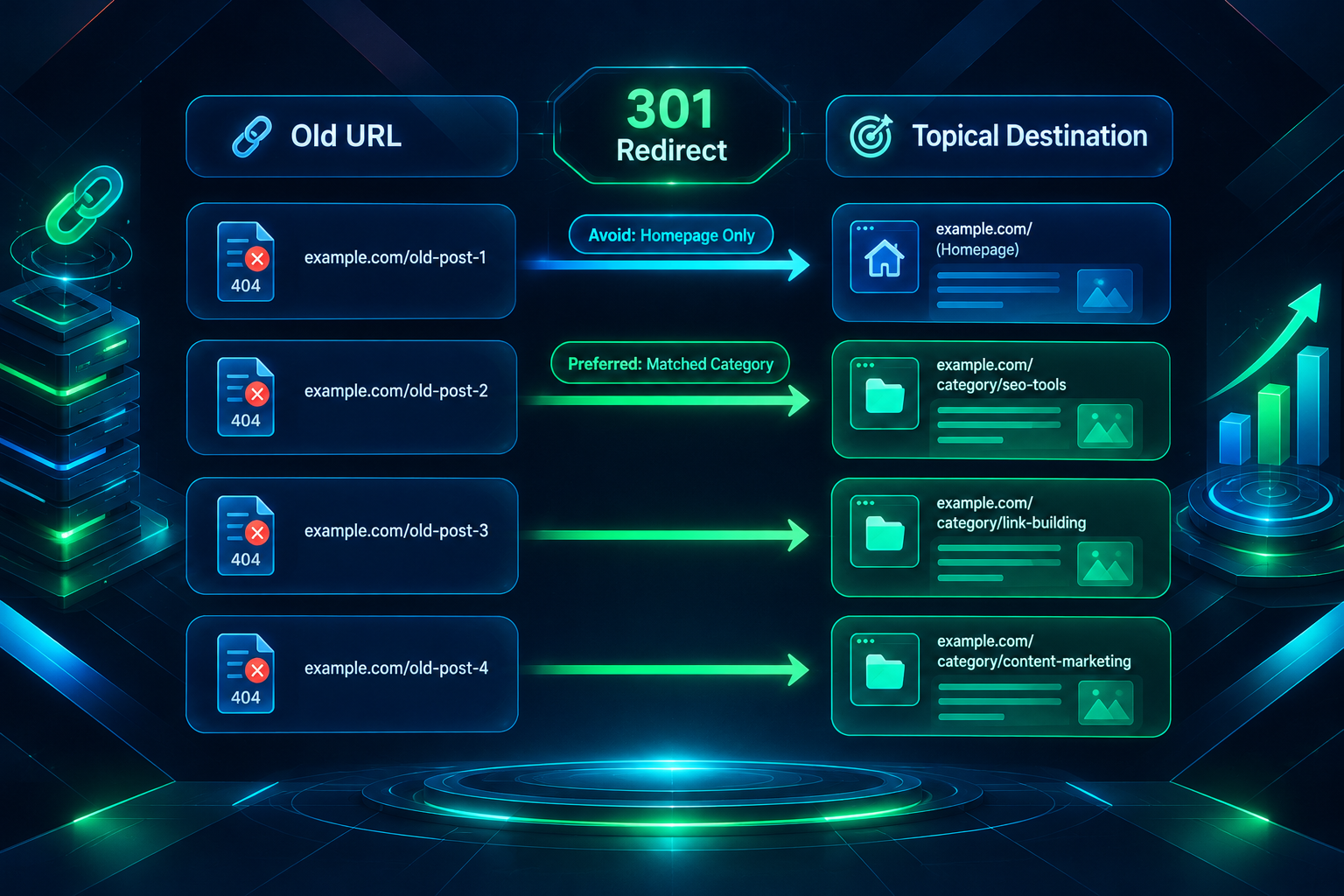
After implementing redirects, verify each one individually using a tool that checks HTTP response codes — Screaming Frog is commonly used for this purpose. Crawl the list of historical URLs and confirm that each returns a 301 status and resolves to the correct destination. Also check that the destination URL itself returns a 200 status and is not itself redirecting, which would create a redirect chain. Chains of two or more redirects can reduce the equity passed and slow crawl resolution.
Document every redirect in your restoration spreadsheet so that future site changes — permalink updates, category restructuring, content removal — can be cross-referenced against the existing redirect map before they are implemented.
Step Five: Handle URL Variations and Protocol Differences
Historical URLs often exist in multiple variations that all need to resolve correctly. Common variations include HTTP versus HTTPS versions, www versus non-www versions, trailing slash versus no trailing slash, and URLs with query strings appended. Each variation that returns a different response code or resolves to a different page can fragment the link equity associated with that path.
The standard approach is to choose a canonical version of each URL — typically HTTPS with your preferred www or non-www format and a consistent trailing slash policy — and redirect all other variations to it. In WordPress, the canonical URL preference is set in Settings → General, and most hosting environments can be configured to enforce HTTPS and www preference at the server level. Once the canonical version is established, test each variation of your priority URLs to confirm they all resolve to the same canonical address with a single redirect hop.
SSL configuration deserves particular attention on restored PBN domains. If the original domain operated on HTTP and you are restoring it on HTTPS, any inbound links pointing to HTTP URLs need to resolve correctly through the HTTPS redirect chain. Confirm that the SSL certificate is correctly installed and that the HTTPS version of every priority URL is accessible before the site is indexed.
Step Six: Submit and Monitor Indexing After Restoration
Once the site is live with the correct URL structure and redirects in place, the next phase is ensuring that search engine crawlers discover and index the restored pages. Submitting an XML sitemap through Google Search Console and Bing Webmaster Tools gives crawlers a structured list of the URLs you want indexed. The sitemap should include only the canonical versions of your live pages — not redirect URLs or historical paths that no longer have matching content.
Monitor the Index Coverage report in Google Search Console in the weeks following launch. This report identifies URLs that were crawled but not indexed, URLs returning errors, and URLs flagged as redirects. Any 404 errors appearing for URLs that should be live indicate a mismatch between your redirect map and the actual site configuration. Address these promptly, as a 404 on a URL with referring domains means those links are not passing equity to any destination.
Backlink monitoring through Ahrefs, Semrush, or Majestic allows you to track whether the referring domains pointing to your historical URLs are being crawled and whether the domain’s authority metrics are stabilizing or improving after restoration. Significant drops in referring domain counts or domain rating shortly after restoration can indicate that crawlers are encountering errors on the paths those links point to.
Set up regular crawl schedules — monthly at minimum — using a tool like Screaming Frog to catch new 404 errors introduced by content changes, plugin updates, or permalink modifications. A single accidental permalink change in WordPress can break a large number of URLs simultaneously, so ongoing monitoring is a practical maintenance requirement rather than a one-time task.
Common URL Preservation Mistakes in PBN Restoration
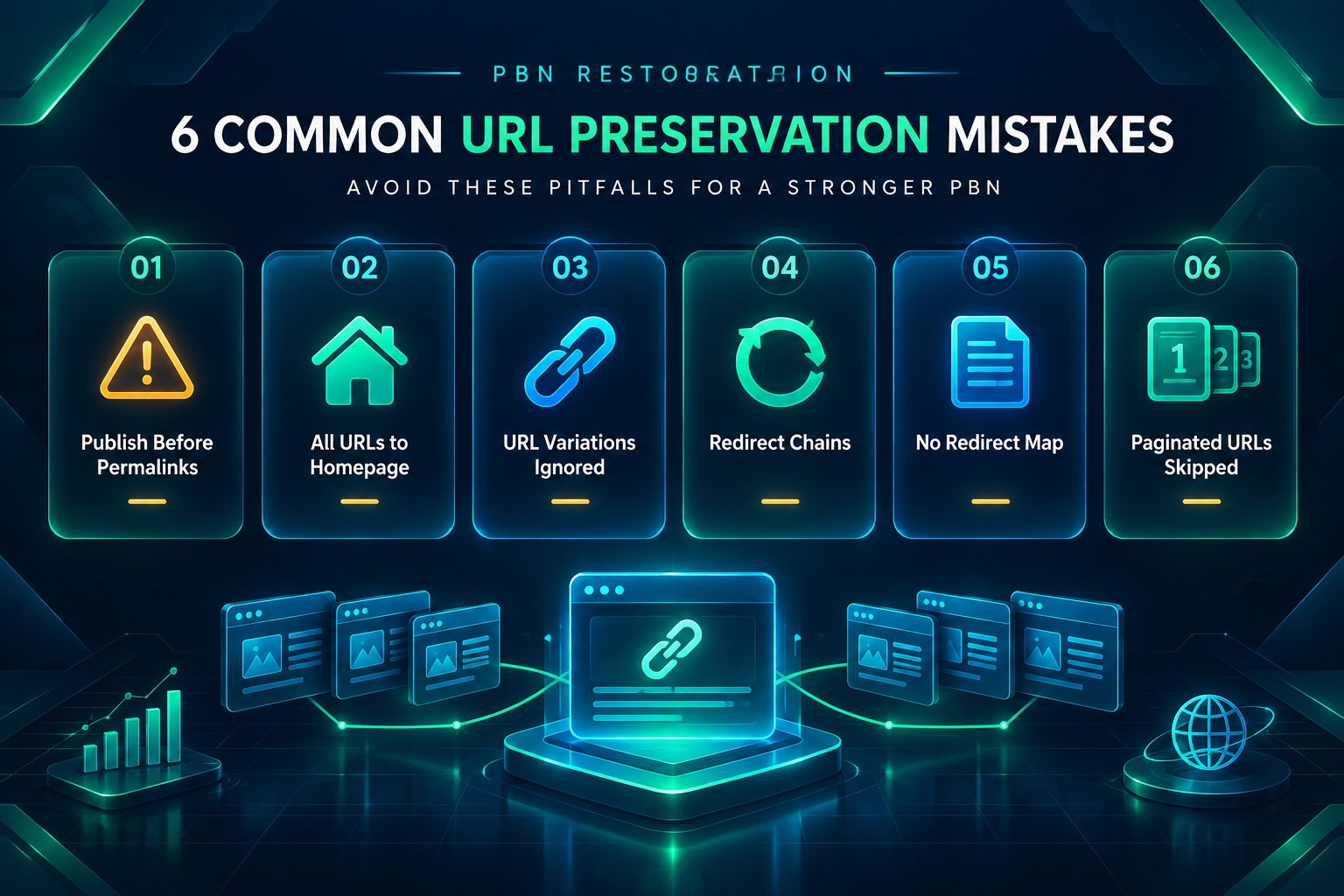
Several recurring errors can undermine URL preservation even when the overall restoration process is carefully planned. Understanding these in advance helps you avoid them.
- Publishing content before finalizing permalink settings: Any content published under a temporary or default permalink structure will need to be manually corrected or redirected if the structure changes later. Always configure permalinks first.
- Redirecting all old URLs to the homepage: Bulk homepage redirects are faster to implement but less effective than topically matched redirects. Prioritize relevant destinations for high-value URLs.
- Ignoring URL variations: HTTP, www, and trailing slash variants that resolve inconsistently can split link equity across multiple versions of the same URL. Enforce a single canonical format across the entire domain.
- Creating redirect chains: Redirecting an old URL to an intermediate URL that itself redirects adds latency and may reduce the equity passed. Map redirects directly to their final destinations.
- Failing to document the redirect map: Without a documented map, future site changes can inadvertently break redirects that were working correctly. Maintain the spreadsheet as a living document throughout the site’s operation.
- Overlooking paginated URLs: Some historical domains had paginated category or archive pages that attracted links. These paths need the same redirect treatment as individual post URLs if they appear in the backlink data.
Frequently Asked Questions
Do I need to restore every historical URL on a PBN domain?
No. Focus your restoration effort on URLs that have referring domains pointing to them, particularly those with multiple referring domains or links from topically relevant sources. URLs with no inbound links and no archived content have minimal impact on the domain’s link equity and can be left as 404s or omitted from the redirect map without meaningful consequence.
How do I find the original URL structure if the Wayback Machine has limited snapshots?
Backlink analysis tools such as Ahrefs and Semrush record the specific URLs that referring domains link to, regardless of whether those pages are still archived. Pulling the full referring URL list from one of these platforms gives you the URL paths that matter most, even when Wayback Machine coverage is incomplete. The URL patterns visible in that list — slug formats, category prefixes, date structures — usually reveal the original permalink logic.
Will a 301 redirect pass the same link equity as a live page at the original URL?
A 301 redirect passes the majority of the link signal associated with the original URL to the redirect destination, but the exact proportion is not publicly documented by search engines. Restoring content at the exact original URL is generally preferable for the highest-value paths because it eliminates any uncertainty about signal transfer and provides a live, indexable page at the address the referring domain links to.
What happens if I change the permalink structure after the site is already indexed?
Changing the permalink structure on an indexed PBN site creates new URLs for all existing content and leaves the old URLs returning 404 errors unless redirects are immediately implemented. This can temporarily disrupt the equity flow from inbound links and may cause the affected pages to drop from index until the redirects are crawled and processed. If a permalink change is necessary, implement the redirect map simultaneously and submit an updated sitemap immediately afterward.
How long does it take for restored URLs to regain their link equity after a PBN restoration?
The timeline depends on how frequently search engine crawlers revisit the domain and the referring pages. Domains with stronger historical authority and more frequent crawl schedules may see equity flow stabilize within weeks. Less frequently crawled domains or those with sparse backlink profiles may take longer. Monitoring domain authority metrics and crawl coverage in the weeks following restoration gives you the clearest picture of how quickly the equity chain is being re-established.
Should I use a plugin or server-level redirects for PBN URL management?
Server-level redirects — configured in .htaccess for Apache servers or in the server block for Nginx — are faster and more reliable than plugin-based redirects because they do not require WordPress to load before the redirect is processed. For a small number of redirects, a well-maintained plugin is a practical option. For large redirect sets covering dozens or hundreds of historical URLs, server-level rules are generally preferable for performance and reliability.
Choosing the Right Approach for Your PBN Restoration
URL preservation during PBN restoration is not a single action — it is a sequence of decisions made before, during, and after the site is rebuilt. The quality of the outcome depends on how thoroughly you map the historical URL structure before configuring the CMS, how carefully you match or redirect high-value paths, and how consistently you monitor for new errors after the site is live.
The domains that deliver the most durable link equity to your target pages are those where the restoration process treats URL integrity as a first-order concern rather than an afterthought. A domain with a strong historical backlink profile but a poorly executed URL restoration may pass significantly less equity than its metrics suggest, while the same domain restored with accurate URL matching and a clean redirect map can function as a reliable link source for the network.
If you are evaluating expired or aged domains for a private blog network and want to assess how URL structure, backlink profile quality, and restoration requirements interact for a specific acquisition, the team at PBN Backlinks Service can help you review domain suitability and plan a restoration approach that protects the equity you are investing in.