

Restoring a PBN site from a backup, migrating it to a new domain, or rebuilding it after a hosting failure almost always leaves behind a collection of broken internal links. These dead links interrupt the flow of link equity between pages, create crawl inefficiencies, and can leave important target pages isolated from the rest of the site’s internal structure. Fixing them is a straightforward maintenance task once you understand where to look, which tools to use, and how internal link repair fits into the broader goal of keeping a private blog network site functioning effectively.
Key Takeaways
- Broken internal links on restored PBN sites typically result from URL structure changes, missing pages, or domain migrations that occur during the restoration process.
- A systematic crawl using a site auditing tool is the most reliable way to identify every broken internal link before attempting repairs.
- Repairing broken internal links restores the flow of internal link equity and ensures that crawlers can reach all indexable pages on the site.
- Redirects, direct link edits, and content restoration are the three main repair methods, and the right choice depends on whether the destination page still exists.
- After repairs, re-crawling the site and verifying that no new broken links were introduced is an essential final step before the site resumes its role in a link-building campaign.
Why Broken Internal Links Appear After a PBN Site Restoration
A PBN site restoration involves moving files, databases, and sometimes entire domain configurations from one state to another. During that process, several conditions commonly produce broken internal links. Understanding the root cause matters because it determines which repair method is most appropriate and how likely the same problem is to recur.
The most frequent cause is a URL structure mismatch. If the restored site uses a different permalink format than the original — for example, switching from a date-based structure to a slug-only structure in WordPress — every internal link that was written using the old format will return a 404 error. Similarly, if the site was restored to a staging subdomain or a temporary URL and then moved to its permanent domain, any absolute internal links pointing to the old address will break immediately.
A second common cause is missing content. Backups are not always complete. If a backup was taken before certain posts or pages were created, those pages will not exist in the restored version, and any internal links pointing to them will produce dead ends. This is particularly relevant for PBN sites that have been actively developed over time, where the backup may predate several months of content additions.
Plugin or theme changes during restoration can also alter URL patterns for category pages, tag archives, and custom post types. If the restored site runs a different version of a plugin that generates different URL slugs, internal links written against the old slug format will fail. Identifying which of these scenarios applies to a specific site is the first diagnostic step before any repair work begins.
Auditing the Site to Find Every Broken Internal Link
Manual inspection is not a practical approach for finding broken internal links across a restored PBN site. Even a site with thirty or forty posts can contain hundreds of internal links spread across body content, navigation menus, sidebar widgets, footer links, and image links. A dedicated crawl tool is the reliable method.
Screaming Frog SEO Spider is one of the most widely used tools for this task. Running a crawl against the restored site’s URL will produce a list of all internal links, their HTTP status codes, and the pages on which they appear. Filtering the results by status code 404 isolates every broken internal link in a single exportable list. The tool also identifies redirect chains, which are relevant when some broken links have already been partially addressed with redirects that point to other redirects rather than directly to the destination page.
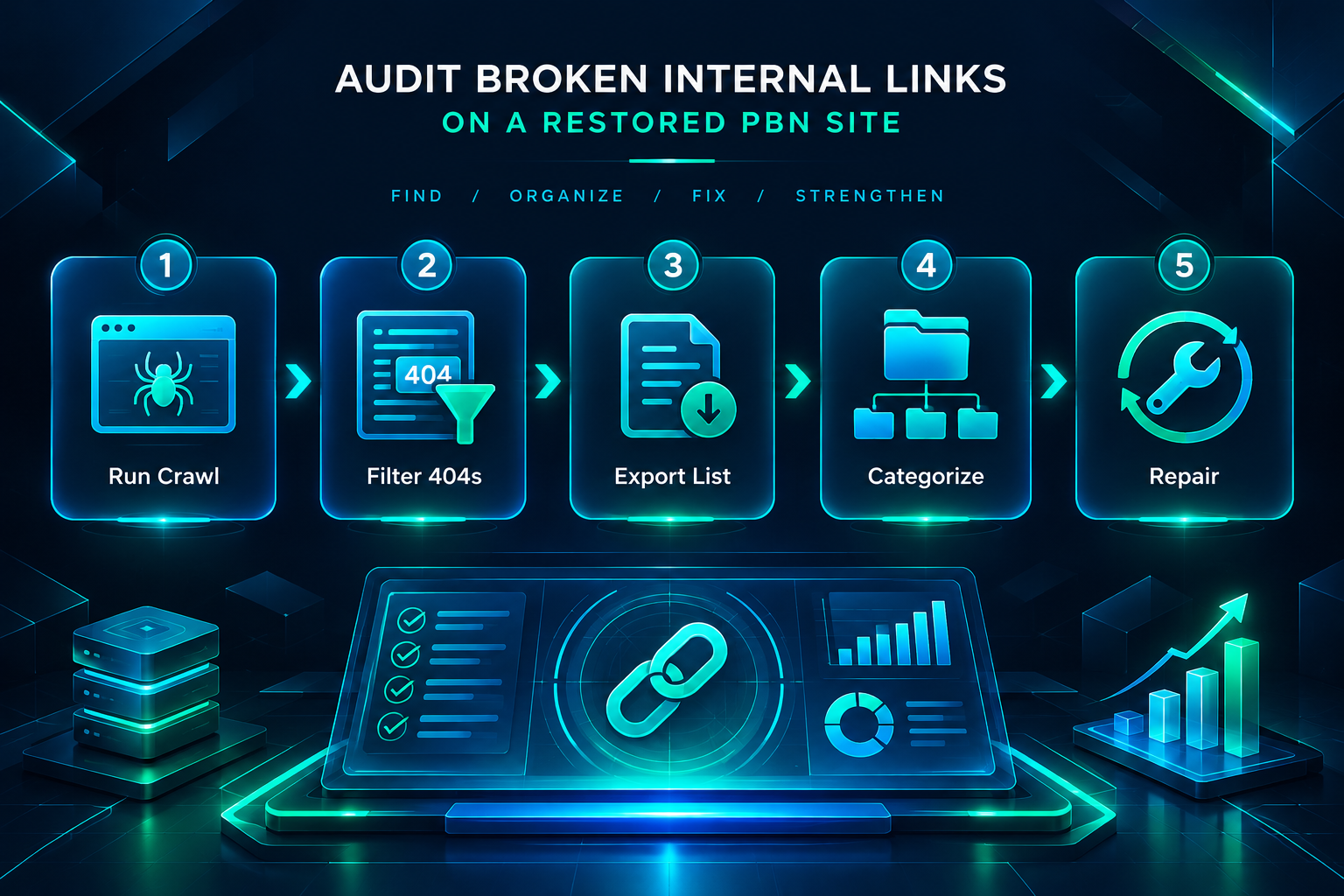
Ahrefs Site Audit and Semrush’s site audit feature offer similar crawl-based broken link detection and may be more convenient for practitioners who already use those platforms for backlink analysis. Google Search Console can also surface crawl errors for broken internal links, though it reflects Google’s crawl history rather than a real-time audit of the current site state. For a freshly restored site, a dedicated crawl tool will give a more immediate and complete picture than Search Console alone.
When running the audit, configure the crawl to follow all internal links including those in navigation menus and footers, not just body content. PBN sites often use footer or sidebar link blocks to distribute internal link equity across the site, and broken links in those locations affect every page that shares the same template. Export the full broken link report before beginning any repairs so that you have a reference list to work against systematically.
The Three Main Methods for Repairing Broken Internal Links
Once the audit is complete, each broken internal link falls into one of three categories that determine the appropriate repair method: the destination page exists at a new URL, the destination page no longer exists and should be recreated, or the destination page no longer exists and the link should be removed or redirected to a relevant alternative.
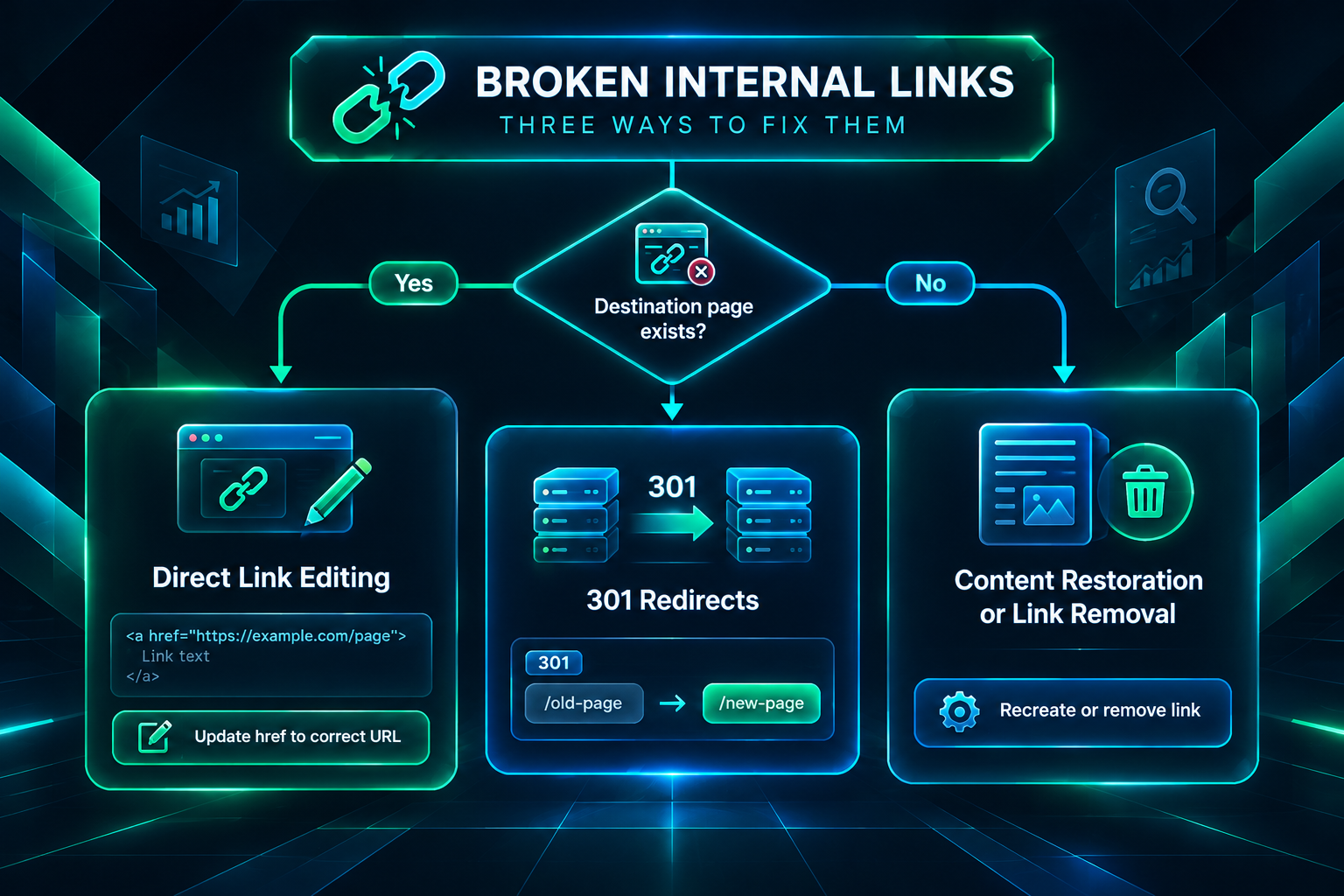
Method 1: Direct Link Editing
Direct link editing is the cleanest repair method when the destination page still exists but at a different URL than the one stored in the internal link. This approach involves opening the source page in the CMS editor, locating the broken link in the body content or widget, and updating the href attribute to the correct current URL. In WordPress, this can be done through the block editor or the classic editor without any additional plugins.
For sites with a large number of broken internal links caused by a systematic URL structure change — such as a permalink format migration — editing each link individually is impractical. In that situation, a database search-and-replace operation is more efficient. The Better Search Replace plugin for WordPress allows you to replace one URL pattern with another across the entire database, including post content, meta fields, and widget data. Running a dry-run first shows how many instances will be affected before committing the change. Always take a fresh database backup immediately before running a bulk search-and-replace operation on a restored site.
Method 2: 301 Redirects
A 301 redirect is appropriate when the destination page has moved to a new URL and you want to preserve any link equity that was flowing through the internal link, or when updating every source link individually is not feasible. Implementing a 301 redirect at the server level or through a WordPress plugin such as Redirection means that any internal link pointing to the old URL will automatically forward to the new destination without producing a 404 error.
Redirects are a practical interim solution, but they are not a permanent substitute for updating the source links directly. Each redirect adds a small amount of latency to the request and introduces a redirect hop that crawlers must follow. For a PBN site where crawl efficiency and clean internal link structure matter for how the site passes link equity to its outbound target pages, resolving the underlying broken link directly is preferable to accumulating a large number of redirects. Use redirects to stop the immediate crawl errors, then work through the source links to update them directly over time.
Method 3: Content Restoration or Link Removal
When the destination page no longer exists and cannot be recreated, the broken internal link should either be removed from the source content or replaced with a link to a relevant existing page. Leaving a broken internal link in place serves no purpose: it does not pass link equity, it creates a poor experience for any visitor who follows it, and it signals to crawlers that the site’s internal structure has not been properly maintained.
If the missing page was a significant piece of content that contributed meaningfully to the site’s topical structure — for example, a cornerstone article that several other posts linked to — recreating it may be worth the effort. A restored PBN site that is missing key content pages will have gaps in its internal link graph that reduce the effectiveness of the site’s overall link-building function. Recreating the missing content and restoring the internal links that pointed to it is the most complete repair in that scenario.
Handling Navigation Menus, Footers, and Widget Links
Body content links are the most visible broken internal links, but navigation menus, footer link blocks, and sidebar widgets are often the source of the highest-volume broken links on a restored PBN site. Because these elements appear on every page or on large groups of pages, a single broken link in a footer widget can produce hundreds of broken link instances in a crawl report even though it requires only one edit to fix.
In WordPress, navigation menus are managed through the Appearance menu. After a restoration, check each menu item’s URL against the current site structure. If the site was restored to a new domain or with a different URL format, menu items that were saved as absolute URLs will need to be updated individually. Footer and sidebar widgets that contain manually entered links should be reviewed in the same way through the widget editor or, for block-based themes, through the site editor.
Some PBN sites use custom-coded link blocks in theme files rather than the standard WordPress widget system. In those cases, the broken links will need to be corrected directly in the theme files, which requires access to the theme editor or FTP. Identifying whether a broken link originates from a theme file or from a CMS-managed element is straightforward from the crawl report: if the same broken URL appears on every page of the site, it almost certainly originates from a template-level element rather than individual post content.
Internal Link Equity and Why Repairs Matter for PBN Effectiveness
A PBN site’s primary function is to pass link equity from its pages to the target site through outbound links. The internal link structure of the PBN site itself affects how that equity is distributed across the site’s pages before it reaches the outbound links. A page that is well-connected within the site’s internal link graph will generally accumulate more internal link equity than an isolated page, and that equity contributes to the relative authority of the outbound link placed on that page.
Broken internal links interrupt this distribution. If a post that contains an outbound link to the target site is not internally linked from other pages on the PBN site — because the links that should point to it are broken — that post receives less internal link equity than it would in a properly maintained site structure. Repairing broken internal links restores the intended flow of equity through the site and ensures that the pages carrying outbound links are properly supported by the site’s internal architecture.
This is not a theoretical concern. Crawlers follow internal links to discover and re-crawl pages. A page that is not reachable through internal links may be crawled less frequently or may not be crawled at all if it is not included in the sitemap. For a restored PBN site that needs its pages to be indexed and crawled regularly, a complete and functional internal link structure is a practical requirement, not an optional refinement.
Verifying Repairs and Preventing Recurrence
After completing the repair process, running a second full crawl of the restored site is essential. The second crawl confirms that all previously identified broken internal links have been resolved and checks whether the repair process itself introduced any new broken links — a risk when bulk search-and-replace operations are used, since an incorrectly specified replacement string can corrupt URLs that were previously working.
Compare the second crawl report against the original broken link list to verify that the 404 count has reached zero for internal links. If any broken links remain, investigate whether they were missed in the initial repair pass or whether they represent a different category of issue, such as a broken link introduced by a plugin update during the restoration process.
To reduce the likelihood of broken internal links appearing again after future site changes, consider using relative URLs for internal links rather than absolute URLs wherever the CMS and theme support it. Relative URLs are not affected by domain changes or protocol changes, which means they remain valid if the site is moved to a new domain or migrated from HTTP to HTTPS. In WordPress, plugins that manage internal linking can help enforce consistent URL formats across new content going forward.
Maintaining an XML sitemap that is submitted to Google Search Console and Bing Webmaster Tools also helps monitor the site’s crawl health over time. If new broken internal links appear after a plugin update or content change, Search Console’s coverage report will surface them, giving you an early signal to investigate before the issue affects the site’s crawl efficiency for an extended period.
Frequently Asked Questions
How long does it take to fix broken internal links on a restored PBN site?
The time required depends on the number of broken links and their source. A site with a systematic URL structure change affecting dozens of pages can often be repaired in under an hour using a bulk database search-and-replace operation. A site with scattered broken links across individual posts may take longer to work through manually. Running the audit first gives you an accurate count before estimating the repair effort.
Should I use redirects or direct link edits to fix broken internal links?
Direct link edits are preferable for long-term site health because they eliminate the redirect hop entirely. Redirects are a practical first step when you need to stop crawl errors quickly or when the volume of broken links makes immediate direct editing impractical. Ideally, use redirects as a temporary measure and update the source links directly over time.
Will broken internal links affect how Google crawls my PBN site?
Broken internal links can reduce crawl efficiency by creating dead ends that crawlers cannot follow. Pages that are only reachable through broken links may be crawled less frequently. Repairing broken internal links ensures that all pages remain reachable through the site’s internal link graph, which supports consistent crawling and indexing.
Can I use a plugin to automatically fix broken internal links in WordPress?
Several WordPress plugins can detect and flag broken internal links, and some offer bulk redirect creation. However, automated fixes carry a risk of incorrect URL substitutions if the plugin does not accurately identify the correct destination for each broken link. Using a plugin to identify broken links and then reviewing each repair manually or through a controlled bulk operation is a more reliable approach than fully automated correction.
Do broken internal links affect the outbound links on a PBN site?
Broken internal links do not directly disable outbound links on the same page. However, they can reduce the internal link equity flowing to the pages that carry outbound links, and they can prevent crawlers from reaching those pages efficiently if the only paths to them are broken. Maintaining a clean internal link structure supports the overall function of the site’s outbound link placements.
What should I check after restoring a PBN site before running a link-building campaign?
Before resuming a link-building campaign on a restored PBN site, verify that all pages are indexed, that the internal link structure is intact with no broken links, that the sitemap is current and submitted, that outbound links to target pages are live and returning 200 status codes, and that the site’s content is complete and matches the intended topical focus of the network site.
Keeping Restored PBN Sites in Working Order for Link-Building Campaigns
Broken internal links on a restored PBN site are a maintenance issue with a clear solution: audit the site with a crawl tool, categorize each broken link by its cause, apply the appropriate repair method, and verify the results with a second crawl. The process is methodical rather than complex, and completing it properly restores the site’s internal link structure to a state where it can support outbound link placements effectively.
The broader point is that a PBN site’s value as a link-building asset depends on its technical health as much as its domain history or content quality. A site with a strong backlink profile and relevant content but a broken internal link structure is not functioning at its full potential. Internal link repairs are one part of the routine maintenance that keeps a private blog network site operating as intended after a restoration, migration, or rebuild.
If you are managing multiple restored PBN sites or evaluating the technical condition of a network before launching a new campaign, a systematic site audit across all properties will surface not only broken internal links but also other crawl issues that may affect how the sites perform. PBN Backlinks Service can help you assess placement quality, domain suitability, and campaign fit — reach out to discuss your network’s current state and what a well-maintained link-building setup looks like for your specific goals.