

Brute force attacks target login pages by systematically trying username and password combinations until access is gained. For private blog network sites, a successful attack can mean lost content, compromised link placements, and potential exposure of the network’s structure — all of which carry real operational consequences. Protecting each PBN site’s login endpoint is a practical maintenance task, not an optional extra, and the methods available range from simple plugin-based rate limiting to server-level firewall rules that block malicious traffic before it reaches WordPress at all.
Key Takeaways
- Brute force protection for PBN sites centers on limiting login attempts, obscuring the login URL, enforcing strong credentials, and adding authentication layers such as two-factor authentication.
- WordPress-level plugins handle most common attack patterns, but server-level or CDN-level rules provide stronger protection by blocking traffic before it consumes server resources.
- Each PBN site should be treated as an independent security unit with its own credentials, so a breach on one site does not cascade across the network.
- Automated monitoring and alerting reduce the window between a breach attempt and a response, which is especially important when managing multiple sites simultaneously.
- Security hardening does not need to be complex or expensive; a consistent baseline applied across every site in the network is more effective than elaborate measures on a few sites and nothing on the rest.
Why Brute Force Protection Matters for PBN Sites
A private blog network typically consists of multiple WordPress installations, each hosting content and outbound links that support a broader SEO strategy. Because these sites are often managed by a small team or a single operator, security can be deprioritized in favor of content production and link placement work. Attackers, however, do not distinguish between a high-traffic authority site and a smaller PBN property — automated bots scan for exposed WordPress login pages continuously, and any site running the default /wp-login.php endpoint without additional protection is a viable target.
The consequences of a successful brute force attack on a PBN site go beyond the immediate inconvenience of regaining access. An attacker who gains administrator access can inject malicious code, redirect outbound links, delete content, or use the site as part of a spam or phishing operation. Any of these outcomes can trigger deindexation of the compromised site, which removes the link placement value that the site was built to provide. From a network management perspective, a breach also creates a potential footprint risk if the attacker’s activity generates unusual crawl patterns or if the site is flagged by security databases that search engine crawlers may reference.
Brute force protection is therefore a direct operational concern for anyone running or maintaining PBN sites, not merely a general web security best practice.
Understanding How Brute Force Attacks Work on WordPress
WordPress installations expose a predictable login endpoint at /wp-login.php and, in many configurations, at /wp-admin/. Automated attack tools — commonly called bots or credential-stuffing scripts — send hundreds or thousands of login requests per minute, cycling through common username and password combinations or using lists of previously leaked credentials. Because WordPress does not natively limit the number of failed login attempts, an unprotected site will process every request, which can also degrade server performance during a sustained attack even if the attacker never succeeds.
Most brute force attempts targeting WordPress sites use the default admin username, common passwords, and the standard login URL. Sites that have changed the administrator username away from admin, use a strong unique password, and have moved or obscured the login URL are significantly harder to attack through automated tools. However, more sophisticated attacks use credential lists derived from data breaches, which means that even non-obvious usernames and moderately strong passwords can be at risk if they have appeared in a previous breach. This is why layered protection — combining multiple measures rather than relying on any single one — is the recommended approach for PBN site security.
Login Attempt Limiting and Lockout Policies
The most widely deployed first line of defense against brute force attacks on WordPress is a login attempt limiter. This type of protection tracks failed login attempts by IP address and temporarily blocks further attempts after a defined threshold is reached — for example, locking out an IP after five failed attempts within ten minutes. Several WordPress security plugins provide this functionality, including Wordfence Security, Limit Login Attempts Reloaded, and WP Cerber Security. Each plugin allows the operator to configure the number of permitted failures, the lockout duration, and whether to notify the site administrator by email when a lockout occurs.
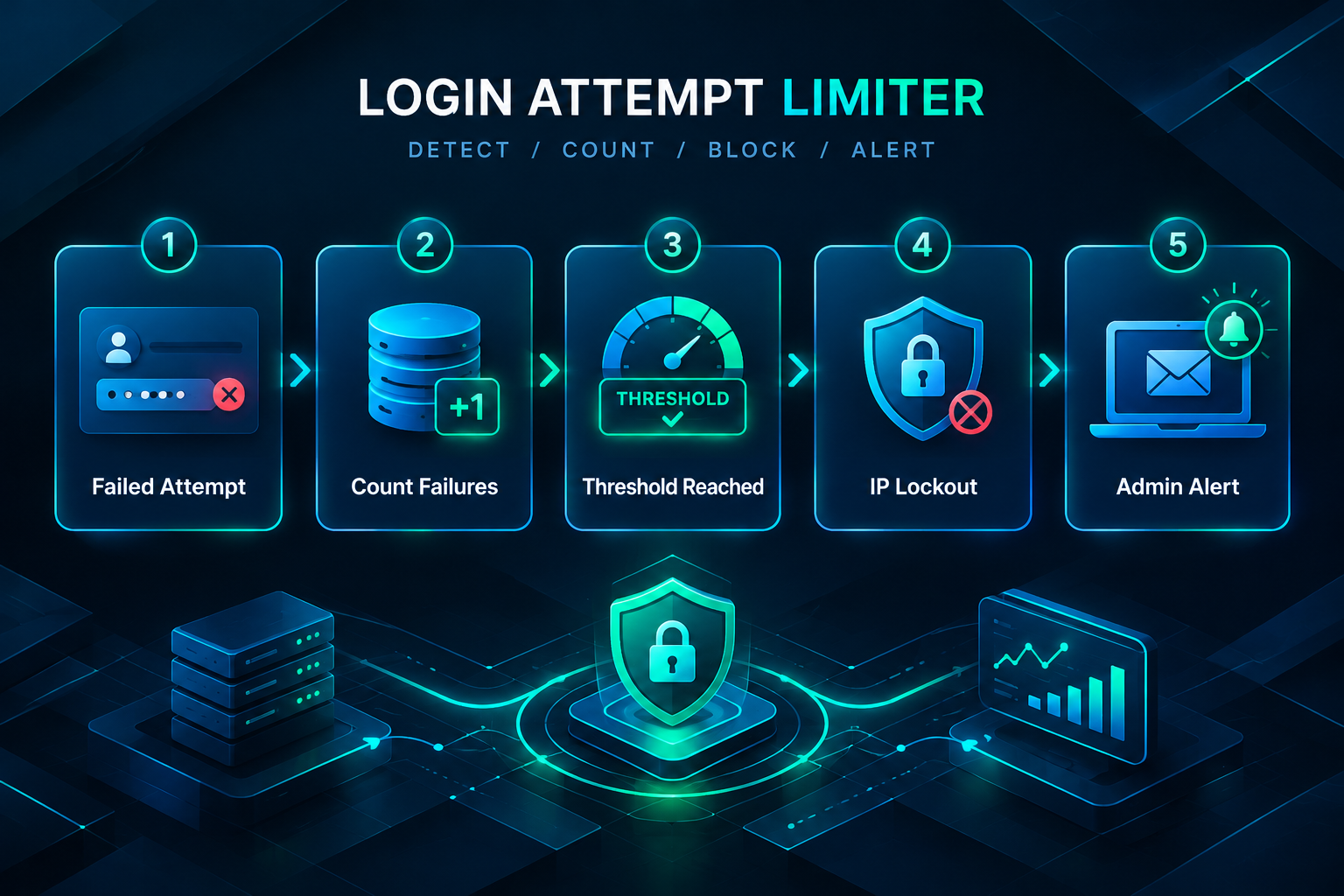
When configuring lockout policies for PBN sites, it is worth setting a relatively low failure threshold — three to five attempts is common — combined with a progressively longer lockout for repeat offenders. Some plugins support permanent IP banning after a certain number of lockout events from the same address, which is useful for blocking persistent automated attackers. The trade-off is that overly aggressive lockout settings can occasionally lock out legitimate users, including the site owner, if they mistype their password. Whitelisting the operator’s own IP address in the plugin settings avoids this problem for sites managed from a consistent location.
For networks with many sites, it is practical to use a plugin that supports centralized configuration or to deploy a consistent configuration template across all installations. Inconsistent lockout settings across a network mean that some sites remain more exposed than others, which undermines the overall security posture.
Changing and Obscuring the WordPress Login URL
Because automated brute force tools target the default WordPress login URL, moving the login page to a non-standard path removes the site from the scope of the most common attack scripts. Plugins such as WPS Hide Login allow the operator to set a custom login URL — for example, /site-access/ or any other path — and return a 404 error to requests made to the original /wp-login.php address. This does not make the login page impossible to find for a determined attacker, but it eliminates the vast majority of automated bot traffic that relies on the predictable default path.
When using a custom login URL across a PBN, it is important to use a different path on each site rather than a single shared path across the entire network. Using the same custom login URL on every site creates a detectable pattern that could contribute to network footprint identification. Each site should have a unique, non-obvious login path that is documented securely by the operator.
It is also worth noting that obscuring the login URL is a complementary measure, not a replacement for login attempt limiting or strong credentials. A site with a hidden login URL but a weak password and no lockout policy remains vulnerable if the login path is discovered through directory enumeration or other reconnaissance methods.
Strong Credentials and Username Hardening
WordPress installations created before version 3.0 defaulted to the username admin, and many older sites — including some expired domains repurposed for PBN use — may still carry this default. Automated brute force tools almost universally try admin as the first username, so changing the administrator account to a unique, non-obvious username is one of the simplest and most effective hardening steps available. The username does not need to be complex in the way a password does, but it should not be the site’s domain name, the operator’s real name, or any other easily guessable identifier.
Password strength is equally important. A strong WordPress administrator password should be at least sixteen characters and include a mix of uppercase and lowercase letters, numbers, and symbols. WordPress’s built-in password generator produces suitable passwords, and a password manager makes it practical to use a unique strong password for every site in the network without needing to memorize them. Reusing the same password across multiple PBN sites is a significant risk: if one site’s credentials are compromised through any means, an attacker who tries those credentials on other sites in the network may gain access to multiple properties.
For PBN networks managed by more than one person, each contributor should have their own account with the minimum necessary permissions. Editor-level access is sufficient for content contributors; administrator access should be limited to the operator responsible for site configuration and security.
Two-Factor Authentication for PBN Site Logins
Two-factor authentication (2FA) adds a second verification step to the login process, requiring the user to provide both a password and a time-sensitive code generated by an authenticator app or delivered by another method. Even if an attacker obtains the correct username and password through a brute force attack or a credential leak, 2FA prevents login without the second factor. For PBN sites, this is a particularly valuable layer of protection because the sites are often accessed infrequently, meaning a compromised password might not be noticed quickly.
WordPress does not include 2FA natively, but several plugins add this capability. Wordfence Security includes 2FA as part of its feature set. WP 2FA is a dedicated plugin that supports multiple authenticator apps and provides a setup wizard. Google Authenticator plugins are also available, though the operator should verify that any plugin chosen is actively maintained and compatible with the current WordPress version before deploying it across a network.
For PBN networks with many sites, the practical challenge of 2FA is managing the authenticator codes across multiple installations. Using an authenticator app that supports multiple accounts — such as Authy or a similar tool — makes this manageable. The operator should also configure backup codes during 2FA setup on each site, stored securely, to avoid being locked out if the primary authenticator device is unavailable.
Server-Level and CDN-Level Brute Force Protection
Plugin-based protection operates within WordPress, which means the server still receives and processes each login request before the plugin can evaluate and block it. During a high-volume brute force attack, this can place significant load on the server even if no login attempts succeed. Server-level protection addresses this by blocking malicious traffic at the web server or firewall layer, before requests reach the WordPress application.
Common server-level approaches include configuring the web server — Apache or Nginx — to rate-limit requests to the login endpoint, or using a Web Application Firewall (WAF) to identify and block attack patterns. Hosting providers that offer managed WordPress hosting often include server-level brute force protection as part of their service. For PBN operators using unmanaged VPS or dedicated hosting, configuring Fail2Ban is a widely used approach: Fail2Ban monitors server logs for repeated failed authentication attempts and automatically adds firewall rules to block the offending IP addresses.
Content delivery networks such as Cloudflare provide an additional layer of protection through their WAF and rate-limiting features. Cloudflare’s free tier includes basic DDoS protection and the ability to create rate-limiting rules for specific URLs, including the WordPress login page. Paid Cloudflare plans offer more granular WAF rules and bot management features. For PBN sites, using Cloudflare also has the benefit of masking the origin server’s IP address, which reduces the attack surface for direct-to-IP attacks that bypass the CDN.
When using Cloudflare or another CDN in front of PBN sites, the operator should ensure that the CDN configuration does not inadvertently expose the origin IP through DNS records or other means, as this would undermine the IP-masking benefit.
XML-RPC Disabling and REST API Considerations
WordPress’s XML-RPC interface provides an alternative authentication endpoint that brute force tools frequently target. XML-RPC allows multiple login attempts to be bundled into a single request, which can make brute force attacks faster and harder to detect with simple per-request rate limiting. Unless the PBN site uses a plugin or service that requires XML-RPC — such as certain mobile apps or third-party publishing tools — disabling XML-RPC entirely is a straightforward hardening measure.
XML-RPC can be disabled through a security plugin such as Wordfence or WP Cerber, or by adding a rule to the site’s .htaccess file or Nginx configuration that blocks requests to /xmlrpc.php. Some hosting control panels also provide a one-click option to disable XML-RPC at the server level. After disabling XML-RPC, the operator should verify that no active plugin or integration depends on it before applying the change across the full network.
The WordPress REST API also exposes user enumeration endpoints by default, which can allow an attacker to discover valid usernames before attempting a brute force login. Restricting or disabling user enumeration through the REST API — available through security plugins or custom code — removes this reconnaissance vector. This is particularly relevant for PBN sites where keeping the administrator username non-obvious is part of the security strategy.
Monitoring, Alerting, and Incident Response for PBN Networks
Consistent monitoring across a PBN network allows the operator to detect attack activity early and respond before a breach occurs. Most security plugins that include login attempt limiting also provide logging of failed login attempts, lockout events, and successful logins from new IP addresses. Reviewing these logs periodically — or configuring email alerts for significant events such as repeated lockouts or a successful login from an unfamiliar location — gives the operator visibility into attack patterns across the network.
For larger networks, manual log review across every site is impractical. Centralized security monitoring tools, or a managed WordPress security service, can aggregate alerts from multiple sites into a single dashboard. Some hosting providers offer server-level intrusion detection that covers all sites on the account. The key operational requirement is that the monitoring system generates actionable alerts rather than simply logging events that are never reviewed.
An incident response plan for a PBN network does not need to be elaborate, but it should define the steps to take if a site is compromised: isolating the affected site, changing all credentials, reviewing recent file changes for injected code, restoring from a clean backup if necessary, and auditing other sites in the network for signs of related activity. Having a recent backup of each site is a prerequisite for effective incident response; backup frequency should match the rate at which the site’s content changes.
Applying Security Consistently Across the Entire Network
The security of a PBN network is determined by its weakest site. An attacker who gains access to one poorly protected site may use that access to identify other sites in the network — through shared hosting accounts, similar plugin configurations, or internal links — and attempt to compromise them as well. Applying a consistent security baseline across every site in the network is therefore more valuable than implementing advanced measures on a subset of sites while leaving others unprotected.
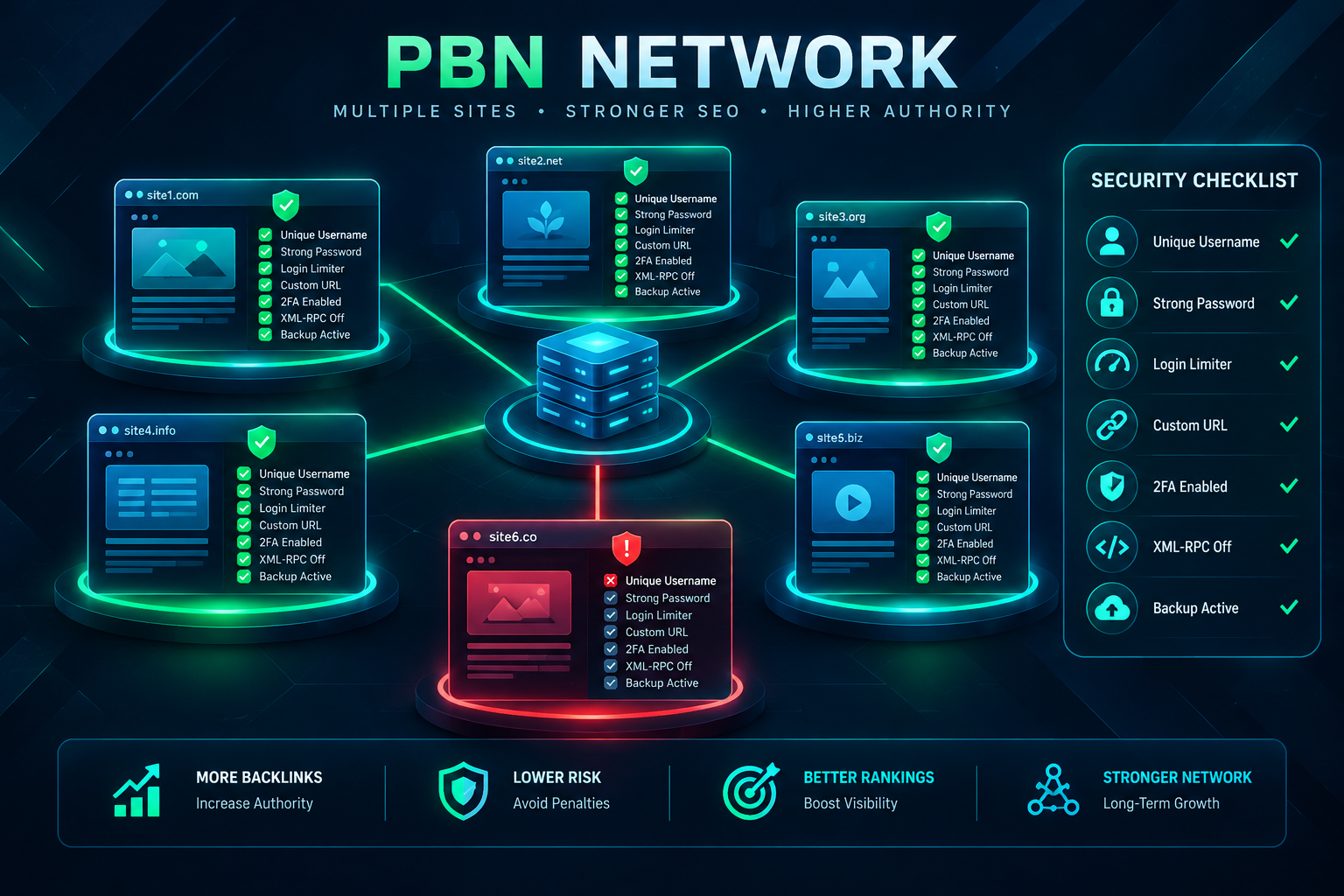
A practical baseline for each PBN site includes: a non-default administrator username, a strong unique password, login attempt limiting enabled, the login URL changed to a site-specific custom path, XML-RPC disabled unless required, 2FA enabled for administrator accounts, and a recent backup stored off-server. This baseline can be implemented using free or low-cost plugins and does not require advanced technical knowledge. For operators managing a large number of sites, documenting the baseline configuration and using it as a checklist during site setup reduces the likelihood of individual sites being left with default settings.
Periodic security audits — reviewing plugin versions, checking for unauthorized user accounts, confirming that lockout settings are still active after plugin updates — help maintain the baseline over time. WordPress plugin updates occasionally reset or alter security plugin settings, so verifying the configuration after major updates is a worthwhile habit.
Frequently Asked Questions
Does changing the WordPress login URL fully protect a PBN site from brute force attacks?
Changing the login URL removes the site from the scope of automated tools that target the default /wp-login.php path, which eliminates a large proportion of common bot traffic. However, it does not protect against attackers who discover the custom URL through other means. It should be used alongside login attempt limiting and strong credentials rather than as a standalone measure.
Should every PBN site have a different custom login URL?
Yes. Using the same custom login path across all sites in a network creates a consistent pattern that could contribute to network identification. Each site should use a unique path, documented securely by the operator.
Is Cloudflare suitable for PBN sites, and does it affect link value?
Cloudflare is widely used for WordPress sites of all types and provides meaningful brute force and DDoS protection through its WAF and rate-limiting features. Using Cloudflare as a CDN in front of a PBN site does not inherently affect the link value of outbound placements. The primary security benefit is blocking malicious traffic before it reaches the origin server and masking the server’s IP address.
What should I do if a PBN site is successfully compromised?
Isolate the site immediately by taking it offline or restricting access, change all credentials associated with the site and the hosting account, scan all files for injected code or unauthorized changes, restore from a clean backup if the extent of the compromise is unclear, and audit other sites in the network for related activity. Review how the breach occurred and update the security configuration to close the gap.
Do security plugins slow down PBN sites?
Most login security plugins have a minimal performance impact because they operate only on login requests rather than on every page load. Comprehensive security plugins that include real-time malware scanning may have a more noticeable effect on server resources, particularly on low-specification hosting. For PBN sites where performance is a concern, a focused login-protection plugin combined with server-level or CDN-level rate limiting is often a lighter-weight alternative to a full-featured security suite.
How often should I audit the security configuration of PBN sites?
A security review after each significant WordPress core update, after major plugin updates, and at least quarterly for the network as a whole is a reasonable baseline. The review should confirm that lockout settings are active, that no unauthorized user accounts have been added, that plugin versions are current, and that backups are functioning correctly.
Building a Secure Foundation for Your PBN Network
Brute force login protection for PBN sites is a practical, achievable goal that does not require specialized security expertise or significant ongoing cost. The measures that provide the greatest protection — login attempt limiting, custom login URLs unique to each site, strong non-reused credentials, two-factor authentication, and XML-RPC disabling — are available through widely maintained free plugins and standard hosting configurations. Server-level tools such as Fail2Ban and CDN-level protection through Cloudflare add meaningful depth for operators who want to reduce the load that attack traffic places on their servers.
The most important principle for a network of sites is consistency. A single unprotected site represents a potential entry point that could affect the broader network, so applying a documented security baseline during setup and maintaining it through periodic audits is more effective than any individual measure applied selectively. Monitoring and alerting ensure that attack activity is visible rather than silent, and a clear incident response process reduces the impact of any breach that does occur.
If you are building or expanding a PBN and want to discuss the operational and technical aspects of managing a network effectively — including site setup, domain selection, and placement quality — the team at PBN Backlinks Service can help you assess your requirements and identify an approach that fits your SEO goals.