

Managing user access across a private blog network requires deliberate planning, especially when multiple contributors, editors, or outsourced writers need varying levels of control over different sites. Without a structured access framework, a PBN can quickly become difficult to maintain, vulnerable to accidental changes, and harder to keep operationally secure. This guide covers the practical steps, role structures, and platform-level tools that help network operators control who can do what across each site in their PBN.
Key Takeaways
- Assigning the minimum necessary permissions to each user role reduces the risk of accidental or unauthorized changes across PBN sites.
- WordPress user roles — Subscriber, Contributor, Author, Editor, and Administrator — provide a built-in permission hierarchy that suits most PBN team structures.
- Separating administrative credentials from content contributor accounts is one of the most effective operational security measures for a private blog network.
- Centralized management tools and password managers help network operators maintain consistent access control without logging into each site individually.
- Regular access audits — removing inactive accounts and rotating credentials — are a routine maintenance task for any multi-site PBN operation.
Why Access Control Matters for Private Blog Networks
A private blog network typically consists of multiple independent websites, each requiring its own content, technical maintenance, and occasional updates. When a network grows beyond a handful of sites, the operator usually needs to involve other people — content writers, SEO specialists, virtual assistants, or developers. Each additional user represents both an operational necessity and a potential point of vulnerability. Poorly managed access can lead to unintended content changes, accidental plugin updates that break a site, or exposure of the network’s structure if login credentials are shared carelessly.
Access control in a PBN context is not just a security concern; it is also an operational efficiency issue. When roles are clearly defined, contributors know exactly what they can and cannot do, which reduces the need for constant oversight. A writer who only needs to draft posts does not need access to theme settings or plugin management. A developer fixing a technical issue does not need to see or modify published content. Matching permissions to actual job functions keeps each site stable and reduces the chance of configuration errors that could affect indexing or site performance.
There is also a footprint consideration worth noting. If multiple PBN sites share the same administrator email address, the same user accounts, or the same login credentials, that pattern could potentially be identified by someone conducting a thorough investigation of the network. Keeping user accounts distinct across sites — and avoiding obvious shared identifiers — is a standard operational practice for network operators who want to maintain separation between their properties.
Understanding WordPress User Roles for PBN Management
Most PBN sites run on WordPress, which includes a built-in role system that covers the majority of access scenarios a network operator will encounter. Understanding what each role can and cannot do is the foundation of a sensible access policy.
Administrator is the highest permission level. An Administrator can install and delete plugins, change themes, modify site settings, manage all users, and access every area of the WordPress dashboard. In a PBN context, Administrator access should be reserved for the network owner or a trusted technical manager. Giving Administrator access to a content writer or a freelancer is unnecessary and creates avoidable risk.
Editor can publish, edit, and delete any post or page, including content written by other users. Editors can also manage categories, tags, and comments. This role suits a content manager who needs to review and publish work from multiple contributors without needing access to site settings or plugins.
Author can write, edit, and publish their own posts, but cannot modify content created by others. Authors can upload media files. This role is appropriate for a regular content contributor who submits finished articles directly to a specific PBN site.
Contributor can write and edit their own posts but cannot publish them — content must be reviewed and published by an Editor or Administrator. Contributors cannot upload media. This is the most restrictive active-contributor role and suits freelance writers whose work needs approval before going live.
Subscriber can only manage their own profile. This role has almost no practical use in a PBN content workflow but may be relevant if a site has a membership or comment-registration component.
For most PBN operations, the practical role structure is: one or two Administrator accounts held by the network owner, an Editor account for a content manager if one exists, and Author or Contributor accounts for individual writers. Keeping the Administrator count low is a consistent best practice.
Setting Up and Assigning User Accounts Across PBN Sites
Adding a user in WordPress is straightforward. From the dashboard, navigate to Users, then Add New. Enter a username, email address, and select the appropriate role from the dropdown menu. WordPress will send an invitation email to the new user with a link to set their password. The network operator does not need to create or share the password directly, which is a cleaner and more secure process than distributing credentials manually.
For a PBN with many sites, creating individual accounts on each site separately can become time-consuming. Several approaches can reduce this overhead. WordPress Multisite allows a single installation to host multiple sites under one dashboard, with a Network Administrator role that sits above individual site administrators. However, Multisite is not always the right choice for a PBN because it creates a visible technical relationship between all sites on the network — a shared database, shared hosting environment, and a common installation. Many network operators prefer to keep sites on separate hosting accounts and separate WordPress installations precisely to avoid that kind of shared footprint.
For networks of independent WordPress installations, a management tool such as MainWP or ManageWP can connect multiple sites to a central dashboard. These tools allow the operator to add users, push updates, and monitor sites from one interface without logging into each site individually. The user management features in these tools vary, so it is worth reviewing what each platform currently supports before committing to one. Both platforms require installing a plugin on each connected site, which is a factor to consider in the context of plugin footprint across the network.
Operational Security Practices for PBN User Access
Operational security for a private blog network goes beyond assigning the right WordPress role. The way credentials are stored, shared, and rotated has a significant effect on how well the network is protected against both external threats and internal mistakes.
Use a password manager. Storing PBN site credentials in a spreadsheet or a shared document is a common but avoidable risk. A password manager such as Bitwarden, 1Password, or a similar tool allows the network operator to store unique, complex passwords for each site and share specific credentials with team members without exposing the full credential set. Most password managers support shared vaults or individual sharing, which means a writer can be given access to one site’s login without seeing credentials for the rest of the network.
Create unique credentials for each site. Reusing the same username and password across multiple PBN sites means that a single compromised account could expose the entire network. Each site should have its own Administrator username — avoiding the default “admin” username that WordPress historically used — and a unique, strong password.
Use unique email addresses for Administrator accounts. If every PBN site is registered with the same Administrator email address, that email becomes a visible link between the sites. Many network operators use separate email addresses for each site, often hosted on the site’s own domain or through a privacy-focused email provider. This is a standard footprint-reduction measure.
Enable two-factor authentication where practical. WordPress does not include two-factor authentication by default, but plugins such as WP 2FA or Google Authenticator for WordPress can add this layer. Two-factor authentication is most valuable on Administrator accounts, where unauthorized access would have the most significant consequences. For Contributor or Author accounts with limited permissions, the risk-benefit calculation may differ depending on the network’s size and sensitivity.
Limit login attempts. Brute-force login attempts are a common attack vector for WordPress sites. A plugin that limits failed login attempts or implements a lockout period after repeated failures reduces this exposure. This is a basic hardening step that applies to any WordPress site, including PBN properties.
Managing Access for Outsourced Writers and Freelancers
Outsourcing content creation is common in PBN management, and it introduces specific access considerations. A freelance writer typically needs the minimum access required to submit content — usually a Contributor or Author role on the specific site they are writing for. They do not need access to other sites in the network, and they do not need to know how many sites the network contains.
When working with freelancers, it is worth considering whether to give them direct WordPress access at all. Some network operators prefer to receive finished content by email or through a document-sharing platform and then publish it themselves or through a trusted Editor. This approach keeps the number of active user accounts low and avoids the need to manage and revoke freelancer access after a project ends. The trade-off is additional time spent on publishing tasks.
If direct WordPress access is granted to a freelancer, the account should be created with the Contributor role rather than Author, so that content requires approval before publication. Once the working relationship ends, the account should be deleted or deactivated promptly. Leaving inactive accounts on a site is an unnecessary security exposure, and it also creates clutter in the user list that makes auditing more difficult over time.
For ongoing content relationships, some operators create a generic Author account for a specific site — for example, a pen name that matches the site’s editorial persona — and share those credentials with the current writer through a password manager. When the writer changes, the password is rotated rather than a new account being created. This approach keeps the user list clean and avoids accumulating accounts tied to former contributors.
Conducting Regular Access Audits
An access audit is a periodic review of who has accounts on each PBN site, what role they hold, and whether that access is still necessary. For a small network, this might be a quarterly task. For a larger operation with frequent contributor turnover, monthly reviews may be more appropriate.
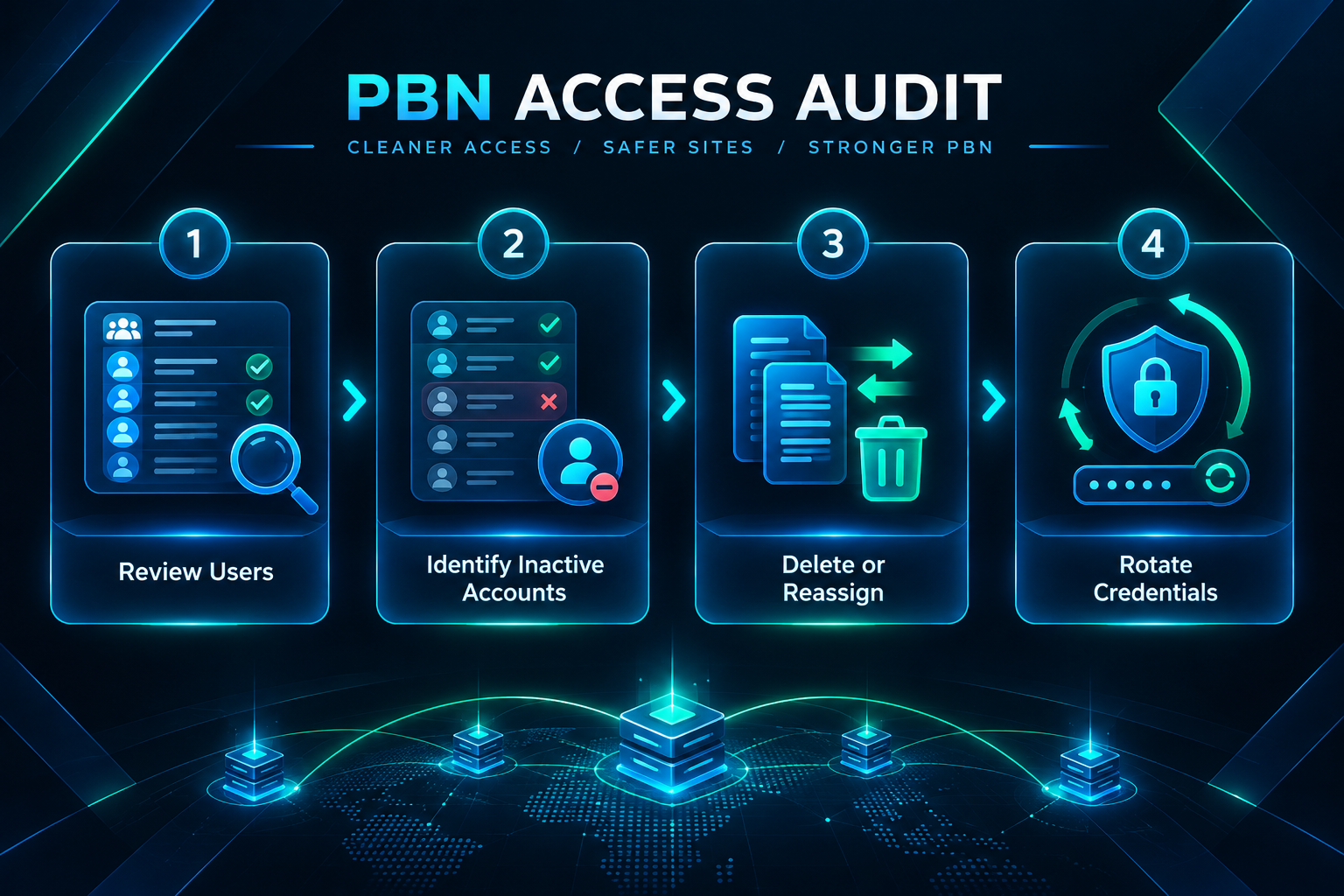
During an audit, the operator should check the Users list in each WordPress dashboard and identify any accounts that belong to former contributors, developers who completed a one-time task, or anyone whose role has changed. Accounts that are no longer needed should be deleted. WordPress will prompt the operator to reassign or delete content associated with the account being removed, which is an important step — deleting an Author account without reassigning their posts will remove those posts from the site.
Credentials for active Administrator accounts should be rotated periodically, particularly after any team change or if there is any reason to suspect that credentials may have been exposed. Password rotation is a routine maintenance task, not an emergency measure, and treating it as such makes it easier to maintain consistently.
Keeping a simple log of who has access to which sites, when access was granted, and when it was last reviewed is useful for larger networks. This does not need to be a complex system — a shared spreadsheet or a note in a password manager is sufficient. The goal is to avoid the situation where access has been granted and then forgotten, leaving accounts active long after they are needed.
Structuring Access for Agencies and SEO Teams
SEO agencies and in-house teams managing PBN campaigns on behalf of clients face a slightly different access challenge. The agency needs enough access to manage placements, verify that content is published correctly, and monitor site health, but the client may also want visibility into what is happening across the network.
A practical structure for agency-managed PBN operations separates the network owner’s Administrator credentials from the operational accounts used for day-to-day management. The agency’s technical team might hold Editor or Administrator access on individual sites for the duration of a campaign, with those accounts removed or downgraded when the engagement ends. Client-facing reporting can be handled through screenshots, exported data, or read-only access to analytics rather than direct WordPress access.
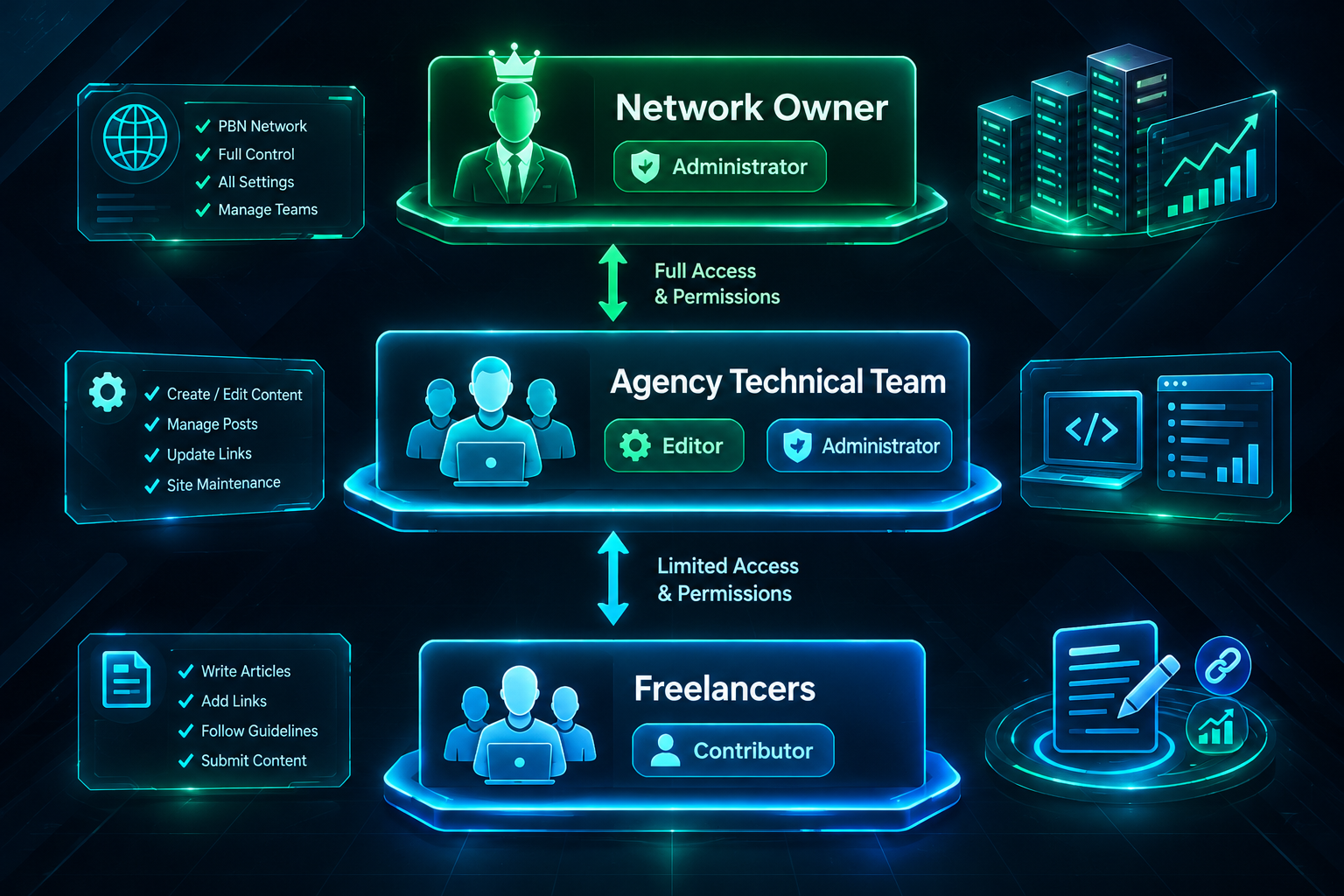
When an agency manages a PBN on behalf of a client, clear documentation of which accounts exist on which sites — and who is responsible for maintaining them — prevents confusion when team members change or when the client eventually takes over management. Handover documentation should include a full list of active user accounts, the credentials stored in the password manager, and any plugins or tools used for centralized management.
Plugin and Tool Considerations for Multi-Site Access Management
Beyond the built-in WordPress role system, several plugins and external tools can extend access management capabilities for PBN operators managing larger networks.
User Role Editor is a WordPress plugin that allows the operator to customize what each role can do, adding or removing specific capabilities beyond the defaults. This can be useful if the standard Author role is slightly too permissive or too restrictive for a specific workflow. Custom roles can be created to match the exact permissions a particular contributor needs.
Members is another capability management plugin with a similar function, offering a visual interface for adjusting role permissions on a per-site basis.
MainWP and ManageWP, mentioned earlier in the context of centralized management, both offer user management features that allow the operator to add or remove users across connected sites from a single dashboard. The specific features available in each platform change over time, so reviewing current documentation before relying on a particular capability is advisable.
Cloudflare access controls, while not WordPress-specific, can add an additional layer of protection to PBN sites by restricting who can reach the WordPress login page at all. Cloudflare’s Access product allows the operator to require authentication before a visitor can even reach the wp-admin URL, which significantly reduces exposure to automated login attacks. This is a more advanced configuration that may be appropriate for larger or higher-value networks.
Frequently Asked Questions
What WordPress role should I assign to a freelance content writer on a PBN site?
A Contributor role is generally the most appropriate starting point for a freelance writer. Contributors can draft and edit their own posts but cannot publish them without approval from an Editor or Administrator. This means content goes through a review step before it goes live, which suits most PBN workflows where quality control matters. If the writer is trusted and the review step is unnecessary, an Author role allows direct publishing without granting access to site settings or other users’ content.
Should each PBN site have a separate Administrator account?
Yes. Using a separate Administrator account — with a unique username, password, and email address — for each site is a standard practice for reducing the operational and footprint risks associated with shared credentials. If one site’s credentials are compromised, separate accounts limit the exposure to that single site rather than the entire network.
How do I remove a user from a WordPress site without deleting their content?
When deleting a user in WordPress, the platform prompts you to either delete all content associated with that user or reassign it to another user. Choose the reassign option and select an active account — typically the Administrator or a designated Author persona — to retain the published posts. This keeps the content live while removing the former contributor’s account from the site.
Is WordPress Multisite a good option for managing a PBN?
WordPress Multisite simplifies some management tasks by centralizing multiple sites under one installation, but it creates a visible technical relationship between all sites in the network — shared hosting, shared database, and a common installation path. Many PBN operators prefer separate installations on separate hosting accounts to maintain clearer separation between properties. The right choice depends on the network’s size, the operator’s technical resources, and how much weight is placed on keeping sites technically distinct.
How often should I audit user access across my PBN sites?
For most networks, a quarterly audit is a reasonable baseline. Networks with frequent contributor turnover or active development work may benefit from monthly reviews. The audit should check for inactive accounts, verify that current roles still match each user’s actual responsibilities, and confirm that Administrator credentials have been rotated if any team changes have occurred.
Can I use the same email address for Administrator accounts across multiple PBN sites?
Using the same email address across multiple sites creates a visible link between those properties, which is generally something PBN operators prefer to avoid. Using separate email addresses — ideally hosted on each site’s own domain or through distinct accounts — is a straightforward footprint-reduction measure that most experienced operators treat as standard practice.
Building a Sustainable Access Management System for Your PBN
Effective user access management for a private blog network is less about any single tool or setting and more about establishing consistent habits: assigning the minimum necessary permissions, keeping Administrator accounts separate and limited, using a password manager to store and share credentials safely, and reviewing access regularly as the team and network evolve. These practices reduce operational risk, make the network easier to maintain, and keep the management structure clean as the number of sites and contributors grows.
For network operators who are scaling their PBN or taking on outsourced content at volume, investing time in a centralized management approach — whether through a tool like MainWP or a well-organized credential system — pays dividends in reduced administrative overhead. The goal is a system where adding a new contributor, rotating a credential, or removing a former team member takes minutes rather than hours across a large network.
If you are building or expanding a private blog network and want to discuss placement quality, domain selection, or how a managed PBN service handles operational structure, the team at PBN Backlinks Service can help you assess what approach fits your campaign requirements.