

A distributed denial-of-service attack can take a PBN site offline within minutes, breaking the link equity it passes and potentially exposing the network’s structure to competitors or automated crawlers. Protecting private blog network sites from DDoS attacks requires a layered approach that combines traffic filtering, hosting configuration, and network-level mitigation — the same fundamentals that apply to any website, adapted to the operational requirements of a PBN.
Key Takeaways
- DDoS protection for PBN sites relies on the same core techniques used for any website: traffic scrubbing, rate limiting, CDN-based filtering, and resilient hosting infrastructure.
- A CDN with built-in DDoS mitigation — such as Cloudflare — can absorb volumetric attacks before they reach the origin server, keeping individual PBN sites accessible during an attack.
- Hosting diversity across different providers and IP ranges reduces the risk that a single attack or infrastructure failure takes down multiple PBN sites simultaneously.
- Monitoring tools that alert on abnormal traffic spikes allow faster response and help distinguish a genuine DDoS from a sudden organic traffic surge or a crawler burst.
- No single protection layer eliminates all DDoS risk; a combination of CDN filtering, server-level hardening, and a reliable hosting strategy provides the most practical resilience for a private blog network.
What a DDoS Attack Means for a PBN Site
A distributed denial-of-service attack floods a target server with more requests than it can process, causing the site to slow down or go offline entirely. For a standard commercial website, the primary concern is lost revenue and user experience. For a PBN site, the consequences extend further: an offline site stops passing link signals to the target URL, and prolonged downtime can trigger deindexation by search engine crawlers that repeatedly fail to access the page. If a PBN site remains unreachable for an extended period, search engines may drop it from their index, which removes the placement’s value until the site recovers and is recrawled.
PBN sites are also relatively lightweight targets. Many run on shared or budget hosting with limited bandwidth, making them easier to overwhelm than enterprise infrastructure. An attacker — whether a competitor, a bot operator, or an opportunistic script — does not need a sophisticated attack to bring down a small WordPress site on a low-tier hosting plan. Understanding this asymmetry is the starting point for building a realistic protection strategy.
Types of DDoS Attacks That Affect PBN Sites
DDoS attacks are generally categorized by the layer they target. Volumetric attacks send massive amounts of traffic — often using UDP floods or ICMP floods — to saturate the server’s bandwidth. These are the most common type and the easiest to mitigate with a CDN or upstream traffic scrubbing service. Protocol attacks exploit weaknesses in network protocols, such as SYN floods that exhaust server connection tables. Application-layer attacks, sometimes called Layer 7 attacks, send seemingly legitimate HTTP requests at high volume, targeting the web server or the CMS directly rather than the network connection.
For PBN sites running WordPress, application-layer attacks are particularly relevant because WordPress itself can be resource-intensive under load. A flood of POST requests to wp-login.php or xmlrpc.php can consume server resources even at relatively low request volumes, making the site unresponsive without the raw traffic volume of a volumetric attack. Recognizing which attack type a site is experiencing helps determine which mitigation layer to prioritize first.
CDN-Based DDoS Mitigation for PBN Sites
A content delivery network with integrated DDoS protection is the most practical first line of defense for most PBN sites. When a PBN site’s DNS is pointed to a CDN, incoming traffic passes through the CDN’s network before reaching the origin server. The CDN can identify and filter malicious traffic patterns — volumetric floods, protocol anomalies, and suspicious request signatures — before they reach the hosting infrastructure.
Cloudflare is widely used for this purpose and offers a free tier that includes basic DDoS mitigation, rate limiting, and bot management. Configuring a PBN site behind Cloudflare means the origin server’s real IP address is hidden from public DNS lookups, which removes one attack vector: an attacker who cannot identify the origin IP cannot bypass the CDN by targeting the server directly. This IP masking is a meaningful operational benefit for PBN sites, where keeping infrastructure details less visible is already a standard practice.
When using a CDN for PBN sites, it is important to ensure that the origin IP is not exposed through other channels — DNS history, SSL certificate transparency logs, or server headers. Tools that check for IP leaks can help verify that the CDN is genuinely shielding the origin. If the origin IP is already known, changing it at the hosting provider level and then configuring the CDN before pointing DNS is the correct sequence.
Server-Level Hardening and Rate Limiting
CDN-level filtering handles most volumetric and protocol attacks, but server-level hardening provides an additional layer of protection, particularly against application-layer attacks that may partially pass through CDN filtering. Several server-side measures are practical for PBN sites regardless of their hosting environment.
Rate limiting restricts the number of requests a single IP address can make within a defined time window. Most CDN providers offer rate limiting as a configurable rule, and web server software such as Nginx and Apache can also enforce rate limits at the server level. For WordPress-based PBN sites, blocking or restricting access to high-risk endpoints — particularly wp-login.php and xmlrpc.php — reduces the attack surface for application-layer floods. Disabling XML-RPC entirely is a common hardening step for PBN sites that do not use remote publishing or pingback functionality.
Web application firewalls (WAFs) inspect incoming HTTP requests and block those matching known attack signatures. Cloudflare’s WAF is available on paid plans, and server-side WAF solutions such as ModSecurity can be configured at the hosting level. A WAF is particularly useful for filtering application-layer attacks that volumetric mitigation alone does not address. For PBN sites on managed WordPress hosting, the hosting provider may already include WAF functionality as part of the plan.
Hosting Strategy and Infrastructure Diversity
Hosting configuration is one of the most important factors in both DDoS resilience and the broader operational stability of a private blog network. A PBN where all sites share the same hosting provider, the same IP block, or the same server is vulnerable in two distinct ways: a single DDoS attack or infrastructure outage can take down multiple sites simultaneously, and the shared infrastructure creates a visible footprint that is operationally undesirable for a private network.
Distributing PBN sites across multiple hosting providers — ideally across different autonomous systems and geographic regions — means that an attack targeting one provider’s infrastructure does not affect sites hosted elsewhere. This hosting diversity is already a standard recommendation for PBN management for footprint reasons, and it provides a natural DDoS resilience benefit as a secondary effect. Different providers also have different upstream DDoS mitigation capabilities, so distributing sites across providers with strong network-level protection adds another layer of defense.
Dedicated IP addresses, where available, allow more granular traffic management and make it easier to apply IP-specific firewall rules. Shared hosting environments, by contrast, may mean that a DDoS attack targeting another site on the same server affects all sites sharing that IP. For PBN sites where uptime and link continuity are important, moving away from shared hosting to VPS or cloud instances with dedicated resources is a practical upgrade that improves both resilience and control.
DNS-Level Protection and Failover
DNS plays a critical role in DDoS resilience. If a PBN site’s DNS provider is itself targeted or experiences an outage, the site becomes unreachable regardless of how well the origin server is protected. Using a DNS provider with built-in DDoS protection and anycast routing — where DNS queries are answered by the nearest available node rather than a single server — reduces the risk of DNS-layer disruption.
DNS failover is a related capability that automatically redirects traffic to a backup server or IP address if the primary server becomes unreachable. For PBN sites where continuous uptime is important for link value, configuring DNS failover with a low TTL (time to live) allows faster recovery if the primary hosting environment is overwhelmed. Some managed DNS providers offer health-check-based failover as a standard feature, which can be configured without requiring manual intervention during an attack.
Keeping DNS TTL values reasonably low — typically between 300 and 600 seconds — also makes it faster to switch a site to a different IP or CDN configuration in response to an ongoing attack, without waiting for cached DNS records to expire across the internet.
Monitoring Traffic and Detecting Attacks Early
Early detection is one of the most practical advantages a PBN operator can build into their infrastructure. A DDoS attack that is identified within minutes of starting can be mitigated before it causes extended downtime; one that goes unnoticed for hours may result in deindexation or link value disruption that takes time to recover from.
Uptime monitoring services check whether a site is accessible at regular intervals — typically every one to five minutes — and send an alert when a site becomes unreachable. Several uptime monitoring tools are available at low or no cost and can monitor multiple sites simultaneously, which is practical for a network with many properties. Configuring alerts to a phone or email means a site outage is detected quickly even without active monitoring.
Server-level traffic monitoring, available through hosting control panels or tools such as Netdata or server log analysis, can reveal abnormal request volumes before they fully overwhelm the server. A sudden spike in requests from a narrow range of IP addresses, or an unusual volume of requests to a specific endpoint, may indicate an early-stage attack that can be blocked at the firewall level before it escalates. CDN dashboards — including Cloudflare’s analytics — also display traffic volume and blocked request data in near real time, which helps distinguish a DDoS from a legitimate traffic surge.
WordPress-Specific Hardening for PBN Sites
Most PBN sites run on WordPress, and WordPress installations have several well-known attack surfaces that are relevant to application-layer DDoS mitigation. Beyond restricting wp-login.php and disabling XML-RPC, several additional hardening steps reduce the server load that an application-layer attack can generate.
Caching is one of the most effective performance and resilience measures for WordPress sites. A page caching plugin — or server-level caching configured by the hosting provider — serves pre-generated HTML to visitors rather than executing PHP and database queries for every request. Under a high-volume application-layer attack, a cached site can handle significantly more requests before becoming unresponsive, because the server is not processing dynamic content for each request. Popular caching plugins for WordPress include WP Super Cache and W3 Total Cache, and many managed WordPress hosts implement server-level caching by default.
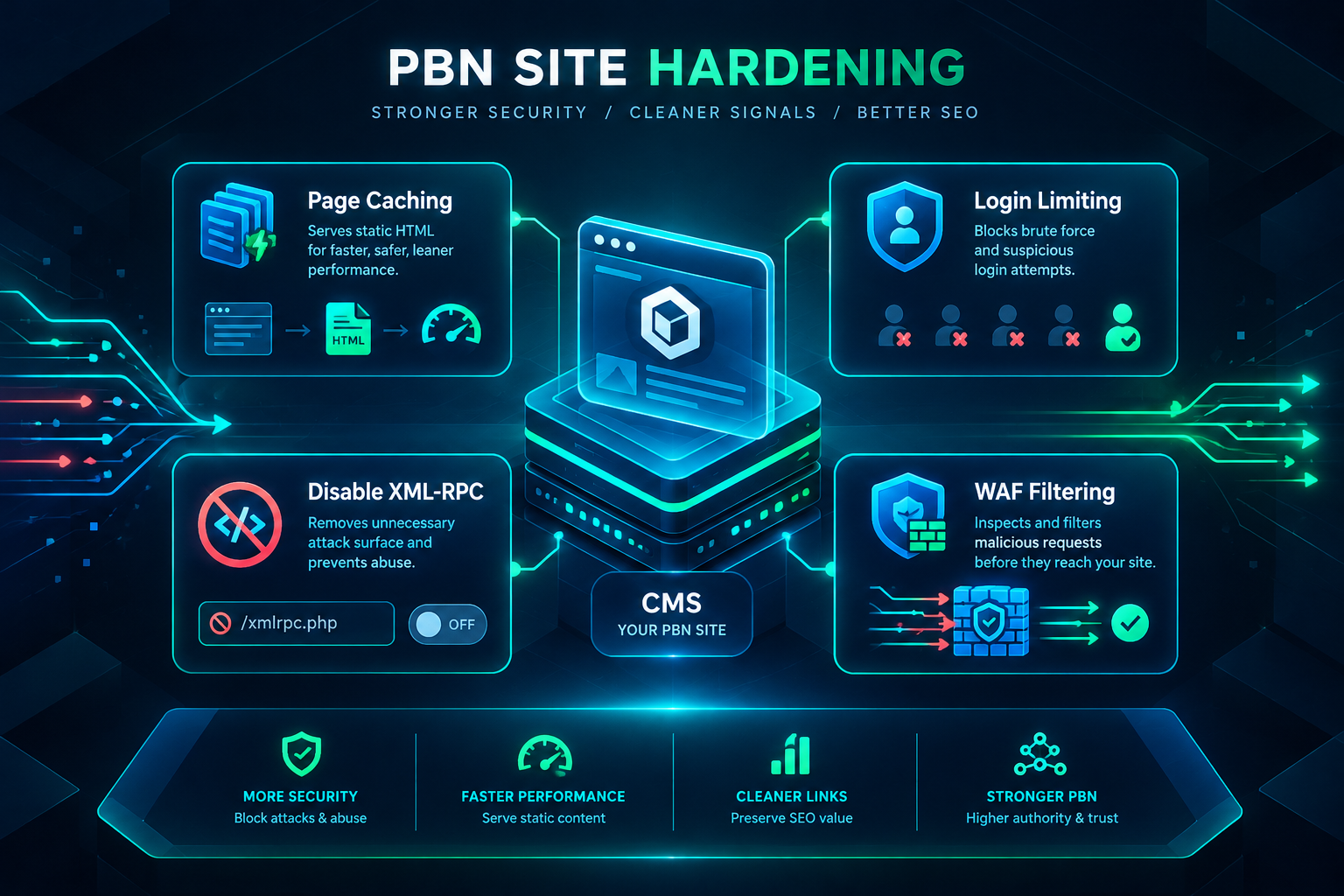
Limiting login attempts through a plugin or server rule prevents brute-force login floods from consuming server resources. Changing the default WordPress login URL from /wp-admin to a custom path adds a minor but practical barrier against automated login attacks. Keeping WordPress core, themes, and plugins updated reduces the risk of vulnerabilities being exploited in combination with a DDoS to gain unauthorized access during a period of reduced server capacity.
Responding to an Active DDoS Attack on a PBN Site
When a PBN site comes under an active DDoS attack, the response sequence matters. The first step is to confirm that the site is actually under attack rather than experiencing a server issue, a traffic spike from a legitimate source, or a crawler burst. Checking the CDN dashboard, server logs, and uptime monitoring alerts together gives a clearer picture of what is happening and where the traffic is originating.
If the site is not already behind a CDN, enabling Cloudflare or a comparable service and updating DNS is the fastest way to absorb ongoing volumetric traffic. Cloudflare’s “Under Attack Mode” adds a JavaScript challenge to all incoming requests, which effectively blocks most automated attack traffic while allowing legitimate browsers to pass through after a brief delay. This mode can be enabled from the Cloudflare dashboard without requiring server-side changes.
At the server level, blocking the IP ranges generating the most attack traffic through the hosting provider’s firewall or through .htaccess rules can reduce the load on the origin server while CDN-level mitigation is being configured. Contacting the hosting provider during an active attack is also worthwhile — many providers have upstream mitigation capabilities and can apply null routing or traffic scrubbing at the network level, particularly for volumetric attacks that exceed what a single server can handle.
After the attack subsides, reviewing server logs to understand the attack pattern helps refine firewall rules and rate limiting configurations to reduce the impact of future attacks. Checking whether the site has been deindexed — by searching for it in Google or reviewing Google Search Console for crawl errors — allows any indexing issues to be addressed promptly through a fetch and render request or by submitting the URL for recrawling.
Frequently Asked Questions
Does using a CDN hide the fact that a site is part of a PBN?
A CDN masks the origin server’s IP address from public DNS lookups, which is an operational benefit for PBN infrastructure management. However, a CDN does not change the site’s content, backlink profile, or other characteristics that may be relevant to how search engines evaluate the site. CDN use is a standard practice for websites of all types and is not specific to PBNs.
Can a DDoS attack cause a PBN site to be deindexed?
Extended downtime can cause search engine crawlers to fail repeatedly when attempting to access a site, which may eventually lead to the site being dropped from the index. The threshold and timeline for this are not publicly documented by search engines. Restoring uptime quickly and submitting the site for recrawling after recovery reduces the risk of lasting indexing disruption.
Is Cloudflare’s free plan sufficient for protecting a PBN site?
Cloudflare’s free plan includes basic DDoS mitigation, IP masking, and rate limiting, which is sufficient for most volumetric attacks targeting small to medium PBN sites. More sophisticated application-layer attacks or very high-volume attacks may benefit from paid plan features such as advanced WAF rules and higher rate limiting thresholds. The appropriate plan depends on the site’s traffic profile and the severity of attacks it experiences.
How does hosting diversity help with DDoS protection?
Distributing PBN sites across multiple hosting providers means that an attack or infrastructure failure affecting one provider does not take down the entire network. Each provider also has its own upstream DDoS mitigation capabilities, so sites on providers with stronger network-level protection are more resilient to large volumetric attacks. Hosting diversity is a practical resilience measure that also reduces the operational footprint of the network.
What should I check after a PBN site recovers from a DDoS attack?
After recovery, verify that the site is accessible and loading correctly, check server logs for any signs of unauthorized access during the attack period, confirm that the site is still indexed by searching for it in Google or reviewing Google Search Console for crawl errors, and review CDN and firewall logs to identify the attack pattern. Updating firewall rules and rate limiting configurations based on the attack data helps reduce the impact of future incidents.
Does WordPress caching really help during a DDoS attack?
Page caching significantly reduces the server resources consumed per request by serving pre-generated HTML instead of executing PHP and database queries dynamically. Under an application-layer attack, a cached WordPress site can handle a substantially higher request volume before becoming unresponsive compared to an uncached installation. Caching is one of the most cost-effective resilience measures available for WordPress-based PBN sites.
Building Resilient PBN Infrastructure for the Long Term
DDoS protection for PBN sites is not a one-time configuration task — it is an ongoing part of managing a network that needs to remain stable and accessible to deliver consistent link value. The most resilient approach combines CDN-based traffic filtering, server-level hardening, hosting diversity, DNS-layer protection, and active uptime monitoring into a layered defense that addresses different attack types at different points in the traffic path.
The practical starting point for most PBN operators is enabling a CDN with DDoS mitigation on each site, restricting high-risk WordPress endpoints, enabling page caching, and setting up uptime monitoring with alerts. These steps address the most common attack scenarios without requiring significant technical expertise or ongoing management overhead. For larger networks or sites that have experienced attacks previously, investing in dedicated hosting resources, advanced WAF rules, and DNS failover provides additional resilience.
If you are building or expanding a private blog network and want to discuss infrastructure choices, domain selection, or placement quality as part of a broader link-building strategy, PBN Backlinks Service can help you assess your requirements and identify an approach that fits your goals.