

Key Takeaways
- WordPress is the dominant CMS choice for PBNs because its widespread use across 43%+ of the web helps sites blend in rather than stand out to network detection algorithms.
- CMS diversity — mixing WordPress with Joomla or static HTML sites — can reduce network-level footprints for larger private blog networks.
- Ghost’s Node.js hosting requirements make it impractical and costly for most PBN operators, particularly those managing more than a handful of domains.
- Static HTML sites offer a near-zero attack surface and strong footprint reduction benefits, but require more manual effort to maintain and update.
- Bulk site management tools like MainWP, ManageWP, and InfiniteWP only work with WordPress, which is a meaningful practical advantage when managing PBNs at scale.
When building a private blog network, the CMS you install on each expired domain is one of the most consequential infrastructure decisions you will make. It affects how detectable your network is, how efficiently you can manage dozens or hundreds of sites, how exposed your sites are to security vulnerabilities, and whether your link equity actually flows to the money site you are trying to rank. This guide compares the realistic options — WordPress, Joomla, Ghost, and static HTML — across the criteria that actually matter for PBN operators in 2025.
Quick Comparison
| CMS / Option | Ease of Use | PBN Footprint Risk | Theme / Design Variety | Plugin Ecosystem | Hosting Requirements | Bulk Management Tools | Typical Cost | Best Network Size |
|---|---|---|---|---|---|---|---|---|
| WordPress | High | Low (ubiquity as camouflage) | Thousands of themes | Extensive | Standard PHP/MySQL | MainWP, ManageWP, InfiniteWP, CMS Commander | Free (hosting costs only) | All sizes |
| Joomla | Moderate | Low-moderate | Good variety | Moderate | Standard PHP/MySQL | Limited | Free | Small–medium |
| Ghost | Moderate | Moderate (less common) | Limited | Minimal | Node.js / VPS required | None | Higher (VPS hosting) | Very small only |
| Static HTML | Lower (manual) | Very low | Fully custom | None (no CMS) | Any basic hosting | None | Very low | Small or selective use |
Why CMS Choice Matters for PBNs
A private blog network depends on appearing to Google’s crawlers and quality assessors as a collection of independent, legitimate websites rather than a coordinated network passing link equity to a single money site. The CMS you choose contributes to this appearance in several ways: the technology fingerprint it leaves in page source code, the hosting infrastructure it demands, the quality and diversity of the sites it enables you to build, and the patterns that emerge when the same software is installed identically across hundreds of expired domains.
Network detection does not rely on a single signal. Google’s systems look at a combination of infrastructure patterns — shared IP addresses or C-class IP ranges, identical nameservers, matching CMS versions and plugin configurations, similar site structures and themes, common ownership signals in WHOIS data, and thin or templated content. No CMS choice alone guarantees protection from deindexation risk, but an informed choice reduces identifiable patterns across your network. The CMS decision is therefore best made alongside decisions about PBN hosting, IP diversity, content strategy, and site appearance diversity.
WordPress: The Practical Default for Most PBN Operators
WordPress powers more than 43% of all websites on the internet. That ubiquity is its single greatest advantage for PBN use. When a site built on WordPress is crawled by Google, it is indistinguishable from the vast majority of legitimate publishers, news sites, blogs, and business websites that also use WordPress. Choosing an open-source CMS that blends in is a meaningful footprint-reduction strategy in itself — sometimes described as hiding in plain sight.
Beyond camouflage, the WordPress plugin ecosystem and theme library are unmatched by any competing platform. WordPress theme variety runs into the tens of thousands of commercial and free options, which means you can give each site in your network a genuinely distinct visual identity. Combined with different plugins per site, randomized usernames, and varied post structures, this makes site appearance diversity achievable without building custom infrastructure. This matters because a network where every site looks structurally identical — even if hosted on different IP addresses — presents a recognizable pattern to both automated crawlers and manual reviewers.
The practical advantages of WordPress become even more significant as your network grows. Bulk site management tools — including MainWP, ManageWP, InfiniteWP, and CMS Commander — are built specifically for WordPress and allow you to push updates, manage plugins, publish content, run backups, and monitor uptime across dozens or hundreds of installations from a single dashboard. No comparable ecosystem exists for Joomla, Ghost, or static HTML. If you are managing 50 or more domains, the operational difference between WordPress and any alternative is substantial.
WordPress Security and Update Considerations
WordPress’s popularity also makes it the most frequently targeted CMS for security exploits. Its large plugin ecosystem means that each additional plugin introduces potential vulnerabilities, and outdated WordPress installations are a common attack vector. For PBN operators, compromised sites carry a double risk: the site may be used to serve malicious content or spam, which accelerates deindexation, and the breach may expose network infrastructure details that identify related sites. Regular updates to WordPress core, themes, and plugins are therefore not optional maintenance — they are a core risk management practice. Bulk management tools like MainWP make this easier at scale, but the underlying security obligation is real.
WordPress for Different Network Sizes
For small PBNs of 5 to 15 sites, WordPress is straightforward to deploy manually and requires no specialist tooling. At medium scale — 15 to 50 sites — the investment in a bulk management dashboard begins to pay for itself in time savings. For large networks of 50 to 200 or more domains, WordPress with a dedicated management tool is effectively the only CMS option that remains operationally sustainable without building custom automation. At this scale, the consistency of WordPress also means that staff or contractors can be trained on a single platform rather than maintaining expertise across multiple systems.
Joomla: A Useful Minority Option for CMS Diversity
Joomla is the second most widely deployed open-source CMS globally, built on the same PHP/MySQL stack as WordPress. This means it runs on standard cPanel hosting without specialist server configuration, making it compatible with most PBN hosting providers. Its presence across roughly 2% of all websites — a small but non-trivial share — means that a Joomla-based site does not immediately stand out as unusual.
The strongest argument for including Joomla in a PBN is CMS diversity at the network level. If every site in a 100-domain network uses WordPress with near-identical configurations, the CMS itself becomes part of a detectable pattern. Allocating 10 to 15% of your network to Joomla introduces variation that is harder for automated systems to classify as a coordinated network. This is a meaningful tactic for larger PBNs where the risk of network-level detection is higher than the operational cost of managing a second platform.
The practical disadvantages of Joomla are real, however. Its administrative interface has a steeper learning curve than WordPress. Its theme and extension ecosystem is significantly smaller. Crucially, there is no equivalent to the WordPress bulk management tools for Joomla — each site generally requires individual administration. For PBN operators managing more than a handful of Joomla installations, this creates meaningful ongoing overhead. Joomla is best treated as a deliberate minority inclusion for footprint reduction rather than a primary platform for a large network.
Ghost: Technically Interesting, Practically Impractical for Most PBNs
Ghost is an open-source CMS built on Node.js with a PostgreSQL or MySQL database backend. It produces clean, minimal websites with a modern aesthetic and genuinely good default performance scores. These qualities have made it a popular choice among independent publishers and newsletters. For PBN use, however, Ghost presents a set of practical obstacles that make it unsuitable for most operators.
The fundamental issue is hosting compatibility. Ghost requires a Node.js environment, which is not available on standard shared hosting or most cPanel-based PBN hosting providers. Deploying Ghost means provisioning a VPS (virtual private server) for each site, or using a managed Ghost hosting service at a significantly higher per-site cost than shared PHP hosting. For a network of 20 or more sites, this cost differential becomes prohibitive. The major PBN hosting providers — including EasyBlogNetworks, SeekaHost, and PBN.LTD — are built around WordPress-compatible PHP hosting, not Node.js infrastructure.
Ghost’s theme and plugin ecosystem is also far smaller than WordPress’s, limiting the site appearance diversity that makes individual PBN sites look like independent publishers. There are no bulk management tools for Ghost equivalent to MainWP or ManageWP. And because Ghost is used by a small fraction of websites overall, its distinctive page structure and technology fingerprint may actually make Ghost-based sites easier to identify as atypical — the opposite of the camouflage benefit that WordPress provides.
Ghost may be worth considering for a very small PBN of three to five sites where the operator wants genuinely distinctive-looking properties and is willing to bear the higher hosting cost and management overhead. For any network larger than this, the practical trade-offs make Ghost a poor fit.
Static HTML Sites: Maximum Footprint Reduction, Minimum Convenience
Static HTML sites — pages built directly in HTML and CSS without a CMS backend — represent the most radical approach to reducing PBN footprint. A static HTML site has no database, no admin panel, no login page, no plugin vulnerabilities, and no CMS fingerprint in its page source. It runs on virtually any web hosting environment, including the most basic shared hosting plans, and presents an almost zero attack surface from a security perspective. These properties address several of the network detection signals that Google’s systems are designed to identify.
The operational cost of static HTML is significant, however. Every content update, structural change, or design modification requires direct file editing. There is no content management interface, no plugin ecosystem, no built-in SEO tooling, and no bulk management integration. For a PBN operator managing 10 or more static sites alongside a primary network, this manual overhead accumulates quickly. There is also the question of content freshness — sites that rarely update their HTML files may present a different kind of signal compared to actively maintained CMS-driven sites.
The most practical application of static HTML in a PBN context is selective deployment — using static HTML sites as a small percentage of a larger network (perhaps 5 to 10% of total domains) to introduce genuine technology-level variation. A network that is predominantly WordPress, with a minority of Joomla and a handful of static HTML sites, presents meaningfully more diversity at the infrastructure level than a pure WordPress network. Static HTML is not a replacement for a primary CMS; it is a diversification tool for operators who are managing significant deindexation risk.
CMS Mixing Strategy: How to Use Multiple Platforms in One Network
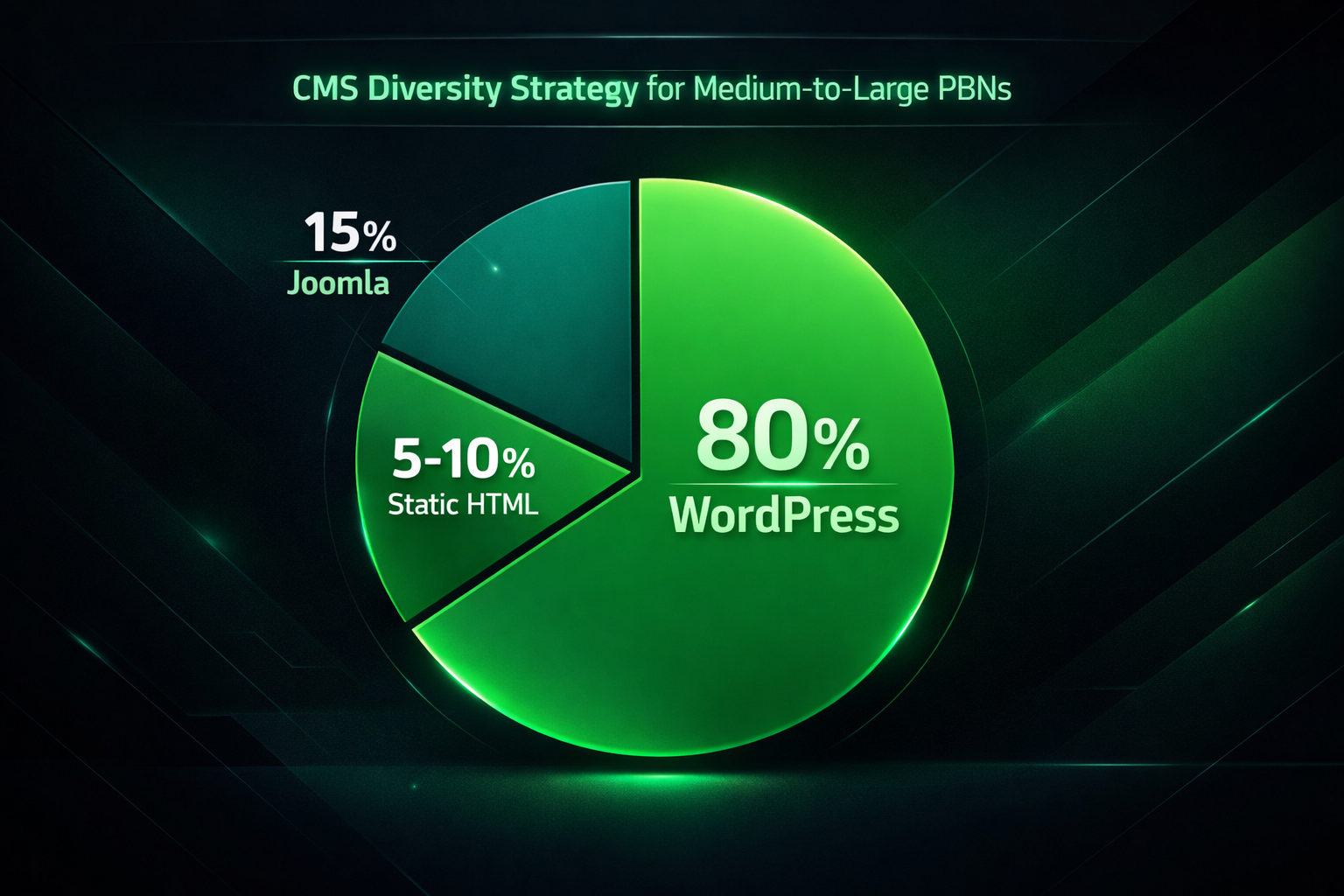
Using multiple CMS platforms across a PBN is a recognized tactic for reducing network-level footprints, but it requires deliberate planning rather than arbitrary variation. The goal is to ensure that no single technology pattern is present across all sites in the network. A practical framework for a medium-to-large PBN might allocate roughly 80% of sites to WordPress (benefiting from bulk management tools and theme variety), 10 to 15% to Joomla (introducing CMS diversity at the PHP/MySQL level), and 5 to 10% to static HTML (providing technology-level variation with no CMS footprint).
When mixing platforms, it is important to ensure that other footprint signals are also varied — particularly IP diversity, nameserver configurations, hosting providers, theme choices, plugin selections, and content structures. CMS diversity alone does not eliminate network detection risk if all sites share the same C-class IP range or use the same nameservers. The CMS decision is one layer of a multi-layer infrastructure strategy, not a standalone solution. Zero footprint hosting — using separate hosting accounts, diverse IP addresses, and varied nameservers — works in combination with CMS variation, not as a substitute for it.
Bulk PBN Management Tools and CMS Compatibility
The choice of CMS has a direct and practical impact on how efficiently you can manage your network at scale. WordPress is the only PBN-relevant CMS with a mature ecosystem of third-party bulk management tools. MainWP, ManageWP, InfiniteWP, and CMS Commander all allow WordPress network operators to manage updates, plugins, themes, backups, and uptime monitoring across large numbers of installations from a centralized dashboard. These tools are designed specifically for scenarios where a single operator manages many sites, and they significantly reduce the per-site maintenance overhead that would otherwise make large PBNs operationally unsustainable.
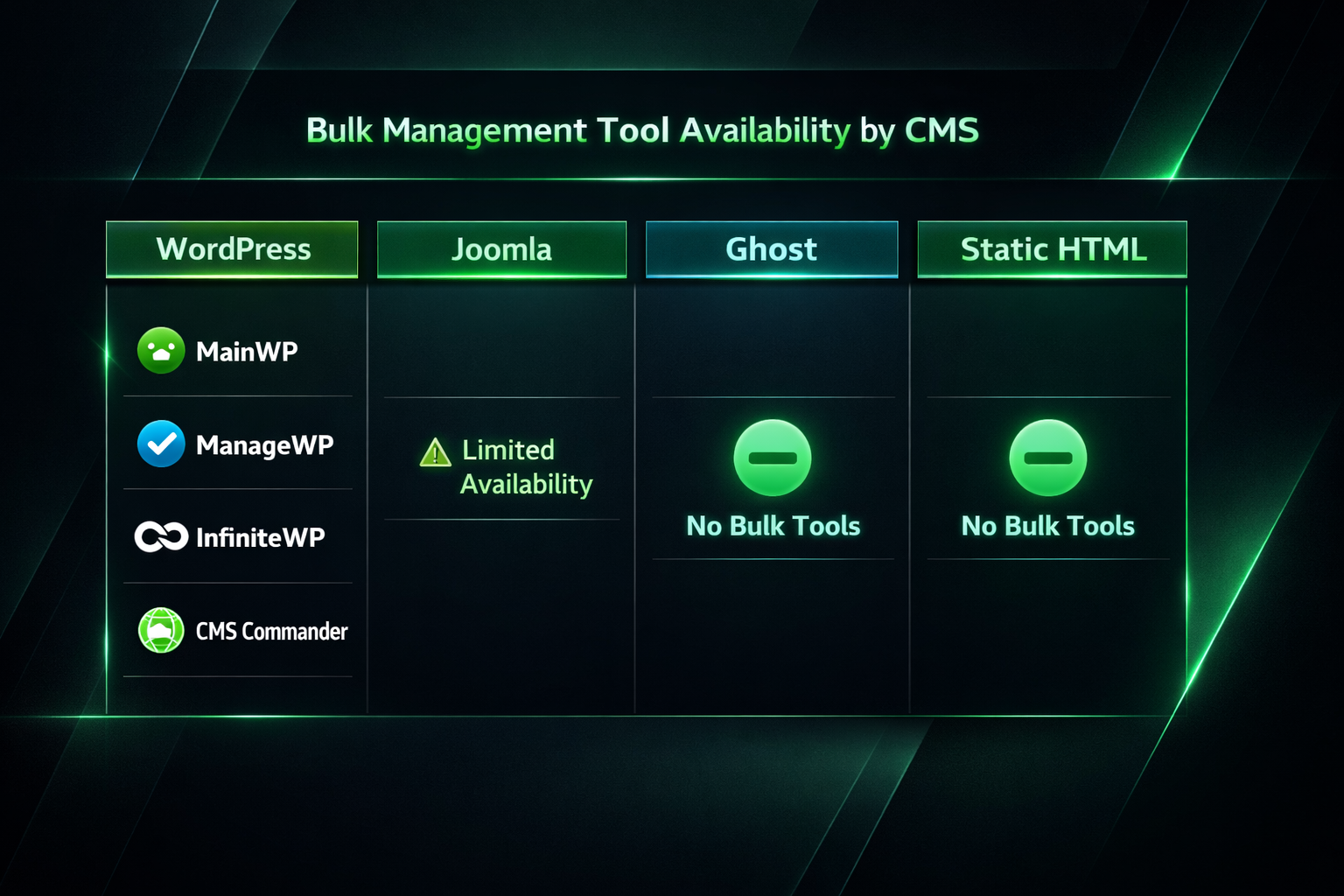
Joomla has some centralized management options, but none with the depth, third-party support, or PBN-operator community behind them that WordPress tools enjoy. Ghost and static HTML have no meaningful bulk management tooling. This means that as a PBN grows beyond 20 to 30 sites, any CMS choice other than WordPress for the majority of the network imposes a growing management burden. Operators who have built large PBNs almost universally converge on WordPress as the primary platform precisely because of this tooling advantage.
PBN Hosting Provider Compatibility
The major PBN hosting providers are built around WordPress-first infrastructure. Services like EasyBlogNetworks, SeekaHost, and PBN.LTD offer 1-click WordPress installation, IP diversity across C-class ranges, and hosting environments optimized for managing many domains under a single account. This infrastructure is specifically designed to support the needs of PBN operators: unique IP addresses per site, variation in server-level signals, and compatibility with WordPress bulk management tools.
Joomla can generally be installed on the same PHP/MySQL hosting environments used by these providers, so incorporating Joomla into a network hosted with a standard PBN provider is straightforward. Ghost, as noted, requires Node.js hosting that is not typically offered by PBN-specialist providers, which means Ghost sites must be hosted separately on a VPS or managed Ghost hosting service — adding infrastructure complexity and cost. Static HTML sites can be hosted on virtually any environment, including the most basic shared hosting, which is actually an advantage for hosting diversity.
Gray Hat SEO Context: Risk Awareness in 2025
Private blog networks occupy gray hat SEO territory. Google’s webmaster guidelines explicitly prohibit link schemes that manipulate PageRank, and PBNs fall within that prohibition. Google’s detection capabilities have grown more sophisticated over time, incorporating machine learning systems that can identify coordinated link networks through combinations of signals that go well beyond simple CMS or IP matching. This does not mean PBNs are ineffective — many operators report meaningful ranking improvements from well-constructed networks — but it does mean that deindexation risk is a permanent operational reality, not a problem that any CMS choice can fully eliminate.
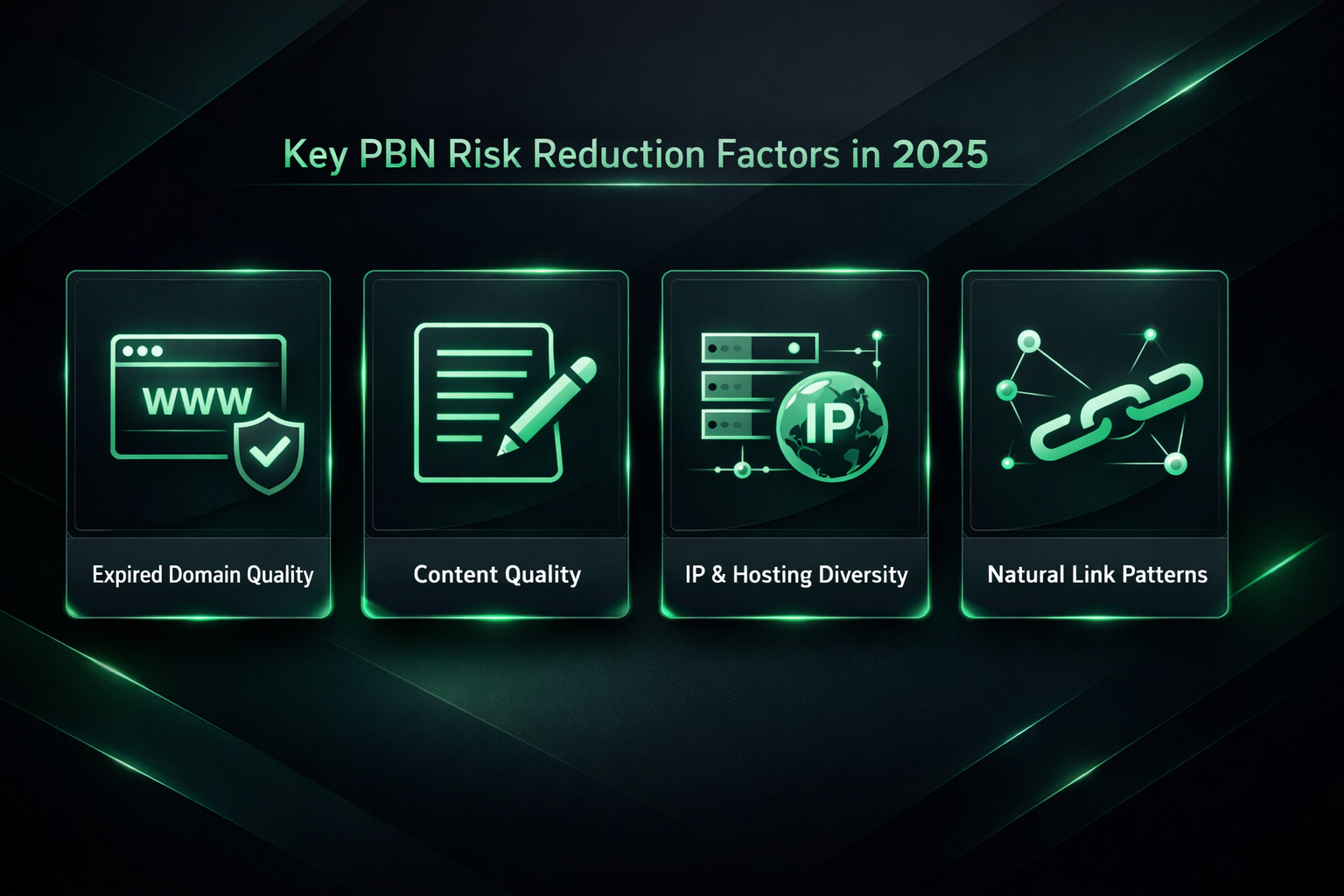
In 2025, the most important risk reduction factors are the quality of the expired domains selected, the quality and relevance of content published on each site, genuine site appearance diversity, infrastructure diversity (IP diversity, hosting diversity, nameserver variation), and the naturalness of outbound linking patterns to the money site. CMS choice contributes to network detection resistance but is one factor among many. Operators who invest heavily in CMS diversification while neglecting content quality or link pattern naturalness are likely misallocating their risk management effort.
Frequently Asked Questions
Does Google detect what CMS a PBN site is using?
Google’s crawlers can identify CMS type through page source code, meta generator tags, URL structures, and technology fingerprints. WordPress, for example, often exposes its presence through wp-content paths and default header tags unless these are actively hidden. However, Google detecting that a site uses WordPress is not itself a problem — the vast majority of legitimate websites do too. The detection risk arises when many sites in a network share identical CMS configurations, versions, and plugin combinations simultaneously. Varying themes, plugins, and configuration details matters more than simply varying the CMS itself.
Can I use Drupal for a PBN?
Drupal is a legitimate open-source CMS and runs on PHP/MySQL hosting, so it is technically compatible with standard PBN hosting environments. In practice, Drupal is rarely recommended for PBN use because it has a steep learning curve, a smaller theme ecosystem than WordPress or Joomla, and no bulk management tools suited to PBN operators. The operational overhead of managing even a small number of Drupal sites makes it an inefficient choice compared to the available alternatives.
Is a custom CMS worth building for a PBN?
Building a custom CMS for a PBN is occasionally discussed as a way to eliminate all standard technology fingerprints. In practice, the development and ongoing maintenance cost of a custom system is prohibitive for most operators. A custom CMS also lacks the plugin ecosystem and content management convenience of established platforms, and introduces its own security risks if not professionally maintained. Custom CMS development is generally only worth considering for very large, professionally operated networks where the team includes dedicated developers.
Should I mix CMS platforms in a small PBN of under 15 sites?
For a PBN of fewer than 15 sites, the operational overhead of managing multiple CMS platforms likely outweighs the footprint-reduction benefit. At small scale, the network is less likely to trigger automated pattern detection based on CMS signals alone. Focusing on content quality, site appearance diversity through varied WordPress themes, IP diversity, and natural linking patterns will typically provide better risk-adjusted outcomes than splitting a small network across multiple platforms.
Do PBN hosting providers support Joomla?
Most PBN hosting providers that offer PHP/MySQL-compatible shared or semi-dedicated hosting can support Joomla installations, since Joomla shares the same basic server requirements as WordPress. However, the 1-click install and bulk management features offered by specialist PBN hosting providers are typically WordPress-specific. Joomla installations on these platforms may need to be set up manually via cPanel, which adds some initial setup overhead compared to WordPress.
What is zero footprint hosting and how does CMS choice relate to it?
Zero footprint hosting refers to infrastructure strategies designed to minimize the detectable signals that link sites in a network to a common owner — typically through unique IP addresses, varied nameservers, separate hosting accounts, and diverse registration details. CMS choice contributes to zero footprint strategy at the application layer: using different CMS platforms, themes, plugins, and configurations prevents the CMS itself from becoming a clustering signal. However, zero footprint hosting at the infrastructure level is the more fundamental layer, and CMS diversity amplifies its effectiveness rather than replacing it.
Choosing a CMS for Your PBN: A Practical Decision Framework
For the majority of PBN operators — regardless of network size — WordPress is the most practical and defensible primary CMS choice. Its ubiquity reduces rather than increases footprint risk, its theme variety enables genuine site appearance diversity, and its bulk management ecosystem makes CMS at scale operationally feasible in a way that no alternative currently matches. The open-source CMS is free, compatible with every major PBN hosting provider, and backed by a community and tooling ecosystem that makes it the default for good practical reasons.
Joomla earns a place in medium-to-large networks as a deliberate minority option for introducing CMS diversity at the platform level. It shares WordPress’s hosting compatibility and its modest footprint on the broader web makes it a credible addition to a diversified network. The operational cost of managing Joomla sites without bulk tools means it should remain a minority allocation — roughly 10 to 15% of a large network — rather than a primary platform.
Ghost is best avoided unless you are building a very small, high-quality network where VPS hosting costs per site are acceptable and genuinely distinctive site aesthetics are a priority. Its Node.js hosting requirements, higher cost, limited ecosystem, and absence of bulk management tooling make it impractical for most PBN operators beyond a handful of sites.
Static HTML sites are a valuable tool for footprint reduction when used selectively — as a small percentage of a larger network — rather than as a primary deployment approach. Their near-zero attack surface and absence of any CMS fingerprint make them genuinely useful for operators who want maximum infrastructure variation, provided they are willing to manage content updates manually.
The most effective PBN infrastructure strategy combines a sensible CMS allocation with IP diversity, varied hosting providers, diverse nameservers, high-quality content, and natural linking patterns. CMS choice is a meaningful layer of that strategy, but it is not the only one, and optimizing it in isolation while neglecting the others leaves meaningful deindexation risk on the table.