

Category pages on a private blog network site do more than organize content — they shape how search engines understand the site’s topical focus, how link equity flows internally, and how naturally a contextual backlink placement fits within the surrounding content ecosystem. Building category pages with deliberate structure can strengthen the perceived authority of a PBN site and make individual link placements more contextually coherent, which is a meaningful quality factor when evaluating placement value.
Key Takeaways
- Well-structured category pages improve topical relevance signals on a PBN site, making contextual link placements more credible and coherent.
- Category architecture should reflect a realistic editorial focus — a narrow, consistent niche is generally easier to develop with depth than a broad, unfocused topic cluster.
- Internal linking between category pages, subcategory pages, and individual posts is a practical mechanism for distributing link equity across the site and toward target pages.
- Category pages benefit from unique introductory content, descriptive metadata, and a logical URL structure rather than thin auto-generated archive pages.
- The relationship between category structure and placement quality matters: a link placed within a well-organized, topically consistent site section carries more contextual weight than one buried in a disorganized archive.
Why Category Pages Matter on a PBN Site
A PBN site that lacks clear category structure often resembles a generic blog with loosely related posts rather than a focused editorial resource. Search engines use the relationships between pages — including category and tag hierarchies — to assess what a site is about and how authoritative it appears within a given topic area. When a PBN site has coherent category pages, each with relevant posts grouped beneath them, the site’s topical signals become more consistent and easier to interpret. This matters because the contextual relevance of a link placement is partly determined by the page it appears on and partly by the broader site section that page belongs to.
Category pages also serve a practical internal linking function. A well-built category page links to every post within that category, and those posts can link back to the category page or to other relevant posts. This creates a navigable content structure that distributes link equity more evenly across the site rather than concentrating it on a single homepage or a handful of isolated posts. For PBN sites where the goal is to pass link value to a target page through a contextual placement, a healthy internal link structure means the placement page itself is better supported by the rest of the site.
Planning Your Category Architecture Before Building
Before creating category pages, it helps to define the site’s primary niche and the logical sub-topics that fall within it. A PBN site focused on personal finance, for example, might have top-level categories covering budgeting, investing, credit, and insurance. Each of these categories can then contain posts that address specific questions or subtopics within that area. The goal is a structure that would make sense to a human reader browsing the site, not just a taxonomy created to host link placements.
When planning category architecture, consider the following factors:
- Niche depth: Choose a niche narrow enough that you can produce genuinely relevant content across multiple categories without stretching into unrelated territory.
- Category count: Three to six primary categories is a practical range for most PBN sites. Too few categories make the site feel underdeveloped; too many create a fragmented structure that dilutes topical focus.
- Post distribution: Each category should contain enough posts to appear substantive. A category with a single post looks thin; aim for at least four to six posts per category before treating it as fully developed.
- Subcategory use: Subcategories are useful when a primary category is broad enough to contain meaningfully distinct sub-topics. Use them selectively rather than creating subcategory layers for their own sake.
- Placement fit: Consider where link placements will naturally sit within the category structure. A placement in a post under a relevant category is more contextually coherent than a placement in a post that sits outside any logical category.
How to Create Category Pages on PBN Sites Using WordPress
Most PBN sites run on WordPress, which handles category pages automatically once categories are created and assigned to posts. The default WordPress category archive page collects all posts assigned to a given category and displays them in reverse chronological order. While this is functional, the default archive page is often thin — it may show only post titles and excerpts without any introductory content that explains the category’s focus.
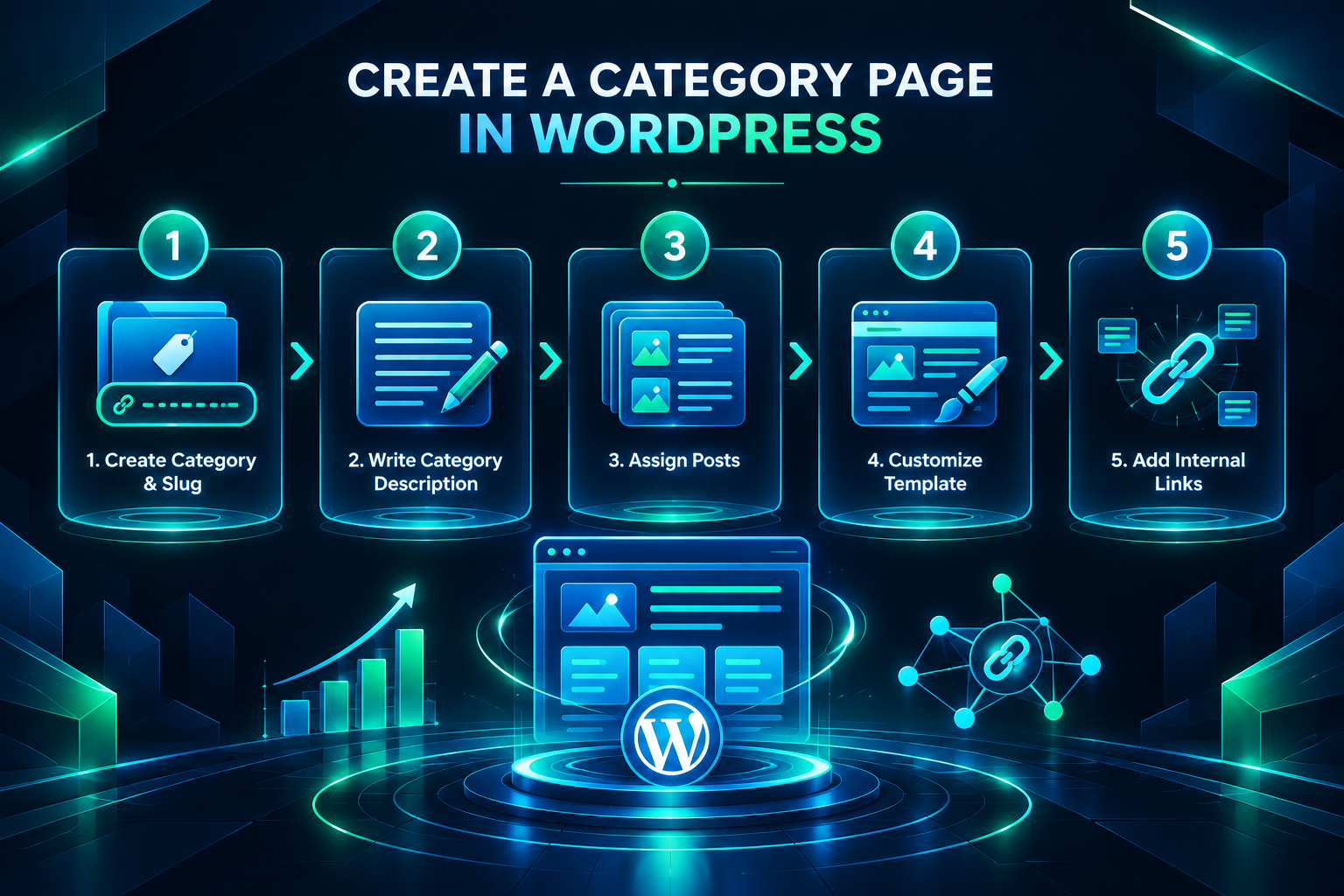
To create more useful category pages, the standard approach involves several steps:
- Create the category: In the WordPress dashboard, navigate to Posts → Categories. Add a category name, slug, and optionally a parent category if you are building a subcategory. The slug determines the URL structure, so keep it short, descriptive, and consistent with the site’s niche.
- Write a category description: WordPress provides a description field for each category. Many themes display this description at the top of the category archive page. Use this field to write a short, relevant paragraph — typically two to four sentences — that describes what the category covers. This introductory text gives the category page unique content rather than leaving it as a bare list of post excerpts.
- Assign posts to the correct category: When publishing or editing posts, assign each post to its most relevant category. Avoid assigning a single post to multiple unrelated categories, as this can dilute the topical signal of each category page.
- Customize the category template if needed: Some WordPress themes allow category-specific templates. If the default archive layout is too minimal, a custom category template can add a header section, featured image, extended description, or curated post grid that makes the page look more like an editorial hub than a plain archive.
- Add internal links within category descriptions: The category description can include links to key posts within that category or to related categories. This reinforces the internal linking structure and helps search engines understand the relationships between pages.
Writing Category Page Content That Supports Topical Relevance
The category description is the primary content element on a WordPress category archive page, but it is often limited to a short paragraph by default theme styling. For PBN sites where topical relevance is a priority, it is worth investing in more substantive category-level content. Some site builders use a custom page template that replaces the standard archive with a hybrid layout — part editorial introduction, part post listing — that gives the category page more content depth.
Effective category page content typically includes:
- A clear statement of what the category covers and why it is relevant to the site’s audience.
- A brief overview of the types of posts or topics the reader will find within the category.
- Internal links to two or three cornerstone posts within the category that represent the most useful or comprehensive content.
- Naturally placed semantic terms related to the category’s subject matter, which helps reinforce the topical focus of the page without keyword stuffing.
The content does not need to be lengthy — a well-written introductory section of 150 to 300 words is generally sufficient for a category page on a PBN site. The priority is that the content is original, relevant, and coherent rather than auto-generated or duplicated from post excerpts.
URL Structure and Metadata for Category Pages
URL structure affects how category pages are perceived and indexed. WordPress generates category URLs based on the slug assigned during category creation. By default, WordPress includes a /category/ prefix in the URL path, producing URLs such as example.com/category/investing/. Some site owners remove this prefix using a plugin or permalink setting to produce cleaner URLs such as example.com/investing/. Either approach is workable, but consistency matters — choose one structure and apply it across the entire site.
Metadata for category pages is often overlooked on PBN sites. Each category page should have a unique meta title and meta description that accurately describe the category’s content. Most WordPress SEO plugins, including widely used options in the SEO plugin ecosystem, allow category-level metadata to be set independently from post-level metadata. A category page with a generic or auto-generated meta title is a missed opportunity to reinforce topical relevance and improve the page’s appearance in search results.
Key metadata considerations for category pages include:
- Meta title: Include the category’s primary topic and the site name. Keep it within approximately 55 to 60 characters.
- Meta description: Write a unique description of 140 to 160 characters that summarizes what the category covers. Avoid duplicating the category description verbatim.
- Canonical tags: Ensure that paginated category archives — pages two, three, and beyond — use canonical tags correctly to avoid duplicate content issues across paginated URLs.
Internal Linking Strategy Across Category and Post Pages
Internal linking is one of the most practical tools available when building a PBN site’s authority structure. A deliberate internal linking strategy connects category pages to posts, posts to other posts, and posts back to category pages in a way that distributes link equity and reinforces topical clusters. For PBN sites, this matters because the page hosting a contextual link placement benefits from being well-supported by the rest of the site’s internal link graph.
A practical internal linking approach for a PBN site with category pages might work as follows:
- Each category page links to the most important posts within that category through the standard archive listing and through any curated links in the category description.
- Each post links to at least two or three related posts within the same category using contextual anchor text within the body content.
- Posts may also link to relevant posts in adjacent categories when the connection is genuinely relevant to the content.
- The homepage links to each primary category page, either through navigation menus or through featured category sections in the homepage layout.
- The post containing the outbound contextual link placement receives internal links from at least two or three other posts on the site, ensuring it is not an isolated page with no internal link support.
This structure means that link equity from the homepage and from other well-linked pages flows through the category pages and into individual posts, including the post containing the placement. The result is a more coherent site architecture rather than a collection of disconnected pages.
Topical Clusters and Category Pages: Aligning Structure with Placement Context
The concept of topical clusters — groups of related content organized around a central topic — is directly applicable to PBN site architecture. A category page functions as the hub of a topical cluster, with individual posts serving as the cluster’s supporting content. When a contextual link placement sits within a post that belongs to a well-developed topical cluster, the placement benefits from the surrounding content’s relevance signals.
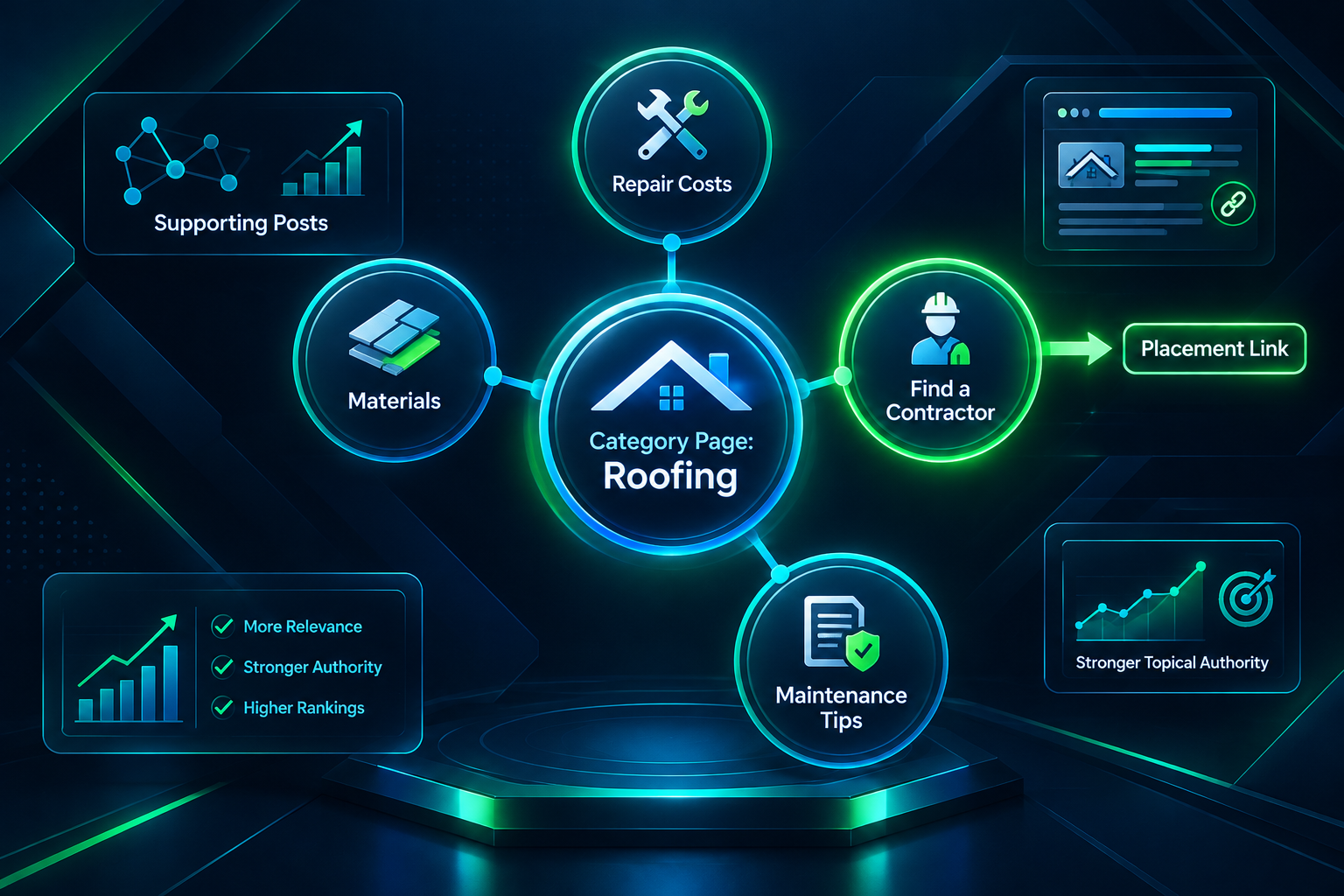
For example, a PBN site in the home improvement niche might have a category page for roofing. That category page links to posts covering roof repair costs, roofing material comparisons, how to find a roofing contractor, and seasonal maintenance tips. A contextual link placement within the roofing contractor post — linking to a target page about roofing services — sits within a coherent topical cluster. The category page, the surrounding posts, and the placement post all reinforce the same subject matter, which strengthens the contextual signal of the link.
Building category pages with this cluster logic in mind means planning content around the categories rather than creating categories after the fact to organize existing posts. The category structure should drive the content plan, not the other way around.
Common Structural Mistakes on PBN Category Pages
Several recurring structural issues reduce the effectiveness of category pages on PBN sites. Identifying these issues early in the site-building process is more efficient than correcting them after content has been published.
- Empty or auto-generated category descriptions: Leaving the category description blank results in a category archive page with no unique content beyond post excerpts. This is a straightforward quality gap that is easy to address.
- Overlapping category topics: When two categories cover similar ground, posts may be assigned inconsistently, and the topical signal of each category page becomes diluted. Clearly differentiate categories before creating them.
- Uncategorized posts: WordPress assigns posts to a default “Uncategorized” category if no category is selected during publishing. Posts in the Uncategorized category do not contribute to any topical cluster and may appear on a generic archive page that weakens the site’s overall structure.
- Too many categories with too few posts: A site with ten categories and one or two posts each looks underdeveloped. Consolidate categories until each one has enough content to appear substantive.
- Ignoring paginated archives: If a category accumulates many posts, WordPress paginates the archive. Without proper canonical tag handling, paginated category pages can create duplicate content signals that affect how the category page is indexed.
- No internal links to the placement post: A post containing a contextual link placement that receives no internal links from other pages on the site is effectively isolated. Even a small number of relevant internal links from other posts or from the category description meaningfully improves the placement post’s position within the site’s link graph.
Maintaining Category Pages Over Time
Category pages are not static once created. As new posts are published and assigned to categories, the category archive updates automatically. However, the category description and any custom introductory content may need periodic review to remain accurate and relevant, particularly if the site’s content focus evolves or if new subtopics are added within a category.
For PBN sites that receive ongoing link placements, it is worth reviewing the category structure periodically to ensure that new placement posts are assigned to the most relevant category and that the internal linking structure continues to support those posts. A category that grows significantly may benefit from being split into two more focused categories, with posts redistributed accordingly. Conversely, a category with very few posts may be better merged into a related category to avoid thin archive pages.
Monitoring which category pages are indexed and how they perform in search results — using tools such as Google Search Console where the site is verified — can provide useful signals about whether the category structure is being interpreted as intended. Indexing of category pages is not guaranteed and may depend on the overall quality and crawlability of the site.
Frequently Asked Questions
Do category pages on a PBN site need to be indexed to pass link value?
Category pages themselves do not need to be indexed for the posts within them to be indexed and to pass link value. However, indexed category pages contribute to the site’s overall crawlability and topical signal. If a category page is indexed and receives internal links from the homepage or other pages, it can help distribute link equity to the posts within it, including posts containing outbound placements.
How many posts should a category have before a placement is made within it?
There is no fixed minimum, but a category with at least four to six published posts generally appears more substantive than one with a single post. The placement post itself should not be the only content in its category. A surrounding cluster of relevant posts makes the placement context more coherent and the category page more credible as an editorial section.
Should subcategories be used on PBN sites?
Subcategories are useful when a primary category is genuinely broad and contains meaningfully distinct sub-topics. For most PBN sites, a flat category structure with three to six primary categories is sufficient. Adding subcategory layers without enough content to populate them can create thin archive pages and complicate the site’s URL structure without a clear benefit.
Can the category description field in WordPress contain links?
Yes. The WordPress category description field accepts HTML in most themes, which means it can contain links to posts within the category or to related categories. Adding two or three relevant internal links within the category description is a practical way to reinforce the internal linking structure from the category page level.
Does the category page URL structure affect how the site is interpreted?
URL structure contributes to how pages are organized and understood, though it is one of many factors. A clean, descriptive category slug — such as /investing/ or /roofing/ — is clearer than a numeric or generic slug. Consistency across all category URLs matters more than the specific format chosen. Changing URL structure after posts have been published requires proper redirects to avoid broken links and indexing disruptions.
How does category structure relate to the quality of a contextual link placement?
A contextual link placement sits within a specific post, but the quality of that placement is partly determined by the context surrounding it — including the category the post belongs to and the other posts within that category. A placement post within a well-developed, topically consistent category is more contextually coherent than one in a thin or disorganized section of the site. This is a meaningful quality factor when evaluating PBN placements.
Building Category Structure That Supports Effective PBN Placements
Category page structure is a foundational element of a well-built PBN site, not an afterthought. A site with clearly defined categories, substantive category descriptions, consistent post assignment, and deliberate internal linking presents a more coherent topical profile than one where content is published without structural planning. This coherence matters for the quality of contextual link placements, because the surrounding content environment contributes to how a placement is interpreted.
The practical steps — planning category architecture before publishing, writing original category descriptions, assigning posts consistently, managing metadata, and building internal links that support placement posts — are achievable for anyone building or maintaining a PBN site. None of these steps require advanced technical knowledge, but they do require deliberate planning rather than relying on WordPress defaults alone.
If you are evaluating PBN placements or building a network of sites and want to discuss how category structure and content quality affect placement value, PBN Backlinks Service can help you assess your requirements and identify placements that fit your target niche and campaign goals.