

A PBN backlink that search engine crawlers cannot reach provides no measurable ranking signal to the target page. When a placement page sits behind a login wall, a members-only gate, or any other access restriction, Googlebot and other crawlers are effectively locked out — meaning the link may never be crawled, indexed, or counted. Understanding why these restrictions appear, how to confirm whether a specific placement is affected, and what steps can restore crawler access is essential for anyone managing a PBN-based link-building campaign.
Key Takeaways
- Login pages and access restrictions prevent search engine crawlers from reaching PBN placement pages, which can neutralize the link’s ability to pass any ranking signal.
- The most common causes include misconfigured WordPress membership plugins, password-protected posts, robots.txt directives, and server-level authentication rules.
- Confirming whether a page is publicly accessible requires testing with crawler simulation tools and checking the page’s indexing status in Google Search Console or equivalent tools.
- Most access restriction issues can be resolved at the CMS, plugin, or server configuration level without rebuilding the placement page or the domain.
- After fixing an access issue, re-crawling and re-indexing the placement page is a necessary step before expecting the link to contribute to the target page’s backlink profile.
Why Crawler Access Matters for PBN Placement Pages
Search engine crawlers such as Googlebot discover and evaluate backlinks by fetching the pages on which those links appear. If a placement page returns a login prompt, a 401 authentication challenge, or a redirect to a members-only area, the crawler receives either an error response or a page that contains no useful content — and certainly no outbound link to the target site. The link effectively does not exist from the crawler’s perspective, regardless of the domain’s authority metrics or the quality of the surrounding content.
This distinction matters because third-party tools such as Ahrefs, Semrush, and Majestic index backlinks from their own crawl databases, which may have captured the link before the restriction was applied. A link can therefore appear active in a backlink analysis tool while being completely inaccessible to Googlebot. Relying solely on tool data to confirm that a PBN placement is working is a common oversight that access restriction issues expose clearly.
The practical consequence is straightforward: a PBN link that cannot be crawled cannot contribute to the target page’s ranking signals. Fixing the access restriction restores the crawler’s ability to reach the page, re-evaluate the content, and follow the outbound link — which is the necessary precondition for the placement to function as intended.
Common Causes of Login-Page Restrictions on PBN Sites
Access restrictions on PBN placement pages typically originate from one of several configuration layers. Identifying the correct layer is the first step toward an efficient fix.
WordPress Membership and Access-Control Plugins
Many PBN sites are built on WordPress, and a significant proportion of access restriction problems trace back to membership or content-protection plugins. Plugins such as MemberPress, Restrict Content Pro, WooCommerce Memberships, and similar tools can be configured to protect individual posts, post categories, or entire sections of a site. If a placement post was inadvertently assigned to a protected content group — or if a plugin’s default settings restrict all new posts — the page will redirect unauthenticated visitors, including crawlers, to a login screen.
The fix in this case is to review the plugin’s content restriction rules and confirm that the specific placement post is set to public visibility. Most membership plugins include a per-post or per-page access setting in the WordPress editor sidebar. Setting the placement post to unrestricted access and saving the change is usually sufficient, though a cache flush may also be required before the change takes effect for crawlers.
WordPress Password-Protected Posts
WordPress includes a native post-visibility option that allows individual posts to be password-protected. A post set to this visibility level displays a password prompt to all visitors, including search engine crawlers. This setting is separate from any third-party plugin and is controlled directly in the WordPress editor under the Visibility option in the Publish panel. Changing the visibility from Password Protected to Public and republishing the post removes the restriction immediately.
robots.txt Disallow Directives
A robots.txt file that includes a Disallow directive covering the placement page’s URL path instructs compliant crawlers not to fetch that page. Unlike a login wall, a robots.txt restriction does not prevent a user from viewing the page in a browser — it only signals to crawlers that the page should not be crawled. However, a page that is not crawled cannot have its outbound links evaluated, which produces the same practical outcome as a login restriction from a link-value perspective.
Checking the robots.txt file at the root of the PBN domain — accessible at domain.com/robots.txt — reveals whether any Disallow rules apply to the placement page’s path. Google Search Console’s robots.txt tester, where available, can also confirm whether a specific URL is blocked. Removing or narrowing the relevant Disallow directive restores crawler access to the affected path.
Noindex Meta Tags and X-Robots-Tag Headers
A noindex directive in the page’s HTML meta tags or in an HTTP response header does not prevent crawling, but it does prevent the page from appearing in search results and may eventually cause Google to stop crawling it regularly. More importantly, Google’s documentation indicates that noindexed pages may have their outbound links devalued or ignored over time, since the page itself is excluded from the index. While a noindex tag is not the same as a login wall, it produces a related problem: the placement page exists and is technically reachable, but its link may not be counted in the way the campaign intends.
Checking the page source for a meta name="robots" content="noindex" tag, or using a tool such as Screaming Frog to audit HTTP response headers for X-Robots-Tag directives, identifies this issue. Removing the noindex directive and requesting re-indexing through Google Search Console’s URL Inspection tool is the appropriate corrective step.
Server-Level Authentication: HTTP Basic Auth and .htaccess Rules
Some PBN hosting environments apply HTTP Basic Authentication at the server level, typically through an .htaccess file on Apache servers or equivalent configuration on Nginx. This type of restriction presents a browser-level authentication dialog before any page content is served, which means crawlers receive a 401 Unauthorized response rather than the page HTML. Unlike a WordPress plugin restriction, this configuration exists outside the CMS and requires access to the server’s configuration files or the hosting control panel to resolve.
Identifying HTTP Basic Auth is straightforward: attempting to access the domain in a browser will trigger a username and password prompt before any page loads. Removing or disabling the authentication block for the relevant directory — or for the entire domain if the PBN site is intended to be publicly accessible — resolves the issue. Hosting providers that offer cPanel or similar control panels typically include an interface for managing directory password protection without requiring direct file editing.
Cloudflare and CDN Access Rules
PBN sites that use Cloudflare or another content delivery network may have firewall rules, bot-fight mode settings, or challenge pages configured in ways that block or challenge automated crawlers. Cloudflare’s bot management features can be configured to present a JavaScript challenge or CAPTCHA to requests that match bot-like behavior patterns, which may include Googlebot in some configurations — though Googlebot is generally recognized and allowed by default in standard Cloudflare setups.
If a PBN site uses Cloudflare, reviewing the firewall rules and bot management settings in the Cloudflare dashboard is advisable. Ensuring that verified bots, including Googlebot, are not subject to challenge pages or block rules is the relevant check. Cloudflare’s documentation describes how to configure rules that allow verified search engine crawlers while still applying protections against other automated traffic.
Staging or Development Mode
Some hosting environments and WordPress management tools include a staging or maintenance mode that presents a holding page or login prompt to all visitors while the site is being worked on. If a PBN site was placed in staging or maintenance mode during setup or after an update and was not returned to live status, every page on the domain — including placement pages — will be inaccessible to crawlers. Plugins such as SeedProd, WP Maintenance Mode, and similar tools manage this setting within WordPress, while some hosting providers apply it at the server level. Deactivating maintenance mode and confirming that the site returns a 200 status code for its pages resolves this category of issue.
How to Diagnose Whether a PBN Placement Page Is Accessible
Before attempting any fix, confirming the exact nature of the access restriction saves time and avoids unnecessary changes. Several diagnostic approaches are available depending on the tools at hand.
Manual Browser Check in Incognito Mode
Opening the placement page URL in a private or incognito browser window removes any stored session cookies or authentication tokens, simulating the experience of an unauthenticated visitor. If the page loads normally and displays the expected content including the outbound link, the restriction may be limited to specific crawlers rather than all unauthenticated users. If the page redirects to a login screen or displays a password prompt, the restriction is confirmed as affecting general access.
HTTP Status Code Check
Using a tool such as Screaming Frog, a browser developer console, or an online HTTP header checker to fetch the placement page URL reveals the HTTP status code returned by the server. A 200 response indicates the page is accessible. A 401 response indicates server-level authentication is required. A 301 or 302 redirect to a login URL confirms a CMS-level or plugin-level restriction. A 403 response indicates the server is actively refusing access. Each status code points toward a different configuration layer and a different fix.
Google Search Console URL Inspection
Google Search Console’s URL Inspection tool allows the site owner to request that Google fetch a specific URL and report what it sees. The tool returns information about whether the page was successfully crawled, what HTTP status code was received, whether the page is indexed, and whether any crawl errors were encountered. For a PBN placement page, this tool provides direct evidence of whether Googlebot can access the page and whether the page is currently in Google’s index. A “Page is not indexed” result combined with a crawl error or redirect finding confirms that the access restriction is affecting Google’s ability to evaluate the link.
Fetch as Googlebot Using Third-Party Tools
Several third-party SEO tools offer a “fetch as Googlebot” or crawler simulation feature that sends a request to a URL using a Googlebot user-agent string and reports the response. While these tools do not replicate Googlebot’s full crawl behavior, they can confirm whether a server is returning different content or responses to crawler user-agents compared to standard browser requests — a pattern sometimes associated with cloaking configurations that may also affect legitimate crawlers.
Restoring Crawler Access: A Practical Sequence
Once the cause of the access restriction has been identified, the following sequence covers the most common resolution steps in order of where the restriction is most likely to originate.
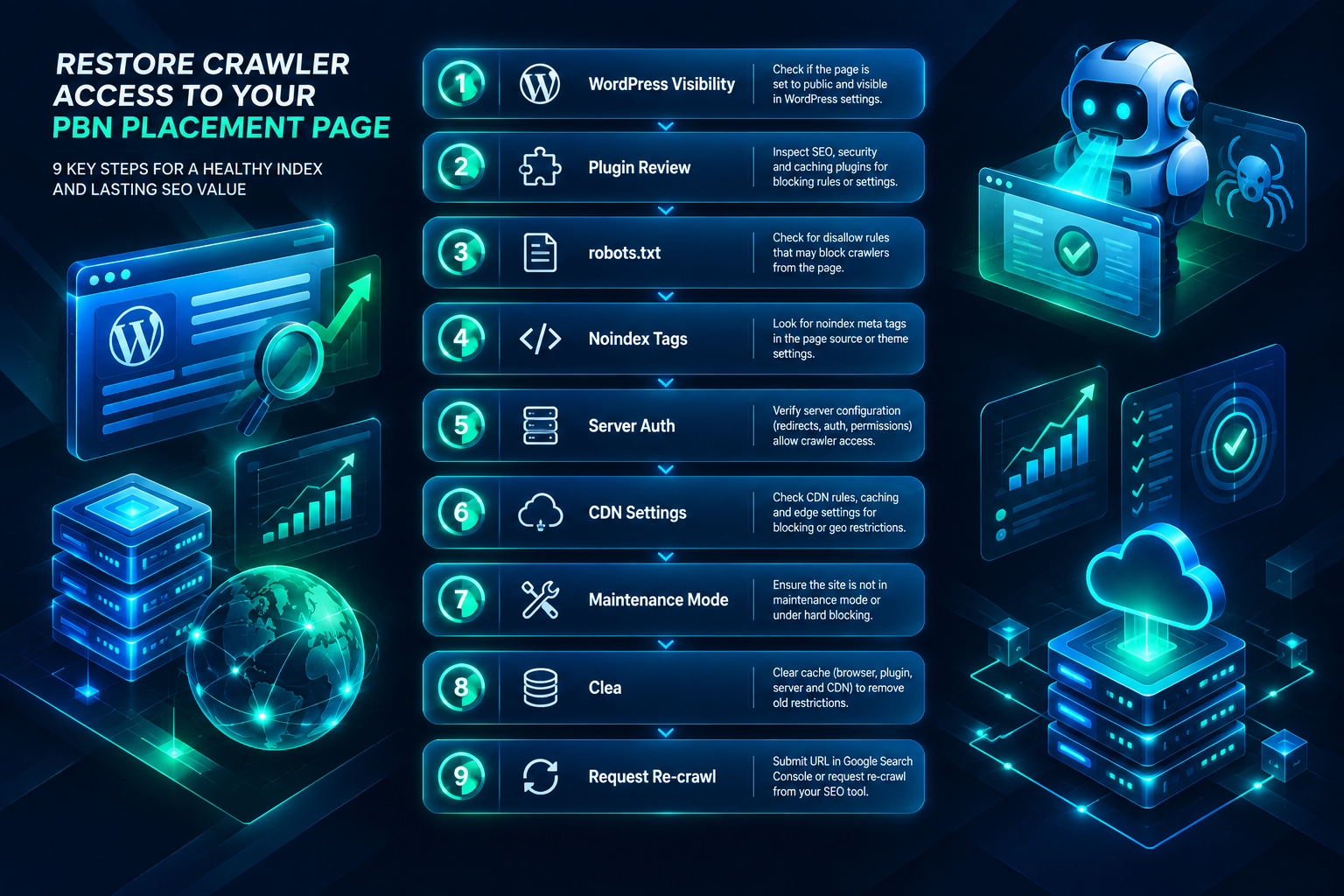
- Check WordPress post visibility first. Open the placement post in the WordPress editor and confirm the Visibility setting is set to Public. Save and republish if needed.
- Review active plugins for any membership, access control, or content restriction functionality. Check whether the placement post is assigned to any restricted content group and remove that assignment.
- Inspect the robots.txt file for Disallow directives that cover the placement page’s URL path. Edit the file to remove or narrow any blocking rules.
- Check for noindex tags in the page source or HTTP headers. Remove any noindex directive from the placement page’s template or plugin settings.
- Review server configuration for HTTP Basic Authentication rules. Use the hosting control panel or .htaccess file to disable directory-level password protection for the domain.
- Check Cloudflare or CDN settings if the domain uses a CDN. Review firewall rules and bot management settings to confirm that verified crawlers are not being challenged or blocked.
- Deactivate maintenance mode if the site or hosting environment has a staging or maintenance setting enabled.
- Clear all caches — including WordPress page caches, server-side caches, and CDN caches — after making any configuration change, so that crawlers receive the updated page rather than a cached version of the restricted state.
- Request re-crawling through Google Search Console’s URL Inspection tool after confirming the page is publicly accessible. This signals to Google that the page is ready to be re-evaluated.
What Happens After the Fix: Indexing and Link Recognition Timelines
Restoring crawler access to a PBN placement page does not produce an immediate change in the target page’s backlink profile or rankings. Several steps must occur in sequence before the link can contribute any ranking signal.
First, Googlebot must crawl the placement page. Requesting a re-crawl through Google Search Console can accelerate this for individual URLs, but Google’s crawl schedule for a given domain depends on factors including the domain’s crawl budget, its historical crawl frequency, and the overall size and quality of the site. A domain that was previously inaccessible may have a reduced crawl priority that takes time to recover.
Second, the page must be indexed. A successfully crawled page is not automatically added to the index; Google evaluates the page’s content, quality signals, and other factors before deciding whether to index it. A placement page with thin or low-quality content may face indexing challenges independent of the access restriction issue.
Third, once the page is indexed and the outbound link is recognized, any ranking effect on the target page depends on a range of factors including the target page’s existing backlink profile, the competitive landscape of the target keyword, and the overall quality and relevance of the placement. These factors are independent of the access restriction fix and cannot be predicted with certainty.
In practical terms, the period from fixing an access restriction to observing any measurable change in the target page’s rankings can range from a few weeks to several months, depending on crawl frequency and the factors described above. Monitoring the placement page’s indexing status through Google Search Console and tracking the target page’s backlink profile through tools such as Ahrefs or Semrush provides the most reliable way to confirm that the fix has taken effect.
Preventing Access Restrictions on Future PBN Placements
Access restriction issues are easier to prevent than to diagnose and fix after the fact. A straightforward verification process at the time of placement reduces the likelihood of a link going undetected for an extended period.
Confirming that a placement page returns a 200 HTTP status code, loads without authentication prompts in an incognito browser, and is not blocked by robots.txt or noindex directives should be a standard step in any PBN placement verification workflow. For campaigns managed through a provider, requesting confirmation that each placement page is publicly accessible and indexable — and understanding how the provider monitors placement health over time — is a reasonable quality check to include in the evaluation of any PBN backlink service.
Periodic audits of existing placements using a backlink monitoring tool or a scheduled crawl of placement URLs can surface access restriction issues that develop after the initial placement — for example, if a PBN site owner later installs a membership plugin or enables maintenance mode without realizing the effect on existing placement pages. Catching these issues early minimizes the period during which a link is inactive.
Frequently Asked Questions
Can a PBN link still appear in Ahrefs or Semrush even if the placement page is behind a login wall?
Yes. Third-party backlink tools maintain their own crawl databases and may have indexed the placement page before the access restriction was applied. A link that appears in Ahrefs, Semrush, or Majestic is not necessarily being crawled by Googlebot at the time of the report. Always verify crawler accessibility directly rather than relying solely on third-party tool data to confirm a link is active.
Does a noindex tag on a placement page have the same effect as a login wall?
Not exactly, but the practical outcome for link value can be similar. A login wall prevents crawling entirely. A noindex tag allows crawling but instructs search engines not to include the page in their index. Google’s documentation indicates that links on noindexed pages may not be counted in the same way as links on indexed pages, though the precise treatment is not fully documented publicly. Removing a noindex directive from a placement page is advisable if the goal is for the link to be recognized and evaluated.
How long does it take for Google to re-crawl a placement page after an access restriction is removed?
The timeline varies depending on the domain’s crawl priority, its historical crawl frequency, and Google’s current crawl queue. Using the URL Inspection tool in Google Search Console to request indexing can accelerate the process for individual URLs. In general, pages on domains with a consistent crawl history may be re-crawled within days to a few weeks, while domains with lower crawl priority may take longer.
What HTTP status code does a login-restricted page typically return to a crawler?
This depends on how the restriction is implemented. A WordPress plugin that redirects to a login page typically returns a 301 or 302 redirect. Server-level HTTP Basic Authentication returns a 401 Unauthorized response. A server-side block may return a 403 Forbidden response. Each status code indicates a different configuration layer and requires a different fix.
Should I disavow a PBN link that was temporarily behind a login page?
Disavowal is not an appropriate response to a temporary access restriction on a placement page. Disavowal is a tool for signaling to Google that specific inbound links to your own site should not be associated with your domain — it is not relevant to the accessibility of outbound links on a PBN placement page. If the access restriction has been resolved and the placement page is now publicly accessible, the appropriate next step is to request re-crawling through Google Search Console, not to disavow anything.
Can Cloudflare’s bot protection block Googlebot from crawling a PBN placement page?
Standard Cloudflare configurations generally recognize verified Googlebot requests and allow them through. However, certain firewall rules, custom bot management settings, or aggressive security configurations can inadvertently challenge or block crawler traffic. If a PBN site uses Cloudflare and a placement page is not being crawled, reviewing the Cloudflare firewall and bot management settings is a worthwhile diagnostic step.
Assessing Your PBN Placements for Access Issues
Access restrictions on PBN placement pages are a practical maintenance issue rather than an inherent limitation of PBN-based link building. The causes are well-defined — misconfigured plugins, server authentication rules, robots.txt directives, CDN settings, or maintenance modes — and the fixes are available at the CMS, plugin, or server configuration level in most cases. The key is identifying the correct configuration layer through systematic diagnosis rather than making changes at random.
What makes access restriction issues worth taking seriously is the gap between appearance and reality: a link that looks active in a backlink tool may be completely invisible to Googlebot. Regular verification of placement page accessibility, combined with prompt resolution when issues are found, keeps a PBN campaign functioning as intended and ensures that the domains and placements in a network are contributing the signals they were acquired to provide.
If you are evaluating PBN placements or managing an existing campaign and want to confirm that your links are publicly accessible and indexable, reviewing placement health as part of a broader backlink profile assessment is a practical starting point. PBN Backlinks Service can assist with evaluating placement quality and accessibility as part of a campaign review.