

Managing a private blog network with more than a handful of sites quickly becomes a logistical challenge. Updating footers, swapping outbound links, refreshing meta tags, or pushing content changes across dozens of WordPress installations one site at a time is slow and error-prone. Bulk editing PBN websites means applying changes to multiple sites simultaneously through centralized tools, scripts, or management platforms, and getting this workflow right can save significant time while keeping your network consistent and well-maintained.
Key Takeaways
- Bulk editing PBN websites is primarily a workflow and tooling challenge: the right combination of a WordPress management dashboard, WP-CLI commands, or a multisite-compatible plugin can reduce repetitive manual work across large networks.
- The most common bulk editing tasks include updating plugins and themes, modifying footer or sidebar content, replacing outbound links, pushing new posts, and adjusting meta settings across multiple installations.
- Footprint awareness matters during bulk operations: applying identical content blocks, identical anchor text, or identical structural changes to every site at the same time can introduce patterns that reduce network diversity.
- A staged rollout approach, testing changes on a small subset of sites before pushing network-wide, reduces the risk of a misconfiguration affecting every installation simultaneously.
- Choosing the right management layer depends on how your network is hosted: shared hosting panels, VPS environments, and dedicated servers each support different bulk-editing methods.
Why Bulk Editing Matters for PBN Management
A private blog network is only as effective as the maintenance effort behind it. Sites that fall out of date, display broken links, or carry outdated plugin versions can degrade in quality over time, which affects both the user experience on each domain and the overall credibility of the placements those sites provide. When a network grows beyond ten or fifteen sites, manual site-by-site editing becomes a bottleneck. Bulk editing solves this by letting a network operator push changes from a single control point rather than logging into each WordPress dashboard individually.
The practical benefits extend beyond time savings. Consistent plugin and theme updates reduce security vulnerabilities across the network. Centralized link management makes it easier to update or remove outbound links when a client’s target URL changes. Bulk content scheduling allows new posts to go live across multiple sites within a defined window rather than requiring manual publishing on each domain. These operational improvements directly support the quality and longevity of the network’s link placements.
Core Methods for Bulk Editing Multiple WordPress Sites
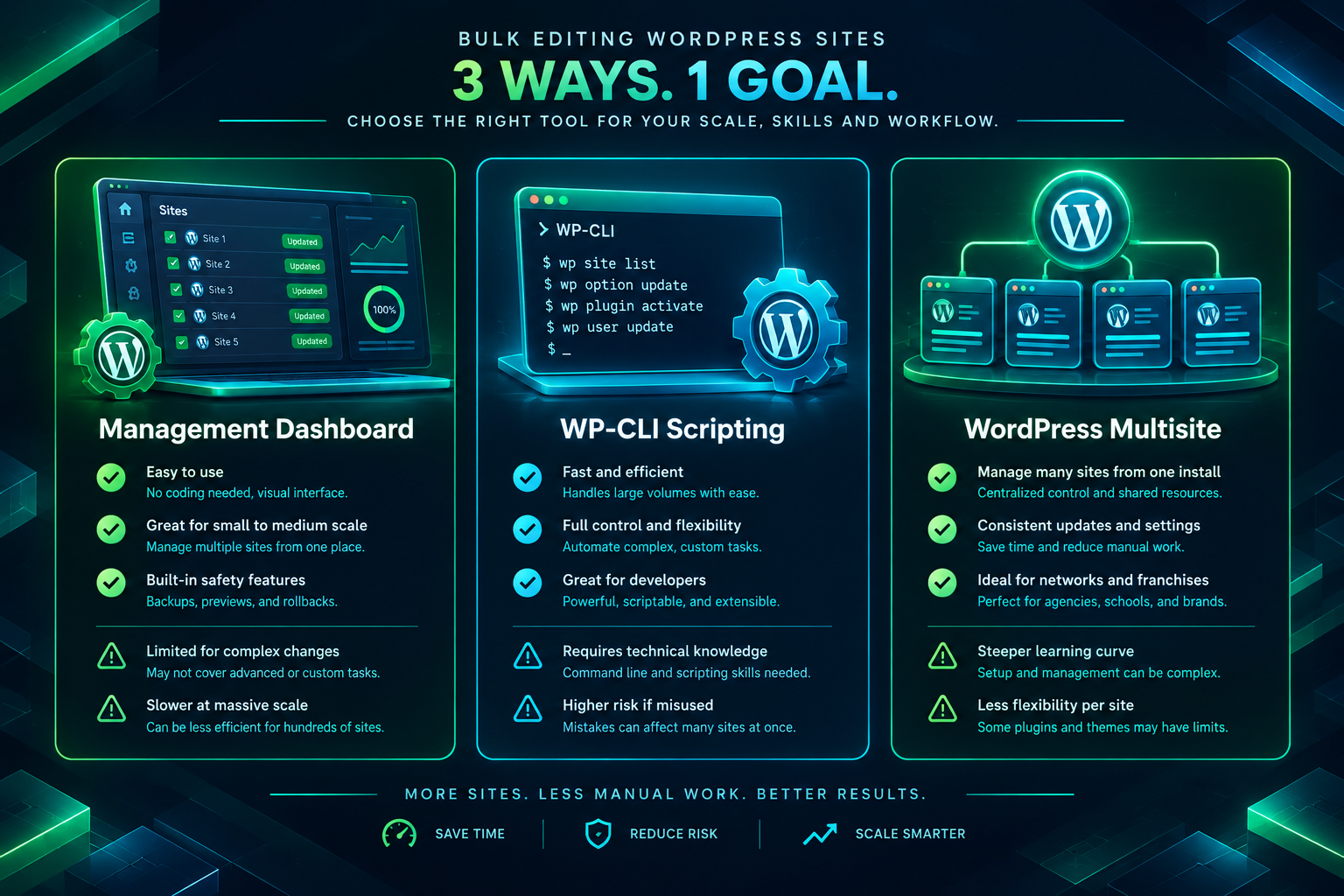
Most PBN sites run on WordPress, which means the bulk editing options available to a standard WordPress operator also apply to PBN management. The three main approaches are centralized management dashboards, WP-CLI command-line scripting, and WordPress Multisite, each with different trade-offs depending on network size, hosting setup, and technical comfort level.
Centralized WordPress Management Dashboards
Tools such as MainWP, ManageWP, and InfiniteWP allow a network operator to connect multiple independent WordPress installations to a single dashboard. From that dashboard, the operator can update plugins, update themes, update WordPress core, publish or schedule posts, manage users, and run backups across all connected sites simultaneously. MainWP in particular is self-hosted, meaning the management layer runs on a server the operator controls rather than on a third-party cloud service, which is a relevant consideration for operators who prefer to keep network infrastructure details off external platforms.
The connection between the management dashboard and each child site is established through a lightweight plugin installed on every site. Once connected, bulk actions such as updating all plugins across fifty sites or pushing a new post to a selected group of sites can be completed in a few clicks. Most dashboards also support filtering by site group, which is useful when a network is segmented by niche, hosting provider, or link tier.
WP-CLI for Scripted Bulk Operations
WP-CLI is the official command-line interface for WordPress. It allows a server administrator to run WordPress operations directly from a terminal without opening a browser. For PBN operators with VPS or dedicated server access, WP-CLI is one of the most powerful bulk editing tools available because it can be combined with shell scripts to automate repetitive tasks across multiple installations in a single command sequence.
Common WP-CLI bulk operations include updating all plugins on a site with wp plugin update --all, searching and replacing text across the database with wp search-replace, publishing or importing posts, flushing caches, and regenerating permalinks. When these commands are wrapped in a shell loop that iterates over a list of site directories or WordPress installation paths, the same operation runs sequentially or in parallel across every site in the network. For example, a script can loop through a directory list of WordPress installations and run a database search-replace to update an outbound URL across every site that contains it, completing in minutes what would otherwise take hours of manual editing.
WordPress Multisite
WordPress Multisite allows multiple sites to run under a single WordPress installation, sharing a common codebase, plugin set, and database structure. From a bulk editing perspective, Multisite is the most tightly integrated option: a network administrator can activate or deactivate plugins across all subsites simultaneously, push theme changes network-wide, and manage users from a single admin panel. However, Multisite also concentrates all sites on a single server and a single WordPress installation, which creates a shared infrastructure footprint. For PBN operators who prioritize network diversity across different hosting environments and IP addresses, Multisite is generally less suitable than managing independent installations through a dashboard or CLI approach.
Common Bulk Editing Tasks and How to Approach Them
Updating Plugins and Themes Across the Network
Outdated plugins are one of the most common sources of security vulnerabilities on WordPress sites. Bulk plugin updates through a management dashboard such as MainWP allow an operator to review available updates, select all connected sites, and push updates in a single action. Before running a network-wide update, it is worth testing the update on one or two sites first to confirm compatibility, particularly for major version changes. Most management dashboards support site grouping, so a test group can be updated before the full network rollout.
Replacing or Updating Outbound Links
When a client’s target URL changes, a page is restructured, or a link placement needs to be updated across multiple posts, the WP-CLI wp search-replace command is the most efficient method for independent installations. For dashboard-managed networks, some tools offer a content search feature that locates specific text or URLs across connected sites. The replacement can then be applied selectively to the sites where the old URL appears. Keeping a record of which sites carry which outbound links makes this process faster and reduces the chance of missing a placement during an update.
Pushing New Content to Multiple Sites
Bulk content publishing is one of the most time-intensive tasks in PBN management when done manually. Management dashboards with post-publishing features allow an operator to write or import a post and schedule it across a selected group of sites. However, publishing identical content to multiple PBN sites simultaneously introduces a content duplication pattern that can reduce the distinctiveness of each domain. A more effective approach is to prepare variations of each post, either through manual rewriting or content spinning tools, and assign different versions to different sites before scheduling the bulk publish action. This preserves topical relevance on each domain while still benefiting from the time savings of centralized scheduling.
Updating Footer, Sidebar, and Widget Content
Footer and sidebar content often contains elements that need periodic updating, such as copyright years, contact details, disclaimer text, or navigation links. For dashboard-managed networks, some tools support widget or theme customizer management across multiple sites. For networks managed through WP-CLI, a database search-replace targeting the specific widget or options table entry is the most direct method. Identifying the exact database key for the widget content in advance, typically through a single-site inspection, makes the scripted replacement straightforward to apply network-wide.
Bulk Meta Tag and SEO Setting Updates
If the network uses a consistent SEO plugin such as Yoast SEO or Rank Math, bulk updates to meta settings, schema configurations, or sitemap options can be applied through WP-CLI commands that target the plugin’s options entries in the WordPress database. For example, changing the default meta robots setting or updating the organization schema name across all sites can be scripted as a single database operation per site, looped across the full network. Dashboard tools with plugin management features may also expose some of these settings through their interface, depending on the plugin and dashboard combination.
Footprint Considerations During Bulk Operations
One of the practical tensions in bulk editing a PBN is that the efficiency of applying identical changes everywhere can work against the network diversity that makes individual sites appear independently operated. Applying the same footer text, the same widget content, the same post template, or the same outbound link pattern to every site in a single operation creates structural similarities that a crawler could potentially identify as a shared pattern. This does not mean bulk editing should be avoided, but it does mean that the content and structural elements being pushed in bulk should be varied where variation is practical.
A useful approach is to segment the network into groups before running bulk operations. Sites in the same niche, on the same hosting provider, or pointing to the same client target can be treated as one group, with slightly different content or structural choices applied to each group. This preserves the operational efficiency of bulk editing while reducing the uniformity that could otherwise emerge from a single network-wide push. For link-related updates specifically, varying anchor text, surrounding context, and placement position across sites remains important regardless of how the update is delivered.
Hosting Environment and Its Effect on Bulk Editing Options
The hosting setup of a PBN network directly determines which bulk editing methods are available. Networks hosted on shared hosting accounts typically have limited or no SSH access, which rules out WP-CLI scripting unless the hosting provider offers a terminal interface. In these environments, a management dashboard with a plugin-based connection is usually the most practical option. Networks hosted on VPS or dedicated servers with SSH access have the full range of options available, including WP-CLI, custom shell scripts, and server-level automation through cron jobs.
For networks spread across multiple hosting providers and IP ranges, which is a common configuration for operators who prioritize infrastructure diversity, the management dashboard approach works well because it connects to sites over HTTP regardless of where each site is hosted. The dashboard itself can be hosted on a separate server that is not part of the PBN, keeping the management layer distinct from the network’s public-facing infrastructure. This separation is worth planning deliberately rather than leaving the management server on the same hosting account as the PBN sites.
Staged Rollouts and Testing Before Network-Wide Changes
Applying a misconfigured change to a single site is a recoverable problem. Applying the same misconfiguration to fifty sites simultaneously is a much larger issue. A staged rollout process reduces this risk by testing changes on a small representative subset of sites before pushing them to the full network. The test group should ideally include sites on different hosting environments, running different theme versions, and using different plugin combinations, so that compatibility issues surface before the network-wide push.
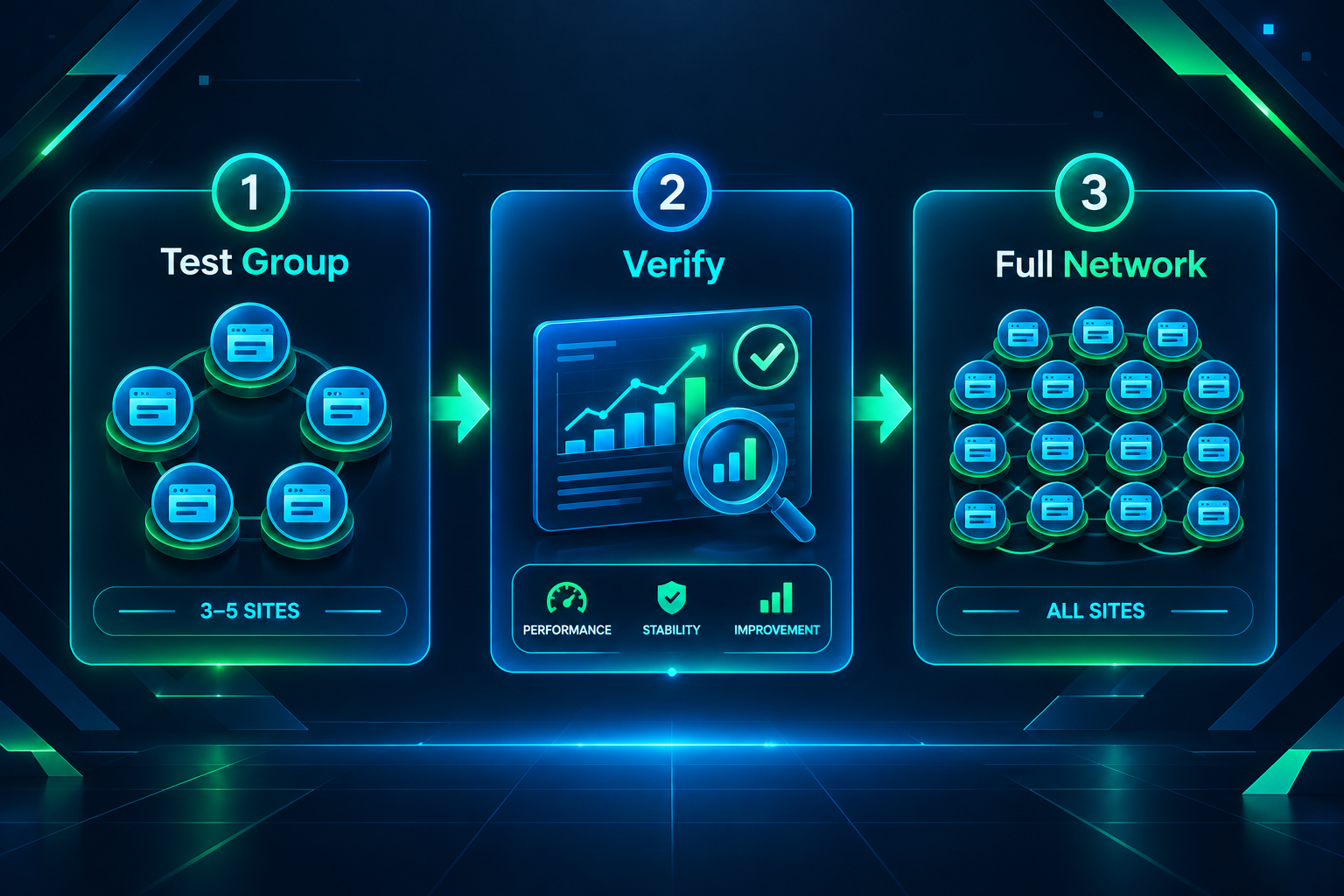
Most management dashboards support site tagging or grouping, which makes it straightforward to define a test group and a production group. Running the update on the test group, verifying the result on each test site, and then proceeding to the full network is a simple discipline that prevents the most common bulk editing errors. For WP-CLI scripts, the same principle applies: run the script on one or two site directories first, inspect the output, and then expand the loop to the full site list.
Backup Strategy for Bulk Operations
Any bulk operation that modifies the database, replaces content, or updates core files carries a risk of unintended changes. Running a full backup of each site before a major bulk operation is the standard precaution. Management dashboards such as MainWP include backup scheduling features that can run across all connected sites before a planned update window. For WP-CLI-managed networks, the wp db export command exports a database dump for each site, which can be scripted to run across all installations before the main operation begins. Storing backups off the PBN’s primary hosting environment, on a separate storage service, ensures they remain accessible if a hosting account is affected by the change.
Monitoring After Bulk Edits
After a bulk operation, confirming that the intended change was applied correctly across all sites is as important as the operation itself. Management dashboards typically provide a status log showing which sites completed an update successfully and which encountered errors. For WP-CLI scripts, capturing the output of each command to a log file allows a post-operation review without revisiting each site individually. For content changes, a spot-check of several sites across different groups confirms that the published version matches the intended variation rather than a default or fallback template.
Ongoing monitoring of the network’s sites, including uptime, indexing status, and outbound link health, is a separate but related discipline. Tools such as Google Search Console can be configured for each domain to track indexing and any manual action notifications. Uptime monitoring services can alert an operator when a site goes offline, which is particularly useful after a bulk plugin or core update that might introduce a compatibility conflict. Keeping the monitoring layer active after bulk operations, not just during them, supports the long-term health of the network’s placements.
Frequently Asked Questions
What is the most practical tool for bulk editing a large PBN?
For most operators, a self-hosted management dashboard such as MainWP offers the best combination of control and usability. It connects to independent WordPress installations regardless of hosting provider, supports bulk plugin updates, post publishing, and backup scheduling, and keeps the management layer on infrastructure the operator controls. WP-CLI is more powerful for scripted database operations but requires SSH access and some command-line familiarity.
Can I use WordPress Multisite to manage a PBN?
WordPress Multisite is technically capable of managing multiple sites from a single admin panel, but it places all sites on a single server and shared codebase, which reduces infrastructure diversity. Most PBN operators who prioritize separate hosting environments and IP addresses prefer independent installations managed through a dashboard or CLI rather than Multisite.
How do I update outbound links across multiple PBN sites at once?
The WP-CLI wp search-replace command is the most direct method for independent installations with SSH access. It searches the WordPress database for the old URL and replaces it with the new one. For dashboard-managed networks, some tools include a content search feature that locates the URL across connected sites and allows selective replacement. Maintaining a record of which sites carry which outbound links makes this process faster and more reliable.
How can I push new posts to multiple PBN sites without creating duplicate content?
Prepare content variations before scheduling the bulk publish action. Each site or site group should receive a distinct version of the post rather than an identical copy. Content variation can be achieved through manual rewriting, template-based variation, or content tools that produce structurally different versions from a common brief. Scheduling the variations through a management dashboard preserves the time savings of bulk publishing while keeping each site’s content distinct.
What should I back up before running a bulk database operation?
A full database export for each affected site is the minimum precaution before any bulk database operation. The WP-CLI wp db export command produces a SQL dump that can be used to restore a site if the operation produces an unintended result. Storing these exports off the primary hosting environment ensures they remain accessible if the hosting account itself is affected.
How do I reduce footprint risk when making bulk changes across a PBN?
Segment the network into groups and apply slightly different content, structural choices, or timing to each group rather than pushing identical changes to every site simultaneously. Vary footer text, widget content, and post templates across groups. For link-related updates, ensure anchor text and surrounding context differ across sites even when the target URL is the same. Staggering the timing of bulk operations across groups also reduces the uniformity of change timestamps visible in crawl data.
Planning Your PBN Bulk Editing Workflow
Bulk editing a private blog network efficiently comes down to choosing the right management layer for your hosting setup, establishing a consistent process for testing before network-wide rollouts, and maintaining enough variation in the changes you push to preserve each site’s individual character. A management dashboard such as MainWP handles the majority of routine tasks for most operators, while WP-CLI scripting adds precision for database-level operations on server-accessible installations. Neither approach eliminates the need for deliberate planning around content variation and footprint management, but both significantly reduce the manual effort required to keep a network of sites well-maintained.
If you are building or expanding a PBN and want to discuss domain selection, placement quality, or how a managed backlink package might fit your campaign, PBN Backlinks Service can help you assess your requirements and identify an approach suited to your niche and goals.