

Changing nameservers for PBN sites is a straightforward DNS task, but the configuration choices you make carry real implications for how your network is structured and how individual sites are managed. Whether you are setting up a new PBN domain, migrating an existing site to a different hosting environment, or reorganising your network’s infrastructure, understanding the nameserver change process and the reasoning behind different configuration approaches will help you make better decisions at each stage.
Key Takeaways
- Changing nameservers for a PBN site is done at the domain registrar level, not inside the hosting control panel, and typically propagates within 24 to 48 hours.
- Nameserver configuration is one of several infrastructure decisions that affect how a private blog network is structured, including IP diversity, hosting separation, and DNS footprint.
- Using the same nameservers across many PBN domains can create a visible pattern; varying nameserver providers across sites is a common approach to reducing shared infrastructure signals.
- After changing nameservers, verify that DNS records resolve correctly, that the site loads as expected, and that any existing SEO signals such as indexed pages and backlinks remain intact.
- Nameserver changes do not affect the link equity or placement value of backlinks already pointing from a PBN site to a target URL, provided the site remains live and accessible after propagation.
What Nameservers Do and Why They Matter for PBN Sites
A nameserver is a DNS server that translates a domain name into the IP address of the server where the website is hosted. When someone types a domain into a browser, their device queries the nameserver associated with that domain to find out where to send the request. Every domain has at least two nameservers assigned to it, and these are configured at the domain registrar where the domain is registered. The nameserver records tell the internet’s DNS system which server is authoritative for that domain’s DNS zone, meaning which server holds the A records, MX records, CNAME records, and other DNS entries that control how the domain behaves.
For PBN sites specifically, nameserver configuration matters beyond basic functionality. A private blog network is a collection of websites, each of which ideally appears to operate independently. When multiple PBN domains share the same nameservers, that shared infrastructure can appear as a common signal across those domains. DNS data is publicly accessible through WHOIS lookups and tools such as SecurityTrails, and nameserver patterns across a group of domains can be identified by anyone conducting a technical review. This is why many PBN operators choose to vary nameserver providers across their sites rather than routing every domain through the same DNS service.
The practical implication is that nameserver selection is not purely a technical hosting decision. It is also an infrastructure decision that affects how the network’s domains relate to one another at a DNS level. Changing nameservers is the mechanism through which you move a domain’s DNS management from one provider to another, and doing it correctly ensures the site remains accessible and functional throughout the transition.
How to Change Nameservers for a PBN Site: The Process
The nameserver change process takes place at the domain registrar, not inside the hosting control panel or WordPress dashboard. The hosting provider controls the server where the website files live, but the registrar controls which nameservers the domain points to. These are two separate systems, and it is important to keep that distinction clear before starting.
Step 1: Identify the New Nameservers
Before making any changes, obtain the correct nameserver addresses from the hosting provider or DNS service you are moving to. Nameservers are typically formatted as pairs, for example ns1.examplehost.com and ns2.examplehost.com. Some providers supply more than two. Log into the hosting account or DNS management panel for the destination provider and locate the nameserver details assigned to your account or the specific domain. Do not proceed without confirming these values, as entering incorrect nameservers will make the site unreachable after propagation.
Step 2: Log Into the Domain Registrar
Access the registrar account where the PBN domain is registered. Common registrars used for PBN domains include Namecheap, GoDaddy, Dynadot, and various others. Navigate to the domain management section and locate the specific domain you want to update. The nameserver settings are usually found under a label such as DNS, Nameservers, or Domain Settings depending on the registrar’s interface.
Step 3: Update the Nameserver Records
Select the option to use custom nameservers rather than the registrar’s default nameservers. Enter the nameserver addresses provided by your hosting or DNS provider. Replace any existing nameserver entries with the new values. Save the changes. Most registrars apply the update immediately on their end, but the change takes time to propagate across the global DNS system.
Step 4: Wait for DNS Propagation
DNS propagation is the process by which the updated nameserver information spreads across DNS resolvers worldwide. This typically takes between a few hours and 48 hours, though most changes resolve within 24 hours. During propagation, some visitors may reach the old server while others reach the new one, depending on which DNS resolver their device queries. For a PBN site, this transitional period is generally low-risk because PBN sites do not typically receive significant direct visitor traffic. The more important concern is ensuring the site is fully functional on the new server before the nameserver change is made.
Step 5: Verify the Change
After propagation, confirm that the domain resolves to the correct server. Tools such as whatsmydns.net or dnschecker.org allow you to check DNS propagation status across multiple global locations. Verify that the website loads correctly, that the SSL certificate is active if one is in use, and that all pages are accessible. If the site uses WordPress, log into the admin panel to confirm the installation is functioning normally.
DNS Records to Check After a Nameserver Change
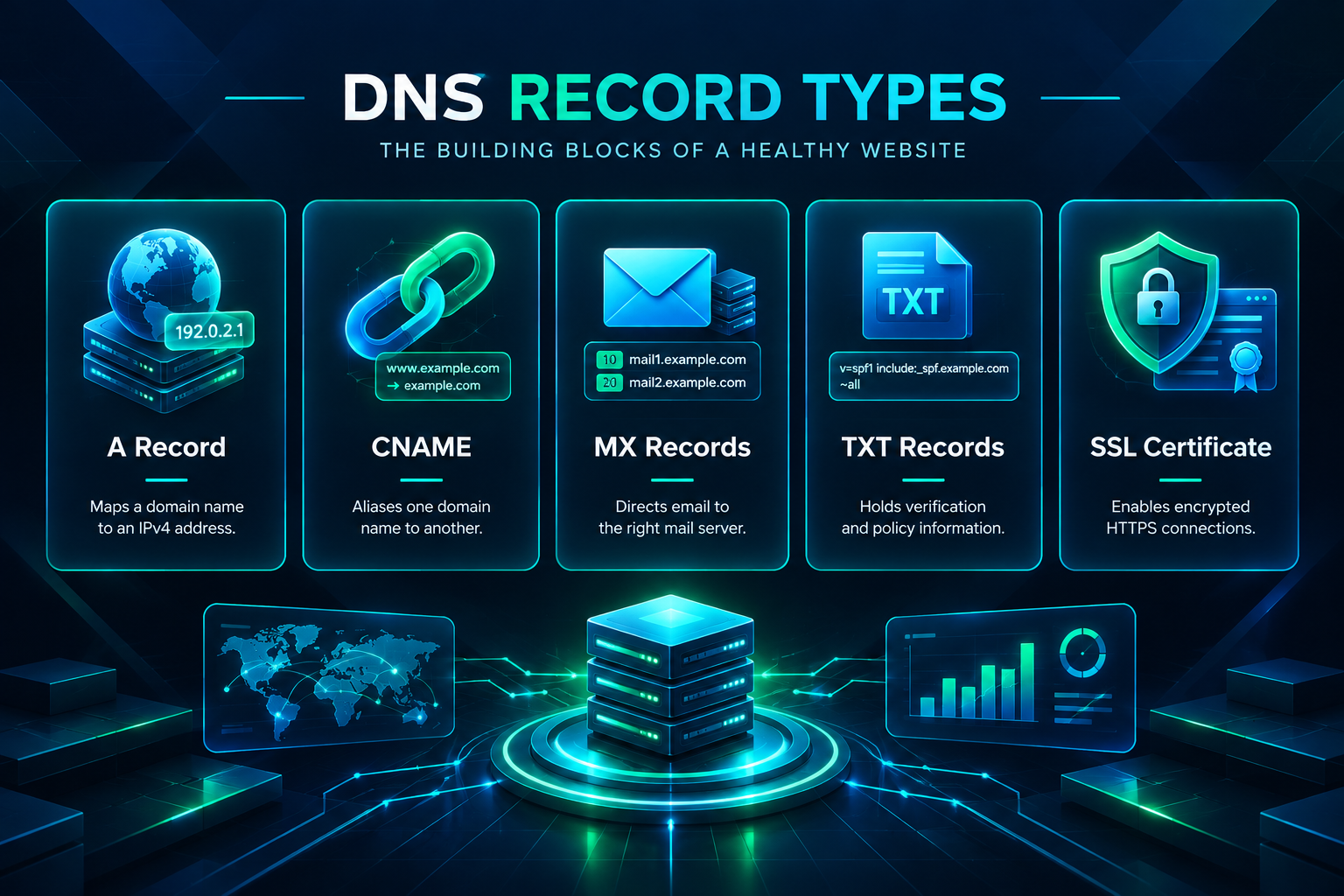
Changing nameservers transfers DNS authority to the new provider, which means all DNS records for the domain must exist at the new nameserver location. If DNS records were previously managed at the old nameserver and have not been recreated at the new one, services associated with those records will stop working after propagation. For a PBN site, the records most likely to require attention include the following.
- A record: Points the domain and often the www subdomain to the server’s IP address. This is the most critical record for the site to load correctly.
- CNAME record: Used to alias one domain name to another. Relevant if the site uses a subdomain or a third-party service that requires a CNAME entry.
- MX records: Control email routing. If the PBN domain has an associated email address, MX records must be present at the new nameserver to maintain email delivery.
- TXT records: Used for domain verification, SPF records for email authentication, and other purposes. Recreate any existing TXT records at the new nameserver if they are needed.
- SSL certificate: If the SSL certificate is managed through the hosting provider or a service like Cloudflare, confirm it is active and correctly configured after the nameserver change.
Many hosting providers offer a DNS zone export or display existing records in the control panel. Review these before initiating the nameserver change so you have a complete record of what needs to be recreated at the new provider.
Nameserver Diversity and PBN Infrastructure
One of the practical reasons PBN operators change nameservers is to introduce variation across the network’s DNS infrastructure. When a group of domains all use the same registrar-default nameservers or the same hosting provider’s nameservers, that shared configuration is visible in public DNS records. Tools that aggregate DNS data can surface these patterns, and a consistent nameserver across many domains associated with the same operator is one of several signals that may indicate a coordinated network.
Varying nameserver providers across PBN sites is a common approach to reducing this type of shared signal. This might involve using different hosting providers for different sites, using a dedicated DNS management service such as Cloudflare for some domains while leaving others on hosting-provider nameservers, or using registrar-level DNS for a portion of the network. The goal is to avoid a uniform DNS fingerprint across the entire set of domains.
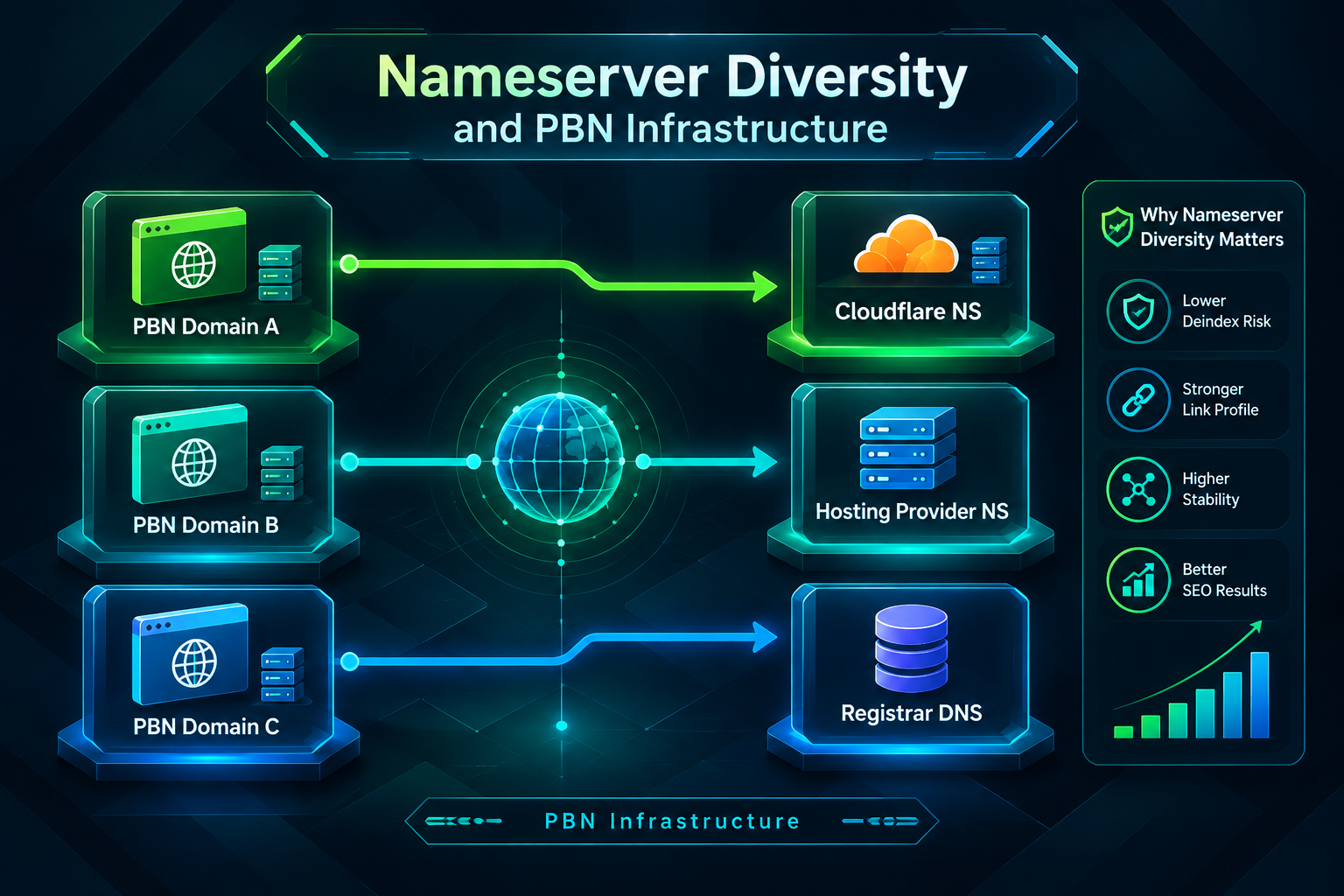
It is worth being precise about what nameserver diversity does and does not accomplish. Varying nameservers removes one specific shared infrastructure signal from public DNS records. It does not by itself address other footprint considerations such as shared IP ranges, identical CMS configurations, similar content structures, or overlapping WHOIS registration patterns. Nameserver configuration is one component of a broader infrastructure strategy, not a standalone solution to network footprint management.
Cloudflare is frequently used for DNS management on PBN sites because it offers free DNS hosting, fast propagation, and additional features such as proxy mode, which can mask the origin server’s IP address. When a domain’s nameservers are set to Cloudflare’s nameservers and the A record is proxied, the IP address visible to external tools is a Cloudflare IP rather than the actual hosting server’s IP. This is a legitimate use of Cloudflare’s service and is used across a wide range of websites for performance and security reasons, not exclusively for PBN infrastructure.
Changing Nameservers When Migrating a PBN Site to a New Host
Migrating a PBN site from one hosting provider to another involves both moving the website files and database and updating the nameservers to point to the new server. The order of operations matters here. Migrating the site files and database to the new host before changing the nameservers allows you to test the site on the new server using a temporary URL or by editing the local hosts file, confirming everything works correctly before the DNS change goes live.
Once the site is confirmed to be functioning on the new server, update the nameservers at the registrar to point to the new hosting provider. Keep the old hosting account active for at least 48 to 72 hours after the nameserver change to ensure visitors and crawlers that are still resolving to the old server can still reach the site during the propagation window. After propagation is complete and the site is confirmed to be resolving correctly on the new host, the old hosting account can be cancelled.
For PBN sites that carry existing backlinks pointing to them from other sources, or that have outbound links to target URLs as part of a link-building campaign, maintaining site continuity during migration is important. A site that goes offline during migration may lose indexed pages if search engine crawlers attempt to access it during the downtime and receive errors. Keeping the transition window short and verifying the site is live on the new server before completing the nameserver change reduces this risk.
Impact on Indexed Pages and Existing Backlinks
A nameserver change, when executed correctly, does not affect the indexed status of a PBN site’s pages or the link equity associated with backlinks pointing from that site to a target URL. The domain name remains the same, the content remains the same, and the URLs remain the same. Search engine crawlers that revisit the site after propagation will find the same content at the same addresses and will continue to treat the site’s outbound links as they did before the change.
The risk to indexed pages arises only if the site experiences downtime during the migration. If a crawler visits the site while it is unreachable and receives a server error, that page may be temporarily removed from the index. Sustained downtime over multiple crawl attempts increases the likelihood of deindexation. This is a general website management concern, not a specific consequence of changing nameservers, and it applies equally to any site migration or hosting change.
After the nameserver change is complete and the site is confirmed to be live, it is good practice to check that key pages remain indexed. A simple site: search in Google using the PBN domain can confirm whether the site’s pages are still appearing in the index. If pages have dropped out during a migration, they typically return to the index once the site is consistently accessible and crawlers revisit them, though the timeline for reindexation varies.
Common Issues When Changing Nameservers for PBN Sites
Several issues can arise during or after a nameserver change. Being aware of them in advance makes troubleshooting faster if something does not resolve as expected.
- Incorrect nameserver values: Entering a nameserver address with a typo or using an outdated nameserver provided by the host will cause the domain to fail to resolve. Always copy nameserver values directly from the hosting provider’s documentation or control panel rather than typing them manually.
- Missing DNS records at the new provider: If the A record or other essential records have not been created at the new nameserver before the change propagates, the site will be unreachable. Set up all required DNS records at the new provider before initiating the nameserver change at the registrar.
- SSL certificate errors after migration: If the SSL certificate is tied to the old hosting environment and has not been provisioned on the new server, visitors will see a certificate warning after propagation. Ensure the SSL certificate is active on the new host before completing the migration.
- Propagation appearing slow: DNS propagation speed depends on the TTL (time to live) values set on the old DNS records and on the caching behaviour of individual DNS resolvers. Lowering the TTL on existing DNS records several hours before making the nameserver change can speed up propagation, though this is an optional optimisation rather than a requirement.
- Registrar lock preventing changes: Some domains are subject to a registrar lock that prevents DNS changes. If the nameserver update is not saving at the registrar, check whether the domain has a transfer lock or change lock applied and disable it before proceeding.
Nameserver Configuration as Part of a Broader PBN Setup
Nameserver management is one element of the technical setup involved in running a private blog network. When evaluating how to configure a PBN site’s infrastructure, nameservers sit alongside decisions about hosting provider selection, IP address allocation, domain registration details, CMS configuration, and content management. Each of these decisions contributes to how the network’s sites relate to one another at a technical level.
For operators building or expanding a PBN, the nameserver decision is typically made at the point of domain setup or when migrating sites to a new infrastructure arrangement. The process itself is not technically complex, but it requires attention to detail to avoid service interruptions. Getting the DNS records right at the new provider before initiating the nameserver change, verifying propagation after the update, and confirming the site is fully functional are the three steps that matter most for a clean transition.
If you are working with a managed PBN service or purchasing PBN backlinks rather than building and maintaining your own network, the nameserver and hosting configuration is typically handled by the provider. In that context, understanding nameserver changes is useful for evaluating the infrastructure quality of the network you are working with and for asking informed questions about how the provider manages DNS diversity and site separation across their domains.
Frequently Asked Questions
How long does a nameserver change take to propagate for a PBN site?
DNS propagation for a nameserver change typically takes between a few hours and 48 hours. Most changes resolve within 24 hours. The exact time depends on the TTL values set on the previous DNS records and on how quickly individual DNS resolvers around the world update their cached information. During propagation, the site may be accessible from some locations but not others.
Do I change nameservers at the registrar or at the hosting provider?
Nameservers are changed at the domain registrar, which is where the domain is registered. The hosting provider supplies the nameserver addresses you need to enter, but the actual update is made inside the registrar’s domain management interface. These are two separate systems, and it is important not to confuse the hosting control panel with the registrar account.
Will changing nameservers affect the backlinks pointing from my PBN site to my target URL?
A correctly executed nameserver change does not affect the outbound links on a PBN site or the link equity associated with them. The domain name, URLs, and content remain unchanged. As long as the site stays live and accessible throughout the transition, existing links continue to function as before. The risk arises only if the site experiences significant downtime during the migration.
Can I use Cloudflare nameservers for PBN sites?
Cloudflare’s nameservers can be used for PBN sites. Cloudflare offers free DNS hosting with fast propagation and the option to proxy traffic through Cloudflare’s network, which masks the origin server’s IP address. This is a widely used DNS configuration across many types of websites. Whether using Cloudflare for some PBN domains while using other nameserver providers for others is part of a broader infrastructure strategy depends on the specific network setup.
What DNS records do I need to recreate after changing nameservers?
At minimum, you need an A record pointing the domain to the new server’s IP address. If the site uses a www subdomain, that typically requires either an A record or a CNAME record. If the domain has associated email, MX records must be recreated. Any TXT records used for domain verification or email authentication should also be transferred. Review the existing DNS records at the old nameserver before making the change so nothing is missed.
Does changing nameservers affect a domain’s SEO or authority metrics?
Changing nameservers does not directly affect a domain’s authority metrics as measured by tools such as Ahrefs DR, Moz DA, or Majestic TF. These metrics are based on the domain’s backlink profile, which is not altered by a DNS configuration change. Indexed pages and their associated signals remain intact provided the site stays accessible during and after the transition.
Getting Your PBN Nameserver Configuration Right
Changing nameservers for a PBN site is a routine DNS task when approached methodically. The process involves identifying the correct nameserver values from the new provider, updating those values at the domain registrar, ensuring all necessary DNS records are in place at the new nameserver before the change propagates, and verifying the site is fully functional after propagation completes. Done carefully, the transition is clean and the site experiences no meaningful interruption.
The broader infrastructure context matters too. Nameserver configuration is one of several decisions that shape how a private blog network’s domains are structured at a technical level. Varying nameserver providers across sites, choosing hosting environments thoughtfully, and maintaining site quality and accessibility are all part of managing a network that functions reliably over time. A nameserver change executed correctly keeps the site live, preserves indexed pages, and maintains the functionality of any outbound links the site carries.
If you are evaluating PBN backlink placements or considering how a managed PBN service handles domain infrastructure, PBN Backlinks Service can help you assess placement quality, domain configuration, and campaign fit for your specific SEO goals. Reviewing the technical setup of any network you work with is a reasonable step before committing to a link-building strategy.