

When you point a PBN domain to a new hosting environment or nameserver, the updated DNS records do not become visible to every resolver simultaneously. DNS propagation is the period during which those changes spread across the global network of resolvers, and until propagation completes, some visitors, crawlers, and indexing systems may still see the old records. For PBN domain management, understanding how to verify propagation status is a practical necessity: a domain that has not fully propagated may not be crawlable by search engine bots, which delays indexing and, in turn, delays any link value the placement is intended to provide.
Key Takeaways
- DNS propagation for PBN domains typically completes within a few hours to 48 hours, depending on the TTL value set on the previous DNS records and the resolver caching behavior of individual ISPs.
- Free tools such as whatsmydns.net, dnschecker.org, and MXToolbox allow you to query DNS records from multiple geographic locations simultaneously, giving a reliable picture of propagation progress.
- Checking propagation from a single location or your own browser is not sufficient, because local resolver caches may return stale records long after most of the world sees the updated ones.
- Incomplete propagation is a common reason why a newly configured PBN domain fails to be crawled or indexed promptly, so verifying propagation before expecting link activity is a sensible step in any PBN setup workflow.
- TTL settings on your DNS records directly influence how quickly changes propagate; lowering TTL before making a change can reduce the propagation window significantly.
What DNS Propagation Actually Means
DNS, or the Domain Name System, is the infrastructure that translates a human-readable domain name into an IP address that servers can route traffic to. When you register a PBN domain, configure hosting, or move a domain to a new server, you update DNS records — most commonly the A record, which maps the domain to an IP address, or the NS records, which point to the authoritative nameservers. These updates are made at the authoritative nameserver level, but the rest of the internet does not instantly learn about them.
Recursive resolvers — the DNS servers operated by ISPs, cloud providers, and public services like Google’s 8.8.8.8 or Cloudflare’s 1.1.1.1 — cache DNS responses for a period defined by the TTL, or Time to Live, value attached to each record. Until a cached record expires, a resolver will continue serving the old answer to anyone who queries it. DNS propagation is simply the process of waiting for cached records to expire and be replaced with the new, correct values across all resolvers worldwide. For PBN domain operators, this means a domain that has been pointed to new hosting may appear fully live from one location while still returning the old IP from another.
Why DNS Propagation Matters for PBN Domains
PBN domains are typically acquired, configured, and put into service as part of a deliberate link-building workflow. Each step in that workflow depends on the domain being correctly resolvable. If a search engine crawler attempts to visit a PBN domain during the propagation window and encounters a DNS failure or the wrong IP address, the crawl attempt may fail or return an error. A failed crawl means the page containing the target link is not indexed, and an unindexed page cannot pass link signals to the destination URL.
Beyond indexing, DNS propagation affects the reliability of your own verification steps. If you check whether a PBN domain is live by visiting it in your browser, your local resolver may still be serving a cached record from the previous configuration. You might see the site loading correctly while a Googlebot crawl from a different network segment encounters a DNS error. This discrepancy is why checking propagation through a multi-location tool is more informative than a single browser check.
For PBN domain management at scale, propagation delays can also create timing mismatches between when a domain is considered ready and when it is actually accessible to crawlers. Building a consistent verification step into your domain setup process helps avoid deploying content and links on domains that are not yet fully reachable.
How to Check DNS Propagation: Tools and Methods
Several free and reliable tools allow you to query DNS records from multiple resolver locations simultaneously. Each tool sends a DNS lookup request from servers distributed across different countries and ISPs, then reports what each resolver currently returns. Comparing these results gives you a practical view of how far propagation has progressed.
whatsmydns.net
Whatsmydns.net is one of the most widely used propagation checkers. You enter the domain name, select the record type you want to check — typically A, AAAA, NS, or CNAME — and the tool queries its network of global servers. Results are displayed as a list of locations with a green tick or red cross indicating whether each resolver is returning the expected value. For a PBN domain, you would enter the domain and check the A record to confirm that the majority of locations are returning the new hosting IP address.
dnschecker.org
DNSChecker.org operates similarly, querying from a large set of global locations and displaying results on a world map as well as a list. The map view is useful for identifying geographic clusters where propagation is lagging, which can happen when a regional ISP has a particularly long cache TTL or a slow refresh cycle. For PBN domains hosted across different IP ranges or data centers, this geographic view can help confirm that the domain is resolving correctly from the regions most relevant to your target audience or the search engine’s crawl infrastructure.
MXToolbox DNS Lookup
MXToolbox provides a more detailed DNS lookup that returns the full record set from a single authoritative query, along with diagnostic information about nameserver configuration. While it does not show multi-location propagation in the same way as the tools above, it is useful for verifying that the DNS records themselves are correctly configured before you begin monitoring propagation. If the authoritative nameserver is returning the wrong record, no amount of waiting will resolve the issue — MXToolbox helps you catch configuration errors early.
Google Admin Toolbox: Dig
Google’s own DNS diagnostic tool, available at toolbox.googleapps.com, allows you to perform a DNS lookup that reflects what Google’s infrastructure is likely to see. For PBN domain operators who are specifically concerned with whether Googlebot can resolve a domain correctly, this tool provides a useful data point. It queries from Google’s resolver network and returns the current DNS response, which can be compared against the expected IP address or nameserver.
Command-Line Tools: dig and nslookup
For those comfortable with a terminal, the dig command on Linux and macOS, or nslookup on Windows, allows direct DNS queries against specific resolvers. Running dig @8.8.8.8 yourdomain.com A queries Google’s public resolver for the A record of your domain. Running the same command against @1.1.1.1 queries Cloudflare’s resolver. Comparing results across multiple public resolvers gives you a manual propagation check without relying on a third-party web interface. This approach is particularly useful when you want to test a specific resolver that you know a crawler or monitoring tool is using.
Reading Propagation Results Correctly
When you run a propagation check, you will typically see a mix of results during the propagation window: some locations returning the new IP address and others still returning the old one. This is normal and expected. Propagation is not an all-or-nothing event; it progresses gradually as cached records expire across different resolvers.
A result showing the new IP address from the majority of locations, including major public resolvers like Google’s 8.8.8.8 and Cloudflare’s 1.1.1.1, is a reasonable indicator that propagation is substantially complete for most practical purposes. Remaining discrepancies are usually confined to ISP resolvers in specific regions with longer cache TTLs. For PBN domain management, waiting until the major public resolvers and a broad geographic spread of locations return the correct record is a sensible threshold before considering the domain fully live.
If a propagation check shows that the authoritative nameservers themselves are returning inconsistent results, the issue is not propagation delay but a configuration problem. In that case, reviewing the DNS records at the registrar or DNS provider level is the appropriate next step before waiting for propagation to complete.
TTL Settings and Their Effect on Propagation Speed
The TTL value attached to a DNS record is the primary factor controlling how long resolvers cache that record before requesting a fresh copy. A TTL of 86400 seconds means resolvers may cache the record for up to 24 hours before checking for an update. A TTL of 300 seconds means resolvers will refresh the record every five minutes.
For PBN domain operators who anticipate moving domains between hosting environments, lowering the TTL of existing DNS records before making the change is a practical way to reduce the propagation window. If you lower the A record TTL to 300 seconds at least 24 to 48 hours before making the hosting change, most resolvers will have already adopted the shorter cache duration by the time you update the IP address. After the change, the new record will propagate to most resolvers within minutes rather than hours.
After propagation is confirmed complete, raising the TTL back to a standard value such as 3600 or 86400 seconds reduces the query load on your nameservers and is generally considered good DNS hygiene. For PBN domains that are not expected to move frequently, a standard TTL is appropriate once the configuration is stable.
Common DNS Record Types to Verify for PBN Domains
When setting up a PBN domain, several DNS record types may need to be configured and verified, depending on the hosting and email setup.
- A record: Maps the domain to an IPv4 address. This is the primary record to check during propagation, as it determines where HTTP requests for the domain are directed.
- AAAA record: Maps the domain to an IPv6 address. Relevant if the hosting environment supports IPv6.
- NS records: Identify the authoritative nameservers for the domain. Verifying NS records confirms that the domain is delegated to the correct nameservers, which is the foundation for all other DNS records resolving correctly.
- CNAME record: Maps a subdomain to another domain name. Relevant if the PBN domain uses a subdomain configuration or a CDN such as Cloudflare.
- MX records: Specify the mail servers for the domain. While not directly related to web crawling, correctly configured MX records contribute to a domain appearing as a fully operational website rather than a parked or abandoned domain.
For most PBN domain setups, the A record and NS records are the most critical to verify during propagation. Confirming that both are resolving correctly from multiple locations before publishing content and links is a straightforward quality check that avoids wasted effort on domains that are not yet accessible.
Integrating DNS Propagation Checks into a PBN Domain Workflow
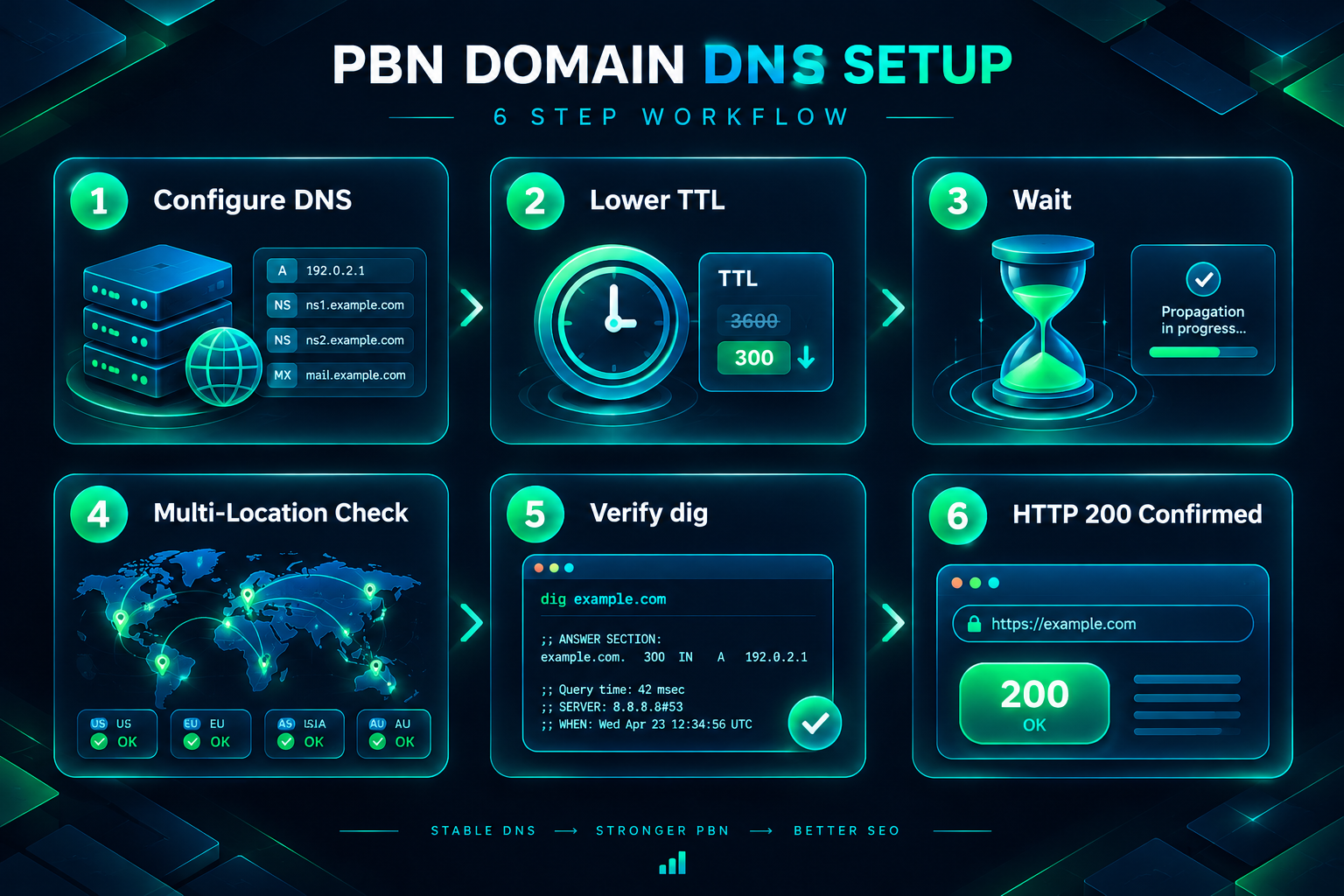
A structured approach to DNS verification reduces the risk of deploying content on domains that are not yet crawlable. The following sequence reflects a practical workflow for PBN domain setup.
- Configure DNS records at the registrar or DNS provider. Set the A record to the new hosting IP and confirm the NS records are pointing to the correct nameservers. Use MXToolbox or a similar tool to verify the authoritative configuration before waiting for propagation.
- Lower TTL in advance if possible. If you are migrating an existing domain rather than configuring a new one, reduce the TTL of the A record 24 to 48 hours before the change to shorten the propagation window.
- Wait for the initial propagation period. For new domain configurations, allow at least a few hours before running a propagation check. For domains with previously high TTL values, allow up to 48 hours.
- Run a multi-location propagation check. Use whatsmydns.net or dnschecker.org to query the A record from multiple global locations. Confirm that the majority of locations, including major public resolvers, are returning the correct IP address.
- Verify with a command-line query against Google’s resolver. Run a dig query against 8.8.8.8 to confirm the record Google’s infrastructure is likely to see.
- Confirm the site is accessible and returning a 200 status. Use a tool such as Screaming Frog or a simple HTTP status checker to confirm the domain is serving content correctly, not just resolving to an IP.
- Proceed with content publication and link placement. Once DNS propagation is confirmed and the site is returning a valid HTTP response, the domain is ready for content deployment and link placement.
DNS Propagation and Indexing: Understanding the Relationship
DNS propagation and search engine indexing are related but distinct processes. A domain that has fully propagated is correctly resolvable, meaning crawlers can reach it. However, propagation does not trigger indexing automatically. After a PBN domain is fully accessible, search engine crawlers still need to discover and crawl the domain, process its content, and decide whether to index the pages.
For PBN domains, the path to indexing typically involves submitting the domain’s sitemap through Google Search Console if the domain has a verified property, or relying on crawl discovery through internal links, external links pointing to the domain, or direct URL submission. The time between a domain becoming fully propagated and its pages appearing in a search engine’s index can range from a few days to several weeks, depending on the domain’s crawl priority, its link profile, and the quality and freshness of its content.
Understanding this distinction matters because a propagation check confirms reachability, not indexing. If a PBN domain’s pages are not appearing in search results after a reasonable period, the issue may be indexing-related rather than DNS-related. Checking the domain’s indexing status through Google Search Console or a site: query in Google Search is the appropriate next diagnostic step after propagation has been confirmed.
Frequently Asked Questions
How long does DNS propagation typically take for a PBN domain?
DNS propagation for most domain configurations completes within a few hours to 48 hours. The actual duration depends primarily on the TTL value that was set on the previous DNS records. If the previous A record had a TTL of 86400 seconds (24 hours), resolvers that cached it just before the change was made may not refresh for up to 24 hours. Lowering TTL in advance of a planned change can reduce this window to under an hour in many cases.
Can I use my browser to check if a PBN domain has propagated?
A browser check alone is not reliable for confirming propagation. Your local resolver or ISP may be caching the old DNS record, making the domain appear live from your location while it is still unresolvable from other networks. Using a multi-location tool such as whatsmydns.net gives a more accurate picture of propagation status across different resolvers and geographic regions.
Does DNS propagation affect whether a PBN link gets indexed?
Yes, indirectly. If a PBN domain has not fully propagated, search engine crawlers that attempt to visit it may encounter DNS resolution failures, which prevent the page from being crawled and indexed. An unindexed page cannot contribute link signals to the target URL. Confirming propagation before expecting crawl activity is a practical step in any PBN domain setup workflow.
What should I do if propagation is not completing after 48 hours?
If a propagation check still shows a significant number of locations returning the old record after 48 hours, the issue is likely a configuration problem rather than normal propagation delay. Check that the NS records at the registrar are pointing to the correct nameservers, and verify that the A record is correctly set at the DNS provider level using MXToolbox or a similar diagnostic tool. A misconfigured authoritative record will not propagate correctly regardless of how long you wait.
Should I check DNS propagation for every PBN domain I set up?
For any domain that has been recently acquired, migrated to new hosting, or had its nameservers changed, a propagation check is a straightforward verification step that takes only a few minutes. It confirms that the domain is reachable before you invest time in content creation and link placement. For PBN domain management at scale, incorporating a propagation check into a standard setup checklist helps avoid deploying links on domains that are not yet accessible to crawlers.
Does using Cloudflare as a DNS provider affect propagation for PBN domains?
Cloudflare’s nameservers are known for fast propagation, often completing within minutes to a few hours for changes made within the Cloudflare dashboard. However, if you are changing the NS records at the registrar level to point to Cloudflare for the first time, the NS record change itself is subject to the same propagation dynamics as any other DNS change. The initial NS delegation can take up to 48 hours to propagate fully, after which subsequent record changes within Cloudflare propagate quickly.
Confirming DNS Propagation Before Your PBN Domain Goes Live
DNS propagation checking is a straightforward but genuinely useful step in PBN domain management. A domain that has not fully propagated is not reliably reachable by crawlers, which means content and links deployed on it may not be indexed on the expected timeline. Using multi-location tools such as whatsmydns.net or dnschecker.org to verify that the A record and NS records are resolving correctly from a broad set of global locations takes only a few minutes and removes a common source of uncertainty in the domain setup process.
Managing TTL values thoughtfully — lowering them before planned migrations and restoring them after propagation is confirmed — gives you more control over how quickly changes take effect. Pairing a propagation check with an HTTP status verification and, where appropriate, a Google Search Console indexing check gives you a complete picture of whether a PBN domain is ready to contribute to a link-building campaign.
If you are building or expanding a private blog network and want guidance on domain selection, hosting configuration, or placement quality, the team at PBN Backlinks Service can help you assess your requirements and identify domains and placements suited to your campaign goals.