

Exporting private blog network data to CSV is a routine but important task for anyone managing multiple PBN sites, tracking link placements, or reporting campaign progress to clients. A well-structured CSV export gives you a portable, filterable record of your network’s domains, placements, metrics, and indexing status — information that is difficult to act on when it lives only inside a spreadsheet tool, a link-tracking dashboard, or a provider’s client portal. This guide explains what data to export, which tools and methods support CSV output, how to structure the file for ongoing use, and how to keep the export accurate over time.
Key Takeaways
- PBN data exports typically cover domain metrics, placement URLs, anchor text, target URLs, indexing status, and publication dates — capturing all of these fields in one CSV makes auditing and reporting significantly faster.
- Most SEO tools such as Ahrefs, Semrush, and Majestic offer CSV export for backlink data, but network-level operational data often requires a custom spreadsheet or a dedicated link-tracking tool.
- Structuring your CSV with consistent column headers from the start reduces the manual cleanup needed when merging data from multiple sources or providers.
- Regular exports — monthly at minimum — help you detect dropped placements, deindexed pages, or metric changes before they affect campaign decisions.
- A clean, well-maintained CSV record is useful for client reporting, provider accountability, and making informed decisions about scaling or adjusting a PBN link-building campaign.
What PBN Data Is Worth Exporting
Before choosing a tool or method, it helps to define exactly which data points belong in a PBN CSV export. The answer depends on whether you are managing the network yourself, buying placements from a provider, or auditing an existing backlink profile. In practice, most SEO managers need a combination of domain-level data and placement-level data, and keeping these in separate tabs or separate files avoids confusion when filtering or sorting.
Domain-level data describes each PBN site as a whole. Useful fields include the domain name, registration date, expiry date, hosting provider or IP address, CMS platform, domain rating or trust flow from a third-party tool, referring domain count, topical category, and any notes about the domain’s history or previous use. These fields help you assess the overall health of the network and identify domains that may need attention — for example, a domain approaching expiry or one whose third-party metrics have dropped significantly since the last export.
Placement-level data describes individual link placements within the network. Useful fields here include the placement URL, the target URL receiving the link, the anchor text used, the publication date, the link attribute (followed or nofollowed), the indexing status of the placement page, and any notes about the surrounding content or page topic. Placement-level data is what most clients and campaign managers actually want to review, and it is the data most likely to be requested in a reporting context.
A third category — metric snapshots — captures the state of key third-party metrics at a specific point in time. Tools such as Ahrefs, Semrush, Majestic, and Moz each produce proprietary scores (Domain Rating, Authority Score, Trust Flow, Domain Authority) that are not interchangeable and do not directly represent Google’s assessment of a domain. Recording these scores at the time of placement and again at regular intervals gives you a historical record that is useful for spotting metric decay, which can indicate link loss or changes in the referring domain profile of a PBN site.
Tools That Support CSV Export for Backlink and Domain Data
Several established SEO tools allow you to export backlink and domain data directly to CSV, which is the most practical format for merging, filtering, and sharing outside a browser-based interface.
Ahrefs allows users to export backlink reports, referring domain lists, and anchor text distributions to CSV from within the Site Explorer tool. The export includes columns for referring page URL, domain rating of the referring domain, anchor text, target URL, link type, first seen date, and last seen date. For a PBN manager reviewing placements, the first seen and last seen columns are particularly useful because they indicate whether a link is still live and being crawled. Ahrefs export limits vary by subscription tier, so large networks may require multiple exports or a higher-tier plan.
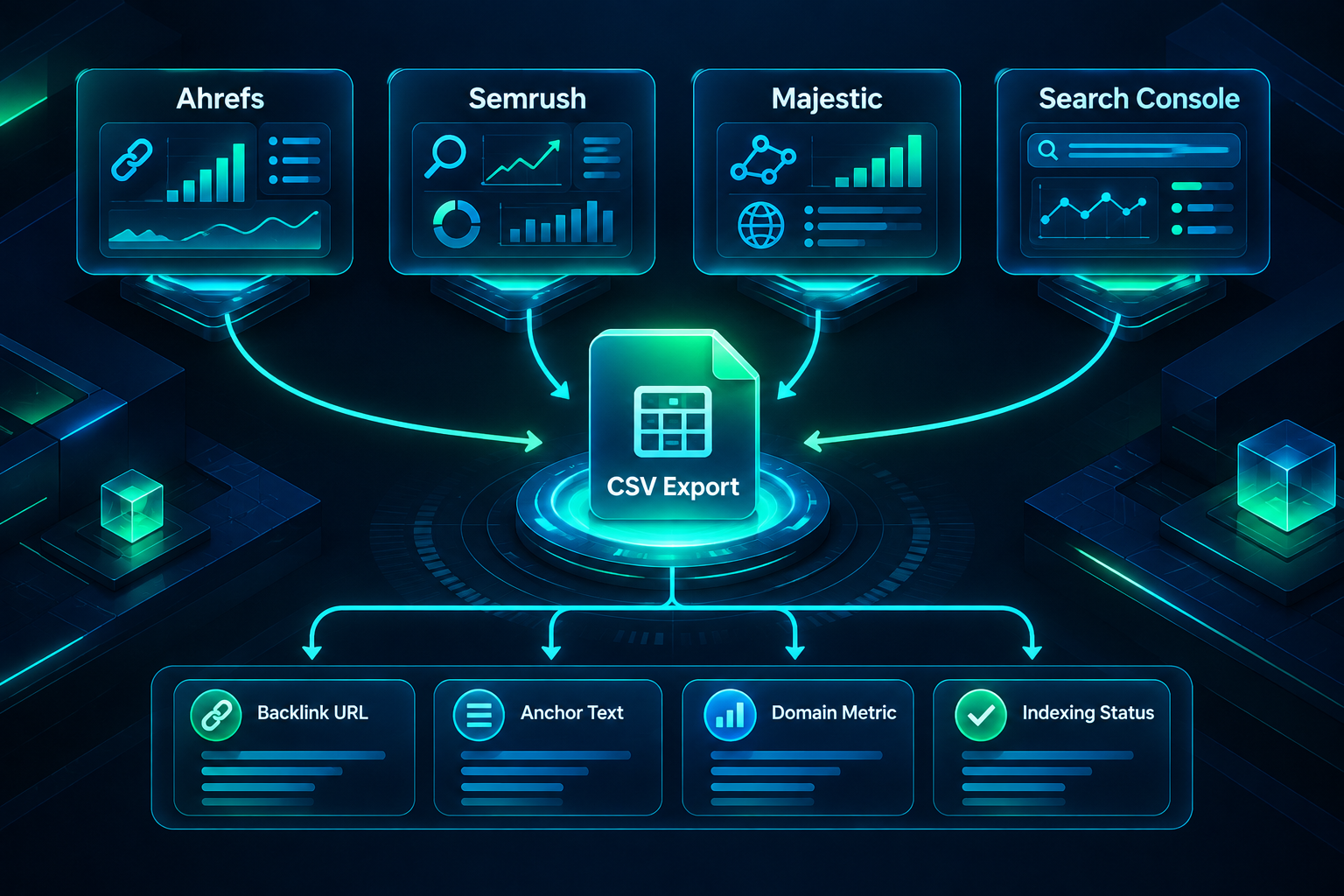
Semrush provides CSV export from its Backlink Analytics and Backlink Audit modules. The Backlink Audit tool is especially relevant because it aggregates link data from multiple sources and allows you to tag, filter, and export subsets of the backlink profile. Exported columns typically include source URL, target URL, anchor text, authority score, link type, and status. Semrush also allows you to export data from its Domain Overview report, which is useful for capturing a snapshot of a PBN domain’s organic visibility and keyword footprint alongside its link profile.
Majestic exports are available from the Site Explorer and Backlink History tools and include Trust Flow, Citation Flow, topical trust flow categories, and link context data. Majestic’s topical trust flow categories can be useful for verifying that a PBN domain’s link profile is consistent with its stated niche, which is a relevant quality check when auditing a network.
Google Search Console provides a Links report that shows the top linking sites and top linked pages for a verified property. The export from Search Console covers links pointing to your own verified site, not to PBN domains you do not own. If you are auditing inbound links to a money site that receives PBN placements, the Search Console export gives you a first-party view of which links Google has associated with the site, though it does not show all links and does not indicate how Google weights each one.
For operational data that goes beyond what third-party tools capture — such as login credentials, hosting details, content schedules, or placement notes — a manually maintained Google Sheets or Excel workbook exported to CSV remains the most flexible option. Many SEO agencies and network managers use a master spreadsheet with separate tabs for domains, placements, and metric snapshots, then export each tab as a CSV when needed for reporting or handoff.
How to Structure a PBN Data CSV
A consistent column structure makes CSV exports reusable across tools, team members, and reporting periods. The following column set covers most use cases for a placement-level export and can be adapted depending on whether you are managing the network yourself or working with a provider.
- Domain — the PBN site’s root domain
- Placement URL — the full URL of the page containing the link
- Target URL — the page on the money site receiving the link
- Anchor Text — the exact anchor text used in the placement
- Anchor Type — branded, exact match, partial match, generic, or naked URL
- Link Attribute — followed, nofollowed, or sponsored
- Publication Date — when the placement went live
- Indexing Status — indexed, not indexed, or unknown
- DR / TF / DA at Placement — the third-party metric score recorded at the time of placement
- Current DR / TF / DA — the most recent metric score from the last export
- Status — active, removed, or under review
- Notes — any relevant context about the placement or domain
Keeping anchor type as a separate column from anchor text makes it easier to filter and review anchor text distribution across a campaign without manually categorizing each row. This is particularly useful when a campaign uses a mix of branded, partial match, and generic anchors across multiple PBN placements, and you want to check whether the distribution looks natural relative to the target site’s overall backlink profile.
Exporting Data from a PBN Provider’s Dashboard
If you purchase PBN placements from a service rather than managing your own network, the export process depends on what the provider’s client portal supports. Some providers offer a downloadable report in CSV or PDF format once placements are delivered. Others send placement details by email or through a shared document. If a provider does not offer a structured export, you can build your own CSV by copying placement URLs, anchor text, and target URLs from the delivery report into a spreadsheet using the column structure described above.
When working with a provider, it is worth asking before ordering whether placement reports are available in a downloadable format and which fields are included. A provider that delivers structured placement data — including the placement URL, anchor text, publication date, and domain metrics at the time of delivery — makes it significantly easier to maintain an accurate ongoing record. This level of transparency also makes it easier to verify placements independently using a tool such as Ahrefs or Screaming Frog to confirm that the link is live and correctly attributed.
For agencies managing PBN campaigns on behalf of multiple clients, a consistent CSV template applied across all providers and campaigns reduces the time spent reformatting data before it can be used in a client report. Standardizing column names and value formats — for example, always recording dates as YYYY-MM-DD and indexing status as a fixed set of values rather than free text — prevents the merge errors that commonly occur when combining exports from different sources.
Checking Indexing Status at Scale
One of the most practical uses of a PBN placement CSV is checking whether placement pages are indexed by search engines. An unindexed placement page means the link on that page is unlikely to be crawled and passed through to the target site, which affects the practical value of the placement. Checking indexing status manually for a small number of placements is straightforward using a site: search query in Google, but this approach does not scale well for networks with dozens or hundreds of placements.
Several tools support bulk indexing checks using a list of URLs, which is where a well-maintained CSV becomes directly useful. You can export the Placement URL column from your CSV, paste the URLs into a bulk indexing checker, and then import the results back into the CSV to update the Indexing Status column. Tools such as Screaming Frog can crawl a list of URLs and return HTTP status codes, which helps identify pages that return errors or redirects in addition to those that are simply not indexed. Some third-party indexing check tools accept CSV uploads directly, which further reduces manual work.
It is worth noting that indexing status can change over time. A placement page that was indexed at the time of delivery may later be deindexed due to changes on the PBN site, content removal, or other factors. Running an indexing check as part of a regular monthly or quarterly export routine — rather than only at the time of delivery — gives you a more accurate picture of which placements are currently active and contributing to the campaign.
Merging and Filtering CSV Data for Reporting
Once you have a structured CSV with consistent columns, filtering and merging data for different reporting purposes becomes straightforward using standard spreadsheet tools. Google Sheets and Microsoft Excel both support filtering by column value, which allows you to quickly isolate placements for a specific target URL, a specific anchor type, or a specific indexing status without modifying the underlying data.
For client reporting, a filtered view showing only active, indexed placements for a specific money site — with columns for placement URL, anchor text, anchor type, and publication date — is usually sufficient. Metric columns such as DR or TF at placement can be included to give context about the relative authority of each placement, with a clear note that these are third-party proprietary scores rather than Google ranking signals.
When merging exports from multiple tools — for example, combining an Ahrefs backlink export with a manually maintained placement log — the most reliable merge key is the placement URL. Matching rows by URL rather than by domain or anchor text avoids duplicate entries and makes it easier to identify placements that appear in one source but not another, which can indicate a link that has been removed or a crawl that has not yet picked up a new placement.
Pivot tables are useful for summarizing anchor text distribution across a campaign. By creating a pivot table with anchor type as the row field and count of placements as the value field, you can quickly see how many placements use each anchor type and whether the distribution is consistent with the campaign’s anchor text strategy. This kind of summary is useful both for internal review and for explaining campaign structure to a client.
Maintaining an Accurate PBN Data Record Over Time
A CSV export is a snapshot of data at a specific point in time. To remain useful, it needs to be updated regularly and version-controlled so that changes over time are visible. A simple approach is to save each export with a date suffix — for example, pbn-placements-2024-11.csv — and keep a master file that is updated monthly by importing the latest data and reconciling any changes.
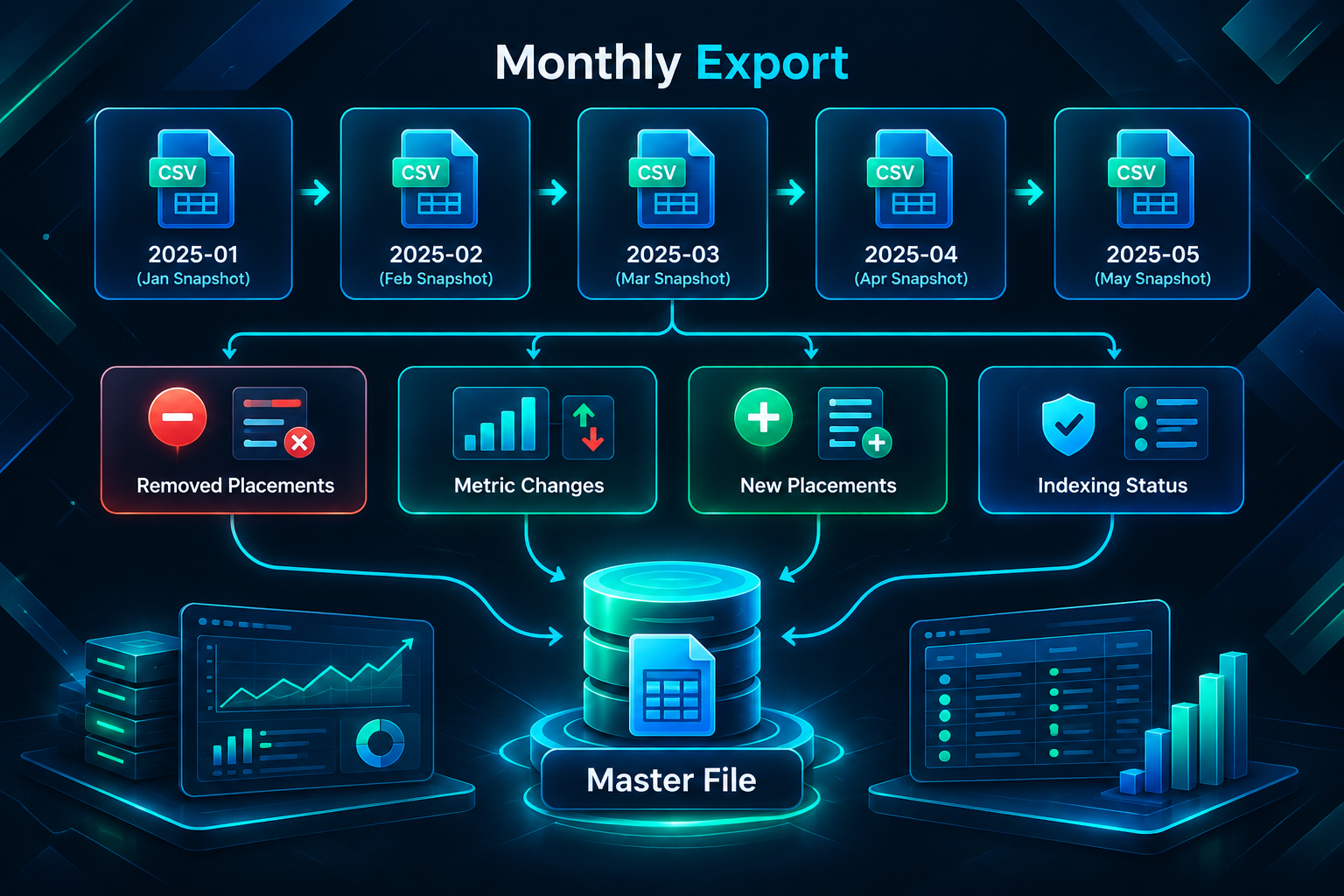
Key changes to track between exports include placements that have been removed or whose pages now return errors, domains whose third-party metrics have changed significantly, new placements added since the last export, and changes in indexing status. Tracking these changes over time gives you a more accurate view of the campaign’s current state than any single snapshot can provide, and it makes it easier to identify patterns — for example, a PBN domain that consistently loses placements or shows declining metrics may warrant closer review.
For larger networks or agencies managing multiple campaigns, a dedicated link-tracking tool or a database-backed system may be more practical than a manually maintained CSV. Several link-building management tools support CSV import and export as part of their workflow, which allows you to use a CSV as a portable interchange format while keeping the primary record in a more structured system. The choice between a spreadsheet-based approach and a dedicated tool depends on the scale of the network, the number of team members involved, and the reporting requirements of the campaigns being managed.
Frequently Asked Questions
What is the easiest way to export PBN backlink data to CSV?
The easiest method depends on where the data lives. If you are using a tool such as Ahrefs or Semrush, use the built-in export button in the backlink or referring domain report and select CSV as the format. If you are working from a provider’s delivery report or a manually maintained spreadsheet, copy the relevant fields into a spreadsheet with consistent column headers and export as CSV from there. For most PBN managers, a combination of a tool export for metric data and a manual log for operational data gives the most complete picture.
Which columns should I always include in a PBN placement CSV?
At minimum, include the placement URL, target URL, anchor text, anchor type, publication date, indexing status, and a status field indicating whether the placement is active or removed. Adding a metric snapshot column — such as DR or TF at the time of placement — gives useful context for later review. Notes columns are optional but helpful for recording anything unusual about a placement or domain.
Can I use Google Search Console to export PBN placement data?
Google Search Console’s Links report shows links pointing to your own verified property, not to PBN domains you do not own. It can be useful for confirming which PBN placements Google has associated with your money site, but it does not show all links and does not replace a dedicated placement log. Export the Links report as a CSV and cross-reference it with your placement log to identify any discrepancies.
How often should I update my PBN data CSV?
Monthly updates are a practical minimum for active campaigns. If you are managing a large network or running a time-sensitive campaign, more frequent updates — every two weeks or after each new batch of placements — give you a more current view of indexing status and placement health. Quarterly metric snapshots are usually sufficient for tracking changes in domain-level scores from tools such as Ahrefs or Majestic.
What should I do if a placement URL no longer returns a 200 status?
First, check whether the page has moved to a new URL by following any redirects. If the page returns a 404 or has been removed, update the status column in your CSV to reflect this and contact your provider if the placement was guaranteed. If the domain itself is no longer resolving, the PBN site may have been taken down or allowed to expire, which would affect all placements on that domain. Document the change in your CSV with a date and note so you have a record of when the placement became inactive.
Is it possible to automate PBN data exports?
Some SEO tools offer API access that allows you to pull backlink and domain data programmatically and write it to a CSV or database on a schedule. Ahrefs and Semrush both offer API plans, though these are typically available at higher subscription tiers. For operational data such as placement logs and notes, automation is less straightforward because the data is often entered manually. A practical middle ground is to use a tool’s scheduled report feature — where available — to receive regular CSV exports by email, then import them into a master tracking file.
Building a Reliable PBN Data Export Workflow
Exporting PBN data to CSV is most valuable when it is part of a consistent, repeatable workflow rather than a one-off task. The practical steps are straightforward: define the fields you need, choose the tools that can supply them, establish a consistent column structure, and set a regular export schedule. The discipline of maintaining an accurate, up-to-date CSV record pays off when you need to audit a campaign, report to a client, verify placements with a provider, or make decisions about scaling or adjusting a link-building strategy.
For SEO managers working with PBN placements from a provider, a structured CSV record also supports provider accountability. When placement URLs, anchor text, and publication dates are recorded at delivery and checked again at regular intervals, discrepancies — such as a placement that was delivered but later removed — become visible rather than going unnoticed. This kind of ongoing monitoring is a practical complement to the initial quality checks that should happen at the time of delivery.
If you are evaluating PBN placements or building out a tracking system for a new campaign, PBN Backlinks Service can help you understand what placement data to expect, what fields are typically included in a delivery report, and how to structure your records for ongoing campaign management. Reviewing your data requirements before a campaign begins makes the export and reporting process significantly more straightforward once placements are live.