

A PBN backlink placed on a page carrying a noindex directive delivers no measurable ranking value. Search engine crawlers that respect the tag will process the page but exclude it from the index, which means the link it contains cannot contribute to your target site’s authority signals. Identifying and correcting noindex tags on PBN placement pages is therefore one of the most practical maintenance tasks in any private blog network campaign, and the fix is usually straightforward once you know where to look.
Key Takeaways
- A noindex tag on a PBN placement page prevents that page from appearing in search results and blocks the link from passing equity to your target URL.
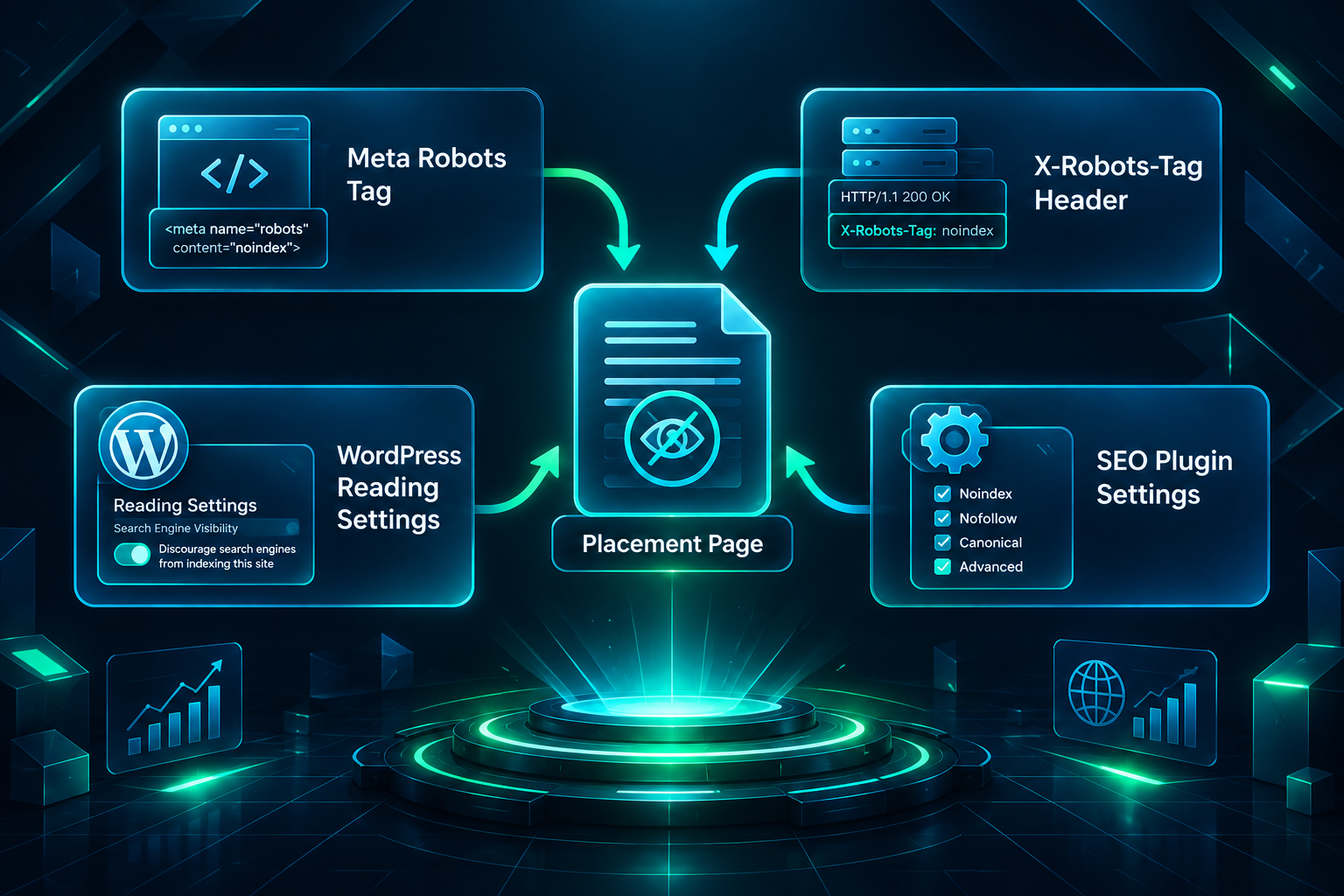
- Noindex directives can appear in four main locations: the HTML meta robots tag, the HTTP response header, the WordPress reading settings, and the robots.txt file combined with a noindex header.
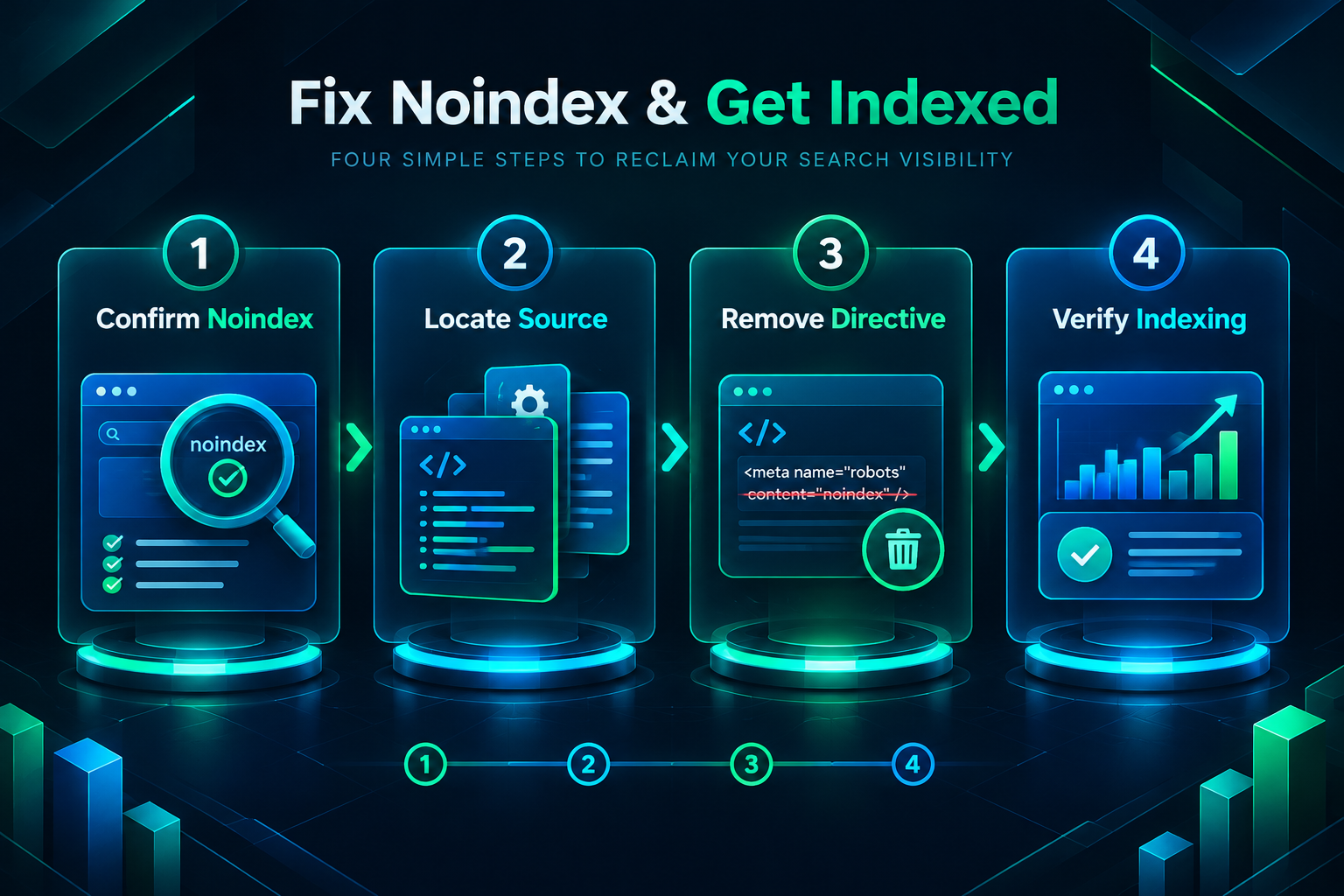
- Fixing the tag requires locating the source of the directive, removing or correcting it, and then verifying that the page is re-crawled and re-indexed.
- Google Search Console’s URL Inspection tool and third-party crawlers such as Screaming Frog are the most reliable ways to confirm whether a page is indexed or blocked.
- Routine indexing checks across all placement pages should be part of any ongoing PBN campaign monitoring process.
Why a Noindex Tag Breaks a PBN Placement
When a search engine crawler visits a page and finds a noindex directive, it follows the instruction and removes the page from its index or never adds it in the first place. Because the page does not exist in the index, any outbound link on that page — including your PBN backlink — cannot be evaluated as part of the target site’s link graph. The link is technically present in the HTML, but it is functionally invisible from a ranking-signal perspective. This is distinct from a page that is simply not yet crawled or one that has been crawled but not yet indexed; a noindex tag is an explicit instruction that overrides normal indexing behavior.
The practical consequence is that you may have paid for or built a placement, confirmed the link is live in the source code, and still see no benefit because the hosting page is excluded from the index. This situation is more common than many practitioners expect, particularly on PBN sites that were recently set up, migrated, or modified by someone unfamiliar with WordPress or CMS indexing settings. Catching and correcting the issue early prevents wasted placements and keeps your link-building investment working as intended.
The Four Main Sources of a Noindex Directive
Before you can fix a noindex problem, you need to identify exactly where the directive is coming from. There are four common sources, and more than one can be active simultaneously on the same page.
1. HTML Meta Robots Tag
The most frequently encountered source is a meta robots tag placed inside the <head> section of the page’s HTML. A tag that reads <meta name="robots" content="noindex"> or <meta name="robots" content="noindex, nofollow"> tells all major crawlers to exclude the page from their index. Some implementations use crawler-specific tags such as <meta name="googlebot" content="noindex">, which targets Google’s crawler specifically. To check for this tag, view the page source in your browser using Ctrl+U or Cmd+U and search for the string “noindex” within the head section.
2. HTTP X-Robots-Tag Response Header
A noindex directive can also be delivered at the server level through an HTTP response header called X-Robots-Tag. This header functions identically to the meta robots tag but is invisible in the page’s HTML source, which makes it easy to overlook. To check for it, use a browser developer tool, a header-inspection tool, or a crawler such as Screaming Frog that reports response headers. If the server returns a header such as X-Robots-Tag: noindex, the page will be excluded from the index regardless of what the HTML says. This type of directive is sometimes introduced by hosting configurations, caching plugins, or server-side scripts.
3. WordPress Reading Settings
WordPress includes a built-in setting that instructs search engines not to index the entire site. It is found under Settings → Reading in the WordPress admin panel, and the relevant checkbox is labeled something similar to “Discourage search engines from indexing this site.” When this box is checked, WordPress adds a noindex directive to every page on the site. This setting is commonly left enabled on newly installed WordPress sites and is a frequent cause of indexing failures on PBN properties that were recently set up or restored from a backup. Unchecking this box and saving the settings removes the site-wide directive, though individual pages may still carry their own noindex tags from other sources.
4. SEO Plugin Page-Level Settings
SEO plugins such as Yoast SEO, Rank Math, and All in One SEO allow editors to set a noindex directive on individual posts or pages through a field in the post editor. These settings override the site-wide defaults and can be set independently for each piece of content. If the placement page was created or edited by someone who toggled the indexing setting in the plugin’s meta box, the page will carry a noindex tag even if the rest of the site is configured correctly. To check this, open the placement page in the WordPress editor, locate the SEO plugin’s settings panel, and confirm that the indexing option is set to “index” rather than “noindex.”
Step-by-Step: How to Fix Noindex Tags on PBN Placement Pages
The correction process follows a logical sequence: detect the directive, identify its source, remove it, and then verify that the fix has taken effect. Working through each step in order prevents the common mistake of removing one directive while another remains active.
Step 1: Confirm the Page Is Noindexed
Use Google Search Console’s URL Inspection tool to check the current indexing status of the placement page. Enter the full URL and review the coverage report. If the tool reports “URL is not on Google” and the reason references a noindex directive, you have confirmed the problem. Alternatively, perform a site-specific search in Google using the operator site:placementdomain.com/page-url. If the page does not appear in results and the domain is otherwise indexed, a noindex directive is a likely cause. Screaming Frog can also crawl the placement page and report both the meta robots tag content and the X-Robots-Tag header in a single pass, which is useful when auditing multiple placement pages at once.
Step 2: Locate the Source of the Directive
View the page source and search for “noindex” in the HTML head section. If you find a meta robots tag, note whether it is hardcoded in the theme template or generated by an SEO plugin. Check the WordPress Reading settings to determine whether the site-wide discourage-indexing option is active. Use a header inspection tool to check for an X-Robots-Tag in the HTTP response. Open the placement post in the WordPress editor and review the SEO plugin’s indexing field. Document every location where a noindex directive appears before making any changes, because removing only one source while another remains will not resolve the problem.
Step 3: Remove the Directive
Once you have identified all active noindex sources, remove them in the following order. First, uncheck the WordPress Reading setting if it is enabled and save the change. Second, open the placement post in the editor, locate the SEO plugin’s robots setting, change it to “index,” and update the post. Third, if the meta robots tag is hardcoded in the theme’s header template, edit the template file to remove or correct the tag — this typically requires access to the theme editor or the site’s file manager. Fourth, if an X-Robots-Tag header is being sent by the server, the fix depends on the hosting environment: it may require editing an .htaccess file, a Nginx configuration block, or a plugin that is generating the header. If you are managing the PBN site through a hosting panel, check whether any caching or security plugin is adding the header automatically.
Step 4: Verify the Fix
After removing the directive, use Google Search Console’s URL Inspection tool to request a re-crawl of the placement page. The tool’s “Test Live URL” function checks the current state of the page as Googlebot would see it and reports whether a noindex directive is still present. Allow several days to a few weeks for Google to re-crawl and re-index the page, depending on the crawl frequency of the domain. Once the page appears in the index, confirm that the backlink is visible by checking the target site’s link profile in a tool such as Ahrefs or Majestic. Note that indexing the placement page is a necessary condition for the link to be evaluated, but it does not guarantee an immediate or measurable change in the target site’s rankings, as link equity assessment involves additional factors beyond page indexation.
Common Mistakes That Reintroduce Noindex Tags
Fixing a noindex tag once does not always prevent it from reappearing. Several common scenarios cause the directive to return after an initial correction. Theme updates can overwrite a manually edited header template, restoring a hardcoded noindex tag. Plugin updates or configuration resets can revert SEO plugin settings to a default noindex state. Migrating a PBN site to a new host or restoring it from a backup can reactivate the WordPress Reading setting if the backup was taken while the setting was enabled. Some managed WordPress hosting environments apply server-level noindex headers to staging environments, and if a site is accidentally left in staging mode after a migration, every page will carry the directive. Building a brief post-update checklist that includes an indexing verification step helps catch these regressions before they affect placement performance for an extended period.
Auditing Multiple PBN Placement Pages Efficiently
When a campaign involves a significant number of placement pages across multiple PBN domains, manually checking each page individually is time-consuming. A more efficient approach uses a combination of tools to audit indexing status at scale. Screaming Frog can be configured to crawl a list of specific URLs and export the meta robots tag value and X-Robots-Tag header for each one, allowing you to identify all noindexed pages in a single report. Google Search Console provides coverage reports that flag pages excluded from the index, though it requires that each PBN domain be verified separately, which may not be practical for every network configuration. Third-party rank-tracking and backlink-monitoring tools can also flag when a previously indexed placement page disappears from the index, which may indicate that a noindex tag has been reintroduced or that the page has been removed.
Establishing a regular audit schedule — for example, checking placement page indexing status monthly or after any site update — reduces the risk of running a campaign with a significant proportion of non-indexed placements. The frequency of audits can be adjusted based on the size of the network and the rate at which placement pages are updated or modified.
Noindex vs. Nofollow: Understanding the Difference
A noindex directive and a nofollow attribute are distinct instructions that affect different aspects of how a page and its links are treated. A noindex tag on a placement page removes the page from the search index, which prevents the outbound link from being evaluated as part of the link graph. A nofollow attribute on the link itself — written as rel="nofollow" in the anchor tag — instructs crawlers not to follow or pass equity through that specific link, but it does not affect whether the hosting page is indexed. Both issues can affect the value of a PBN placement, but they require different fixes. When auditing a placement page, check both the page-level indexing status and the link-level attributes to confirm that the backlink is both on an indexed page and not carrying an unintended nofollow or UGC attribute that would limit its equity-passing potential.
When to Contact Your PBN Provider
If you are using a managed PBN backlink service rather than operating your own network, the responsibility for placement page indexing typically rests with the provider. Before ordering placements, it is reasonable to ask the provider how they verify that placement pages are indexed and what their process is for correcting indexing issues if they arise. A provider that monitors placement page indexing as part of their standard workflow and offers corrections when pages are found to be noindexed is demonstrating a meaningful quality control commitment. If you discover that a placement page is noindexed after delivery, contact the provider with the specific URL and the evidence from your indexing check. A reputable provider should be able to identify the source of the directive and correct it, or replace the placement with one on a properly indexed page.
When evaluating a PBN backlink service, asking about their indexing verification process is a practical quality signal. Providers who can explain how they check placement page indexing, what tools they use, and how they handle indexing failures are more likely to deliver placements that function as intended than those who cannot describe their quality assurance process.
Frequently Asked Questions
How long does it take for a placement page to be re-indexed after removing a noindex tag?
The timeline varies depending on how frequently Google crawls the domain. For domains with regular crawl activity, re-indexing can occur within a few days to two weeks after the noindex directive is removed and a re-crawl is requested through Google Search Console. Domains with lower crawl budgets or limited inbound links may take longer. Using the URL Inspection tool to request indexing can accelerate the process, but it does not guarantee a specific timeline.
Can a page pass link equity if it is crawled but not indexed?
This is an area of ongoing discussion in the SEO community. Google has indicated that it can follow links on pages it crawls even if those pages are not indexed, but the extent to which equity is passed through links on noindexed pages is not publicly documented with precision. The safest and most reliable approach is to ensure that placement pages are fully indexed, as this removes ambiguity about whether the link is being evaluated.
Does robots.txt blocking cause the same problem as a noindex tag?
Blocking a page via robots.txt prevents crawlers from accessing the page at all, which means they cannot read the noindex tag or the outbound links. A robots.txt block and a noindex tag are different mechanisms with different effects. A noindexed page can still be crawled and its links potentially followed; a robots.txt-blocked page cannot be crawled at all. If a placement page is blocked in robots.txt, the fix involves editing the robots.txt file to remove the disallow rule for that URL, then verifying that the page becomes crawlable and indexed.
What if the placement page was indexed before but has now disappeared from the index?
A page that was previously indexed and has since been removed may have had a noindex tag added after the initial indexing, may have been deleted or redirected, or may have been affected by a crawl budget or content quality issue. Use the URL Inspection tool to check the current status and identify the reported reason for exclusion. If a noindex tag was added after the original placement, removing it and requesting re-indexing should restore the page. If the page has been deleted or significantly altered, contact your provider to discuss a replacement placement.
Should I check noindex status before or after a placement goes live?
Checking after the placement is live is the most direct approach, since you can verify the actual page that contains your link. However, if you are managing your own PBN, auditing the indexing configuration of each domain before adding new placements prevents the situation where a link is placed on a page that was never going to be indexed. Building an indexing check into both the pre-placement setup and the post-placement verification process provides the most reliable coverage.
Can an SEO plugin noindex setting affect only the placement post without affecting the rest of the site?
Yes. SEO plugins such as Yoast SEO and Rank Math allow noindex to be set at the individual post or page level, independently of the site-wide settings. This means a single placement post can be noindexed while every other page on the domain is indexed normally. This is why a site-level check — such as confirming the WordPress Reading setting is correct — is not sufficient on its own; each placement page should be checked individually to confirm its specific indexing status.
Keeping PBN Placement Pages Indexed and Effective
Noindex tags on PBN placement pages are a correctable technical issue, not an irreversible problem. The fix requires identifying which of the four main directive sources is active — the HTML meta robots tag, the HTTP response header, the WordPress site-wide setting, or the SEO plugin’s post-level configuration — removing the directive, and confirming through Google Search Console or a crawler that the page has returned to the index. The process is methodical and, in most cases, can be completed without advanced technical knowledge once you know where to look.
The more important habit is building indexing verification into your standard campaign workflow. A placement page that carries a noindex tag for weeks or months after a link goes live represents a period during which the backlink is not contributing to your campaign’s goals. Regular audits using tools such as Screaming Frog for bulk URL checks and Google Search Console for individual page inspection keep your placement pages in the index and your link-building investment functioning as intended. If you are working with a managed PBN service, confirming that the provider includes indexing verification as part of their delivery and maintenance process is a straightforward quality check that can meaningfully affect campaign outcomes. For a review of placement quality standards or to discuss how indexing is handled across a backlink package, PBN Backlinks Service can walk you through what to look for before committing to a campaign.