

Duplicate tag archives are one of the more overlooked technical issues on PBN websites, yet they can quietly dilute crawl budget, fragment link equity, and create thin-content signals that reduce the overall quality of a private blog network. Managing them correctly keeps each PBN site lean, well-structured, and more effective as a link-passing asset.
Key Takeaways
- Tag archive pages on WordPress and similar CMS platforms generate duplicate or near-duplicate content by default, which can affect how search engines crawl and evaluate PBN sites.
- The most practical solutions are noindexing tag archives, applying canonical tags pointing to the primary content, or disabling tag archives entirely at the CMS level.
- Crawl budget management matters more on PBN sites with large post counts, because unnecessary archive URLs consume crawl allocation that could be directed toward the pages passing link equity.
- Consistent implementation across all sites in a network reduces footprint signals associated with poor technical hygiene and improves the overall quality profile of the network.
- The right approach depends on the CMS, the size of the site, and how the network is structured, so a one-size-fits-all rule is less useful than understanding the underlying mechanism.
What Are Tag Archives and Why Do They Create Duplicate Content?
A tag archive is an automatically generated page that collects all posts assigned to a particular tag. In WordPress, for example, assigning the tag “SEO” to five posts creates a /tag/seo/ URL that lists those posts, often displaying full post content or substantial excerpts. If those same posts also appear on category archive pages, the homepage feed, author archives, and date-based archives, the same content is effectively accessible through multiple distinct URLs. Search engines crawling the site encounter the same text repeatedly, which is the core of the duplicate content problem.
On a standard editorial website with strong brand signals, deep backlink profiles, and high crawl frequency, tag archive duplication is a manageable nuisance. On a PBN site, where the goal is to maintain a clean, credible, and efficiently crawled web presence, the problem carries more weight. Each unnecessary duplicate URL is a page that consumes crawl budget without contributing meaningful unique content, and a site with dozens of thin archive pages looks structurally weaker than one with a focused, well-organized URL structure.
Tag archives also tend to accumulate over time. A PBN site that has been publishing content for months or years may have accumulated hundreds of tag URLs, many of which contain only one or two posts. These single-post tag pages are particularly problematic because they offer no aggregation value and are almost indistinguishable from the original post page in terms of content.
How Duplicate Tag Archives Affect PBN Site Quality
The practical effects of unmanaged tag archives on a PBN site fall into three main areas: crawl budget consumption, link equity fragmentation, and thin-content signals.
Crawl Budget Consumption
Search engine crawlers allocate a finite crawl budget to each domain based on factors including domain authority, crawl demand, and server responsiveness. On a PBN site that may not have an exceptionally strong crawl priority, every unnecessary URL that a crawler visits is one fewer visit to the pages that actually matter, specifically the posts containing the contextual backlinks pointing to your target site. If a crawler spends a significant portion of its crawl allocation on tag archive pages that offer no unique value, the indexed depth of the site may be shallower than intended. Keeping the crawlable URL count focused on meaningful pages is a straightforward way to improve the efficiency of how a PBN site is processed.
Link Equity Fragmentation
Internal links pointing to tag archive pages, whether from navigation menus, tag clouds, or in-post tag links, distribute some portion of the site’s internal link equity toward those archive URLs. If tag archives are indexed and accumulate their own internal link weight, the equity available to flow toward the posts containing your outbound contextual links is reduced. Consolidating or removing tag archive pages concentrates internal link equity on the content pages that are doing the actual link-passing work.
Thin-Content Signals
A tag archive page that lists one or two posts, displays excerpts, and offers no original editorial content is a thin page by most reasonable definitions. A site with many such pages has a higher ratio of thin URLs to substantive content, which can influence how a search engine evaluates the overall quality of the domain. For a PBN site where domain quality is directly related to the value of the links it passes, maintaining a low proportion of thin pages is a meaningful quality consideration.
The Main Methods for Handling Duplicate Tag Archives
There are several practical approaches to managing tag archive duplication on PBN sites. The best choice depends on the CMS in use, the size of the site, and how much control you have over the technical configuration.
Noindexing Tag Archives
Adding a noindex directive to tag archive pages tells search engines not to include those pages in their index while still allowing crawlers to follow links on them. In WordPress, this is most commonly implemented through an SEO plugin. Plugins such as Yoast SEO and Rank Math include archive management settings that allow you to apply noindex to tag archives, category archives, author archives, and date archives individually. Enabling noindex on tag archives is the most widely used approach because it is straightforward to implement, does not require disabling tags at the database level, and can be reversed if needed.
One nuance worth understanding: noindex prevents indexing but does not prevent crawling. Crawlers may still visit noindexed tag archive pages, which means crawl budget is not fully recovered by noindexing alone. For sites with very large numbers of tag URLs, combining noindex with a disallow rule in the robots.txt file can reduce crawl consumption further, though this also prevents crawlers from following links on those pages. The appropriate balance depends on whether the tag archive pages contain any internal links that you want crawlers to follow.
Canonical Tags Pointing to the Primary Content
A canonical tag on a tag archive page signals to search engines that a different URL is the preferred version of that content. For a tag archive listing posts about a specific topic, the canonical could point to the most relevant category page or to the site’s homepage. This approach consolidates link signals toward the canonical target rather than leaving them distributed across archive URLs.
Canonical tags are more nuanced than noindex because they are treated as hints rather than directives by most search engines. A search engine may choose to ignore a canonical tag if it determines that the tag archive page is sufficiently distinct. For this reason, canonical tags work best when the tag archive content genuinely overlaps with the canonical target. On PBN sites where tag archives are near-duplicates of category pages, canonical tags can be an effective consolidation tool, but noindex is generally simpler and more reliable for straightforward duplicate suppression.
Disabling Tag Archives at the CMS Level
In WordPress, it is possible to disable tag archive pages entirely by redirecting them to the homepage or to a relevant category page using a plugin or custom code. This approach removes the duplicate URLs from the site’s accessible URL structure rather than simply suppressing them from the index. Redirecting tag archive URLs to the homepage with a 301 redirect is a clean solution that consolidates any link equity those URLs may have accumulated and eliminates the crawl budget consumption associated with them.
Disabling tags entirely is the most thorough approach, but it requires care during implementation. If any existing internal links or external links point to tag archive URLs, those links will follow the redirect to the destination page. Verifying that no important navigation elements rely on tag archive URLs before disabling them prevents broken user journeys and unexpected redirect chains.
Removing Tags from Posts and Preventing Future Tag Creation
On smaller PBN sites or newly built network sites, the simplest approach is to avoid using tags altogether. If posts are not assigned tags, no tag archive pages are generated. For existing sites with tags already applied, bulk-removing tags from posts and then disabling the tag taxonomy prevents future accumulation. This approach is most practical during the initial setup of a PBN site or when rebuilding a site’s content structure, rather than as a retroactive fix for a large established site.
Crawl Budget Considerations Specific to PBN Sites
Crawl budget management on PBN sites deserves specific attention because these sites typically operate with lower crawl priority than established editorial domains. A PBN site that has been recently built or that has a modest backlink profile of its own will receive fewer crawler visits per day than a high-authority domain. In that context, every crawl visit to a thin tag archive page is a missed opportunity for the crawler to process a content page containing the outbound contextual link you are trying to get indexed and evaluated.

Practical crawl budget optimization for PBN sites involves several steps beyond tag archive management. Submitting an XML sitemap that includes only the URLs you want indexed, verifying that the sitemap excludes archive pages, and checking the crawl coverage report in Google Search Console can help confirm that crawlers are reaching the intended pages. If tag archive pages appear in the coverage report as indexed or as crawled but not indexed, that is a signal that the duplicate management implementation needs adjustment.
Internal linking structure also affects crawl efficiency. A tag cloud widget in the sidebar of every post creates internal links to every tag archive page on the site, effectively inviting crawlers to visit all of them. Removing tag cloud widgets and ensuring that the site’s navigation links only to category pages and individual posts reduces the number of archive URLs that crawlers are directed toward.
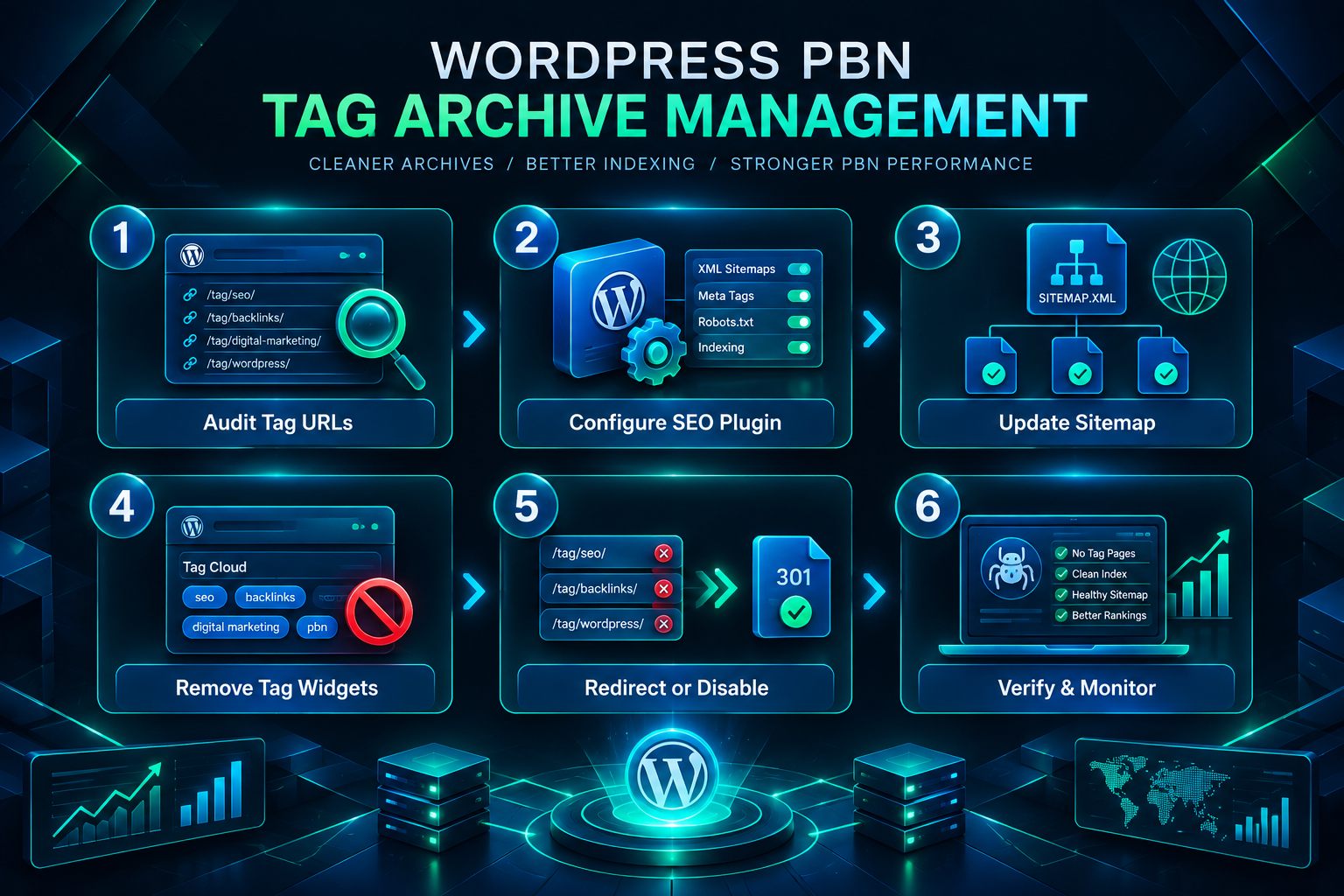
Implementation Steps for WordPress PBN Sites
WordPress is the most common CMS used for PBN sites, so the following steps reflect a WordPress-specific workflow. The general principles apply to other CMS platforms, though the specific settings and plugin options will differ.
- Audit existing tag archives: Use a crawl tool such as Screaming Frog to identify all tag archive URLs currently accessible on the site. Note which ones are indexed, which contain only one or two posts, and which appear in the sitemap.
- Configure your SEO plugin: In Yoast SEO, navigate to the Taxonomies section and set the Tag Archives option to noindex. In Rank Math, the equivalent setting is found under Titles and Meta, then Tags. Apply the setting and verify it is active by checking the source code of a tag archive page for the
noindexmeta tag. - Remove tag archives from the XML sitemap: Confirm that your SEO plugin is excluding tag archive URLs from the sitemap. Most plugins do this automatically when noindex is enabled, but verifying the sitemap output directly is good practice.
- Remove tag cloud widgets: Check all widget areas and page templates for tag cloud elements and remove them to reduce internal links pointing to tag archive pages.
- Consider redirecting or disabling tags: If you prefer a cleaner approach, use a redirect plugin to send all tag archive URLs to the homepage or to the most relevant category page with a 301 redirect, then remove tags from posts in bulk.
- Verify implementation: Re-crawl the site after changes to confirm that tag archive URLs are returning the expected response codes and that the noindex directive is present where intended. Check Google Search Console after a few weeks to monitor whether previously indexed tag archive pages are being removed from the index.
Consistency Across the Network
Managing duplicate tag archives on a single PBN site is straightforward, but applying consistent technical standards across an entire network requires a systematic approach. Inconsistent implementation, where some sites have noindexed tag archives and others have them fully indexed and linked from navigation menus, creates variation in site quality that can affect the overall value of the network’s link output.
Establishing a standard site setup template that includes tag archive management as a default configuration step reduces the likelihood of oversight. When building new PBN sites, applying the noindex setting or disabling tags before publishing any content means the issue never develops. For existing sites in the network, a periodic technical audit using a crawl tool can identify sites where tag archives have accumulated and need attention.
Consistent technical hygiene across a network also reduces the kind of structural footprint signals that can arise from uniform CMS configurations. A network where every site has identical default WordPress settings, including active and indexed tag archives with tag cloud widgets, presents a more uniform technical profile than one where each site has been individually configured. Thoughtful variation in technical setup, including how archive pages are handled, contributes to a more natural-looking network structure.
Frequently Asked Questions
Do tag archives affect the ranking value of links placed on PBN posts?
Tag archive pages themselves do not typically pass link equity to external sites unless they contain direct outbound links. The concern is indirect: unmanaged tag archives consume crawl budget and dilute internal link equity, which can reduce how efficiently crawlers reach and process the posts containing your contextual backlinks. Keeping tag archives suppressed or removed helps ensure crawl resources are directed toward the pages that matter.
Is noindex sufficient, or should tag archives be completely removed?
Noindex is sufficient for most PBN sites and is the easiest approach to implement and reverse. Complete removal through redirects or disabling the tag taxonomy is a more thorough solution that also recovers crawl budget more fully, since crawlers will not visit redirected or non-existent URLs as frequently. The right choice depends on the size of the site and how many tag archive URLs have accumulated.
Will previously indexed tag archive pages be removed from Google’s index after applying noindex?
Search engines typically remove noindexed pages from their index over time as they recrawl the site, but the timeline varies. Pages that were previously indexed may remain in search results for weeks or months before being dropped. Submitting an updated sitemap that excludes tag archive URLs can help signal to crawlers that those pages should be deprioritized, though removal is not instantaneous.
Should category archives be handled the same way as tag archives?
Category archives can present similar duplicate content issues, but they are generally more useful than tag archives because they provide meaningful topical organization. On a well-structured PBN site, category archives that contain unique introductory text and are logically organized may be worth keeping indexed. Tag archives, which tend to be more granular and less editorially controlled, are more commonly the source of thin duplicate content and are the higher priority for suppression.
Does handling tag archives require technical SEO expertise?
The core steps, enabling noindex through an SEO plugin and removing tag cloud widgets, are accessible to anyone comfortable with WordPress settings. More advanced approaches such as custom redirects or disabling the tag taxonomy at the code level may require familiarity with WordPress functions or a redirect plugin. For network operators managing many sites, documenting the process and applying it consistently is more important than technical complexity.
Can duplicate tag archives cause a manual action on a PBN site?
Duplicate tag archives alone are unlikely to trigger a manual action. They are a technical quality issue rather than a spam signal in isolation. However, a site with many thin archive pages, combined with other quality concerns, contributes to an overall quality profile that may affect how the site is evaluated. Addressing tag archives is one component of maintaining a technically sound PBN site, not a standalone penalty-prevention measure.
Keeping PBN Sites Technically Sound for Long-Term Link Value
Duplicate tag archive management is a specific but meaningful part of maintaining PBN sites that function effectively as link-passing assets over time. A PBN site with a clean URL structure, focused crawl budget allocation, and a low proportion of thin pages is better positioned to have its content pages crawled, indexed, and evaluated than one where technical debt has accumulated through unmanaged archive generation.
The practical steps are not complex: audit the existing tag archive situation on each site in the network, apply noindex or redirect settings through your SEO plugin, remove tag cloud widgets from templates, and include tag archive management in the setup checklist for new sites. Verifying the implementation through a crawl tool and monitoring Search Console coverage data closes the loop and confirms the changes are working as intended.
For network operators who want to assess the technical quality of their existing PBN sites or discuss how placement quality and site structure affect link value, PBN Backlinks Service can help evaluate campaign fit and domain quality as part of a broader link-building strategy review.