

Managing scheduled tasks across a private blog network requires more deliberate planning than running a single website. Each PBN site operates as an independent web property, which means content publishing schedules, plugin updates, database maintenance, uptime checks, and backup routines all need to be coordinated without creating obvious patterns that could signal shared ownership. Getting this operational layer right keeps your network healthy, your placements live, and your link equity flowing consistently to target pages.
Key Takeaways
- Scheduled task management on PBN sites covers content publishing, plugin and CMS updates, database optimization, backups, and uptime monitoring—each requiring a distinct approach across multiple independent properties.
- Automation tools such as WordPress cron jobs, server-level cron schedulers, and third-party management dashboards can reduce manual workload, but tasks should be staggered across sites to avoid synchronized footprints.
- Content scheduling is one of the highest-impact tasks: publishing intervals, post frequency, and update cadence should vary naturally between PBN sites rather than following a uniform pattern.
- Plugin and CMS maintenance is a security and uptime priority; outdated installations on PBN sites can lead to deindexation through spam injection or server blacklisting, not just ranking concerns.
- Monitoring tools should track uptime, indexing status, and crawl activity independently for each site so that problems are caught before they affect link delivery to target pages.
What Scheduled Task Management Means for a PBN
A private blog network is a collection of independently hosted websites, each with its own domain, hosting account, CMS installation, and content. Unlike a single-site operation, a PBN multiplies every routine maintenance task by the number of sites in the network. Scheduled task management refers to the systematic planning and automation of recurring operational activities across all of those properties. These activities fall into several broad categories: content publishing and updating, CMS and plugin maintenance, database optimization, backup execution, uptime and indexing monitoring, and in some cases, outbound link auditing.
The goal of managing these tasks well is twofold. First, it keeps each PBN site functioning as a credible, independently maintained web property—one that is indexed, accessible, and capable of passing link equity to the target page. Second, it reduces the operational burden of running multiple sites by introducing appropriate automation and scheduling systems, while keeping each site’s activity pattern distinct enough to avoid obvious shared-management footprints.
Content Publishing Schedules Across PBN Sites
Content scheduling is arguably the most visible scheduled task on any PBN site. Search engine crawlers assess publishing frequency and content freshness as part of how they evaluate a site’s activity level. A PBN site that publishes content in a rigid, synchronized pattern with other sites in the same network may draw attention to shared management. Varying the publishing cadence—posting twice a week on one site, once every ten days on another, and sporadically on a third—creates a more natural activity profile for each property.
WordPress, the most common CMS used for PBN sites, includes a native post scheduling feature that allows content to be queued and published at a future date and time. This is sufficient for basic scheduling on individual sites. For operators managing a larger number of properties, a remote WordPress management tool or a custom content calendar can help coordinate publishing across sites without requiring daily manual logins. Tools such as MainWP or ManageWP allow centralized scheduling and publishing, though their use introduces a management footprint consideration: if all sites are managed through a single dashboard with the same credentials or IP, that connection may be visible to a sufficiently thorough audit. Operators who prioritize footprint separation often prefer to schedule content directly within each site’s WordPress admin or through site-specific automation scripts.
Content update scheduling is equally important. Refreshing older posts on PBN sites—updating statistics, expanding thin sections, or adjusting internal links—signals ongoing editorial activity. Scheduling these updates at irregular intervals, rather than running a network-wide refresh on the same day, supports the appearance of independent site management.
Using WordPress Cron and Server-Level Cron for PBN Task Automation
WordPress includes a built-in pseudo-cron system called WP-Cron, which handles scheduled events such as publishing queued posts, checking for plugin updates, sending scheduled emails, and running database cleanup routines. WP-Cron is triggered by site visits: when a user or crawler loads a page, WordPress checks whether any scheduled tasks are due and executes them. On low-traffic sites—which many PBN properties are—this means WP-Cron tasks may not fire reliably if the site receives few visits during the scheduled window.
A more reliable approach for PBN sites is to disable WP-Cron’s default behavior and replace it with a true server-level cron job. This involves adding a line to the site’s wp-config.php file to disable the built-in pseudo-cron, then configuring a cron job on the server (via cPanel, Plesk, or a direct server terminal) to call the WordPress cron endpoint at a defined interval—typically every five or fifteen minutes. This ensures that scheduled posts publish on time, plugin update checks run consistently, and database optimization tasks execute as planned, regardless of traffic levels.
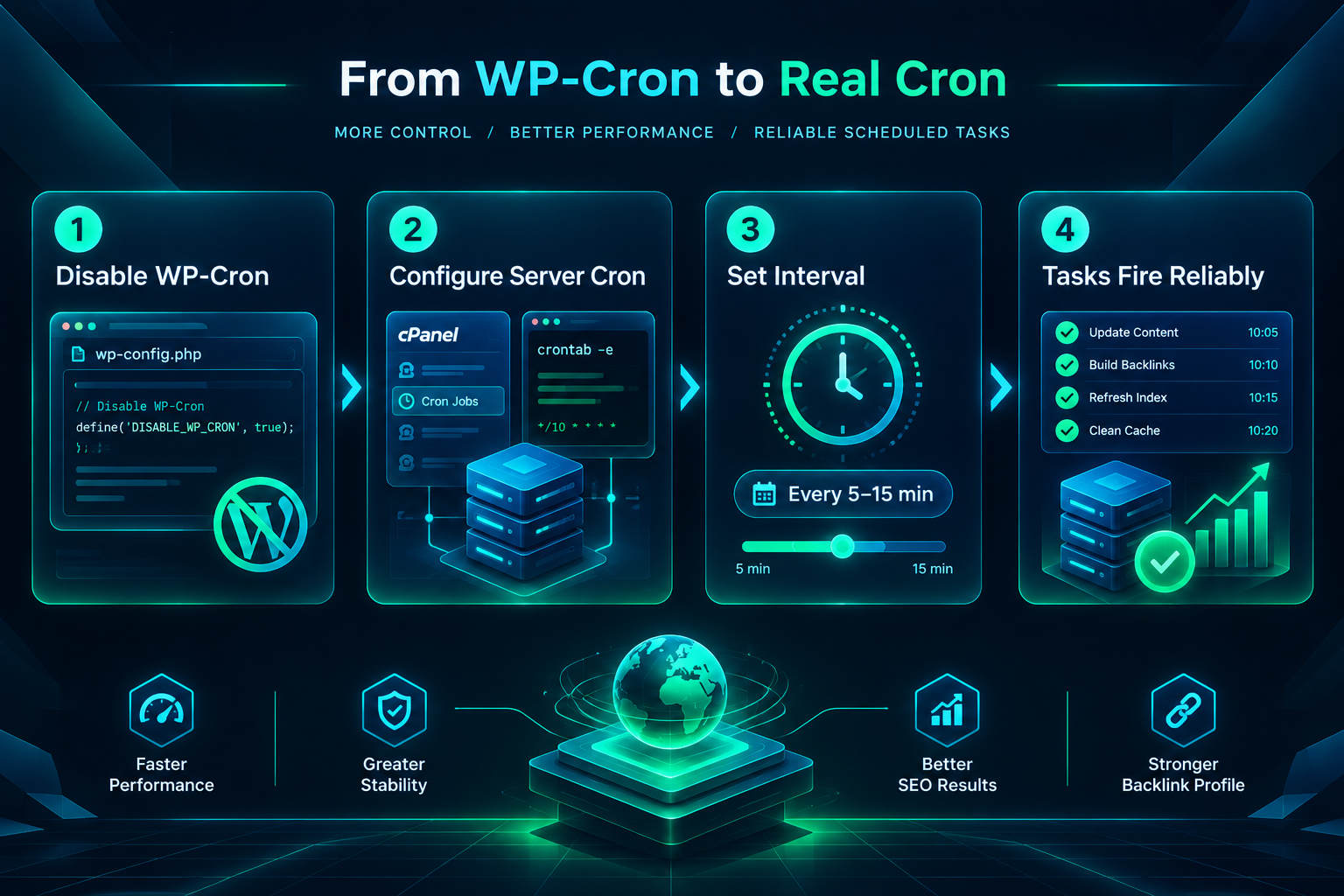
For PBN operators managing sites across multiple hosting accounts, setting up server-level cron jobs needs to be done individually on each hosting environment. This is an additional setup step, but it significantly improves the reliability of all scheduled tasks on each property. The specific cron syntax and available scheduling options will vary depending on the hosting provider and server environment, so consulting the hosting provider’s documentation is advisable rather than assuming a universal configuration.
Plugin and CMS Update Scheduling
Keeping WordPress core, themes, and plugins updated is a security requirement, not just a best practice. Outdated CMS installations are a common vector for malware injection, spam content insertion, and server blacklisting—all of which can cause a PBN site to be deindexed or flagged by hosting providers. A deindexed PBN site no longer delivers link equity to the target page, which directly undermines the purpose of the placement.
Scheduling plugin and core updates requires a balance between automation and control. Enabling automatic minor updates for WordPress core is generally low-risk and reduces the window of vulnerability between a security patch release and its application. Major version updates, however, can break theme compatibility or plugin functionality, so these are better handled manually or with a staged approach—updating one site first, verifying stability, then rolling out the update across remaining properties.
Plugin update scheduling can be managed through WordPress’s built-in auto-update settings, which allow individual plugins to be set to update automatically. Alternatively, a remote management tool can push updates across multiple sites from a single interface. When using centralized update tools, staggering the update schedule across sites—rather than updating all properties simultaneously—reduces the risk of a single broken update affecting the entire network at once and also avoids a synchronized activity pattern that could be visible in server logs.
Deactivating and removing unused plugins is also a scheduled maintenance task worth including in a regular PBN site audit. Unused plugins that remain installed but inactive can still present security vulnerabilities if they contain unpatched code, and they add unnecessary database overhead.
Database Optimization and Cleanup Tasks
WordPress databases accumulate overhead over time: post revisions, spam comments, transient options, orphaned metadata, and auto-draft entries all consume storage and can slow query performance. On PBN sites, which are often running on shared or entry-level hosting plans, database bloat can noticeably affect page load speed. Page speed is a factor in how search engines assess page quality, and slow-loading PBN sites may be crawled less frequently.
Scheduling regular database optimization tasks helps maintain site performance without requiring manual intervention. Plugins such as WP-Optimize or Advanced Database Cleaner can be configured to run cleanup routines on a scheduled basis—weekly or monthly depending on the site’s publishing volume. These routines typically remove post revisions beyond a defined limit, clear expired transients, and optimize database tables. As with other scheduled tasks, staggering these routines across PBN sites rather than running them simultaneously across the network is a sensible operational practice.
For sites on managed WordPress hosting, the hosting provider may handle some database optimization automatically. Checking the hosting provider’s documentation clarifies which tasks are managed at the infrastructure level and which need to be scheduled at the application level.
Backup Scheduling for PBN Sites
Backups are a recovery mechanism, not a ranking factor, but losing a PBN site’s content and configuration to a server failure, malware attack, or accidental deletion has a direct operational cost: the placement is lost, the domain may need to be rebuilt, and the link equity to the target page is interrupted. Scheduling automated backups for each PBN site is a straightforward risk management step.
Most hosting providers offer server-level backup options, either included in the hosting plan or available as an add-on. These backups typically cover the full site files and database. At the application level, WordPress backup plugins such as UpdraftPlus or BackWPup can be scheduled to run at defined intervals and store backup files in a remote location such as cloud storage. Storing backups remotely—rather than only on the same server as the site—ensures that a server-level failure does not destroy both the live site and its backup simultaneously.
For a PBN with multiple sites, backup schedules should be staggered to avoid simultaneous resource consumption across shared hosting environments. A practical approach is to assign each site a specific backup day and time, distributing the load across the week. Backup retention policies—how many backup versions to keep and for how long—should also be defined to avoid storage costs accumulating unnecessarily.
Uptime Monitoring and Indexing Status Checks
A PBN site that is down or deindexed is not delivering any link value to the target page. Uptime monitoring and periodic indexing checks are therefore essential scheduled tasks for any operator who wants to maintain consistent link delivery across a network.
Uptime monitoring tools such as UptimeRobot, Freshping, or similar services can be configured to check each PBN site at defined intervals—typically every one to five minutes—and send an alert when a site becomes unreachable. These tools operate externally, making HTTP requests to the site’s URL and reporting the response status. Setting up individual monitors for each PBN site, using separate alert channels if possible, allows problems to be identified and resolved quickly before extended downtime affects crawl frequency or indexing status.
Indexing status checks are a separate but related task. A site can be online and accessible while still not being indexed in search engine results—for example, if a noindex directive was accidentally applied, if the site was recently migrated and the new URL structure has not been crawled, or if the site was removed from the index due to a spam or quality issue. Periodic checks using Google Search Console (where the site is verified) or by running a site: query for the domain can confirm whether key pages remain indexed. Scheduling these checks monthly, or more frequently for recently launched PBN sites, provides an early warning if indexing problems develop.
Crawl activity can also be monitored through server access logs or log analysis tools. Reviewing which pages are being crawled, how frequently, and whether crawl errors are occurring gives a more detailed picture of how search engine bots are interacting with each PBN site. This level of monitoring is more time-intensive but can surface issues—such as crawl traps, redirect chains, or blocked resources—that simpler uptime checks would miss.
Outbound Link Auditing as a Scheduled Task
Each PBN site contains outbound links to target pages, and those links are the functional purpose of the placement. Scheduling periodic audits of outbound links on each PBN site ensures that the links remain intact, point to the correct target URLs, and have not been altered by plugin conflicts, CMS updates, or unauthorized access.
A broken or redirected outbound link on a PBN site means the placement is no longer delivering its intended value. Link audit tools—including Screaming Frog, Ahrefs, or a simple broken link checker plugin—can be run on a scheduled basis to identify any outbound links that return error responses or have been unintentionally modified. For operators managing a large number of placements across multiple PBN sites, maintaining a placement log that records the target URL, anchor text, and placement page for each link makes it easier to cross-reference audit results and identify discrepancies quickly.
Anchor text consistency is also worth reviewing during scheduled audits. If a CMS update or plugin change has altered the formatting of a placement page, the anchor text surrounding the outbound link may have changed. Verifying that the anchor text and surrounding context remain as intended is part of maintaining placement quality over time.
Coordinating Task Schedules Without Creating Network Footprints
One of the practical challenges of managing scheduled tasks across a PBN is avoiding patterns that make the network’s shared management visible. When all sites in a network publish content at the same time, run database cleanups on the same day, or receive plugin updates in the same hour, those synchronized patterns can appear in server logs, third-party crawl data, and backlink monitoring tools. While no publicly documented threshold defines exactly what level of synchronization triggers a search engine response, minimizing obvious shared-management signals is a standard operational practice among PBN operators.
A practical approach is to create a task schedule matrix: a spreadsheet or project management document that lists each PBN site and assigns specific days and times for each recurring task—content publishing, plugin updates, database optimization, backups, and uptime check intervals. Distributing these tasks across different days of the week and different times of day, with some deliberate variation between sites, reduces the likelihood of synchronized activity patterns appearing in external data sources.
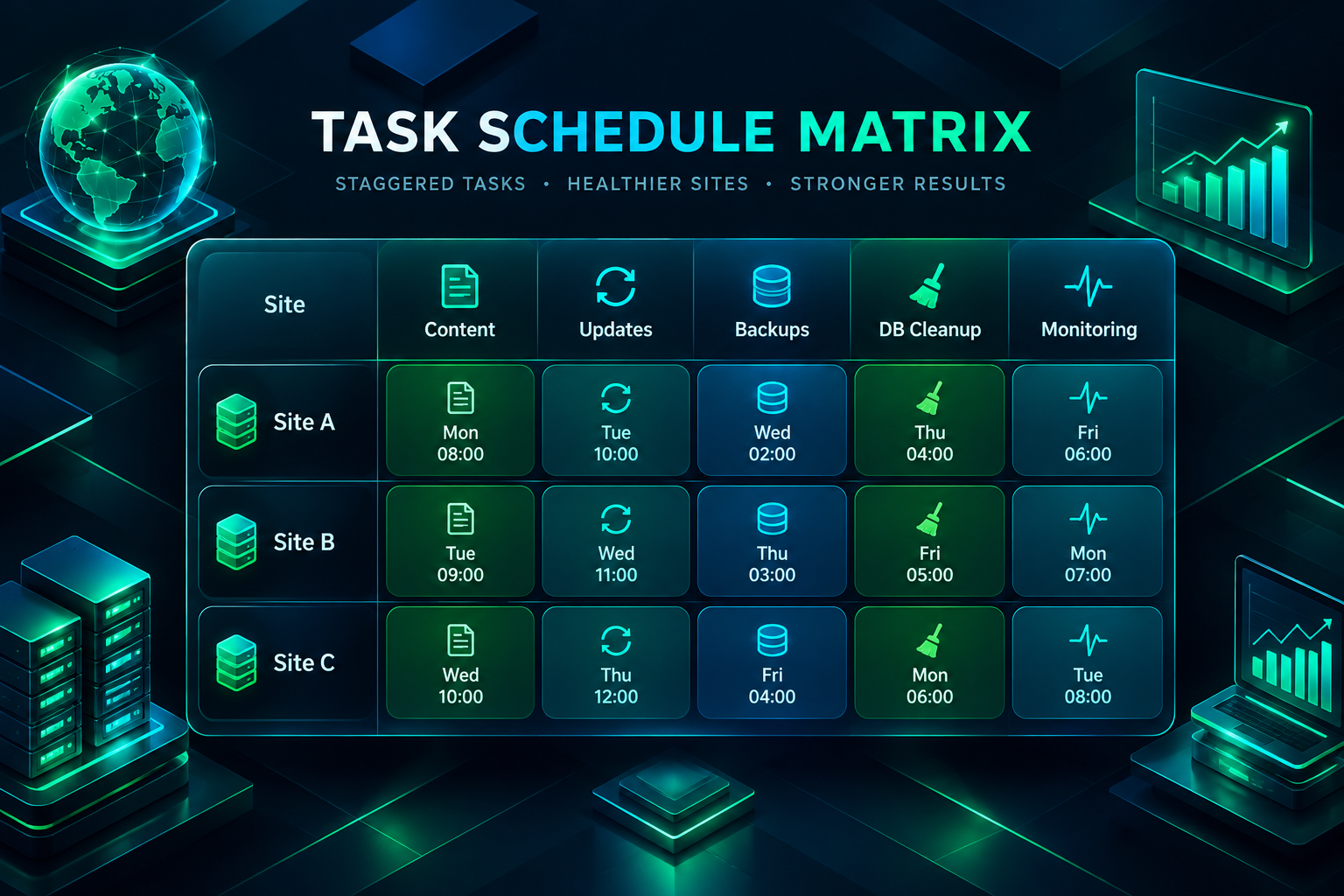
Using separate hosting accounts, separate management credentials, and where possible separate tools for each site further reduces the operational footprint. When a centralized management tool is used for efficiency, understanding what data that tool exposes—and to whom—is a relevant consideration for operators who prioritize network separation.
Frequently Asked Questions
Why does WP-Cron sometimes fail to publish scheduled posts on PBN sites?
WP-Cron relies on site traffic to trigger scheduled events. On low-traffic PBN sites, if no visitor or crawler loads a page during the scheduled window, the task does not fire. Replacing WP-Cron with a true server-level cron job resolves this by triggering WordPress scheduled events at a defined interval regardless of traffic.
How often should PBN sites be backed up?
Backup frequency depends on how often the site’s content changes. A PBN site that publishes new content weekly benefits from weekly backups. A site with infrequent updates may be adequately protected by monthly backups. The key requirement is that backups are stored in a remote location separate from the hosting server.
Can I use a single WordPress management dashboard to handle all PBN sites?
Centralized management tools such as MainWP or ManageWP can reduce the manual workload of managing multiple sites, but they introduce a shared management signal. Operators who prioritize footprint separation often prefer to manage each site individually or use lightweight automation scripts that do not create a visible connection between properties.
What should I do if a PBN site is deindexed?
First, identify the likely cause: check for malware or spam content injection, verify that no noindex directive is present, review the site’s robots.txt file, and check Google Search Console for any manual action notifications if the site is verified there. Resolving the underlying issue and ensuring the site meets basic quality standards is the appropriate first step before attempting to have the site recrawled and reindexed.
How can I check whether outbound links on PBN sites are still live?
Tools such as Screaming Frog can crawl a PBN site and report the HTTP status of all outbound links. Broken link checker plugins can also be scheduled to run periodically within WordPress and flag any links returning error responses. Maintaining a placement log with target URLs makes it straightforward to verify that each link remains intact during audits.
Should database optimization tasks run at the same time across all PBN sites?
Running database optimization simultaneously across multiple sites on shared hosting can cause resource contention and slow response times. Staggering these tasks across different days and times distributes the server load and also avoids creating a synchronized activity pattern across the network.
Building a Reliable Task Management System for Your PBN
Effective scheduled task management for PBN sites is fundamentally an operational discipline. The individual tasks—content scheduling, plugin updates, database cleanup, backups, uptime monitoring, and link auditing—are each straightforward in isolation. The complexity comes from coordinating them across multiple independent properties in a way that keeps each site healthy, each placement live, and each site’s activity pattern distinct.
Starting with a clear task inventory for each site, assigning specific schedules that vary between properties, and implementing server-level cron jobs where WP-Cron reliability is a concern will address the most common operational gaps. Uptime monitoring and periodic indexing checks provide the early warning layer that prevents silent failures from going unnoticed for extended periods. Outbound link audits close the loop by confirming that the placements the network exists to deliver are actually functioning as intended.
If you are building or expanding a private blog network and want to ensure that your sites and placements are set up for consistent, long-term link delivery, reviewing your current task management setup against these operational areas is a practical starting point. PBN Backlinks Service can assist with evaluating placement quality, domain selection, and network structure as part of a broader link-building strategy assessment.