

SSL certificate renewal is a routine but important maintenance task for any website, and PBN sites are no exception. An expired SSL certificate causes browsers to display security warnings, which can prevent crawlers from indexing pages correctly and may affect the perceived trustworthiness of a site. Keeping certificates current across a private blog network requires a clear process, whether you manage a handful of sites or a larger portfolio, and the method you use will depend on your hosting environment, control panel access, and whether you prefer manual or automated renewal.
Key Takeaways
- SSL certificates on PBN sites should be renewed before expiry to avoid browser warnings, crawling interruptions, and potential indexing issues that could reduce the link value passed to target pages.
- Most shared hosting environments and cPanel setups support free Let’s Encrypt certificates with auto-renewal, which reduces the manual workload across a network of sites.
- Manual renewal is straightforward through your hosting control panel or registrar dashboard, but requires tracking expiry dates carefully when managing multiple domains.
- Common renewal errors such as domain validation failures, mismatched domain names, and mixed-content warnings each have specific fixes that do not require advanced server knowledge.
- Maintaining HTTPS consistently across PBN sites supports proper crawling, avoids redirect chains, and contributes to the overall technical health of each site in the network.
Why SSL Certificates Matter for PBN Sites
An SSL certificate enables HTTPS, which encrypts the connection between a visitor’s browser and the web server. For PBN sites, the practical reasons to maintain valid SSL certificates are technical rather than primarily about visitor trust. Search engine crawlers follow HTTPS redirects and can index HTTPS pages, but an expired or missing certificate may cause crawl errors depending on how the crawler handles certificate warnings. A site that returns a certificate error may be crawled less reliably, which can affect whether the pages containing your outbound links are indexed and whether those links are processed by search engines.
Beyond crawling, an expired certificate causes modern browsers to display a full-page warning before a visitor can proceed. While PBN sites are not typically built for high visitor traffic, any tool or service that checks a site’s live status, including backlink auditing tools such as Ahrefs or Semrush, may flag a site with an expired certificate as having technical issues. Keeping SSL certificates current is therefore part of maintaining the basic technical health of each site in a network, alongside uptime monitoring, content freshness, and correct internal linking.
HTTPS is also a minor ranking signal according to Google’s publicly documented guidance, though the weight of that signal relative to content quality and backlink authority is generally considered small. The more immediate concern for PBN site owners is ensuring that crawlers can access pages without encountering certificate errors, and that any HTTPS-to-HTTP redirect chains introduced by an expired certificate do not interfere with how link equity flows from the PBN site to the target page.
Types of SSL Certificates Used on PBN Sites
Most PBN sites use one of two certificate types: free certificates issued through Let’s Encrypt, or paid certificates purchased through a hosting provider, domain registrar, or certificate authority. Let’s Encrypt certificates are valid for 90 days and are widely supported by shared hosting control panels including cPanel, Plesk, and DirectAdmin. Paid certificates from providers such as Sectigo, DigiCert, or Comodo are typically valid for one year and may offer additional validation levels, though for PBN use cases a standard domain-validated certificate is generally sufficient.
Wildcard certificates cover a root domain and all its subdomains under a single certificate, which can be useful if a PBN site uses subdomains for organizational purposes. Multi-domain or SAN certificates cover multiple distinct domain names under one certificate, though managing a PBN through a single shared certificate would create an obvious ownership footprint and is not a recommended approach. Each PBN site should have its own individual certificate tied to its own domain.
How to Renew SSL Certificates Through cPanel
cPanel is the most common hosting control panel for shared hosting environments, and it includes built-in tools for SSL certificate management. If your hosting provider has enabled the AutoSSL feature, Let’s Encrypt certificates are renewed automatically before expiry without any manual action required. To check whether AutoSSL is active for a domain, log into cPanel, navigate to the SSL/TLS section, and look for the AutoSSL or Let’s Encrypt option. If AutoSSL is enabled and the domain passes validation, the certificate will renew on a schedule managed by the hosting provider.
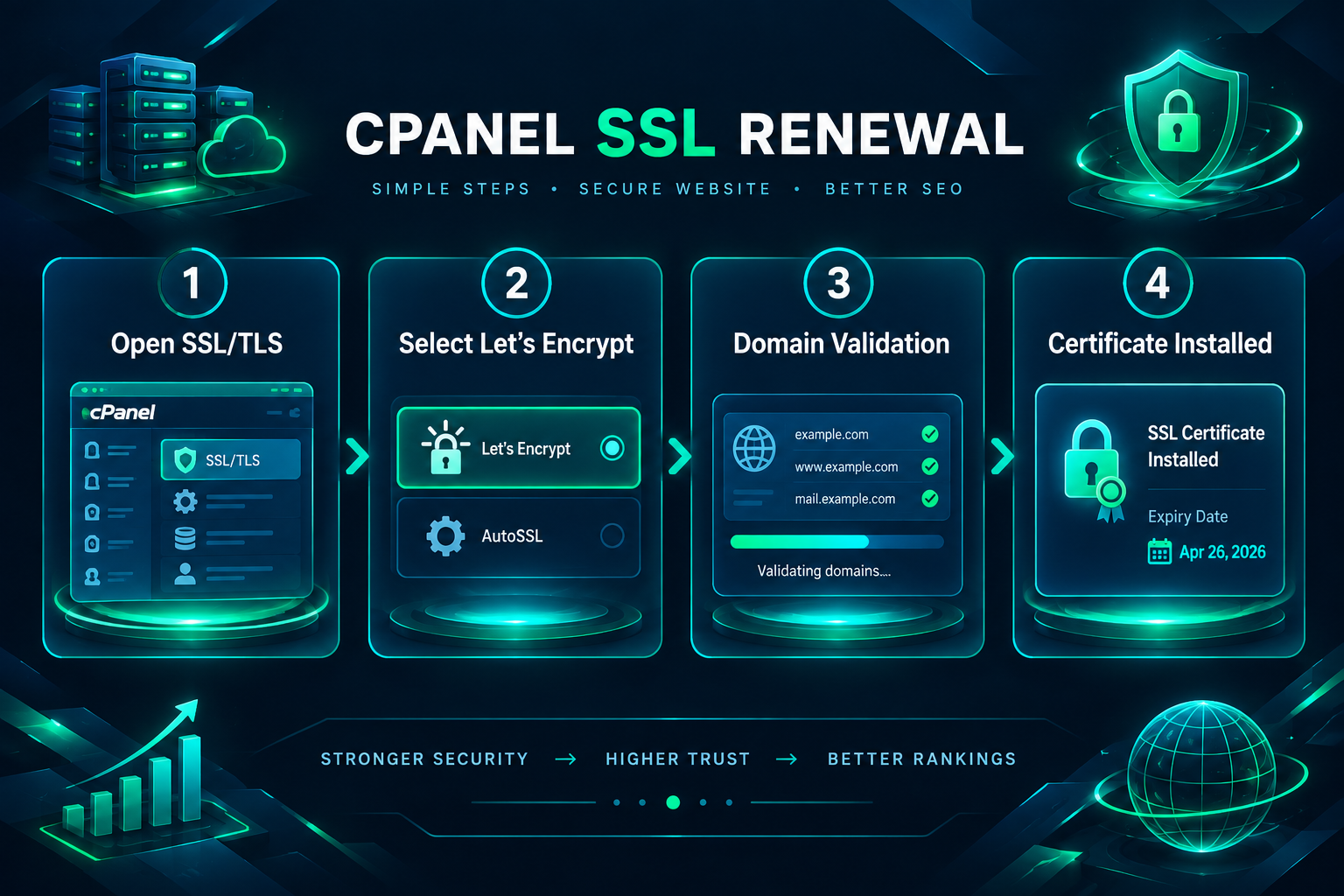
For manual renewal through cPanel, the process involves the following steps. First, navigate to SSL/TLS in cPanel and select the option to manage SSL certificates. If the existing certificate is approaching expiry, you can generate a new certificate signing request (CSR) from within cPanel, or use the Let’s Encrypt plugin to issue a new certificate directly. The Let’s Encrypt plugin, often labeled as Let’s Encrypt SSL or AutoSSL depending on the host, will verify domain ownership automatically through a file-based or DNS-based challenge and then install the new certificate. Once installed, the certificate is active immediately and the expiry date resets to 90 days from the issue date.
After renewal, confirm that the certificate is correctly installed by visiting the site over HTTPS and checking that the browser shows a valid padlock. You can also use a free tool such as SSL Labs’ SSL Test or a browser developer console to verify the certificate details, including the expiry date and the domain names covered.
Renewing SSL Certificates Through Plesk
Plesk is another widely used hosting control panel that supports Let’s Encrypt certificate issuance and renewal. In Plesk, SSL certificate management is found under the Websites and Domains section for each domain. The Let’s Encrypt extension in Plesk allows you to issue and renew certificates with a single click, and it supports automatic renewal by default when the extension is installed and the domain is correctly pointed to the server.
To manually renew a certificate in Plesk, open the domain’s settings, select SSL/TLS Certificates, and choose the Let’s Encrypt option. Plesk will run the domain validation process and install the renewed certificate automatically. If the domain is using a custom paid certificate rather than Let’s Encrypt, you will need to obtain the renewed certificate files from your certificate authority, then upload the certificate, private key, and CA bundle files through the Plesk SSL/TLS interface.
Renewing SSL Certificates on WordPress Sites Using Plugins
Many PBN sites run on WordPress, and while SSL certificate renewal itself is a server-level process rather than a WordPress function, several plugins can help monitor certificate status and flag upcoming expiry dates. Plugins such as Really Simple SSL assist with enforcing HTTPS across a WordPress site by managing redirects and fixing mixed-content issues, but they do not renew the certificate itself. The actual renewal must still be performed at the hosting or server level.
If your WordPress PBN sites are hosted on managed WordPress hosting platforms, the hosting provider typically handles SSL certificate renewal automatically. Platforms such as WP Engine, Kinsta, SiteGround, and similar managed hosts provision and renew Let’s Encrypt certificates without requiring any action from the site owner. In these environments, your primary responsibility is to ensure that the domain’s DNS records remain correctly pointed to the hosting server, as a DNS misconfiguration is one of the most common causes of automatic renewal failure.
Renewing SSL Certificates via Cloudflare
Cloudflare is a popular choice for PBN site management because it provides DNS management, CDN functionality, and SSL termination through its edge network. When a PBN site’s DNS is managed through Cloudflare and the site is proxied through Cloudflare’s network, Cloudflare issues and manages its own Universal SSL certificate automatically. This certificate covers the connection between the visitor and Cloudflare’s edge servers and renews without any manual intervention.
However, Cloudflare’s Universal SSL only covers the front-end connection. If your origin server also requires a valid certificate for the connection between Cloudflare and the origin, you will need to ensure that the origin certificate is also valid. Cloudflare offers an Origin Certificate option within the SSL/TLS section of the dashboard, which issues a certificate valid for up to 15 years for the Cloudflare-to-origin connection. This origin certificate is not trusted by browsers directly but works correctly when Cloudflare is proxying the traffic.
To check and manage SSL settings in Cloudflare, navigate to the SSL/TLS section of the relevant domain in your Cloudflare dashboard. The Overview tab shows the current SSL mode, which should generally be set to Full or Full (Strict) for PBN sites to avoid insecure connections between Cloudflare and the origin server. The Edge Certificates tab shows the status of the Universal SSL certificate and its renewal schedule.
Tracking SSL Expiry Dates Across a PBN
Managing SSL certificate expiry across multiple PBN sites requires a systematic approach. Relying on memory or ad hoc checks is not practical when a network contains more than a few domains. Several approaches can help keep expiry dates under control.
- Hosting provider notifications: Most hosting providers send email alerts when a certificate is approaching expiry. Ensure that the email address associated with each hosting account is actively monitored and that renewal alerts are not filtered as spam.
- Uptime and SSL monitoring tools: Services such as UptimeRobot, StatusCake, and similar monitoring platforms can check SSL certificate expiry dates and send alerts when a certificate is within a defined number of days of expiry. These tools can monitor multiple domains simultaneously and are useful for PBN portfolio management.
- Spreadsheet tracking: A simple spreadsheet listing each domain, its hosting provider, the certificate type, the issue date, and the expiry date provides a quick reference. Update the spreadsheet each time a certificate is renewed.
- Automated renewal confirmation: If AutoSSL or a similar automatic renewal system is in place, periodically verify that renewals are completing successfully rather than assuming the automation is working without errors.
Common SSL Renewal Errors and How to Fix Them
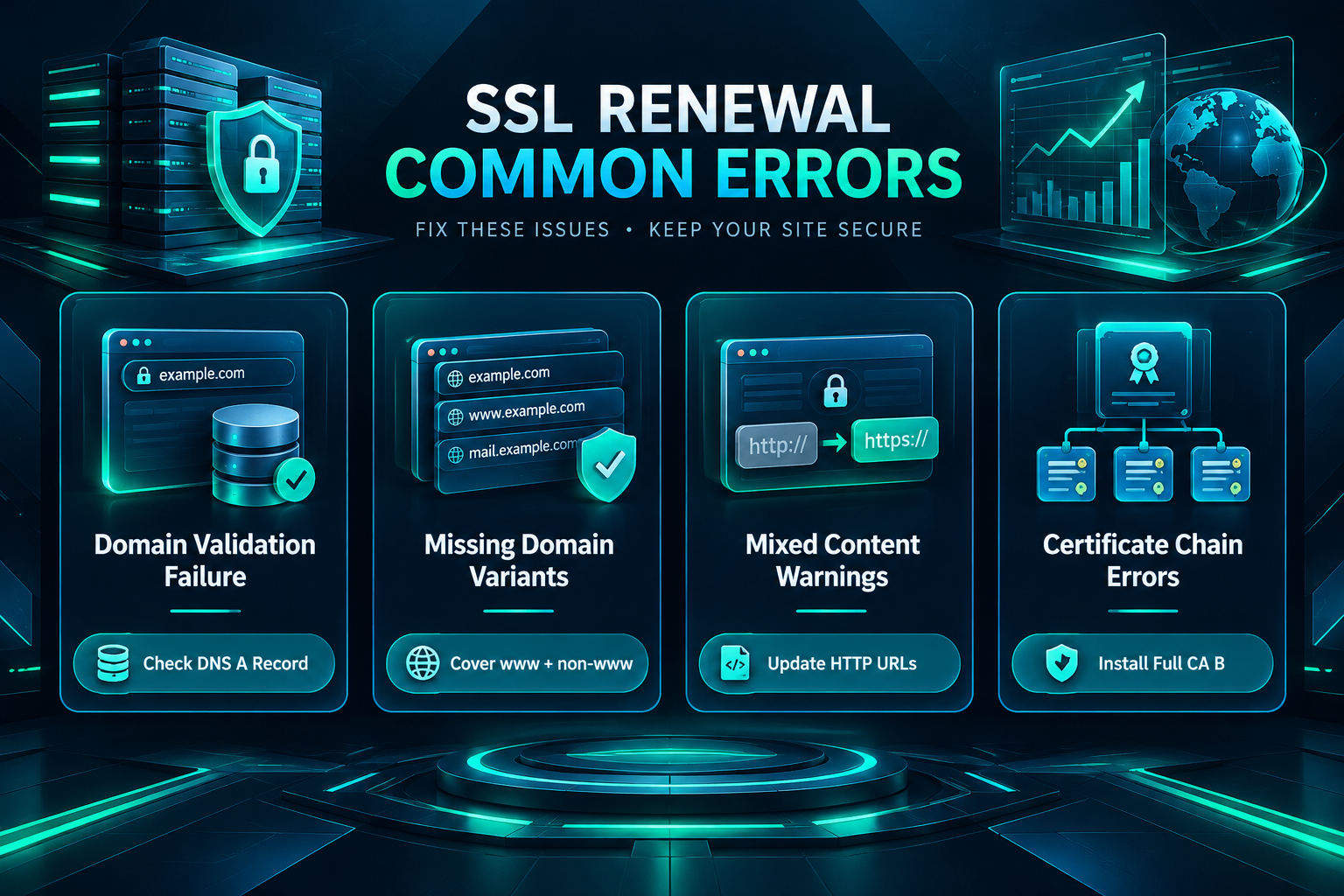
SSL certificate renewal failures are usually caused by one of a small number of identifiable issues. Understanding the most common errors makes it straightforward to resolve them without needing advanced server administration skills.
Domain Validation Failure
Let’s Encrypt and other certificate authorities verify domain ownership before issuing or renewing a certificate. The most common validation method for shared hosting is HTTP-01 challenge validation, where the certificate authority places a temporary file on the server and then retrieves it over HTTP to confirm that the domain resolves to that server. If the domain’s DNS is not correctly pointed to the hosting server, or if the server is blocking the validation request, the challenge will fail and the certificate will not renew. To fix this, confirm that the domain’s A record points to the correct server IP address, and check that no firewall or .htaccess rule is blocking access to the .well-known/acme-challenge directory.
Certificate Does Not Cover All Required Domain Variants
A certificate issued for example.com may not automatically cover www.example.com, or vice versa, depending on how it was issued. If a PBN site redirects between the www and non-www version, ensure that the certificate covers both variants. When using Let’s Encrypt through cPanel or Plesk, both variants are typically included by default, but it is worth confirming this in the certificate details after renewal.
Mixed Content Warnings
After renewing or installing an SSL certificate, a site may still show browser warnings if some page resources such as images, scripts, or stylesheets are loaded over HTTP rather than HTTPS. This is a mixed-content issue and is separate from the certificate itself. In WordPress, the Really Simple SSL plugin or a search-and-replace operation in the database can update internal URLs from HTTP to HTTPS. For non-WordPress sites, updating resource URLs in the site’s templates or configuration files resolves the issue.
Certificate Chain Errors
A certificate chain error occurs when the intermediate certificate files are not correctly installed alongside the primary certificate. This is more common with paid certificates than with Let’s Encrypt, which handles the chain automatically. If a chain error appears, download the full certificate bundle from your certificate authority and reinstall it through your hosting control panel, ensuring that the CA bundle or intermediate certificate file is included.
SSL Renewal for PBN Sites on VPS or Dedicated Servers
PBN sites hosted on virtual private servers or dedicated servers without a graphical control panel require SSL certificate renewal through the command line. The most widely used tool for this is Certbot, the official Let’s Encrypt client. Certbot can be installed on most Linux distributions and handles certificate issuance, renewal, and installation for web servers including Apache and Nginx.
Once Certbot is installed, the command certbot renew checks all certificates managed by Certbot and renews any that are within 30 days of expiry. This command can be scheduled as a cron job to run automatically, typically twice daily as recommended in the Certbot documentation, to ensure that renewals are processed without manual intervention. After renewal, Certbot can reload the web server configuration automatically to apply the new certificate.
For PBN operators managing multiple VPS instances, a configuration management approach or a centralized SSL management tool may reduce the overhead of maintaining certificates across many servers. Tools such as acme.sh provide an alternative to Certbot with support for a wider range of DNS providers and deployment hooks, which can be useful when managing DNS-01 challenge validation for wildcard certificates or domains behind Cloudflare.
Maintaining HTTPS Consistency Across a PBN Network
Beyond renewing individual certificates, maintaining consistent HTTPS implementation across a PBN network involves a few ongoing checks. Redirect configuration is one area that deserves attention: each PBN site should have a single canonical HTTPS URL, with HTTP requests redirecting to HTTPS via a 301 redirect. Redirect chains, where HTTP redirects to HTTPS and then to another URL variant, add unnecessary latency and can dilute the link signals passed through outbound links on the page.
Internal links within each PBN site should use HTTPS URLs rather than HTTP, both to avoid mixed-content issues and to ensure that internal link equity flows correctly. When a PBN site is migrated from HTTP to HTTPS, or when a certificate is renewed after a lapse, it is worth checking that the site’s WordPress settings, if applicable, reflect the HTTPS URL in both the WordPress Address and Site Address fields under Settings > General.
Outbound links from PBN sites to target pages should also use HTTPS where the target page supports it. Linking to an HTTP version of a target page when an HTTPS version exists is a minor inconsistency that is worth correcting as part of routine network maintenance.
Frequently Asked Questions
How often do SSL certificates on PBN sites need to be renewed?
Let’s Encrypt certificates are valid for 90 days and should be renewed before expiry, typically within the last 30 days of the validity period. Paid certificates are usually valid for one year. With automatic renewal enabled through cPanel AutoSSL, Plesk, or Certbot, the renewal process runs on a schedule without manual action, though it is good practice to verify that automatic renewals are completing successfully.
Will an expired SSL certificate cause a PBN site to lose its backlink value?
An expired certificate does not immediately remove a link from a site, but it can cause crawling issues if search engine crawlers encounter certificate errors when attempting to access the page. If a page becomes inaccessible or is crawled less frequently due to certificate errors, the outbound links on that page may be processed less reliably. Renewing the certificate promptly restores normal crawling conditions.
Can I use a single SSL certificate for multiple PBN domains?
Multi-domain SAN certificates can technically cover multiple domains under one certificate, but using a shared certificate across PBN sites creates a clear ownership footprint, as the certificate’s subject alternative names list all covered domains. Each PBN site should have its own individual certificate to avoid this footprint.
What is the easiest way to manage SSL renewals across a large PBN?
Enabling AutoSSL through cPanel or the equivalent automatic renewal feature in your hosting control panel is the most practical approach for shared hosting environments. For VPS-hosted sites, scheduling Certbot’s renew command as a cron job achieves the same result. SSL monitoring tools that alert you to upcoming expiry dates provide a useful safety net regardless of the renewal method used.
Does Cloudflare handle SSL renewal automatically for PBN sites?
Cloudflare’s Universal SSL certificate, which covers the connection between visitors and Cloudflare’s edge network, renews automatically without any action required. If you are also using a Cloudflare Origin Certificate for the connection between Cloudflare and your origin server, that certificate has a long validity period of up to 15 years and does not require frequent renewal. Standard Let’s Encrypt or paid certificates on the origin server still need to be renewed according to their own schedules if the site is not fully proxied through Cloudflare.
What should I check after renewing an SSL certificate on a PBN site?
After renewal, confirm that the browser shows a valid padlock for the site’s HTTPS URL, check that both the www and non-www variants are covered if both are in use, verify that there are no mixed-content warnings in the browser console, and confirm that HTTP requests redirect correctly to HTTPS. If the site uses WordPress, check that the WordPress Address and Site Address settings reflect the HTTPS URL.
Keeping SSL Certificates Current as Part of PBN Network Maintenance
SSL certificate renewal is one component of the broader technical maintenance that keeps PBN sites functioning reliably as link sources. An expired certificate introduces crawling uncertainty, browser warnings, and potential redirect complications that are straightforward to avoid with a consistent renewal process. Whether you rely on automatic renewal through your hosting control panel, Cloudflare’s edge SSL, or a scheduled Certbot cron job on a VPS, the key is to have a documented process and a monitoring system that alerts you before a certificate lapses rather than after.
For operators managing a portfolio of PBN domains, combining automatic renewal with periodic manual verification and an SSL expiry monitoring tool provides a reliable maintenance framework. Checking that renewals have completed successfully, that HTTPS redirects are correctly configured, and that mixed-content issues are resolved after any certificate change keeps each site in the network technically sound and ensures that the outbound links on those pages remain accessible to crawlers.
If you are building or expanding a private blog network and want guidance on domain selection, placement quality, or network configuration, PBN Backlinks Service can help you assess your requirements and identify an approach suited to your campaign goals.