

Broken permalinks on PBN websites are one of the most overlooked causes of backlink failure. When a URL structure changes or breaks after a WordPress update, migration, or settings change, the pages carrying your contextual link placements return 404 errors or redirect incorrectly, effectively cutting off the link equity those placements were meant to pass. Repairing broken PBN permalinks is a straightforward technical process once you understand what causes the problem and where to look, and getting it right means your existing placements continue to function as intended.
Key Takeaways
- Broken permalinks on PBN sites most commonly result from WordPress permalink setting resets, server misconfigurations, failed migrations, or plugin conflicts that alter URL structures.
- A 404 error on a page carrying a backlink means that link is not passing value until the URL is restored or properly redirected.
- The fastest first fix for WordPress-based PBN sites is to re-save the permalink settings in the WordPress admin dashboard, which regenerates the .htaccess rewrite rules.
- When the original URL cannot be restored, a properly implemented 301 redirect from the broken URL to the correct page preserves most of the link’s intended value.
- Regular crawl monitoring of PBN placement pages helps catch broken URLs before they cause extended gaps in your backlink profile.
Why Permalinks Break on PBN Websites
Understanding the root cause of a broken permalink is the most efficient path to a lasting fix. PBN websites are typically built on WordPress, and WordPress generates its URL structure through rewrite rules stored in the server’s .htaccess file or, on Nginx servers, in the server block configuration. When those rewrite rules are missing, corrupted, or overwritten, WordPress falls back to its default query-string URL format, and any previously published URL using a clean permalink structure returns a 404 error.
The most common triggers for permalink breakage on PBN sites include:
- WordPress core updates that overwrite or reset the .htaccess file, particularly on shared hosting environments where file permissions are restrictive.
- Site migrations between hosting providers, where the .htaccess file is not transferred correctly or the new server uses Nginx instead of Apache, requiring a different rewrite configuration.
- Plugin conflicts, especially from security plugins, caching plugins, or page builders that modify rewrite rules and can overwrite the WordPress-generated entries.
- Permalink structure changes made intentionally or accidentally in the WordPress Settings panel, which immediately invalidates all previously published URLs if the old structure is not redirected.
- Database corruption or incomplete imports during a site clone or restore, where the site URL stored in the WordPress options table does not match the live domain.
- Multisite or subdomain configuration errors that affect how WordPress resolves individual post and page URLs.
Identifying which of these applies to a specific PBN site determines the correct repair method. Attempting a fix without diagnosing the cause first can result in the same breakage recurring after the next update or server event.
Diagnosing the Permalink Problem
Before applying any fix, confirm the exact nature of the problem. Open the affected page URL in a browser and note the HTTP response code. A 404 response confirms the URL is not resolving. A 301 or 302 response means a redirect is already in place, which may be pointing to the wrong destination. A 500 response suggests a server configuration error rather than a permalink structure issue.
For a systematic check across multiple PBN placement pages, a crawl tool such as Screaming Frog can be pointed at a list of URLs to return their HTTP status codes in bulk. This is particularly useful when managing a network with multiple sites, because it surfaces broken placement pages across the entire set without requiring manual checks on each one.
Inside the WordPress admin, navigate to Settings > Permalinks and note the current permalink structure. If the structure shown does not match the URL format of the published posts, the settings were changed at some point after publication. Also check whether the .htaccess file in the site’s root directory contains a WordPress rewrite block. On Apache servers, this block begins with # BEGIN WordPress and ends with # END WordPress. If this block is absent or incomplete, the rewrite rules are not functioning.
On Nginx servers, WordPress rewrite rules are not stored in .htaccess. Instead, they must be present in the Nginx server block configuration file, typically managed by the hosting provider or server administrator. A missing try_files directive in the Nginx configuration is a common cause of permalink failure on Nginx-hosted PBN sites.
The Fastest Fix: Re-Saving WordPress Permalink Settings
For the majority of WordPress-based PBN sites running on Apache, re-saving the permalink settings resolves the issue immediately. This action forces WordPress to regenerate the .htaccess rewrite rules without changing the permalink structure itself.
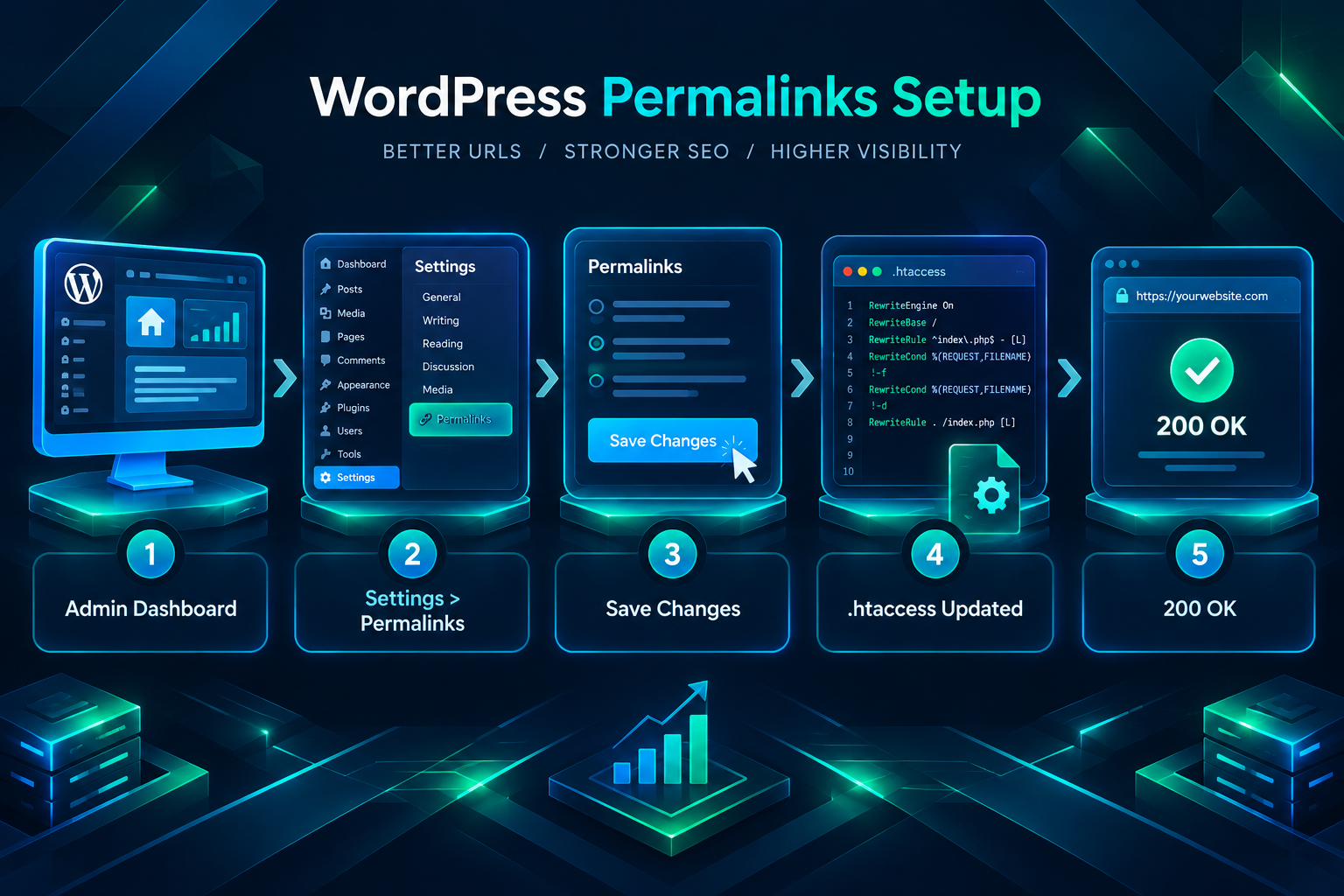
To perform this fix, log into the WordPress admin dashboard, go to Settings > Permalinks, and click Save Changes without altering any of the existing settings. WordPress will write a fresh set of rewrite rules to the .htaccess file. After saving, test the previously broken URLs in a browser to confirm they now return a 200 response.
If the save action does not resolve the issue, the .htaccess file may have incorrect permissions that prevent WordPress from writing to it. In that case, the rewrite block needs to be added manually via FTP or the hosting file manager. The standard WordPress .htaccess rewrite block for most permalink structures is well-documented in WordPress’s own support resources. Copy the correct block into the .htaccess file, save it, and test again.
This fix is non-destructive. It does not change the URL structure, alter any published content, or affect the backlink placements on those pages. It simply restores the server’s ability to resolve the existing URLs correctly.
Fixing Permalink Breaks Caused by a Changed URL Structure
When the permalink structure itself was changed after backlink placements were published, the original URLs no longer exist in the new structure. In this situation, re-saving the permalink settings will make the new URL structure work, but the old URLs that your backlinks point to will still return 404 errors.
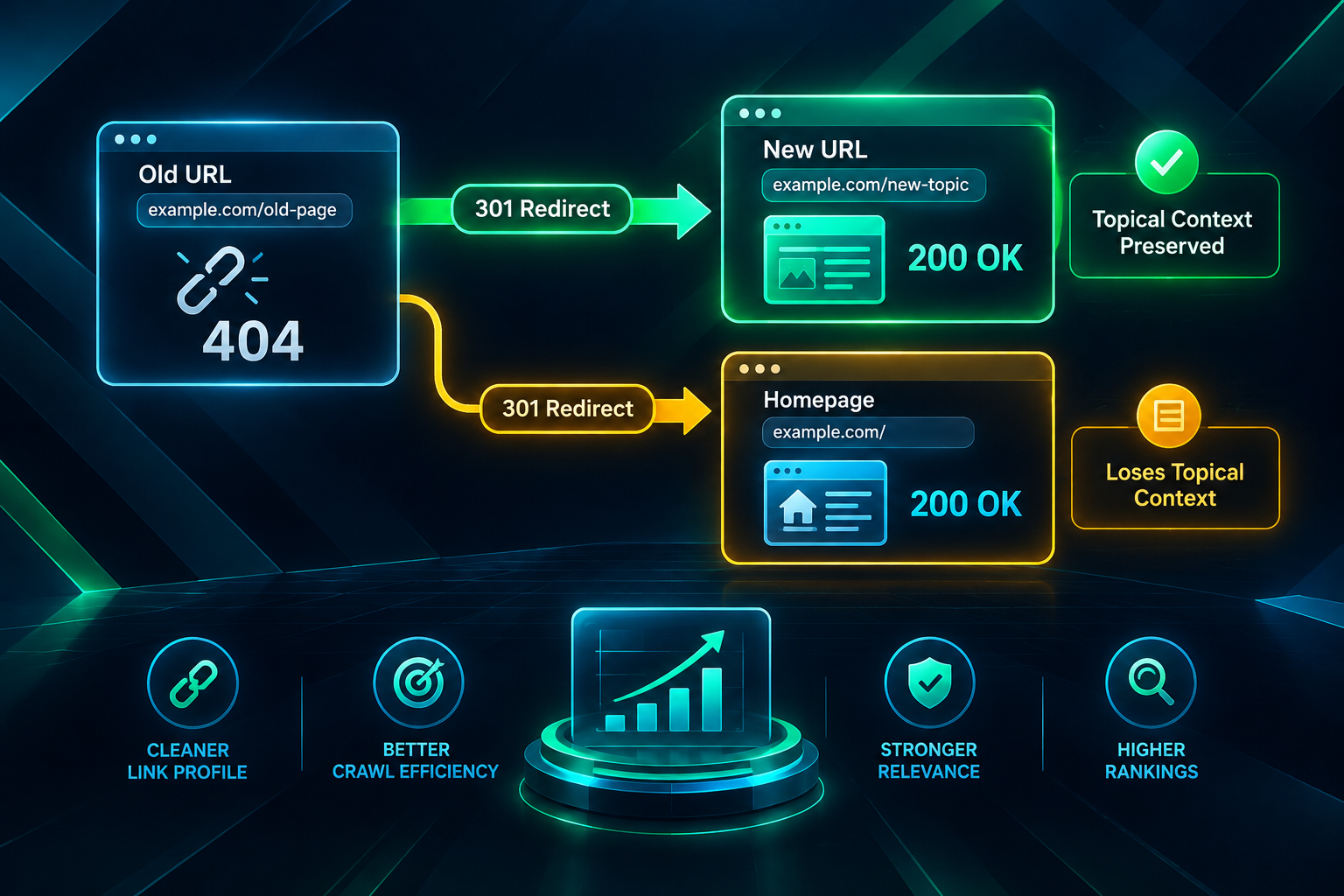
The correct solution here is to implement 301 redirects from each old URL to the corresponding new URL. A 301 redirect signals to search engines that the resource has permanently moved, and most of the link equity associated with the old URL is passed to the destination. This is the standard approach for preserving backlink value after a URL structure change.
On WordPress sites, 301 redirects can be implemented through:
- A redirect plugin such as the Redirection plugin, which provides a straightforward interface for mapping old URLs to new ones without requiring direct server file access.
- Manual .htaccess entries on Apache servers, using
Redirect 301orRewriteRuledirectives placed above the WordPress rewrite block. - Nginx configuration rules on Nginx servers, added to the server block by the hosting administrator.
When setting up redirects for PBN placement pages, map each specific old post URL to its exact new equivalent rather than redirecting everything to the homepage. A redirect to the homepage loses the topical context of the original placement and reduces the relevance signal the link was intended to carry. Matching old URLs to their correct new counterparts preserves both the link equity and the contextual relevance of the placement.
Fixing Permalink Issues After a Site Migration
Migrating a PBN site to a new host is a common source of permalink failure, particularly when the migration involves a change in server software, a domain change, or an incomplete database transfer. After a migration, the WordPress site URL stored in the database may still reference the old host or a temporary staging URL, causing all internal links and permalink resolutions to fail.
To correct a mismatched site URL after migration, the siteurl and home values in the WordPress options table need to reflect the correct live domain. This can be updated through the WordPress admin under Settings > General if the admin panel is accessible, or directly in the database using phpMyAdmin or a similar tool if the admin panel is not loading correctly due to the URL mismatch.
After correcting the site URL, re-save the permalink settings to regenerate the rewrite rules for the new server environment. If the migration moved from Apache to Nginx, work with the hosting provider to ensure the Nginx server block includes the correct WordPress rewrite directives, since .htaccess rules are not read by Nginx.
A search-and-replace operation on the database may also be necessary if the old domain appears in serialized content, internal links within posts, or widget settings. Tools designed for WordPress database search-and-replace handle serialized data correctly, which is important because a simple text replacement can corrupt serialized PHP arrays stored in the database.
Checking That Repaired Permalinks Are Crawlable and Indexed
Restoring a URL so that it returns a 200 response is the first step. Confirming that search engines can crawl and index the repaired page is the follow-up step that determines whether the backlink placement is actually functional from an SEO perspective.
After repairing permalinks, check that the affected pages are not blocked by the site’s robots.txt file and that no noindex meta tag was inadvertently added during the troubleshooting process. A page that returns 200 but is blocked from crawling or marked noindex will not contribute to the backlink profile in the way intended.
Google Search Console can be used to request indexing of specific repaired URLs through the URL Inspection tool, which also shows whether Google has previously crawled the page and what its current index status is. For PBN sites where Search Console access is available, this provides direct confirmation of crawl status. Where Search Console is not set up on individual PBN sites, monitoring can be done by checking whether the repaired URL appears in search results using a site-specific search query, or by using a backlink monitoring tool to confirm the link is being detected at the correct URL.
Ahrefs, Semrush, and Majestic all track backlinks at the URL level. After a permalink repair, these tools will eventually update their records to reflect the restored URL, though the update frequency depends on each tool’s crawl schedule. A previously broken URL that was returning 404 may show a drop in referring domain counts in these tools; once the URL is repaired and recrawled, the link should reappear in the tool’s index.
Preventing Permalink Breakage on PBN Sites
Reactive repairs are necessary when breakage occurs, but a small amount of preventive configuration reduces the frequency of permalink failures across a network of sites. Several practical measures help maintain permalink stability on WordPress-based PBN sites over time.
Locking the permalink structure after the site is set up and placements are published is the most important preventive step. Avoid changing the permalink format on any site that already has active backlink placements pointing to specific URLs. If a structural change is genuinely necessary, plan the redirect mapping before making the change rather than after.
Setting correct file permissions on the .htaccess file ensures that WordPress can update it during core updates without failing silently. The recommended permission for .htaccess on most shared hosting environments is 644, which allows the web server and WordPress to read and write the file while preventing public write access.
Maintaining a record of the active placement URLs for each PBN site makes it straightforward to run a periodic crawl check. A simple spreadsheet listing each placement URL, the target page it links to, and the anchor text used allows for a quick bulk status check using a crawl tool. Running this check after any WordPress update, plugin update, or hosting change catches breakage early, before an extended period of 404 responses reduces the practical value of those placements.
For networks managed across multiple hosting environments, standardizing the server configuration where possible reduces the variability that leads to migration-related permalink failures. Documenting the server type, PHP version, and permalink structure for each site in the network makes troubleshooting faster when issues do arise.
When a Placement Page Cannot Be Restored
In some cases, the original placement page cannot be restored because the content was deleted, the domain expired and was re-registered without the original content, or the site underwent a complete rebuild. When the page itself no longer exists and cannot be recreated, the backlink placement at that URL is effectively lost.
In this situation, the practical options are to replace the placement with a new one on a functioning page within the same network, or to source a new placement on a different site. A 301 redirect from the dead URL to a different page on the same site is a partial measure, but it changes the topical context of the link and may not fully replicate the value of the original placement.
If you are working with a managed PBN backlink service, reporting broken placement URLs to the provider is the appropriate first step. Reputable providers typically have processes for verifying placement status and addressing broken links, whether through repair, replacement, or credit toward a new placement. Confirming what the provider’s policy covers before ordering placements is a useful due diligence step.
Frequently Asked Questions
How do I know if a broken permalink is affecting my backlink?
Check the HTTP status code of the placement page URL. If it returns a 404 error, the page is not resolving and the backlink is not functional. A backlink monitoring tool such as Ahrefs or Semrush will also flag lost links when a previously indexed URL stops returning a valid response.
Will re-saving permalink settings delete any content or change my posts?
No. Re-saving permalink settings in WordPress only regenerates the server rewrite rules. It does not alter any published posts, pages, or their content. The permalink structure itself remains unchanged unless you manually select a different format before saving.
Does a 301 redirect fully preserve the link equity from a broken placement URL?
A properly implemented 301 redirect passes most of the link equity associated with the original URL to the redirect destination. The exact proportion is not publicly documented by search engines, but 301 redirects are the standard technical method for preserving link value after a URL change. Redirecting to a topically relevant destination page is preferable to redirecting to the homepage.
My PBN site is on Nginx and re-saving permalinks did not fix the issue. What should I do?
On Nginx servers, WordPress cannot write rewrite rules to .htaccess because Nginx does not use .htaccess files. The rewrite configuration must be added directly to the Nginx server block by the hosting provider or server administrator. The required directives for WordPress on Nginx are available in WordPress’s documentation and typically include a try_files directive that routes requests through WordPress’s index.php.
How often should I check PBN placement URLs for broken permalinks?
Running a crawl check after any WordPress core update, plugin update, or hosting change is a practical minimum. For actively managed networks, a monthly bulk status check of all placement URLs using a crawl tool catches breakage before it causes extended gaps. The frequency can be adjusted based on the size of the network and the update frequency of the individual sites.
Can a broken permalink cause a sitewide issue on the PBN site itself?
A broken permalink structure that affects all posts and pages on a site, rather than a single URL, can make the entire site’s content inaccessible. This typically happens when the .htaccess rewrite rules are missing or the site URL in the database is incorrect. Repairing the rewrite rules or correcting the site URL resolves the sitewide issue and restores all affected URLs simultaneously.
Keeping Your PBN Placements Functional Over Time
Broken permalinks are a maintenance issue rather than a fundamental flaw in the placement itself. The underlying link placement, the content context, and the domain’s backlink profile remain intact; the problem is simply that the server is not resolving the URL correctly. Addressing the root cause, whether that is a missing .htaccess rewrite block, a mismatched site URL after migration, or an unintended permalink structure change, restores the placement to its intended working state.
The practical priority after any permalink repair is to confirm that the restored URLs are crawlable, not blocked by robots.txt or noindex directives, and returning clean 200 responses. Following that confirmation with a check in a backlink monitoring tool gives a complete picture of whether the placements are being detected at the correct URLs.
For anyone managing a network of PBN sites or working with a provider that maintains placements on their behalf, building a simple URL monitoring routine into the regular maintenance schedule is the most reliable way to catch permalink issues early. If you are evaluating a PBN backlink package or reviewing the health of existing placements, PBN Backlinks Service can help you assess placement status and discuss what a well-maintained network of contextual link placements looks like in practice.