

When a PBN site suddenly stops appearing in search results or fails to pass link equity, the cause is not always obvious. A hosting outage and a deindexing event can look nearly identical from the outside — the page is unreachable, rankings on the target site may soften, and the network node appears to have gone dark. Knowing which problem you are actually dealing with determines the correct response, and confusing the two can lead to wasted effort, unnecessary alarm, or missed maintenance that compounds the original issue.
Key Takeaways
- A hosting outage is a temporary server-side failure that prevents crawlers and users from reaching a PBN site; deindexing is a search-engine decision to remove a URL or domain from its index, and the two require different diagnostic and remediation approaches.
- The fastest way to separate the two causes is to check whether the site is live and accessible before checking whether it is indexed — a site that loads normally but does not appear in search results points toward deindexing rather than a hosting problem.
- Google Search Console coverage reports, the site: search operator, and server response code checks are the primary diagnostic tools for distinguishing these two scenarios.
- Deindexing can be page-level or domain-level, and the scope of the removal affects how the PBN node’s link equity is likely to behave; a hosting outage does not inherently affect indexing status unless the downtime is prolonged.
- Monitoring PBN sites proactively — rather than only after a problem is noticed — reduces the time between an event and a correct diagnosis.
What Each Problem Actually Means
A hosting outage occurs when the web server hosting a PBN site becomes temporarily unavailable. The domain still exists, the DNS records still resolve, and the content has not been removed from the index — but the server returns an error code, most commonly a 500-series response such as 503 (Service Unavailable) or simply times out. Googlebot and other crawlers treat a temporary server error as a signal to retry later rather than to remove the URL from the index immediately. Google’s own crawling documentation notes that a 503 response instructs crawlers to try again, and a short outage is unlikely to cause deindexing on its own.
A deindexing event is a search-engine decision. The URL or domain is removed from the search engine’s index, meaning it will not appear in organic search results and will not pass link signals through normal indexing pathways. Deindexing can result from a manual action applied through Google Search Console, from an algorithmic assessment that the site does not meet quality thresholds, or from a noindex directive being added to the page or site. The site may still be fully accessible to users and crawlers — it loads, it returns a 200 OK response — but it simply does not appear in search results.
The critical distinction is that a hosting outage is a connectivity problem while deindexing is an indexing status problem. A site can be deindexed while its server is running perfectly, and a site can be down due to a hosting failure while its pages remain indexed. These are independent states, and the diagnostic path for each is different.
Why the Distinction Matters for PBN Management
For a private blog network, each node is intended to pass link equity to a target site through indexed, crawlable pages. If a PBN site is experiencing a hosting outage, the link may temporarily be uncrawlable, but the indexing status is likely preserved once the server recovers. The practical impact on the target site’s backlink profile is usually short-term, assuming the outage is resolved promptly.
If a PBN site has been deindexed, the situation is meaningfully different. A deindexed page or domain is not contributing to the target site’s link profile in the same way as an indexed, crawlable placement. The duration and scope of the deindexing — whether it affects a single page, a section of the site, or the entire domain — determines how significant the impact may be. A page-level deindexing of the specific post containing the link is more directly relevant than a deindexing of an unrelated page on the same domain.
Misidentifying a deindexing event as a hosting outage leads to waiting for a server problem that will never self-resolve. Misidentifying a hosting outage as deindexing can trigger unnecessary concern about the network’s integrity when the real fix is simply contacting the hosting provider. Getting the diagnosis right first saves time and informs the correct next step.
Step-by-Step Diagnostic Process
The following sequence moves from the simplest check to the most specific, allowing you to isolate the cause efficiently.
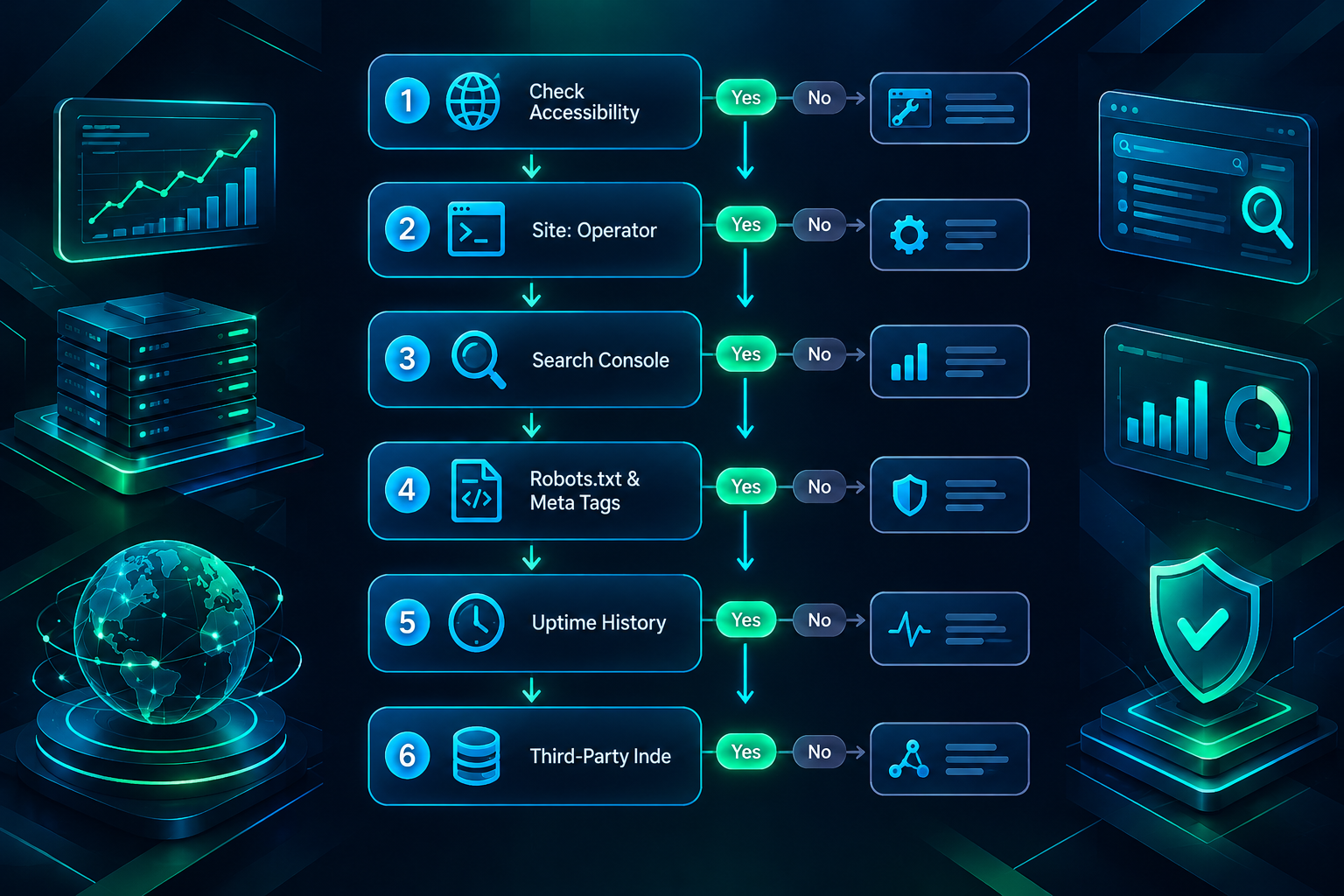
Step 1: Check Whether the Site Is Accessible
Open the PBN site’s URL directly in a browser. If the page loads and returns visible content, the hosting infrastructure is functioning. A site that loads normally but does not appear in search results is almost certainly experiencing a deindexing issue rather than a hosting problem. If the page does not load — returning a timeout, a 500-series error, or a connection refused message — the hosting layer is the first place to investigate.
To confirm the server response code rather than relying on browser behavior, use a tool such as a header checker or a command-line curl request. A 200 OK response confirms the server is healthy. A 503 or 500 response confirms a server-side failure. A 404 response means the specific URL does not exist on the server, which is a separate issue from either a general outage or deindexing.
Step 2: Use the Site Search Operator
In Google, run the query site:yourdomain.com replacing the placeholder with the actual PBN domain. If results appear, the domain is indexed. If no results appear, the domain may have been deindexed — but this operator alone is not conclusive, because a temporary crawl gap or a very new site may also return zero results. Cross-reference with the next step before drawing a conclusion.
Run the same check for the specific URL containing the link placement: site:yourdomain.com/specific-post-url. A domain-level result with no page-level result for the placement URL suggests the post itself may have been removed from the index while the domain remains partially indexed.
Step 3: Check Google Search Console Coverage Data
If Google Search Console is configured for the PBN site, the Coverage or Indexing report provides the most direct evidence. A URL listed under “Crawl anomaly” or “Server error (5xx)” points toward a hosting or connectivity problem. A URL listed under “Excluded” with a reason such as “Noindex tag detected”, “Blocked by robots.txt”, or “Crawled — currently not indexed” points toward an indexing status issue rather than a server failure.
A manual action notification in Search Console is a definitive signal of a search-engine enforcement decision. Manual actions are documented in the Manual Actions report and are distinct from algorithmic deindexing. If a manual action is present, the site has received a human-reviewed enforcement decision, not a hosting failure. If no manual action is present but the URL is excluded, the cause may be algorithmic or technical — a noindex tag, a robots.txt block, or a quality-related algorithmic assessment.
Step 4: Check the Robots.txt File and Meta Tags
A common cause of accidental deindexing that is sometimes mistaken for a hosting or network problem is an incorrectly configured robots.txt file or a noindex meta tag added during a CMS update or plugin change. Fetch the robots.txt file directly by appending /robots.txt to the domain. Check whether any Disallow rules block Googlebot from crawling the relevant pages. Separately, view the page source of the placement URL and search for a noindex directive in the meta robots tag or the X-Robots-Tag header.
If a noindex directive is present and was not intentionally added, this is a technical configuration problem rather than a search-engine enforcement action. Removing the directive and requesting reindexing through Search Console is the appropriate response. This scenario is worth checking early because it is a relatively common cause of unexpected disappearance from search results that has nothing to do with the hosting environment or a search-engine quality decision.
Step 5: Check Uptime Monitoring History
If you use an uptime monitoring service for your PBN nodes — which is a practical maintenance step for any managed network — review the incident log for the period when the problem was first noticed. A confirmed downtime window that coincides with the disappearance from search results suggests a hosting outage. An absence of any downtime event during the same period, combined with the site being accessible now, points toward a deindexing event that occurred while the server was running normally.
Uptime monitoring tools typically record the timestamp, duration, and HTTP response code of each incident. A pattern of repeated short outages over days or weeks is also worth noting, because prolonged or repeated 5xx errors can eventually affect crawl scheduling and, in extended cases, may influence indexing freshness — though Google’s documentation indicates that a temporary outage should not by itself cause removal from the index.
Step 6: Check Third-Party Index and Backlink Data
Tools such as Ahrefs, Semrush, and Majestic maintain their own crawl indexes and can show whether a domain or URL was recently crawled and whether the linking page is still live in their records. These are not Google’s index, and discrepancies between a third-party tool’s data and Google’s actual index are normal — but a sudden drop in a tool’s “live” link count for a PBN domain, combined with the site being inaccessible, can help confirm the timeline of a hosting outage. Conversely, if the third-party tool shows the page as live and crawlable but Google does not index it, the issue is more likely an indexing status problem.
Ahrefs’ Site Explorer, for example, shows the HTTP status code of linking pages as recorded during its most recent crawl. A 200 status on the linking page in Ahrefs combined with a zero result in the Google site: operator is a useful signal that the page is accessible but not currently indexed by Google.
Signals That Point Toward Deindexing
Several observable patterns are more consistent with a deindexing event than a hosting failure:
- The PBN site loads normally in a browser and returns a 200 OK response, but the site: operator returns no results.
- Google Search Console shows the URL under an “Excluded” category with a reason unrelated to server errors.
- A manual action notification appears in the Search Console Manual Actions report.
- The disappearance from search results occurred gradually or was noticed after a period of stable uptime, rather than coinciding with a confirmed server incident.
- A noindex tag or robots.txt disallow rule is present on the affected URL or domain.
- The domain’s indexed page count dropped sharply according to the site: operator, while the server remains accessible.
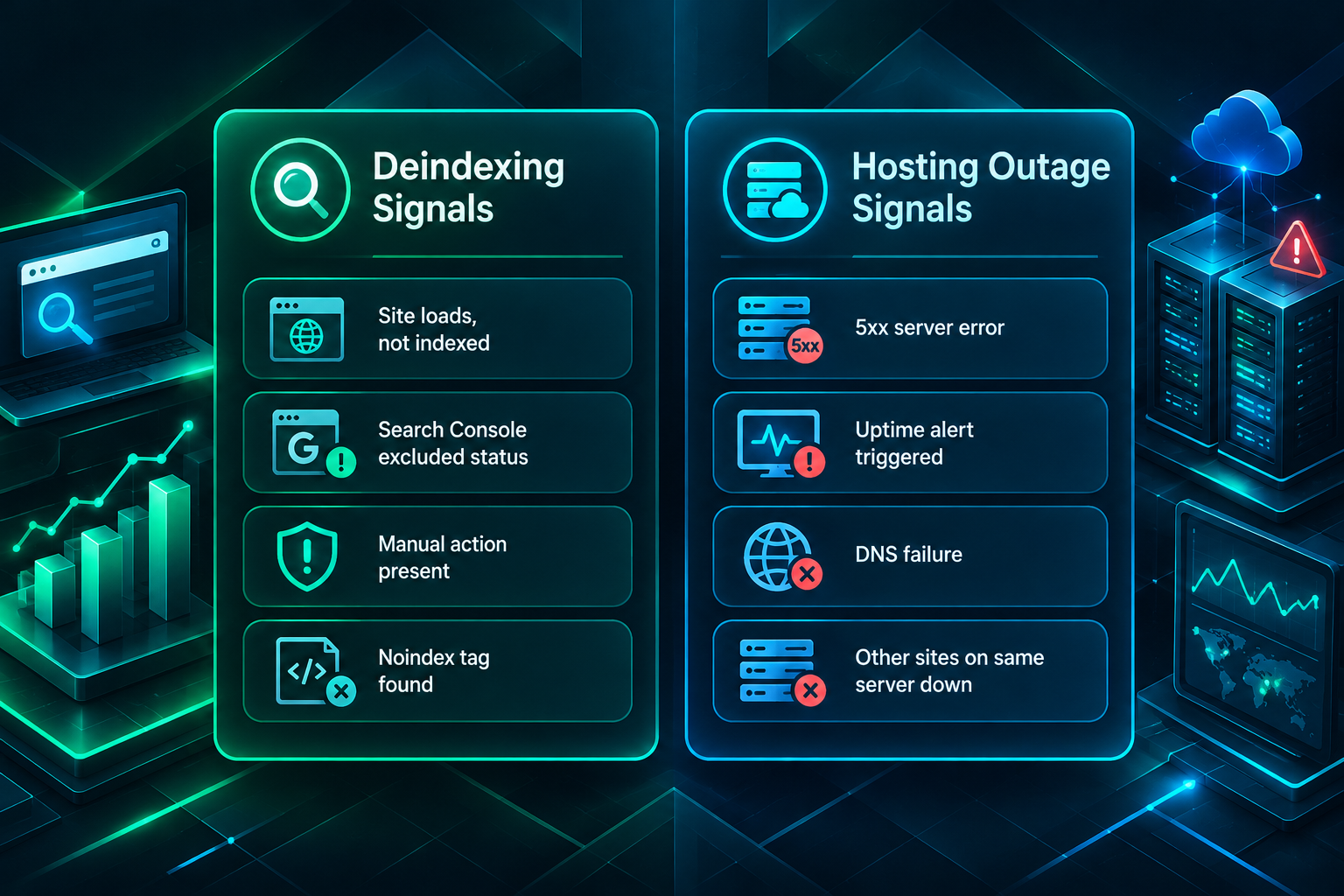
Signals That Point Toward a Hosting Outage
The following patterns are more consistent with a server or hosting problem:
- The site returns a 500, 502, 503, or 504 error, or the connection times out entirely.
- An uptime monitoring tool recorded a downtime event during the relevant period.
- The hosting control panel or server logs show resource exhaustion, a crashed process, or a suspended account.
- Other sites hosted on the same server or IP address are also unreachable.
- The site was accessible before the outage and returns to normal once the server issue is resolved, with no change in its indexed status.
- DNS resolution fails, suggesting a nameserver or registrar-level problem rather than a search-engine decision.
What Happens to Link Equity During Each Scenario
During a hosting outage, Googlebot will encounter crawl errors when it attempts to access the PBN site. Google’s systems are designed to handle temporary unavailability without immediately removing pages from the index. The crawl scheduler may reduce crawl frequency for a site that repeatedly returns errors, but a short outage — typically measured in hours rather than days — is unlikely to cause the placement URL to be dropped from the index. Once the server recovers, normal crawling resumes and the link placement continues to function as before.
During a deindexing event, the placement page is no longer part of Google’s active index. The practical effect on link equity from a deindexed page is a subject of ongoing discussion in the SEO community, and Google does not publish a precise formula for how it handles links from deindexed pages. What is clear is that a link from a page that is not indexed does not function in the same way as a link from an indexed, crawlable page. The duration of the deindexing and whether it is page-level or domain-level are both relevant factors when assessing the impact on a target site’s backlink profile.
It is worth noting that these two states are not mutually exclusive over time. A prolonged hosting outage that causes repeated crawl errors over an extended period could eventually affect the crawl scheduling and freshness of indexed pages, though this is a different mechanism from a deliberate deindexing decision. Keeping outages short and resolving them promptly is therefore relevant to maintaining the indexing health of PBN nodes.
Practical Monitoring Setup for PBN Sites
Reactive diagnosis — investigating only after a problem is noticed — is slower and less precise than proactive monitoring. A basic monitoring setup for PBN nodes typically includes the following components:
- Uptime monitoring: A service that checks each PBN domain at regular intervals and records the HTTP response code and response time. Free and paid options exist; the key requirement is that the tool logs the timestamp and response code of each check so you have a historical record to reference during diagnosis.
- Search Console access: Configuring Google Search Console for each PBN site provides direct access to coverage data, manual action notifications, and crawl statistics. This is the most authoritative source for distinguishing a server error from an indexing status issue.
- Periodic site: operator checks: Running a site: query for each PBN domain on a regular schedule — weekly or monthly depending on the size of the network — provides a simple baseline for indexed page counts. A sudden drop is a prompt to investigate further.
- Backlink tool monitoring: Tools such as Ahrefs or Semrush can track the live status of specific linking pages. Setting up alerts for lost backlinks from PBN placements provides an early signal that a page may have become inaccessible or been removed from the index.
The combination of uptime monitoring and Search Console data covers the two primary diagnostic dimensions — server accessibility and indexing status — and allows you to separate the causes quickly when an issue arises.
When to Act and What Action to Take
Once you have identified the cause, the response differs significantly between the two scenarios.
For a confirmed hosting outage, the appropriate action is to contact the hosting provider, check the server control panel for resource or account issues, and restore normal server operation. If the outage was caused by a shared hosting environment affecting multiple sites simultaneously, migrating to a more reliable hosting arrangement may be worth considering for network stability. Once the server is restored and returning 200 responses, verify that the placement URLs are still indexed using the site: operator and Search Console, and confirm that the content has not been altered during the recovery process.
For a confirmed deindexing event, the appropriate action depends on the cause. If a noindex tag or robots.txt block was added accidentally, removing it and submitting the URL for reindexing through Search Console is the first step. If a manual action is present, the Search Console Manual Actions report will describe the reason, and the site owner can address the stated issue before submitting a reconsideration request. If the deindexing appears to be algorithmic with no manual action present, the cause is less transparent and may require a review of the site’s content quality, internal linking, and technical configuration.
In either case, avoid making changes to the PBN site’s content or structure based on an incorrect diagnosis. Changing content in response to what is actually a hosting outage, or waiting for a server fix that will never come when the real issue is a noindex tag, both delay resolution and may introduce additional variables that complicate future diagnosis.
Assessing the Impact on Your PBN Strategy
A single deindexed page or a brief hosting outage on one PBN node is unlikely to produce a measurable change in a target site’s rankings on its own, particularly if the network contains multiple placements across different domains. The significance of any individual node’s status depends on the overall structure of the campaign, the number of active placements, and the target site’s existing backlink profile.
When evaluating the health of a PBN campaign, it is useful to distinguish between isolated incidents — a single node experiencing a temporary outage or a page-level indexing issue — and systemic patterns, such as multiple nodes losing indexed status within a short period. An isolated incident is a maintenance task. A systemic pattern may indicate a shared footprint, a hosting configuration issue affecting multiple sites, or a broader quality signal that warrants a more thorough review of the network’s setup.
If you are working with a managed PBN service, provider transparency about the indexing status and uptime of placement sites is a practical quality indicator. A provider that monitors placement health and communicates proactively about indexing or server issues gives you the information needed to maintain an accurate picture of your campaign’s active link profile.
Frequently Asked Questions
Can a short hosting outage cause a PBN site to be deindexed?
A brief outage that causes Googlebot to encounter a 503 or 500 error is unlikely to result in deindexing on its own. Google’s crawling systems are designed to retry temporarily unavailable pages. Prolonged or repeated outages over an extended period may affect crawl scheduling and indexing freshness, but a short server failure is generally treated as a temporary condition rather than a reason to remove the URL from the index.
What is the fastest way to check if a PBN site is deindexed?
Run a site: search in Google for the specific domain and for the placement URL. If the site loads normally in a browser but returns no results in the site: operator, deindexing is the more likely cause. Confirm by checking the Coverage or Indexing report in Google Search Console if it is configured for the site.
Does a deindexed PBN page still pass any link equity?
Google does not publish a precise formula for how it handles links from pages that are not in its active index. The SEO community’s general understanding is that a link from a deindexed page does not function in the same way as a link from an indexed, crawlable page, but the exact mechanism is not publicly documented. The practical implication is that restoring the indexing status of a deindexed placement page is a relevant maintenance priority.
How do I tell if a PBN site has received a manual action versus an algorithmic deindexing?
A manual action will appear in the Manual Actions report in Google Search Console with a description of the reason. Algorithmic deindexing does not generate a manual action notification — the URL simply moves to an excluded or not-indexed status in the Coverage report without a corresponding manual action entry. If Search Console is not configured for the site, the absence of a manual action cannot be confirmed directly.
Should I set up Google Search Console for every PBN site?
Configuring Search Console for PBN sites provides the most direct access to indexing status data, crawl error reports, and manual action notifications. Whether to do so is a network management decision that involves weighing the diagnostic benefit against any footprint considerations relevant to your specific setup. The diagnostic value of having direct Search Console data is significant for distinguishing deindexing from hosting issues accurately.
What response code should I look for to confirm a hosting outage?
A 500 (Internal Server Error), 502 (Bad Gateway), 503 (Service Unavailable), or 504 (Gateway Timeout) response code indicates a server-side failure. A connection timeout with no response code also suggests a hosting or network problem. A 200 OK response confirms the server is functioning normally, which shifts the investigation toward indexing status rather than hosting.
Diagnosing PBN Issues Accurately Before Taking Action
Distinguishing a PBN deindexing event from a hosting outage is a practical diagnostic skill that directly affects how efficiently you can maintain a network’s link profile. The two problems share a surface-level symptom — a PBN node that appears to have stopped functioning — but they have different causes, different implications for link equity, and different remediation paths. Checking server accessibility first, then verifying indexing status through the site: operator and Search Console data, gives you a reliable sequence that avoids acting on the wrong assumption.
The most important practical takeaway is that a site being unreachable and a site being deindexed are independent states. Confirming which state you are dealing with before taking any corrective action saves time and prevents changes that could complicate the situation further. Proactive uptime monitoring and periodic indexing checks reduce the diagnostic window and give you a historical record that makes the cause easier to identify when an issue does arise.
If you are evaluating the health of an existing PBN campaign or considering a new set of placements, PBN Backlinks Service can help you assess placement quality, indexing status, and network structure as part of a broader link-building review. Understanding the active status of your placements is a foundational part of managing any PBN campaign effectively.