

When PBN backlinks are built to a staging URL instead of the live production URL, the link equity those placements carry does not reach the intended target page. The staging environment is typically blocked from indexing, inaccessible to the public, or later discarded, which means the placement is effectively wasted. Preventing this problem requires a clear workflow before ordering placements, during the build process, and after links go live — and it is straightforward to manage once the right checks are in place.
Key Takeaways
- PBN links built to staging URLs do not pass value to the live site because staging environments are usually noindexed, password-protected, or on a different domain or subdomain than the production URL.
- The most reliable prevention is confirming the exact live production URL before submitting it to a PBN provider, and verifying that the URL resolves correctly without redirects or authentication walls.
- After placements go live, a URL audit using a crawl tool or backlink platform can confirm that anchor text and destination URLs match what was ordered.
- If a site migration or domain change happens after placements are built, updating or redirecting the target URLs promptly protects the value of existing PBN links.
- Clear communication with a PBN provider about the exact target URL, including protocol, subdomain, and trailing slash, eliminates the most common source of staging URL errors.
Why Staging URLs Cause Problems for PBN Placements
A staging environment is a separate version of a website used for development, testing, or pre-launch review. It commonly lives on a subdomain such as staging.example.com or dev.example.com, on a temporary hosting URL such as a server IP address or a provider-assigned subdomain, or behind a password or IP restriction. Because staging environments are not intended for public access, they are almost always configured to block search engine crawlers — either through a noindex directive, a robots.txt disallow rule, or HTTP authentication that prevents Googlebot from accessing the page at all.
When a PBN link points to a staging URL, the linked page is typically not indexed, which means the link cannot contribute to the ranking of the intended production page. Even if the staging environment is temporarily accessible, it will eventually be taken down, redirected, or replaced by the live site at a different URL. A link pointing to a URL that no longer exists or that returns a non-200 HTTP status code stops passing value. The placement cost is spent, but the intended SEO benefit does not reach the target page.
This problem is more common than it might appear. It tends to occur when a site is being built or redesigned while a link campaign is running simultaneously, when a client or agency submits a URL from a browser session that is still pointed at the staging environment, or when a PBN provider receives a URL without verifying whether it resolves to the live site. In each case, the fix is procedural rather than technical — it comes down to URL verification before and after placement.
Confirming the Correct Production URL Before Ordering
The single most effective step is to verify the exact live production URL before submitting it to a PBN provider. This sounds straightforward, but several details deserve attention. The production URL should be checked for the correct protocol — https:// rather than http:// if the site uses SSL — and for the presence or absence of www, since these are technically different URLs and a mismatch can affect how link equity is attributed. The target page should load without requiring a login, a password, or an IP whitelist, and it should return an HTTP 200 status code rather than a redirect chain.
A quick way to confirm this is to open the target URL in a browser where you are not logged into any CMS or staging tool, or to use a browser in incognito mode. If the page loads normally and displays the intended content, the URL is accessible to external crawlers. If it prompts for a password, redirects to a different URL, or shows a maintenance page, the staging environment is still active or the URL is not yet pointing to the live site.
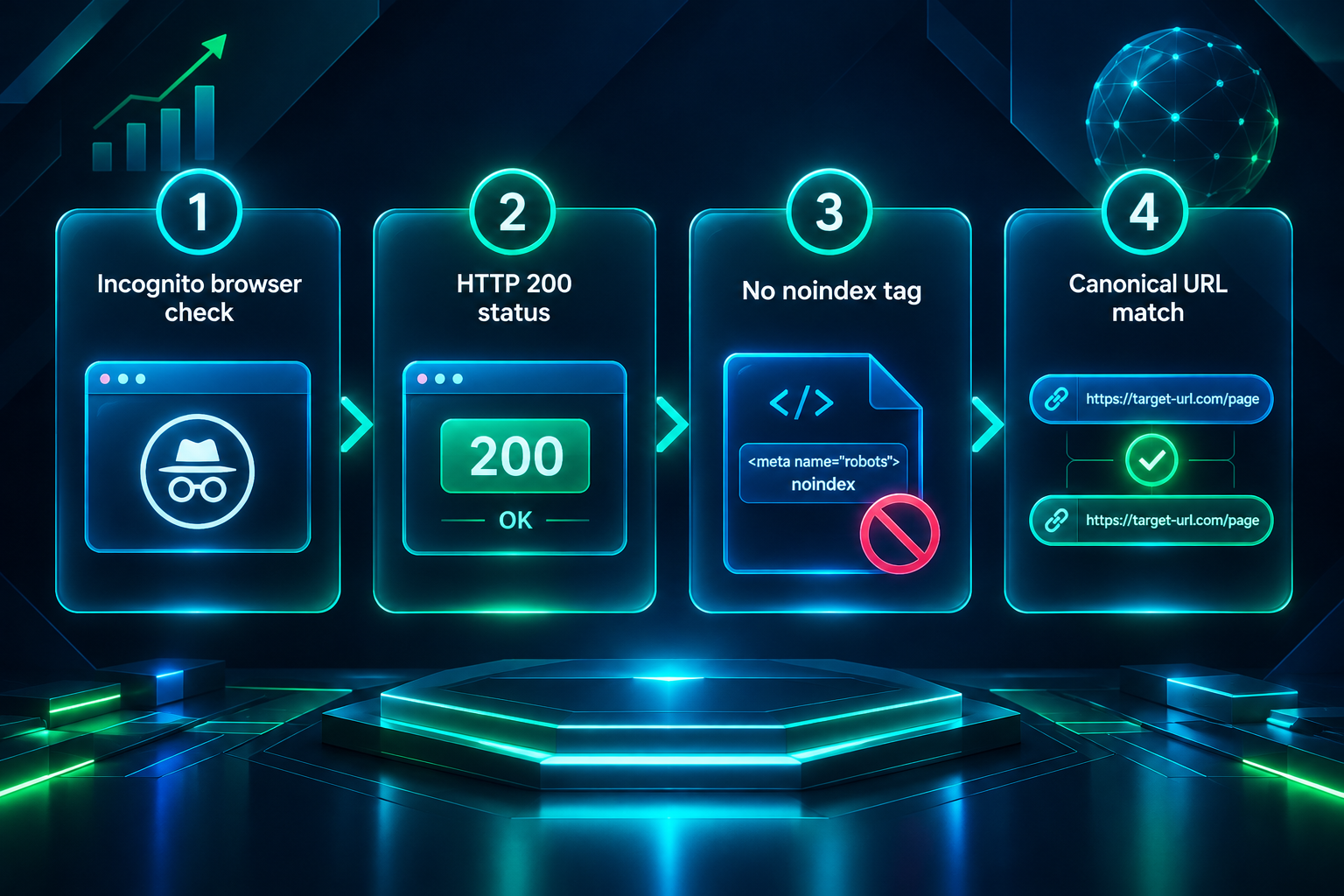
For agencies managing multiple client sites, building a pre-order checklist that includes URL verification reduces the risk of submitting a staging URL by accident. The checklist should confirm that the target URL is the canonical version of the page, that it is not blocked in robots.txt, and that it does not carry a noindex meta tag. Google Search Console can be used to check whether a URL is indexed and whether it is the version Google recognizes as canonical, though access to the client’s Search Console account is required for this step.
Checking for Redirects and Canonical Mismatches
A redirect from the staging URL to the production URL does not reliably solve the problem for PBN placements. While a 301 redirect passes a portion of link equity in most cases, relying on a redirect chain means the link is pointing to a URL that is not the intended target, and the redirect may be removed or changed during a future site update. The cleaner approach is to ensure the PBN link points directly to the canonical production URL from the start.
Canonical mismatches are a related concern. If the live site has a canonical tag pointing to a different version of the URL — for example, if the page at https://example.com/page/ has a canonical pointing to https://example.com/page without the trailing slash — then a PBN link built to the non-canonical version may not consolidate as expected. Checking the canonical tag on the target page before submitting the URL takes only a few seconds and avoids this issue. The canonical tag appears in the <head> section of the page source and can also be checked using browser extensions such as those offered by SEO tool providers.
Tools such as Screaming Frog can crawl a list of target URLs and report their HTTP status codes, redirect chains, canonical tags, and noindex status in bulk. For agencies running multiple PBN campaigns, a brief crawl of all target URLs before submitting them to a provider is a practical quality control step that takes a few minutes and prevents wasted placements.
Coordinating Site Launches and Link Campaigns
One of the more common scenarios where PBN links end up pointing to staging URLs is when a site launch and a link campaign run at the same time. A developer may be working on the staging environment while an SEO team is ordering placements, and if the URLs are not coordinated, the placements may go live before the production site is ready or may be built to the staging URL by mistake.
The practical solution is to sequence the campaign so that PBN placements are ordered only after the production site is live and the staging environment has been taken down or restricted. If the campaign timeline requires links to be built before the full site launch, the target URLs should be limited to pages that are already live on the production domain. Pages that are still in development on staging should not be submitted as link targets until they are published at their final production URLs.
When a site migration is planned — for example, moving from one domain to another or restructuring URL paths — existing PBN links pointing to the old URLs should be reviewed. If the old URLs are properly redirected to the new canonical URLs with 301 redirects, the links may continue to pass value through the redirect. However, updating the target URLs directly with the PBN provider, where possible, is a more reliable long-term approach than depending on redirect chains that could be altered during future site changes.
Verifying Placements After Links Go Live
Even when the correct URL is submitted, verifying placements after they go live is a useful step. PBN providers build links based on the URL they receive, but a typographical error, a copy-paste mistake, or a URL that changed between submission and placement can result in a link pointing to the wrong destination. A post-placement audit catches these issues before they become long-term problems.
Backlink monitoring tools such as Ahrefs or Semrush can be used to check the destination URLs of newly acquired links. After a placement is reported as live, pulling the referring page data from a backlink tool and confirming that the anchor text and target URL match what was ordered takes only a few minutes. If the destination URL is incorrect — whether it points to a staging subdomain, a redirect, or a different page entirely — the issue can be flagged with the provider for correction.
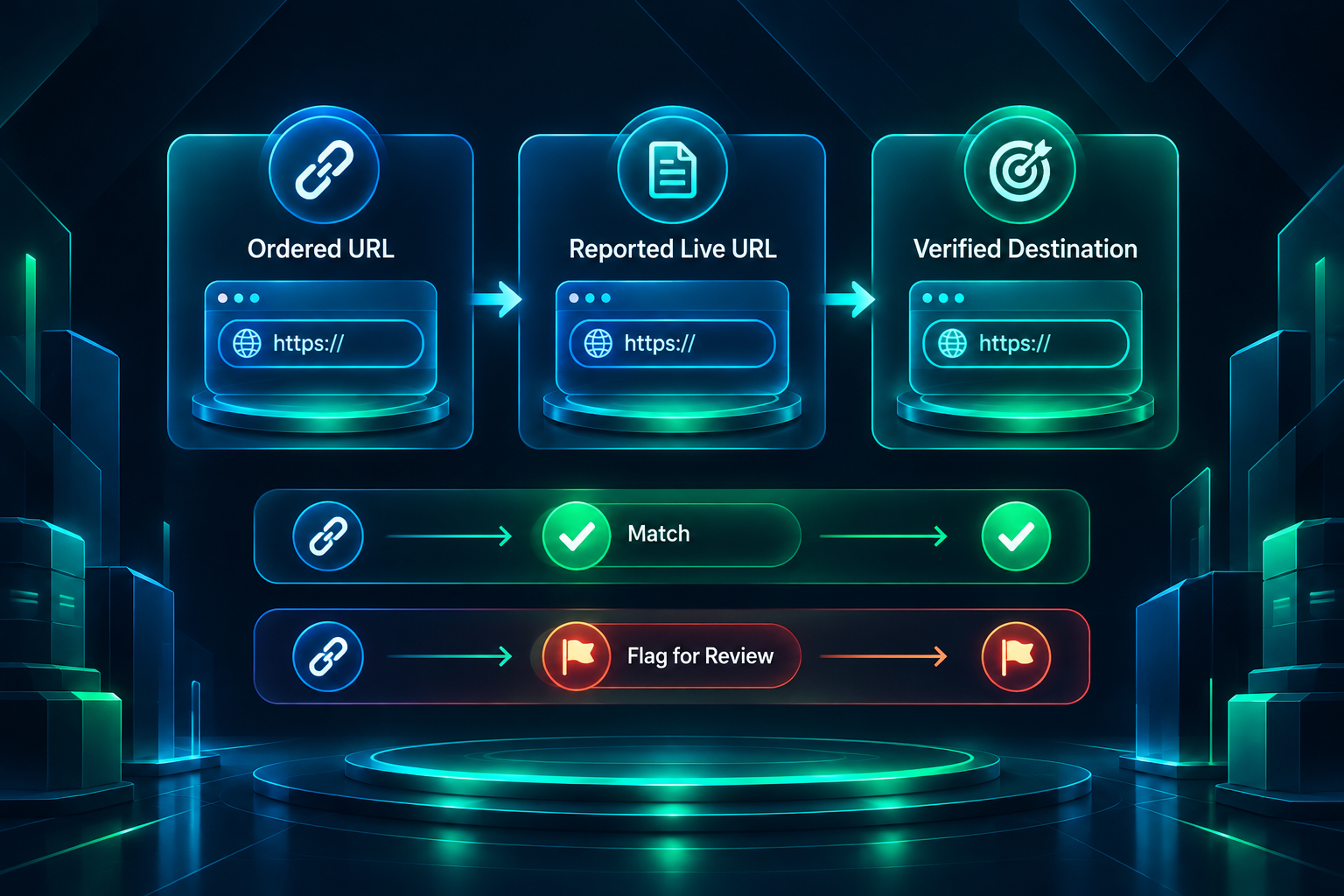
For campaigns involving multiple placements, a simple tracking spreadsheet that records the ordered URL, the reported live URL, and the verified destination URL provides a clear audit trail. This is particularly useful when managing placements across different providers or when a campaign runs over several months and target URLs may change due to site updates.
Communicating URL Requirements Clearly to a PBN Provider
Clear communication with a PBN provider about the exact target URL is one of the most direct ways to prevent staging URL errors. When submitting a URL for placement, the submission should include the full URL with protocol, subdomain preference, and any relevant path details. Ambiguous submissions such as just a domain name without a specific page path, or a URL copied from a browser that is still logged into a staging environment, increase the chance of a placement error.
A reputable PBN provider will typically confirm the target URL before building the placement and may flag obvious issues such as a URL that returns an error or requires authentication. Asking a provider about their URL verification process before ordering is a reasonable due diligence step. Providers who confirm that target URLs are accessible and return a 200 status before placement reduce the risk of wasted links.
If a campaign involves a site that is still in development, communicating this to the provider and agreeing on a start date after the production site is live is a straightforward way to avoid the problem entirely. Most providers can accommodate a delayed start if the timeline is communicated clearly at the time of ordering.
Handling Staging Environments During Active Campaigns
For sites with ongoing development cycles, the staging environment may be spun up and taken down repeatedly while a PBN campaign is running. In this situation, the risk is not just at the point of ordering — it is also present if a site update accidentally makes the staging URL publicly accessible or if a developer temporarily points the production domain to the staging server during a deployment.
A few practical measures reduce this risk during active campaigns. First, the staging environment should consistently use a subdomain or URL that is clearly distinct from the production domain, and that subdomain should always carry a noindex directive and an authentication requirement. This ensures that even if the staging URL is accidentally shared or submitted, it will not be indexed and will not be confused with the production URL by a provider who checks accessibility.
Second, any changes to the production URL structure — such as adding or removing trailing slashes, switching between www and non-www, or changing page paths — should be communicated to the PBN provider so that existing placements can be reviewed. A URL change that is not accompanied by a proper redirect can break existing PBN links, and a URL change that is accompanied by a redirect may still benefit from having the link destination updated to the new canonical URL.
Third, after any significant site update or migration, running a backlink audit using a tool such as Ahrefs or Semrush to check the status of existing PBN placements is a sensible maintenance step. The audit should confirm that target URLs are still returning 200 status codes, that canonical tags have not changed, and that no placements are now pointing to redirected or removed pages.
What to Do If PBN Links Are Already Pointing to a Staging URL
If an audit reveals that existing PBN placements are pointing to a staging URL, the options depend on the specific situation. If the staging URL is still accessible and can be redirected to the production URL with a 301, implementing that redirect is a reasonable first step. The redirect should point directly to the canonical production page rather than to the homepage or a generic URL, since a redirect to an unrelated page is unlikely to pass meaningful value to the intended target.
If the PBN provider offers link updates or URL corrections as part of their service, requesting a correction to point the placement to the correct production URL is the most direct solution. This removes the dependency on a redirect chain and ensures the link points to the intended destination. Not all providers offer this, so it is worth confirming the provider’s policy on URL corrections before ordering.
If neither option is available and the staging URL is permanently inaccessible, the placement value is likely lost. In this case, the practical response is to document the issue, adjust the ordering process to prevent recurrence, and factor the lost placement into the campaign plan. Depending on the campaign goals and the number of affected placements, additional links to the correct production URL may be appropriate to compensate for the wasted placements.
Frequently Asked Questions
Does a 301 redirect from a staging URL to the production URL fix the problem?
A 301 redirect from a staging URL to the production URL may pass a portion of link equity, but it is not as reliable as having the PBN link point directly to the canonical production URL. Redirect chains can be altered during future site updates, and some link equity may be lost in the redirect. The preferred approach is to correct the link destination to the production URL directly, either by updating the placement with the provider or by ensuring the correct URL is submitted before the placement is built.
How can I check whether a URL is accessible to external crawlers before submitting it?
Opening the URL in an incognito browser window is a quick first check — if the page loads without a login prompt or error, it is likely accessible. For a more thorough check, tools such as Screaming Frog or the URL inspection feature in Google Search Console can confirm the HTTP status code, canonical tag, and indexability of the page. Checking that the URL returns a 200 status and is not marked noindex covers the most common accessibility issues.
What details should I include when submitting a target URL to a PBN provider?
Submit the full URL including the protocol (https://), the correct subdomain or lack thereof, the full page path, and any relevant trailing slash. Avoid submitting just a domain name or a URL copied from a browser session that may still be pointed at a staging environment. If the target page is new or recently published, confirm that it is live and accessible before submitting.
Can a PBN link to a staging URL cause any negative effects on the live site?
A PBN link pointing to a staging URL that is separate from the production domain — such as a staging subdomain — does not directly affect the live site’s backlink profile, since the link is pointing to a different URL. The main consequence is that the placement is wasted rather than harmful. If the staging environment is on the same domain as the production site and is accessible, there may be minor crawl budget or indexing considerations, but these are generally secondary to the primary issue of the link not reaching the intended target page.
How often should I audit PBN placements to check for URL issues?
A post-placement audit shortly after each batch of links goes live is a practical baseline. For ongoing campaigns, a periodic review — for example, after any significant site update, migration, or URL restructuring — helps catch issues before they persist for an extended period. Backlink monitoring tools can be set to alert on changes to referring pages or destination URLs, which reduces the manual effort required for ongoing monitoring.
What if my site is still being built — should I wait before ordering PBN links?
Ordering PBN placements before the production site is live increases the risk of links being built to a staging URL or to pages that are not yet published. Waiting until the target pages are live on the production domain and accessible without authentication is the straightforward way to avoid this. If campaign timing requires early ordering, limiting placements to pages that are already live and clearly communicating the production URLs to the provider reduces the risk.
Keeping PBN Placements Pointed at the Right URLs
Preventing PBN links from pointing to staging URLs is primarily a process and communication issue rather than a technical one. The core steps — verifying the production URL before ordering, checking accessibility and canonical status, coordinating campaign timing with site launches, and auditing placements after they go live — are straightforward to implement and significantly reduce the chance of wasted placements. For agencies and SEO teams managing multiple campaigns, building these checks into a standard pre-order and post-placement workflow makes the process consistent and repeatable.
If you are planning a PBN campaign and want to confirm that your target URLs and placement requirements are set up correctly before ordering, PBN Backlinks Service can review your link targets and discuss the right approach for your campaign. Getting the URL details right from the start means every placement works toward the intended goal.