

Configuring SPF, DKIM, and DMARC records for PBN domains is a practical DNS task that affects email deliverability, domain credibility, and how mail servers treat messages sent from or on behalf of each domain in your private blog network. Even if a PBN domain is used primarily for link placement rather than active email communication, correct email authentication records contribute to a cleaner domain profile and reduce the risk of your domains being flagged by spam filters or mail reputation services that some hosting providers and monitoring tools consult.
Key Takeaways
- SPF, DKIM, and DMARC are DNS-based email authentication standards that tell receiving mail servers which senders are authorized for a domain and what to do with messages that fail verification.
- PBN domains benefit from properly configured authentication records because missing or broken records can trigger spam classifications that affect domain reputation signals consulted by some SEO and hosting tools.
- SPF is configured as a TXT record in your DNS zone; DKIM requires a public key TXT record generated by your mail provider or server; DMARC is a separate TXT record that references your SPF and DKIM alignment policy.
- A minimal, correctly formatted set of records is achievable for most PBN domains within a single DNS session, and propagation typically completes within a few hours to 48 hours depending on your registrar and TTL settings.
- Testing each record with a dedicated verification tool after propagation is an important step before considering the configuration complete.
Why Email Authentication Records Matter for PBN Domains
A private blog network domain that lacks SPF, DKIM, or DMARC records is not automatically penalized in search rankings, but the absence of these records can create secondary issues worth understanding. Mail reputation databases and domain health checkers used by hosting providers, domain marketplaces, and some SEO tools flag domains with missing authentication records as potentially unmanaged or low-quality. When you acquire an expired or aged domain for a PBN, checking and correcting its email authentication configuration is part of a thorough domain setup process, alongside reviewing its backlink profile, indexed content history, and DNS propagation status.
Beyond reputation signals, if your PBN domains are connected to a WordPress installation that sends notification emails, password reset messages, or contact form submissions, missing SPF and DKIM records mean those messages are more likely to be rejected or delivered to spam folders by the recipient’s mail server. Hosting environments that use PHP mail or a shared SMTP relay are particularly susceptible to deliverability failures when authentication records are absent. Configuring these records correctly ensures that any transactional email sent from the domain behaves predictably.
DMARC adds a policy layer on top of SPF and DKIM. It instructs receiving mail servers on what action to take when a message claims to come from your domain but fails authentication checks. For PBN domains, a DMARC record set to a monitoring-only policy (p=none) is a reasonable starting point that collects data without rejecting legitimate mail, while still signaling to mail infrastructure that the domain is actively managed.
Understanding SPF, DKIM, and DMARC: A Plain-Language Overview
SPF (Sender Policy Framework) is a DNS TXT record that lists the mail servers and IP addresses authorized to send email on behalf of a domain. When a receiving mail server gets a message claiming to originate from your domain, it queries your DNS for the SPF record and checks whether the sending server’s IP address is listed. If the IP is not listed and no permissive mechanism covers it, the message may be marked as suspicious or rejected depending on the receiving server’s policy.
DKIM (DomainKeys Identified Mail) uses a cryptographic key pair to sign outgoing messages. Your mail server or email service provider holds the private key and attaches a digital signature to each outgoing message header. The corresponding public key is published as a DNS TXT record under a selector subdomain of your domain. Receiving mail servers retrieve the public key and use it to verify that the message content has not been altered in transit and that the signature was produced by an authorized sender.
DMARC (Domain-based Message Authentication, Reporting and Conformance) ties SPF and DKIM together by specifying an alignment policy and a reporting destination. A DMARC record tells receiving servers what to do when a message fails both SPF and DKIM checks: deliver it anyway (p=none), quarantine it (p=quarantine), or reject it outright (p=reject). DMARC also allows you to specify an email address where aggregate and forensic reports are sent, giving you visibility into who is sending mail using your domain name.
How to Configure SPF for a PBN Domain
To add an SPF record, log in to the DNS management panel for the domain at your registrar or DNS provider. Create a new TXT record at the root of the domain (represented as @ in most interfaces) with a TTL of 3600 seconds or your provider’s default. The record value follows a specific syntax.
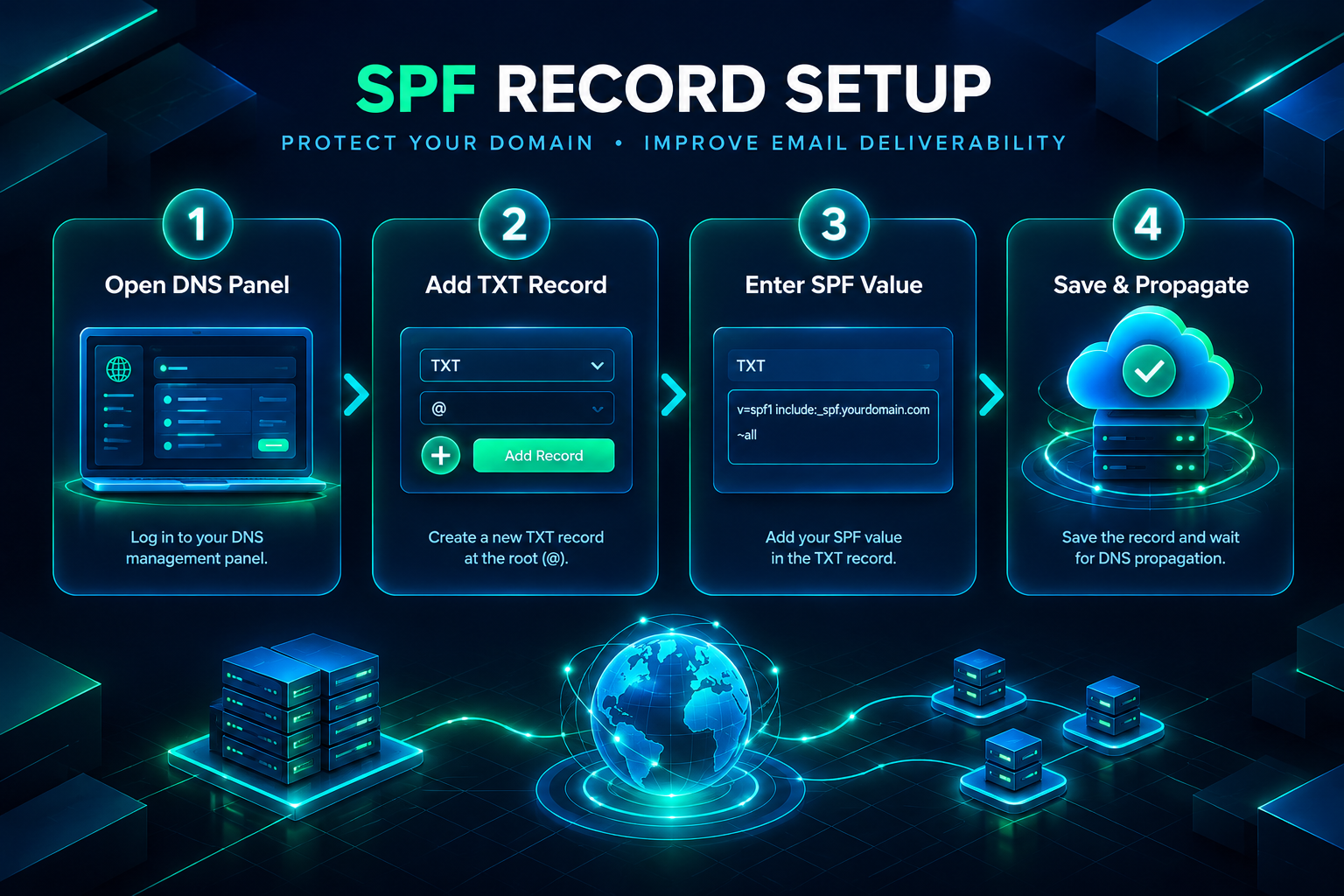
A minimal SPF record that authorizes no external mail servers and instructs receiving servers to treat all other senders as failing looks like this:
v=spf1 -all
This record is appropriate for a PBN domain that does not send any email. It explicitly states that no server is authorized to send mail for the domain, which is a clean and unambiguous configuration for domains used solely for web content and link placement.
If the domain’s WordPress installation sends email through a hosting server, you need to authorize that server. Most shared hosting providers publish their own SPF include mechanism. For example, if your host instructs you to use their include mechanism, the record would look like:
v=spf1 include:mail.yourhostingprovider.com ~all
The ~all suffix (softfail) is more permissive than -all (hardfail) and is commonly recommended during initial setup because it reduces the risk of legitimate mail being rejected while you verify the configuration. Once you have confirmed that all legitimate sending sources are covered, switching to -all provides a stricter policy.
Important constraints to observe: a domain must have only one SPF TXT record. If an expired domain you have acquired already has an SPF record from its previous owner, delete the old record before adding your new one. Multiple SPF records for the same domain cause lookup failures and authentication errors. Also, SPF has a limit of ten DNS lookups per evaluation; if your record includes multiple include: mechanisms that each trigger further lookups, you may exceed this limit and cause SPF to fail even for authorized senders.
How to Configure DKIM for a PBN Domain
DKIM configuration depends on where the domain’s email is processed. The key pair is generated by the mail server or email service provider, not by you directly. The process varies by platform, but the general steps are consistent across most setups.
If your PBN domains use a hosting provider’s built-in mail server, log in to the hosting control panel (such as cPanel or Plesk) and locate the email authentication or DKIM section. Most modern control panels generate the DKIM key pair automatically when you add a domain. The panel will display the public key value and the selector name, which is typically something like default or mail.
Copy the public key value and create a DNS TXT record at the subdomain formed by combining the selector and the _domainkey suffix. For a selector named default, the DNS record name would be:
default._domainkey.yourdomain.com
The record value will look similar to:
v=DKIM1; k=rsa; p=MIIBIjANBgkqhkiG9w0BAQEFAAOCAQ8AMIIBCgKCAQEA…
The long string after p= is the public key. Copy it exactly as provided by your mail server or hosting panel, including any line breaks that need to be removed for DNS entry (most DNS interfaces require the value as a single continuous string).
If your PBN domains send email through a third-party SMTP service such as SendGrid, Mailgun, or Amazon SES, each provider has its own DKIM setup process documented in their platform. The provider generates the key pair and gives you the DNS record values to add. Follow the provider’s specific instructions for the selector name and record format.
For PBN domains that send no email at all, you can publish a null DKIM record to signal that the domain does not use DKIM signing. However, this is less commonly implemented and is not strictly necessary if you have already set a strict SPF -all record. The more practical approach for non-sending domains is to focus on SPF and DMARC and leave DKIM unconfigured unless your hosting environment generates it automatically.
How to Configure DMARC for a PBN Domain
A DMARC record is added as a DNS TXT record at the subdomain _dmarc.yourdomain.com. The record value begins with v=DMARC1 and includes at minimum a policy tag (p=).
A minimal DMARC record for a PBN domain with no active email sending is:
v=DMARC1; p=reject;
This instructs receiving mail servers to reject any message that claims to come from your domain but fails SPF and DKIM alignment checks. For a domain that sends no legitimate email, a reject policy is appropriate and signals that the domain is actively managed.
If the domain does send some email through WordPress or a hosting mail server, start with a monitoring policy while you verify that SPF and DKIM are correctly aligned:
v=DMARC1; p=none; rua=mailto:[email protected];
The rua tag specifies where aggregate DMARC reports are sent. These reports, delivered as XML files, show which servers are sending mail using your domain name and whether those messages are passing or failing authentication. For PBN domains, you may not need to monitor reports actively, but including a reporting address is good practice if you want visibility into any unauthorized use of the domain name.
DMARC alignment refers to whether the domain in the message’s From header matches the domain used in the SPF check (the envelope sender) or the DKIM signature domain. By default, DMARC uses relaxed alignment, which allows subdomain matches. Strict alignment (aspf=s; adkim=s;) requires an exact match. For most PBN domain configurations, relaxed alignment is sufficient.
Once you have confirmed through DMARC reports or a testing tool that legitimate mail is passing authentication, you can move the policy from p=none to p=quarantine and eventually to p=reject for stronger protection against domain spoofing.
DNS Propagation and Verification
After adding or modifying SPF, DKIM, and DMARC records, DNS propagation must complete before the records are visible to mail servers worldwide. Propagation time depends on the TTL value set on the records and the caching behavior of DNS resolvers. Most changes propagate within one to four hours, though some resolvers may cache old values for up to 48 hours if the previous TTL was high.
Verifying each record after propagation is an important step. Several free online tools allow you to query DNS records and validate their syntax. Tools such as MXToolbox, DMARC Analyzer, and mail-tester.com can check whether your SPF, DKIM, and DMARC records are correctly formatted and returning the expected values. For DKIM specifically, the verification tool needs to know the selector name to construct the correct DNS query.
Common errors to check for during verification include: multiple SPF TXT records on the same domain, SPF records that exceed the ten-lookup limit, DKIM public key values that were truncated or split incorrectly during DNS entry, DMARC records placed at the wrong subdomain (the record must be at _dmarc.yourdomain.com, not at the root), and DMARC policies that reference a reporting address on a domain that has not published a DMARC record authorizing reports from external domains.
Managing Email Authentication Across Multiple PBN Domains
A private blog network typically involves multiple domains, each requiring its own set of authentication records. Managing DNS configurations across a large number of domains manually is time-consuming, and errors are more likely when records are entered one by one through individual registrar interfaces. Several approaches can reduce this overhead.
Using a centralized DNS management platform that supports bulk record creation or API-based DNS updates allows you to apply consistent record templates across many domains efficiently. Cloudflare, for example, provides a DNS management interface and API that many PBN operators use to manage records across multiple domains from a single account. When using a centralized DNS provider, ensure that nameserver changes have propagated correctly for each domain before testing authentication records.
Documenting the SPF, DKIM, and DMARC configuration for each domain in a simple spreadsheet or management system helps track which domains have been configured, which selectors are in use, and when records were last verified. This is particularly useful when domains are added to the network over time or when hosting environments change, which may require updating SPF include mechanisms or generating new DKIM key pairs.

When you acquire an expired or aged domain for a PBN, the domain may carry DNS records from its previous owner, including outdated SPF records referencing mail servers that no longer exist, or DKIM records for selectors that are no longer valid. Auditing and cleaning up legacy DNS records is part of the domain onboarding process. Leaving conflicting or outdated records in place can cause authentication failures even after you add new correct records.
Common Configuration Mistakes and How to Avoid Them
Several recurring errors appear when configuring email authentication for PBN domains, particularly when working across multiple domains or using hosting environments with varying levels of automation.
Adding more than one SPF TXT record to a domain is one of the most common mistakes. DNS allows multiple TXT records on the same name, but the SPF specification requires exactly one SPF record per domain. If two SPF records exist, mail servers may return a permanent error result rather than evaluating either record. Always check for existing SPF records before adding a new one, and merge any required mechanisms into a single record.
Entering the DKIM public key with incorrect formatting is another frequent issue. Some DNS interfaces have character limits per field or require the key to be split across multiple strings. If the key is truncated or contains extra spaces, DKIM verification will fail. Copy the key value exactly as provided by your mail server and use a verification tool to confirm the record is returning the complete key.
Placing the DMARC record at the wrong DNS name is a straightforward but consequential error. The DMARC record must be at _dmarc.yourdomain.com. Placing it at the root or at a different subdomain means mail servers will not find it and will treat the domain as having no DMARC policy.
Setting a strict DMARC reject policy before verifying that SPF and DKIM are correctly aligned can cause legitimate mail from the domain to be rejected. If the domain sends any email, use p=none initially, review the aggregate reports, confirm alignment, and then tighten the policy incrementally.
Frequently Asked Questions
Do PBN domains need SPF, DKIM, and DMARC records if they are not used for email?
A PBN domain that sends no email can benefit from a minimal SPF record (v=spf1 -all) and a DMARC reject policy (v=DMARC1; p=reject;) to signal that the domain is actively managed and to prevent unauthorized parties from spoofing it in phishing or spam campaigns. DKIM is less critical for non-sending domains but may be generated automatically by your hosting environment. Configuring at least SPF and DMARC is a low-effort step that contributes to a cleaner domain profile.
Will missing email authentication records affect my PBN domain’s search rankings?
Google’s published ranking documentation does not identify SPF, DKIM, or DMARC records as direct ranking signals. However, domain reputation databases and some third-party tools that assess domain health do consider email authentication status. Missing records may contribute to a domain being flagged as unmanaged or low-quality in contexts outside of search ranking, such as hosting provider assessments or domain marketplace evaluations.
How do I find the DKIM selector for a domain I have acquired?
If the domain was previously hosted on a mail server, the DKIM selector may still be visible in the DNS zone as a TXT record under a subdomain ending in ._domainkey.yourdomain.com. You can query the DNS zone for TXT records or use a tool like MXToolbox’s DKIM lookup with common selector names such as default, mail, or google to check whether a record exists. If you are setting up a new mail configuration, your hosting provider or SMTP service will specify the selector to use.
Can I use the same DKIM key pair across multiple PBN domains?
No. DKIM key pairs are domain-specific. Each domain requires its own key pair generated by the mail server or email service handling that domain’s outgoing mail. Sharing a private key across domains is not supported by the DKIM specification and would not produce valid signatures for each domain’s messages.
How long does it take for SPF, DKIM, and DMARC records to take effect?
DNS propagation for new or updated records typically completes within one to four hours for most resolvers, though the full propagation window can extend to 48 hours depending on the TTL value previously set on the records and the caching behavior of individual DNS resolvers. Setting a TTL of 3600 seconds (one hour) on authentication records is a reasonable balance between propagation speed and DNS query load.
What should I do if DMARC reports show messages failing authentication?
Review the aggregate report data to identify which sending sources are failing SPF or DKIM checks. Common causes include a mail server or SMTP relay that is not listed in the SPF record, a DKIM key that has not been correctly published in DNS, or a mismatch between the From header domain and the domain used in the SPF or DKIM check. Correct the relevant record or add the missing sending source to the SPF record, then monitor subsequent reports to confirm the issue is resolved before tightening the DMARC policy.
Getting Email Authentication Right Across Your PBN
Configuring SPF, DKIM, and DMARC for PBN domains is a manageable DNS task that becomes straightforward once you understand what each record does and where it needs to be placed. For domains that send no email, a strict SPF hardfail record and a DMARC reject policy provide a clean, low-maintenance configuration that signals active domain management. For domains connected to WordPress installations or hosting mail servers, the process involves authorizing the correct sending sources in SPF, publishing the DKIM public key generated by your mail server, and setting an initial DMARC monitoring policy before tightening it once alignment is confirmed.
Across a private blog network with multiple domains, the most practical approach is to establish a consistent configuration template, use a centralized DNS management platform where possible, and audit each domain’s existing DNS records before adding new ones. Expired and aged domains acquired for a PBN may carry legacy authentication records from previous owners that need to be identified and removed to avoid conflicts. Verifying each record with a dedicated tool after propagation is a straightforward final step that confirms the configuration is working as intended.
If you are building or expanding a private blog network and want guidance on domain selection, setup processes, or backlink placement quality, the team at PBN Backlinks Service can help you assess your requirements and discuss how a well-configured network of domains fits into your broader link-building strategy.