

Key Takeaways
- The Server: header and X-Powered-By: header are the two most commonly exploited HTTP response headers for PBN footprint detection.
- Header uniformity across a network — identical server software strings, PHP version numbers, or CDN signatures — creates a detectable shared signature that crawlers and tools like Shodan.io can index at scale.
- Suppressing a header entirely can itself become a footprint if every site in the network does it in the same way.
- A comprehensive audit requires checking more than just the Server: header — SSL certificate fields, CDN headers, and X- prefixed headers all contribute to the overall server fingerprint.
- The safest approach mimics the natural distribution of headers found across the open web, rather than enforcing a single configuration across all sites.
Why HTTP Response Headers Matter for PBN Operators
Every time a browser or crawler requests a web page, the server returns a set of HTTP response headers alongside the content itself. These headers contain metadata about the server software, platform, caching behaviour, and infrastructure provider. For most website owners, this information is unremarkable. For someone operating a Private Blog Network, however, these headers represent one of the most consistently overlooked footprint layers — and one of the most mechanically easy for automated tools to detect at scale.
The core risk is not that any single header value is suspicious in isolation. Apache, nginx, and LiteSpeed are all legitimate, widely used web server software platforms. The risk arises from header uniformity: when dozens or hundreds of sites in a network return identical server signatures, identical PHP version strings, and identical CDN header patterns, those sites share a detectable fingerprint that distinguishes them from the naturally varied header distributions found across independent websites. This is the signal that both algorithmic crawlers and manual reviewers can act on.
Understanding which headers carry the highest deindexation risk, how detection tools aggregate that data, and how to conduct a practical curl -I audit gives PBN operators a measurable advantage in keeping their network footprint-free.
How the HTTP Request/Response Cycle Produces Header Data
When a client — whether a user’s browser or Googlebot — sends an HTTP request to a server, the server responds with a status code (such as 200 for success or 404 for not found) followed by a set of response headers and then the page body. Response headers are plain-text key-value pairs. Examples include Content-Type: text/html, Cache-Control: max-age=3600, and the more sensitive Server: Apache/2.4.54 (Ubuntu).
These headers are transmitted openly with every request and are readable by anyone — including Googlebot, Shodan.io’s internet-wide scanners, Wappalyzer’s technology fingerprinting engine, and SecurityTrails’ reverse-lookup databases. None of this requires special access. A simple curl -I https://example.com command returns the full set of response headers in under a second. The same data that identifies your server to a browser also identifies it to every automated tool that has ever crawled your domain.
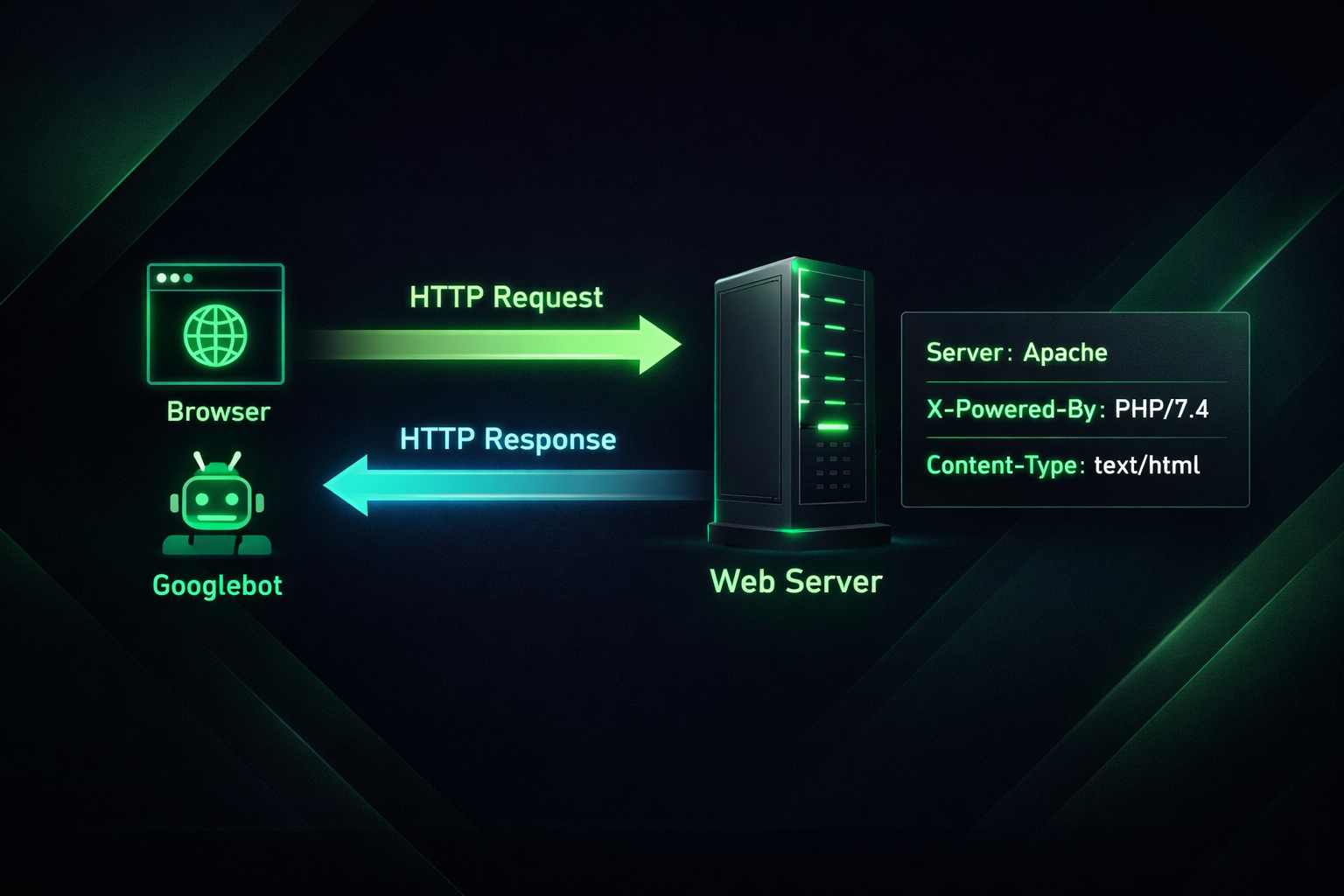
The Server: Header — Your Most Visible Infrastructure Signal
The Server: header is the single most commonly referenced header in PBN footprint discussions, and for good reason. It directly reports the name and often the version number of the web server software handling the request. Common values include Server: Apache/2.4.54 (Ubuntu), Server: nginx/1.24.0, and Server: LiteSpeed. Microsoft IIS servers typically return Server: Microsoft-IIS/10.0.
Shodan.io, which continuously scans the publicly accessible internet and catalogues HTTP response headers, provides a useful reference for the natural header distribution across the open web. Apache has historically held the largest share of WordPress installations, with nginx as the second most common and LiteSpeed growing significantly in recent years — particularly among managed WordPress hosts. IIS is uncommon in a WordPress context and its presence on a site claiming to be a standard blog would be an anomaly worth noting.
The PBN footprint risk with the Server: header is straightforward: if twenty sites in a network all return Server: Apache/2.4.29 (Ubuntu) with the same version string, that precise shared configuration is a signal. Real independent websites accumulate over time across different hosting providers, server configurations, and update schedules. Their Server: header values naturally vary in software name, version number, and operating system substring. A network where every site returns the same string does not resemble organic web infrastructure.
The X-Powered-By: Header — PHP Version as a Footprint
The X-Powered-By: header is a non-standard but extremely common HTTP response header, typically returning a value like X-Powered-By: PHP/7.4.3 or X-Powered-By: PHP/8.1.12. WordPress sites frequently emit this header by default unless it has been explicitly suppressed at the server or application level.
As a PBN footprint risk, the X-Powered-By: header compounds the Server: header problem. A network of sites that all report the same PHP version string alongside the same Server: string narrows the field dramatically. Even if the server software value is plausible (Apache is common), the combination of identical Apache version, identical PHP version, and identical operating system substring is a shared configuration signature that closely resembles a single hosting account or shared infrastructure block rather than independent websites managed by different owners.
Some operators attempt to suppress the X-Powered-By: header entirely by using plugins or server-level configuration. Suppression is a valid technical step, but it introduces a subtler problem discussed later: uniform absence of a header is itself a pattern.
The Full Header Risk Inventory: Beyond Server and X-Powered-By
Most published guidance on PBN server headers focuses narrowly on the Server: and X-Powered-By: headers. A comprehensive audit needs to cover a broader set of signals that contribute to server fingerprinting.
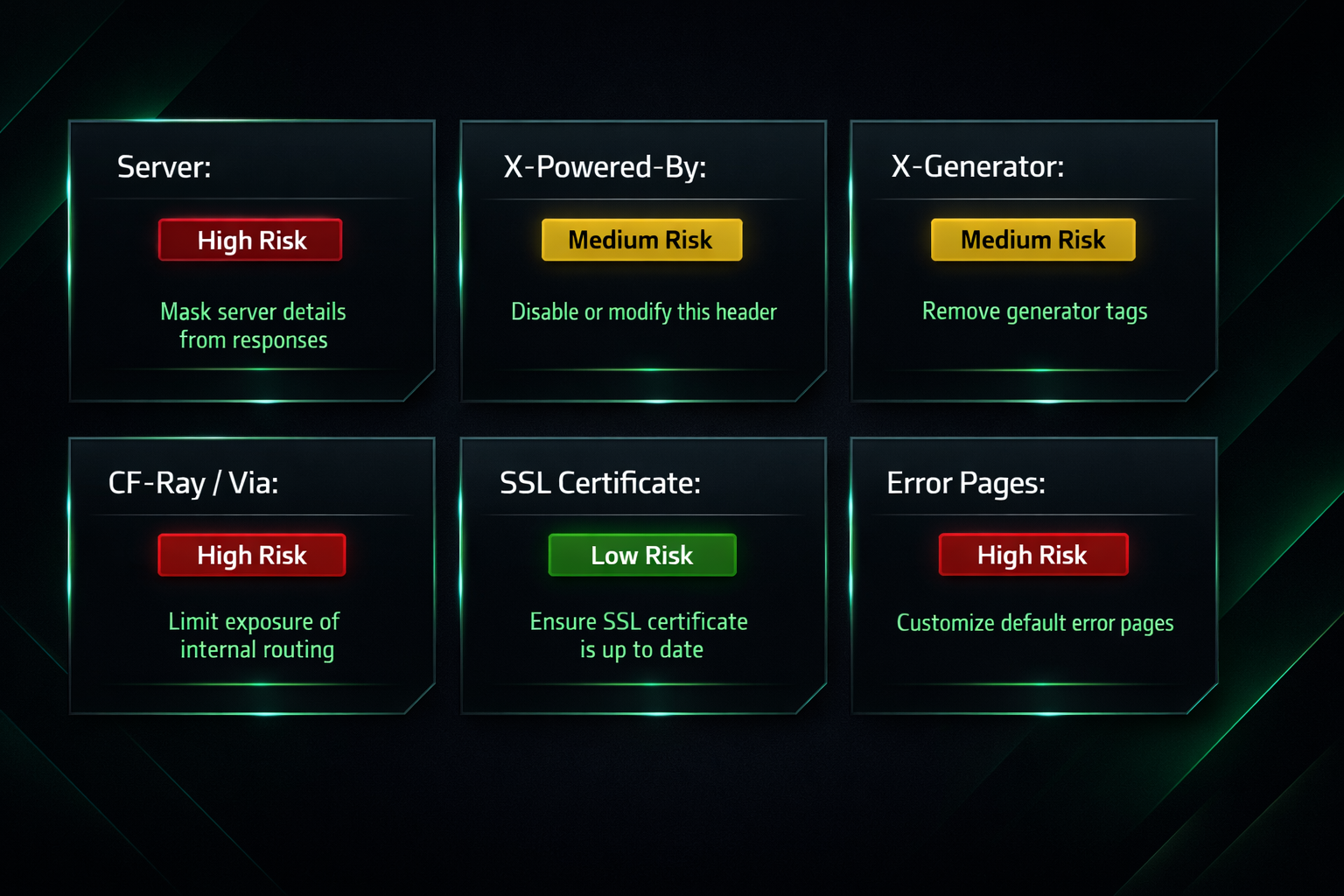
X- Prefixed Non-Standard Headers
Headers beginning with X- are by convention non-standard or application-specific. Examples relevant to PBN detection include X-Generator (which can expose the CMS version), X-Pingback (which reveals the WordPress XML-RPC endpoint path), and proprietary headers emitted by specific hosting control panels or caching plugins. When these headers are present uniformly across a network, they function as a shared signature just as the Server: header does.
CDN Header Leakage
Using a CDN such as Cloudflare is often recommended as a way to obscure the origin server. Cloudflare does replace the origin’s Server: header with its own value (Server: cloudflare), but it introduces its own set of identifiable headers. The CF-Ray header, for example, contains a unique request identifier and a three-letter datacenter code. While individual CF-Ray values are unique per request, the consistent presence of Cloudflare-specific headers across every site in a network is itself a uniform CDN signature. Similarly, headers like X-Cache, Via, and X-Served-By can reveal the CDN or caching layer in use, and uniform CDN adoption across a network is a footprint of its own.
CDN header leakage does not make Cloudflare a poor choice — it is widely used and its presence is far more natural than a bespoke hosting stack. The risk is in treating any single infrastructure solution as a universal fix, particularly when that same solution is applied identically to every site in the network.
SSL/TLS Certificate Header Signals
SSL certificates are not HTTP response headers in the strict sense, but they are transmitted as part of the TLS handshake that precedes every HTTPS connection and are readable by crawlers and tools such as crt.sh and SecurityTrails. The organisation field in a certificate, the certificate issuer, and the Subject Alternative Names listed can all expose shared infrastructure. A network of sites that all use certificates issued through the same reseller account, or that share a wildcard certificate, creates a detectable certificate footprint that overlaps with server header analysis.
Default Error Pages
Server software generates default error pages (404, 403, 500) with characteristic HTML that identifies the underlying software. Apache’s default 404 page looks distinctly different from nginx’s. When a PBN site has not customised its error pages, the default error response functions as an additional server fingerprint that corroborates the Server: header value — or contradicts a spoofed one.
| Header / Signal | What It Reveals | Footprint Risk | Mitigation Approach |
|---|---|---|---|
| Server: | Web server software, version, OS | High | Vary values across the network; use plausible mainstream values |
| X-Powered-By: | PHP version string | High | Suppress or vary version strings; avoid identical values network-wide |
| X-Generator | CMS name and version | Medium | Suppress via server config or plugin |
| X-Pingback | WordPress endpoint path | Low–Medium | Disable XML-RPC if not needed |
| CF-Ray / Via / X-Cache | CDN provider identity | Medium | Acceptable if CDN choice varies; uniform CDN is a footprint |
| SSL certificate fields | Issuer, organisation, SANs | Medium–High | Use separate certificate accounts; avoid shared wildcard certs |
| Default error pages | Server software identity | Medium | Customise error pages on all sites |
How Detection Tools Aggregate Header Data at Scale
Understanding which headers are risky is only part of the picture. The other part is understanding how easy it has become to detect header uniformity across a network of sites.
Shodan.io is an internet-wide scanning service that continuously queries publicly accessible servers and stores their HTTP response headers in a searchable database. An analyst can query Shodan for all servers returning a specific Server: header string and receive a list of matching IP addresses within seconds. This makes it straightforward to identify clusters of sites sharing identical header configurations — exactly the kind of cluster a PBN creates.
Wappalyzer and WhatWeb are technology fingerprinting tools that read response headers, HTML source patterns, JavaScript includes, and other signals to identify the CMS, server software, analytics platform, and other infrastructure components in use on any given site. These tools are used by SEO professionals, security researchers, and increasingly by those mapping link networks.
SecurityTrails offers reverse-lookup capabilities that allow analysts to find all domains sharing a nameserver, IP address, or other infrastructure attribute. When combined with header data, this creates a multi-layer footprint map: all sites on the same subnet with the same Server: header string and the same nameserver represent a high-confidence network cluster.
The practical implication is that PBN detection has become increasingly automated and scalable. A manual reviewer does not need to visit every site in a suspected network. Header data indexed by Shodan, nameserver data from SecurityTrails, and IP data from reverse-IP databases can algorithmically cluster a network before any human judgment is applied.
The Impossible Header Combination Trap
One of the most damaging mistakes a PBN operator can make is deploying a configuration that produces an impossible header combination — a set of response headers that cannot plausibly occur together on a real server. The most common example involves plugins or tools designed to obscure server identity, such as those that attempt to replace the Server: header with a value suggesting Microsoft IIS while the underlying server is running Linux.
The problem is immediately apparent to any header-aware tool: IIS runs on Windows Server, not on Linux. A site returning Server: Microsoft-IIS/10.0 while simultaneously returning Linux-specific headers, serving a WordPress installation, and emitting a X-Powered-By: PHP/8.0.1 header creates an internally contradictory signature. IIS does not typically run PHP in the same configuration as a shared Linux host. A manual reviewer or automated tool encountering this combination would flag it immediately — not because the site is a PBN, but because its header profile is technically impossible.
The safer approach is not to impersonate a different server type, but to return values that are plausible for the actual infrastructure in use and that vary across the network in a way that resembles natural diversity.
Header Uniformity vs. Header Absence — A Subtle Distinction
Many PBN guides recommend suppressing the X-Powered-By: header and, where possible, minimising the detail returned in the Server: header. This is sound advice in isolation. However, it carries a network-level risk that is rarely discussed: uniform absence of a header is itself a footprint.
On the natural web, some sites suppress X-Powered-By:, others do not. Some servers return a full version string in their Server: header, others return only the software name, and some suppress the header entirely. This variation is the product of different hosting providers, different server configurations, different administrator preferences, and different software generations. A PBN in which every site has suppressed X-Powered-By: and returns only Server: nginx with no version string is unusual not because those values are implausible, but because every site doing exactly the same thing simultaneously is statistically unlikely for an independent network.
The goal of header randomisation is not to pick a single clean configuration and apply it everywhere. It is to distribute header configurations across the network in a way that resembles the variance found in the natural web’s header distribution.
How to Audit Your PBN’s Headers: A Practical Workflow
A practical server header audit does not require specialist tools. The following workflow uses freely available resources and can be applied systematically across an entire network.
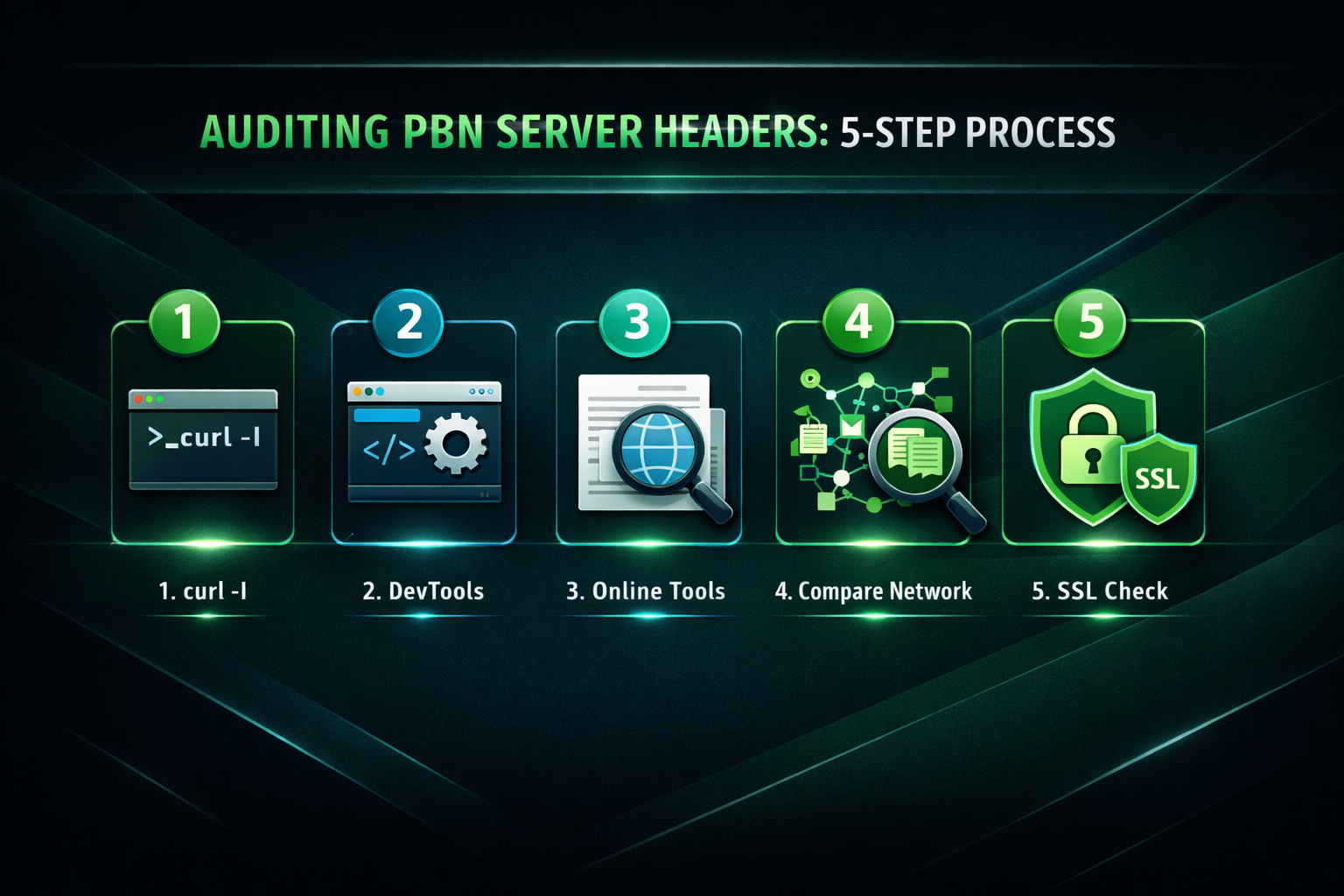
Step 1: Inspect Headers with curl
The curl -I https://yourdomain.com command sends an HTTP HEAD request and prints the response headers without downloading the page body. Running this against each domain in the network and recording the output allows direct comparison of header values across sites. Key fields to note are: Server:, X-Powered-By:, Via:, X-Cache:, CF-Ray: (if Cloudflare is in use), and any X- prefixed non-standard headers.
Step 2: Use Browser DevTools
In Firefox or Chrome, open the Network tab in Developer Tools, load the target page, and select the primary document request. The Response Headers section displays the same information as curl -I in a readable format. This is useful for spot-checking individual sites without leaving the browser.
Step 3: Use Free Online Header Checkers
Tools such as hackertarget.com/http-header-check and debugbear.com/http-header-checker allow header inspection without command-line access. They are useful for verifying results from curl and for checking headers as seen by an external client rather than from a local network connection.
Step 4: Map and Compare Across the Network
Record the Server: and X-Powered-By: values for every domain in the network in a spreadsheet. Look for: identical version strings, identical suppression patterns, identical CDN header sets, and identical X- prefixed non-standard headers. Any value that appears identically across more than a small number of sites warrants diversification.
Step 5: Check SSL Certificate Issuers
Use a browser’s certificate viewer or a tool such as crt.sh to inspect the certificate issuer and organisation fields for each domain. Note whether multiple sites share the same certificate account or wildcard certificate.
How Server Headers Interact with Other Footprint Layers
Server header data does not exist in isolation. In practice, footprint detection tools and manual reviewers assess multiple signal layers simultaneously, and the cumulative weight of overlapping signals is what triggers algorithmic or manual review action.
The other major footprint layers include: nameserver footprints (multiple domains pointing to the same nameserver provider or custom nameserver), ASN numbers (sites clustered on the same Autonomous System Number, indicating the same hosting provider’s IP block), shared IP subnets, SOA record administrator email addresses, and WHOIS registration data. A network that has diversified its server headers but placed every domain on the same /24 IP subnet with the same nameserver provider and the same WHOIS registrant email has addressed one footprint layer while leaving several others fully intact.
Effective footprint reduction requires treating each signal layer independently. Server header randomisation is a meaningful step, but its value is limited if the underlying hosting infrastructure creates overlapping signals at the IP, ASN, nameserver, and WHOIS layers.
What a Natural Header Distribution Looks Like
The practical benchmark for PBN header diversification is the header distribution found across independent WordPress sites on the open web. Based on large-scale scanning data (including Shodan.io queries of publicly accessible WordPress servers), Apache has historically been the most common server software, with nginx as the second most prevalent. LiteSpeed has grown substantially in recent years as managed WordPress hosts have adopted it, and its header string (Server: LiteSpeed) is now common enough that its presence on a WordPress site is unremarkable.
PHP version distribution across the open web is also genuinely varied. At any given time, a cross-section of live WordPress sites will be running several different PHP versions, from older installations that have not been updated to current hosts running the latest stable release. A natural-looking PBN network would reflect similar variance — not every site on the same PHP version, not every site with X-Powered-By suppressed, and not every site on the same server software.
The test to apply to any header configuration is: would a realistic independent website operator with this particular hosting setup produce this exact combination of headers? If the answer requires a very specific set of deliberate choices replicated identically across many unrelated sites, the configuration is unlikely to pass scrutiny.
Frequently Asked Questions
Does Google actually read HTTP response headers?
Yes. Googlebot reads response headers as part of every crawl request. Headers such as Content-Type, Cache-Control, X-Robots-Tag, and status codes directly influence how Google indexes content. Whether Google’s systems actively use server software headers for PBN detection algorithmically is not publicly confirmed, but manual reviewers are capable of inspecting header data, and third-party tools that Google’s teams may use (such as those based on Shodan.io or SecurityTrails data) index this information openly.
Is it enough to just use Cloudflare to hide my server headers?
Cloudflare replaces origin server headers with its own and provides genuine origin IP obscuration, which is a meaningful step. However, Cloudflare’s own headers (including CF-Ray) create a uniform CDN signature across any network that uses it on every site. Cloudflare is a legitimate choice and widely used, but it should be understood as diversifying the Server: header value — not eliminating the header footprint entirely.
Does the X-Powered-By: header matter if most browsers ignore it?
Browsers ignore X-Powered-By: for rendering purposes, but that is not the relevant concern. Crawlers, security scanners, and footprint detection tools read it specifically because it reveals PHP version information. Its presence or absence, and the exact version string it contains, contributes to the server fingerprint that can be compared across a network of sites.
Is it safe to use a plugin like Hide My WP to spoof headers?
Plugins that attempt to modify or spoof server-level headers from within WordPress carry a significant risk of producing impossible header combinations — values that cannot plausibly coexist on a real server. A plugin running on a Linux-based Apache or LiteSpeed server cannot convincingly emulate IIS at the header level because other signals (error pages, certificate fields, path structures) will contradict the spoofed value. Uniform deployment of such a plugin across a network also means every site shares the same spoofed signature, which is itself a footprint.
How often should I audit my PBN’s headers?
A header audit is most important when setting up new sites, after migrating hosting, after applying server updates (which may change version strings), and after deploying new plugins or caching solutions that emit custom X- headers. Periodic checks every few months are reasonable for an established network, particularly after any infrastructure change.
Can uniform header absence (all headers suppressed) be detected?
Yes. If every site in a network returns no X-Powered-By: header and a minimal Server: header with no version string, that uniform configuration is statistically unusual for an independent collection of websites. The natural web contains a mix of sites with headers present and absent, with various levels of detail. Complete uniformity in any direction — present or absent — is a footprint signal.
Reducing Header Footprint: Where to Focus First
Server header analysis is a genuinely useful area of PBN hygiene, but its importance should be proportionate. The Server: header and X-Powered-By: header are the highest-priority targets because they are the most widely indexed and the most directly identifiable. Ensuring these values vary meaningfully across a network — using a realistic mix of Apache, nginx, and LiteSpeed values at plausible version levels — provides the clearest immediate reduction in header uniformity risk.
Beyond the primary headers, the second priority is avoiding CDN header leakage through uniform provider adoption, and the third is confirming that no impossible header combinations exist — particularly on any site where a plugin or configuration change has been applied to modify the apparent server identity. Default error pages and SSL certificate accounts are worth auditing as supporting steps rather than as the primary focus.
The most durable approach treats server header randomisation as one component of a broader infrastructure diversification strategy — one that also addresses hosting provider ASN distribution, nameserver diversity, IP subnet separation, and WHOIS privacy. Addressing headers while leaving the remaining footprint layers unchanged reduces risk only partially. A systematic audit across all signal layers, conducted with the same methodical approach as the header check described above, provides the most complete picture of a network’s current footprint exposure.